Resharper-unity: CsprojAssetPostprocessor is executed when entering Play mode
CsprojAssetPostprocessor is executed every time the assemblies are reloaded, including entering play mode. This slows down the time it takes to enter play mode significantly. With my project it accounts for 20% of the time (csproj files are over 500 kb in total). With an empty project it accounts for 5% of the enter play mode time (csproj files are 20 kb in total).

 Nezz
Nezz
All 11 comments
Thanks for reporting this. Could you share how can I profile entering Play mode?
 van800
on 19 Apr 2018
van800
on 19 Apr 2018
You can do that using the regular Profiler by enabling "Profile Editor" and "Deep Profile". Start recording, enter playmode then stop recording. Look for the spike that takes several seconds:
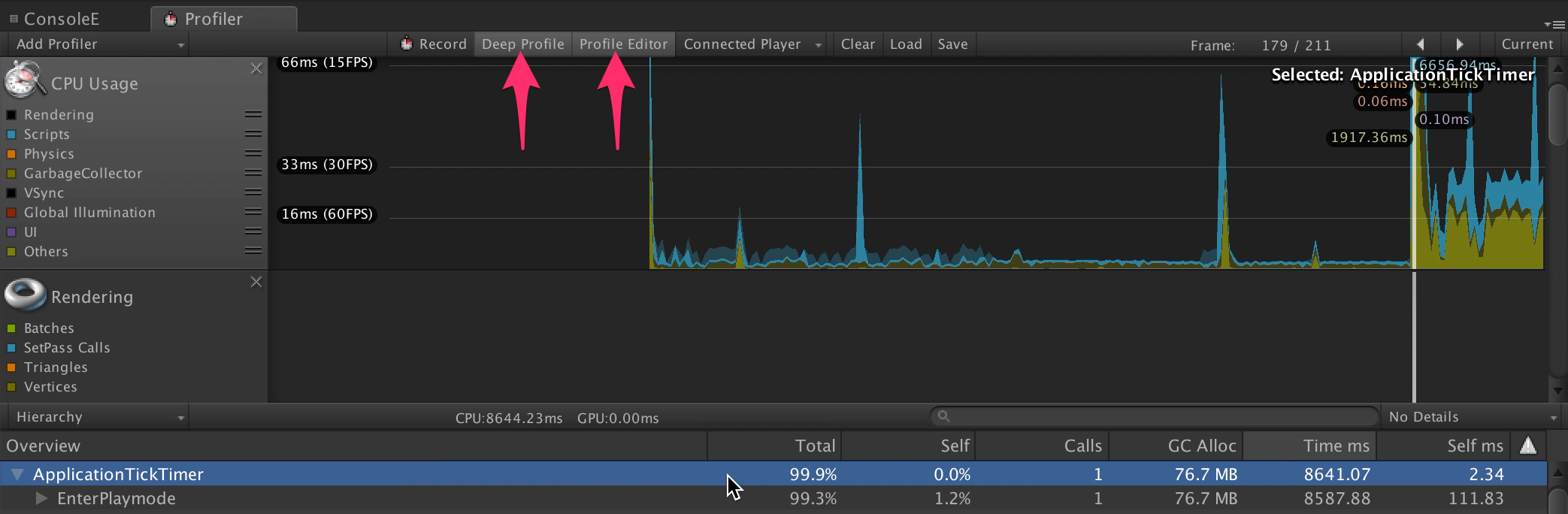
Here is a video showing the process:
https://www.dropbox.com/s/z74hhc8mq7rsr0y/EnterPlaymodeProfile.mov?dl=0
Nezz
on 19 Apr 2018
Aside from preventing it from running in playmode, maybe the post processor processing could be done in a worker thread or on Rider's side?
This processing is significantly expensive, and fairly noticeable on assembly reloads (adds over 1 second to reloads, on a medium project). It also grows linearly in time the more projects you have, so we can expect it to become an even larger issue as custom assemblies (asmdef files) grow in popularity.
 SugoiDev
on 20 Apr 2018
SugoiDev
on 20 Apr 2018
I tried to make Parallel.ForEach using https://www.nuget.org/packages/TaskParallelLibrary
But stuck with this issue https://stackoverflow.com/questions/10249037/mono-problems-with-parallel-for
https://github.com/JetBrains/resharper-unity/tree/parallel-for
Ideas welcome.
We can use Parallel.ForEach in new Unity runtime, but keep non-parallel foreach for old one.
van800
on 20 Apr 2018
The root of the issue is that the project files are post processed every time the assemblies are reloaded, in addition to listening to OnGeneratedCSProjectFiles:
https://github.com/JetBrains/resharper-unity/blob/6fc85a91cc94f2d6b53aa7e1ad2f879912735d1d/unity/JetBrains.Rider.Unity.Editor/EditorPlugin/PluginEntryPoint.cs#L108-L109
In our case running these from OnGeneratedCSProjectFiles is enough, so it would be nice to investigate what are the cases when that's not enough. If such cases are identified, the regeneration could be made conditional so it won't happen every time scripts are recompiled or we enter play mode.
Nezz
on 20 Apr 2018
This sounds like a better plan. I think the idea was to make sure the project files were up to date after e.g. updating the plugin, or changes happening while Rider wasn't running, or wasn't the default editor (in which case we wouldn't be modifying the project). If we can avoid this, it sounds easier than trying to optimise with parallel loops and extra dependencies)
 citizenmatt
on 20 Apr 2018
citizenmatt
on 20 Apr 2018
Well I tried and it seems that for Rider 2018.1 with enabled "Automatically Refresh Assets in Unity" there is no need to call CsprojAssetPostprocessor.OnGeneratedCSProjectFiles on every appdomain.reload.
And, I assume, people who disable "Automatically Refresh Assets in Unity" know what they are doing.
So it looks like I can completely remove the call in question. But it is not super safe change for bugfix release.
@citizenmatt What do you think?
van800
on 20 Apr 2018
The only scenario I can think of that might not be automatically handled is forcing an updated generation when the plugin is updated. Is this a valid scenario? Perhaps we should do one update on process load (or first time reload after being made active editor)?
We can create a scriptable object singleton to keep a bool flag in memory across domain reloads, I saw some code for that yesterday.
citizenmatt
on 21 Apr 2018
I solve a similar issue by storing Unity's pid in the editor prefs and comparing the current pid with the stored one. I run my action when they differ, then update the stored pid.
For multiple actions, you can also store alongside the pid a string ID, but I think this won't be necessary in this case.
SugoiDev
on 21 Apr 2018
I found at least one case.
- Unity 5.3, some code which is not fully compilable
- Rider installs EditorPlugin
Plugin is not loaded because code is not compilable - Fix the redcode, focus Unity
EditorPlugin is loaded, connection is established, but OnGeneratedCSProjectFiles is not called.
For such case @SugoiDev solution should work, I guess.
van800
on 21 Apr 2018
Fixed in the latest available nightly build. https://rider-support.jetbrains.com/hc/en-us/articles/360000009804-How-to-get-Rider-Nightly-build-
van800
on 8 May 2018
Related issues
citizenmatt
·
4Comments
 mihakrajnc
·
5Comments
mihakrajnc
·
5Comments
 real-mikhail
·
5Comments
real-mikhail
·
5Comments
 Theby
·
3Comments
Theby
·
3Comments
 persn
·
3Comments
persn
·
3Comments
Most helpful comment
I found at least one case.
Plugin is not loaded because code is not compilable
EditorPlugin is loaded, connection is established, but OnGeneratedCSProjectFiles is not called.
For such case @SugoiDev solution should work, I guess.