Resharper-unity: Was working, then suddenly "Cannot resolve symbol UnityEngine"
For a while on the first file I was editing, everything seemed like it was working just fine. But then I tried opening a second file, and...something broke. Rider can't seem to find any Unity symbols anymore, which basically blocks Unity development with Rider for me.
I've tried:
- Restarting Rider
- Restarting Unity
- Restarting the entire computer
- Removing and readding the Unity plugin to Rider
- Invalidate Caches and Restart
Nothing changed anything.
I am getting the following warnings, which I don't think I got the first time I started rider:
11:26 AM    Project 'Assembly-CSharp' load finished with warnings: The reference assemblies for framework ".NETFramework,Version=v4.5" were not found. To resolve this, install the SDK or Targeting Pack for this framework version or retarget your application to a version of the framework for which you have the SDK or Targeting Pack installed. Note that assemblies will be resolved from the Global Assembly Cache (GAC) and will be used in place of reference assemblies. Therefore your assembly may not be correctly targeted for the framework you intend. at (1111:5)

11:26 AM    Project 'Assembly-CSharp-Editor-firstpass' load finished with warnings: The reference assemblies for framework ".NETFramework,Version=v4.5" were not found. To resolve this, install the SDK or Targeting Pack for this framework version or retarget your application to a version of the framework for which you have the SDK or Targeting Pack installed. Note that assemblies will be resolved from the Global Assembly Cache (GAC) and will be used in place of reference assemblies. Therefore your assembly may not be correctly targeted for the framework you intend. at (1111:5)

11:26 AM    Project 'Assembly-CSharp-Editor' load finished with warnings: The reference assemblies for framework ".NETFramework,Version=v4.5" were not found. To resolve this, install the SDK or Targeting Pack for this framework version or retarget your application to a version of the framework for which you have the SDK or Targeting Pack installed. Note that assemblies will be resolved from the Global Assembly Cache (GAC) and will be used in place of reference assemblies. Therefore your assembly may not be correctly targeted for the framework you intend. at (1111:5)
However, none of those seem related to Unity.
Version info:
Rider 2017.1 EAP
Build #RS-171.4456.575, built on June 15, 2017
Rider EAP User
Expiration date: July 15, 2017
JRE: 1.8.0_112-release-736-b17 amd64
JVM: OpenJDK 64-Bit Server VM by JetBrains s.r.o
Windows 10 10.0
Unity 5.6.1f1 Personal.
 nanodeath
All 18 comments
Could you please zip and submit logs from Rider Help->Show Log in Files? Thanks!
At least temporary workaround must be unchecking this checkbox in Unity settings.

 van800
on 17 Jun 2017
van800
on 17 Jun 2017
Do you have "Microsoft .NET Framework Developer Pack 4.5.1" installed? It is mentioned in https://rider-support.jetbrains.com/hc/en-us/articles/207288089
van800
on 17 Jun 2017
Logs attached.
I didn't see that article, so...going to give that a try.
When it says Framework Developer Pack "4.5.1 or later", does that mean the latest 4.5.x, or the latest 4.x? 4.5.2 doesn't explicitly mention Windows 10 in the supported operating systems, but I'm going to give it a try anyway.
Also, thanks for the prompt response -- I thought maybe I was missing some other prerequisites, but I wasn't sure where to find them.
nanodeath
on 17 Jun 2017
4.5.1 or later. Thanks!
van800
on 17 Jun 2017
Okay, I've installed Microsoft Build Tools 2017 and Microsoft .NET Framework Developer Pack 4.5.2. No change.
nanodeath
on 17 Jun 2017
Many thanks for logs and update. I will try clean Win10 with Unity and VS 2017 Community.
van800
on 17 Jun 2017
I have reproduced the issue, thanks!
https://youtrack.jetbrains.com/issue/RIDER-7191
btw, does the workaround with unchecking TargetFrameworkVersion 4.5 worked for you?
van800
on 17 Jun 2017
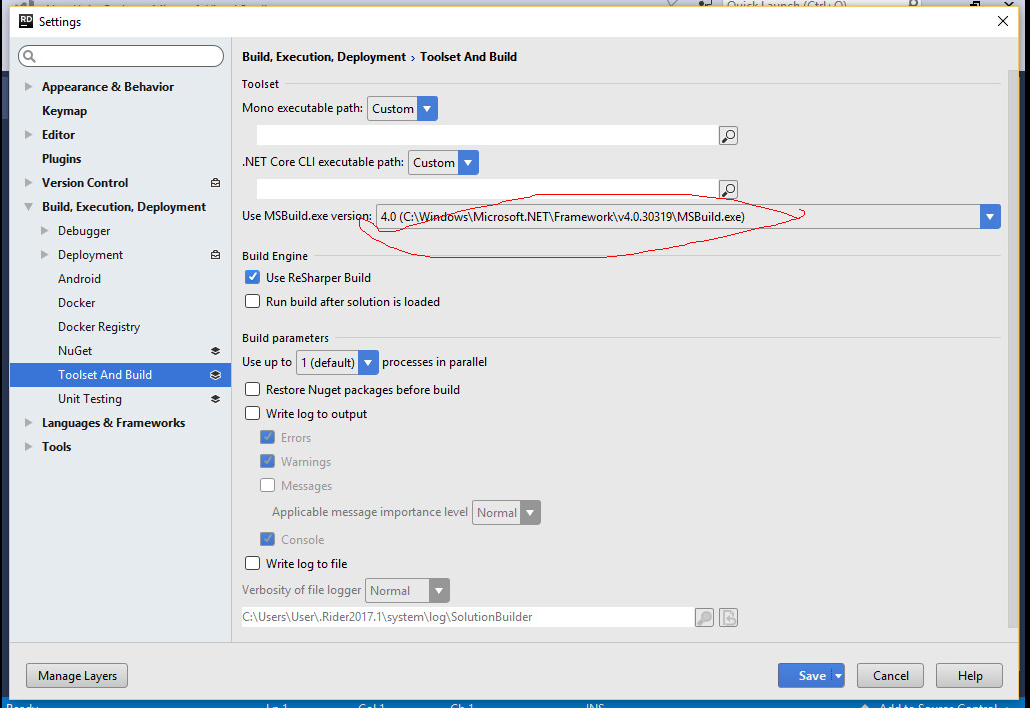
Other workaround is to switch MSBuild to 4.0 in Rider settings
van800
on 17 Jun 2017
I have reproduced the issue, thanks!
Ah, glad to hear my setup isn't just messed up then 😄
btw, does the workaround with unchecking TargetFrameworkVersion 4.5 worked for you?
I didn't understand what you meant before, but yeah, I gave it a try and...it seems to work! I do get a couple additional errors, but they don't appear to be materially interfering with anything:
6/17/2017
2:56 PM Cannot get any IProjectModelElement from Project Model view by id 9, item:
                --- EXCEPTION #1/2 [ArgumentException]
                Message = “Cannot get any IProjectModelElement from Project Model view by id 9, item:”
                ExceptionPath = Root.InnerException
                ClassName = System.ArgumentException
                HResult = E_INVALIDARG=COR_E_ARGUMENT=80070057
                Source = JetBrains.ReSharper.Host
                StackTraceString = “
                at JetBrains.ReSharper.Host.Features.Documents.DocumentHost.GetProjectFileByProjectModelId(ISolution solution, Int32 projectModelElementId)
                at JetBrains.ReSharper.Host.Features.Documents.DocumentHost.GetProjectFile(ISolution solution, FileSystemPath location, Int32 projectModelElementId)
                at JetBrains.ReSharper.Host.Features.Documents.DocumentHost.<AdviseModel>b__0(Lifetime lifetime, EditableEntityId entityId, EditableEntity entity)
                at JetBrains.Platform.RdFramework.Util.ReactiveEx.<>c__DisplayClass19`2.<View>b__18(AddRemove kind, K key, V value)
                at JetBrains.Platform.RdFramework.Util.ReactiveEx.<>c__DisplayClass10`2.<AdviseAddRemove>b__f(MapEvent`2 e)
                ... (show balloon)

2:56 PM element 'Unity3DRider.cs' of type ProjectFileImpl is not valid
                --- EXCEPTION #1/2 [AssertionException]
                Message = “element 'Unity3DRider.cs' of type ProjectFileImpl is not valid”
                ExceptionPath = Root.InnerException
                ClassName = JetBrains.Util.Assertion+AssertionException
                Data.ReentrancyGuard.ActionName = Fire
                HResult = COR_E_EXCEPTION=80131500
                Source = JetBrains.Platform.Core
                StackTraceString = “
                at JetBrains.Util.Assertion.Fail(String message)
                at JetBrains.Util.Assertion.Assert[T1,T2](Boolean condition, String message, T1 arg1, T2 arg2)
                at JetBrains.ProjectModel.ProjectModelElementExtension.AssertIsValid(IProjectModelElement element)
                at JetBrains.ReSharper.Psi.PsiSourceFilePropertiesManager.CalculatePsiSourceFileProperties(IProject project, IProjectFile projectFile, IPsiSourceFile sourceFile)
                at JetBrains.ReSharper.Psi.PsiSourceFilePropertiesManager.GetPsiProperties(IProject project, IProjectFile projectFile, IPsiSourceFile sourceFile)
                at JetBrains.ReSharper.Psi.Impl.PsiProjectFile.get_Properties()
                at J... (show balloon)
But like I said -- I think I can ignore them for now.
nanodeath
on 18 Jun 2017
In the https://youtrack.jetbrains.com/issue/RIDER-7191 I did comparison with what VS does.
van800
on 26 Jun 2017
Hi, I had the same issue. Switching to MSBuild 4.0 in Rider fixed this. But afterwards Rider tells me that .NET Framework 4.5 is not installed. Even though I have Visual Studio 2017 installed which includes .NET 4.5. Not sure if this matters. But it's slightly confusing.
 ciathyza
on 4 Jul 2017
ciathyza
on 4 Jul 2017
@hexagonstar Will setting TargetFrameworkVersion to 3.5 work for you? https://github.com/JetBrains/resharper-unity/issues/164#issuecomment-309234864
van800
on 4 Jul 2017
I have retested the problem with new private build, it has a new suggestion to try change the MSBuild, which is nice, but it will be much better to select the correct MSBuild (4.0 instead of 2017) automatically.
Also
- in many cases dotnet 3.5 may not be present at machine
- For some reason on Windows Unity mono toolset doesn't work in Rider. https://youtrack.jetbrains.com/issue/RIDER-7616
So the safest bet seem to be MSBuild 4.0 + TargetFrameworkVersion 4.5.
van800
on 4 Jul 2017
must get fixed by https://github.com/JetBrains/resharper-unity/pull/199
van800
on 11 Aug 2017
The PR is merged, does that mean we can close the issue?
 citizenmatt
on 5 Oct 2017
citizenmatt
on 5 Oct 2017
I've just recently delt with this Issue. Try looking to see if you have any Imports that you are not using in your scripts. My main script had a VR import that was giving me an error in the console so I removed it (Not clear why an unused import would break everything). This allowed my game to run just like normal, then after going back into the script after running the game Rider was recognizing Monobehaviors. I would also recommend making sure you have have the latest update for Rider.
 JoshuaFry
on 26 Jan 2018
JoshuaFry
on 26 Jan 2018
@JoshuaFry Unity3dRider plugin, which Rider pushes to users solution requires green compilation to be loaded in Unity. In 2018.1 we will have this plugin as a dll, so it will be loaded even if user-solution is not compilable.
van800
on 28 Jan 2018
Hi!
I also have this issue occurring on my end:

Solution:
Go in unity and SAVE -> The errors will then disappear.
When creating and opening a script from Unity, once Rider opens up, a Plugin folder is automatically created in Unity. I guess saving "links" the 2 together.
Just my 2 cents in case someone was having the same issue :)
 paquinem
on 4 May 2018
paquinem
on 4 May 2018
Related issues
 FWCorey
·
4Comments
FWCorey
·
4Comments
 persn
·
3Comments
persn
·
3Comments
 SugoiDev
·
6Comments
SugoiDev
·
6Comments
 harryr0se
·
5Comments
harryr0se
·
5Comments
 Baste-RainGames
·
4Comments
Baste-RainGames
·
4Comments
Most helpful comment
Hi!
I also have this issue occurring on my end:
Solution:
Go in unity and SAVE -> The errors will then disappear.
When creating and opening a script from Unity, once Rider opens up, a Plugin folder is automatically created in Unity. I guess saving "links" the 2 together.
Just my 2 cents in case someone was having the same issue :)