Rescript-compiler: bsb -make-world doesn’t work with spaces in pathnames
I’m getting errors if I clone the following repo into iCloud Drive and build it: https://github.com/rauschma/reasonml-demo-modules
For example:
[1/17] Building src/Log.mliast
FAILED: src/Log.mliast
/Users/rauschma/Library/Mobile Documents/com~apple~CloudDocs/_Code/_reasonml/reasonml-demo-modules/node_modules/bs-platform/lib/bsc.exe -pp "/Users/rauschma/Library/Mobile Documents/com~apple~CloudDocs/_Code/_reasonml/reasonml-demo-modules/node_modules/bs-platform/lib/refmt3.exe --print binary"   -w -30-40+6+7+27+32..39+44+45+101 -bs-suffix -nostdlib -I '/Users/rauschma/Library/Mobile Documents/com~apple~CloudDocs/_Code/_reasonml/reasonml-demo-modules/node_modules/bs-platform/lib/ocaml' -no-alias-deps -color always  -c -o src/Log.mliast -bs-syntax-only -bs-binary-ast -intf '/Users/rauschma/Library/Mobile Documents/com~apple~CloudDocs/_Code/_reasonml/reasonml-demo-modules/src/Log.rei'
/bin/sh: /Users/rauschma/Library/Mobile: No such file or directory
The errors go away if I move the repo into a directory whose path doesn’t have spaces in them.
 rauschma
All 15 comments
@rauschma is Mobile Documents created by you or Apple?
 bobzhang
on 26 Dec 2017
bobzhang
on 26 Dec 2017
@bobzhang That’s where Apple’s iCloud Drive is always located (I prefer how Dropbox solves this problem).
But spaces are generally common on macOS (“John’s SSD” etc.).
rauschma
on 26 Dec 2017
This is annoying. Please fix or can anyone point out how can I do my quick fix?
 digitake
on 3 Apr 2018
digitake
on 3 Apr 2018
How can a "show stopper" unable to use with a space in path name be a "non-critical-bug"?
Broken on windows for %APPDATA% user home containing a space.
These growing pains convinces me to pass on Reason for production projects.
 Nanonid
on 11 Apr 2018
Nanonid
on 11 Apr 2018
I was also affected by this on my first few attempts to get Reason up and working
 NEUDitao
on 20 Sep 2018
NEUDitao
on 20 Sep 2018
Also have this issue on Windows. I can only run .exe from "Program Files" because of policy at work so this is blocking me badly as I can't even build the project.
I think we need to put quotes somewhere to fix this, if I can get pointers on where and I can do the work.
 ulrikstrid
on 12 Nov 2018
ulrikstrid
on 12 Nov 2018
@ulrikstrid we will prioritize this issue
bobzhang
on 13 Nov 2018
@bobzhang I managed to get a policy change to put it in another folder and got unblocked. I'm still willing to do the work if I can just get some pointers on where to do the changes.
ulrikstrid
on 13 Nov 2018
@ulrikstrid thanks for the offer. Mostly I need test it on Windows machine and look at the generated build.ninja. The relevant source code would be in jscomp/bsb directory
bobzhang
on 19 Nov 2018
For the record, there are some serious issues in the combination of a whitespace and an extra flag under Windows:
-pp "/Users/rauschma/Library/Mobile Documents/com~apple~CloudDocs/_Code/node_modules/bs-platform/lib/refmt3.exe --print binary"
Will wait to see if we can get some convenience from reason upstream
bobzhang
on 28 Nov 2018
I just ran into this issue today (macOS).
 kachel
on 19 Feb 2019
kachel
on 19 Feb 2019
Same here, I use ~/Library/Application\ Support/ as a parent directory for my scratch projects, and when running bucklescript (or just the vscode extension) it fails and generates a ~/Library/Application\%20Support directory
 peacememories
on 18 Feb 2020
peacememories
on 18 Feb 2020
@peacememories @kachel can you share with more details, I tested on Application support and it works good for me (at least for BuckleScript), not sure about the vscode extension
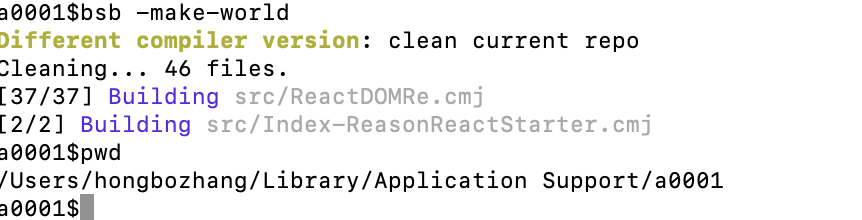
bobzhang
on 22 Feb 2020
Hmm, bsb itself indeed seems to work. The problems I've run into are with the VSCode addon and with Parceljs.
peacememories
on 25 Feb 2020
@peacememories thanks for the confirmation
bobzhang
on 25 Feb 2020
Related issues
 alexfedoseev
·
5Comments
bobzhang
·
5Comments
alexfedoseev
·
5Comments
bobzhang
·
5Comments
 glennsl
·
3Comments
glennsl
·
3Comments
 wyze
·
3Comments
wyze
·
3Comments
 cknitt
·
3Comments
cknitt
·
3Comments