Repodb: [Bug] Enumeration: Property Int - Is not working
Hi
I'm using RepoDb.SqlServer version 1.1.1 and have the following problem/bug with enums.
I want to save the enum as int in the database and according to the documentation this should work.
Setup
Database
CREATE TABLE dbo.Customer
(
  [Id] int NOT NULL IDENTITY(1,1) PRIMARY KEY CLUSTERED
  , [CustomerTypeId] int NOT NULL FOREIGN KEY REFERENCES dbo.CustomerType(Id)
  , [CustomerNumber] varchar(50) NULL
  , INDEX IX_Customer_CustomerNumber UNIQUE (CustomerNumber)
);
Model
public class Customer
{
    public int Id { get; init; }
    public CustomerType CustomerTypeId { get; set; }
    public string CustomerNumber { get; init; }
}

public enum CustomerType
{
    Private = 1,
    Organization = 2
}
Insert call
return await connection.ExecuteScalarAsync<int>(@"
    DECLARE @LastId TABLE (id int);

    INSERT INTO dbo.Customer
    OUTPUT INSERTED.[Id] INTO @LastId
    VALUES(@CustomerTypeId, @CustomerNumber);

    SELECT id FROM @LastId
", customer);
This gives me the following error:
Microsoft.Data.SqlClient.SqlException (0x80131904): Conversion failed when converting the nvarchar value 'Private' to data type int.
If I use the [TypeMap(DbType.Int32)] attribute it works.
If i use RepoDb.TypeMapper.Add<CustomerType>(DbType.Int32); just after call to RepoDb.SqlServerBootstrap.Initialize(); it gives me the same error so only the attribute seems to work.
 SpaceOgre
All 18 comments
@SpaceOgre - any reason why you did not use the fluent method Insert? (see below)
var customer = new Customer { CustomerTypeId = @CustomerTypeId, CustomerNumber = @CustomerNumber };
return await connection.Insert<Customer, int>(customer);
The code above is an alternative fix for you. It is the recommended way actually :)
In relation to your issue, we will be looking for this soon. When do you need the fix for this?
 mikependon
on 5 Dec 2020
mikependon
on 5 Dec 2020
The attribute works for know, so no need to rush a fix since there is a workaround 👍
I'm not using the fluent Insert method since we actually insert into two tables in the "real" version. I just included the parts here that caused the bug.
Our customer object is split across two tables but we don't want two objects in code so we flatten it. And to avoid doing two calls to the DB we do the inserts in one query. If RepoDb have another way to do this please let me know 😃
SpaceOgre
on 5 Dec 2020
Thanks for the clarrification. The multiple insertion is not supported in RepoDB, so what you did is correct if you use the raw SQL execution.
Anyway, this issue will be a part of the next beta release and that is very soon.
mikependon
on 5 Dec 2020
@SpaceOgre - you find a bug that is between the 2 common use-cases pertaining to enumerations. By default, the enum is converted into DbType.Int32, and RepoDB is defaulting to DbType.NVarChar.
The solution to this is as simple as removing the logic that I impose in relation to the auto-conversion of the enum to DbType.NVarChar, so it would utilize the default ADO.NET functionality. However, historically, I had purposely made this behavior meant for texts rather than integer types. We are afraid to remove this logic as it might affect the other user's scenario. Therefore, it seems that this issue will not be fixed.
P.S: In the ExecuteScalar, I do not know which table you are targeting from the DB, therefore, I could not utilize the type from the DB, thus leaves me blank identifying the target database type of the class property enum.
There are 3 solutions to this.
- Via attribute
TypeMap, as you mentioned - Via fluent mapping
FluentMapper.Entity<Customer>().DbType(e => e.CustomerTypeId, DbType.Int32) - Via casting it like below.
using (var connection = new SqlConnection("Server=.;Database=TestDB;Integrated Security=SSPI;"))
{
    var customer = new
    {
        CustomerTypeId = (int)CustomerType.Private,
        CustomerNumber = CustomerType.Organization
    };
    var result = connection.ExecuteScalar<int>(@"
        DECLARE @LastId TABLE (id int);
        INSERT INTO dbo.Customer
        OUTPUT INSERTED.[Id] INTO @LastId
        VALUES(@CustomerTypeId, @CustomerNumber);
        SELECT id FROM @LastId", customer);
}
Hope this explains and please do let me know if that is okay with you.
mikependon
on 6 Dec 2020
If I am to remove the logic, notice the behavior of ADO.NET for the NVarChar database type where the value passed from the client is enumeration.
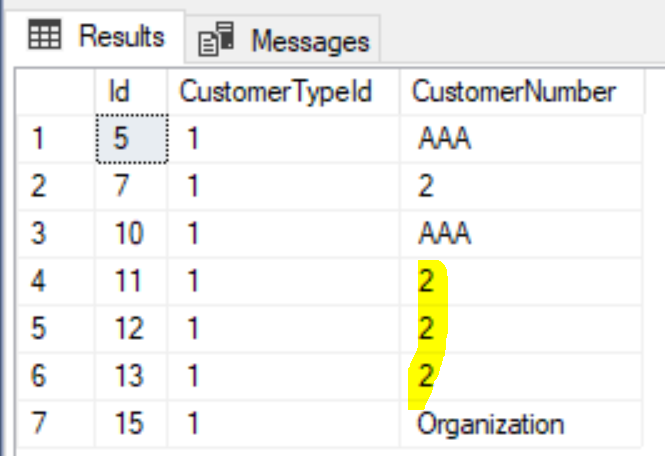
I am afraid to say, but the integer representation of the enum is saved into the NVarChar column instead 🗡️
mikependon
on 6 Dec 2020
Okay good to know :)
I totally understand your conundrum and have no problem with the suggested solutions.
One question though, why does not this work:
RepoDb.TypeMapper.Add<CustomerType>(DbType.Int32); I tought this would cast it to int for every use case?
I can use your suggestion ofc just curious why this does not work.
Oh and maybe add some kind of info about it in the documentation so what you described to me here is clear there as well.
SpaceOgre
on 6 Dec 2020
Definitely, I will do explain this on the documentation. Yeah, I will as well look at that type level mapping issue as well, though I am pretty sure it is working in fluent operation (see the Integration Tests here).
What puzzles me is this code that does ignore it, even the fact that the type.GetDbType method has reused the proper chain of calls. It seems to me an easy and less-impact fix.
P.S: It might as well that the code will used the compiled version from this method. Practically, they are the same in logic.
mikependon
on 6 Dec 2020
Just tried the FluentMapper and found a problem with abstract properties.
RepoDb.FluentMapper.Entity<PrivateCustomer>().DbType(e => e.CustomerTypeId, DbType.Int32);
My classes look like this
    public abstract record Customer
    {
        public int Id { get; init; }
        abstract public CustomerType CustomerTypeId { get; }
        public string CustomerNumber { get; init; }
    }

    public record PrivateCustomer : Customer
    {
        public override CustomerType CustomerTypeId => CustomerType.Private;
        public string SocialSecurityNumber { get; init; }
        public string FirstName { get; init; }
        public string LastName { get; init; }
        public string ChangedBy { get; init; }
    }
If I use the Attribute it works, but not the FluentMapper. If I remove abstract and change override to new then the FluentMapper works.
SpaceOgre
on 7 Dec 2020
Nice. Will as well include this to our fix together with Type Level mapping of the enumerations. Please do not hesitate to just post the findings here. I will create a separate User Story for the last findings you had.
mikependon
on 7 Dec 2020
@SpaceOgre - I am having hard time replicating the issue of the RepoDb.FluentMapper.Entity<PrivateCustomer>().DbType(e => e.CustomerTypeId, DbType.Int32); using the local solution of RepoDB from our DEV environment. It seems that this issue is already fixed there. With this, I tried installing/upgrading the RepoDb core library to the v1.12.5-beta4 and it is confirmed that the issue is already fixed there. Can you as well explicitly install it?
> Install-Package RepoDb -version 1.12.5-beta4
It is also explained in our Package Referencing section that you sometime needs to install the core library separately.
mikependon
on 8 Dec 2020
Tested with 1.12.5-beta4 and now this works: RepoDb.TypeMapper.Add<CustomerType>(System.Data.DbType.Int32);
The fluent mapper does not, but that is because of the abstract thing, without abstract it works. See my comment in #666
SpaceOgre
on 9 Dec 2020
Oh just a question is it possible to just change the default to int for all enums? Otherwise that would be a nice settings feature to have. I more or less always uses ints for enums.
SpaceOgre
on 9 Dec 2020
@SpaceOgre - if I am to understand, seems you prefer the INT enum as the default conversion instead of NVARCHAR/TEXT. I need to open and have it discuss with the community. Would that be okay? Otherwise, you have to manually map the enum explicitly like what you did above.
mikependon
on 9 Dec 2020
@mikependon Yeah that is how I usually do it: int in the database with a table for it to be able to have foreign key constraints.
I have not problem with RepoDb using NVARCHAR/TEXT as default but it would be nice to not have to map all enums manually but just set a flag or something when doing the initialization part. Something like:
c#
RepoDb.TypeMapper.DefaultEnumConversion = EnumConversion.Int;
RepoDb.TypeMapper.DefaultEnumConversion = EnumConversion.Nvarchar;
Using an enum and not bool since more options might be nice and I think it is clearer in this instance too.
SpaceOgre
on 9 Dec 2020
Great! I really like this recommendation, can you create a separate issue for this? I need to capture everything moving forward :)
mikependon
on 9 Dec 2020
Perhaps two or more of the above situations will occur at the same time in the same system.
So I recommend using ConverterFactory like the following
RepoDb.TypeMapper.EnumConverterFactory = new DefaultEnumConverterFactory();

public class DefaultEnumConverterFactory : IEnumConverterFactory
{
    public object CreateFactory(Type enumType) => new StringEnumConverter<TEnum>();
}
public class StringEnumConverter<TEnum> : IEnumConverter<TEnum, string>
{
     public TEnum Get (string input, ClassProperty property) => ...;
     public string Set (TEnum input, ClassProperty property) => ...;
}
Then you can customize EnumConverterFactory and IntEnumConverter like follow
RepoDb.TypeMapper.EnumConverterFactory = new CustomEnumConverterFactory();

public class CustomEnumConverterFactory : IEnumConverterFactory
{
    public object CreateFactory(Type enumType) => new IntEnumConverter<TEnum>();
}
do you think it is similar to IPropertyHandler? :smiley:
 fredliex
on 9 Dec 2020
fredliex
on 9 Dec 2020
@fredliex - thanks for the comment, it is great. I would like to capture this separately. Can you do bring this comment on this newly created User Story (#667)?
mikependon
on 9 Dec 2020
ok, I copy post to #667
fredliex
on 9 Dec 2020
Related issues
 nickdodd79
·
9Comments
nickdodd79
·
9Comments
 asleire
·
5Comments
mikependon
·
6Comments
asleire
·
5Comments
mikependon
·
6Comments
 AngelMunoz
·
6Comments
mikependon
·
4Comments
AngelMunoz
·
6Comments
mikependon
·
4Comments