Repo2docker: R libraries aren't linked to RStudio
Was just trying out R functionality in both Jupyter and RStudio, and I don't think we're linking libraries correctly in RStudio.
In the R Demo repo I've got ggplot2 installing with install.R. In the resulting Binder session, library(ggplot2) works fine from Jupyter, but does not work from within the RStudio session (resulting in Error in library(ggplot2) : there is no package called ‘ggplot2’)
We should figure out how the path linking works with R vs. RStudio, maybe they're not the same thing
 choldgraf
All 18 comments
I made a duplicate issue on the /binder-examples/r repo, but @betatim asked me to link it here: https://github.com/binder-examples/r/issues/7
It looks like different library paths are loaded in both instances:
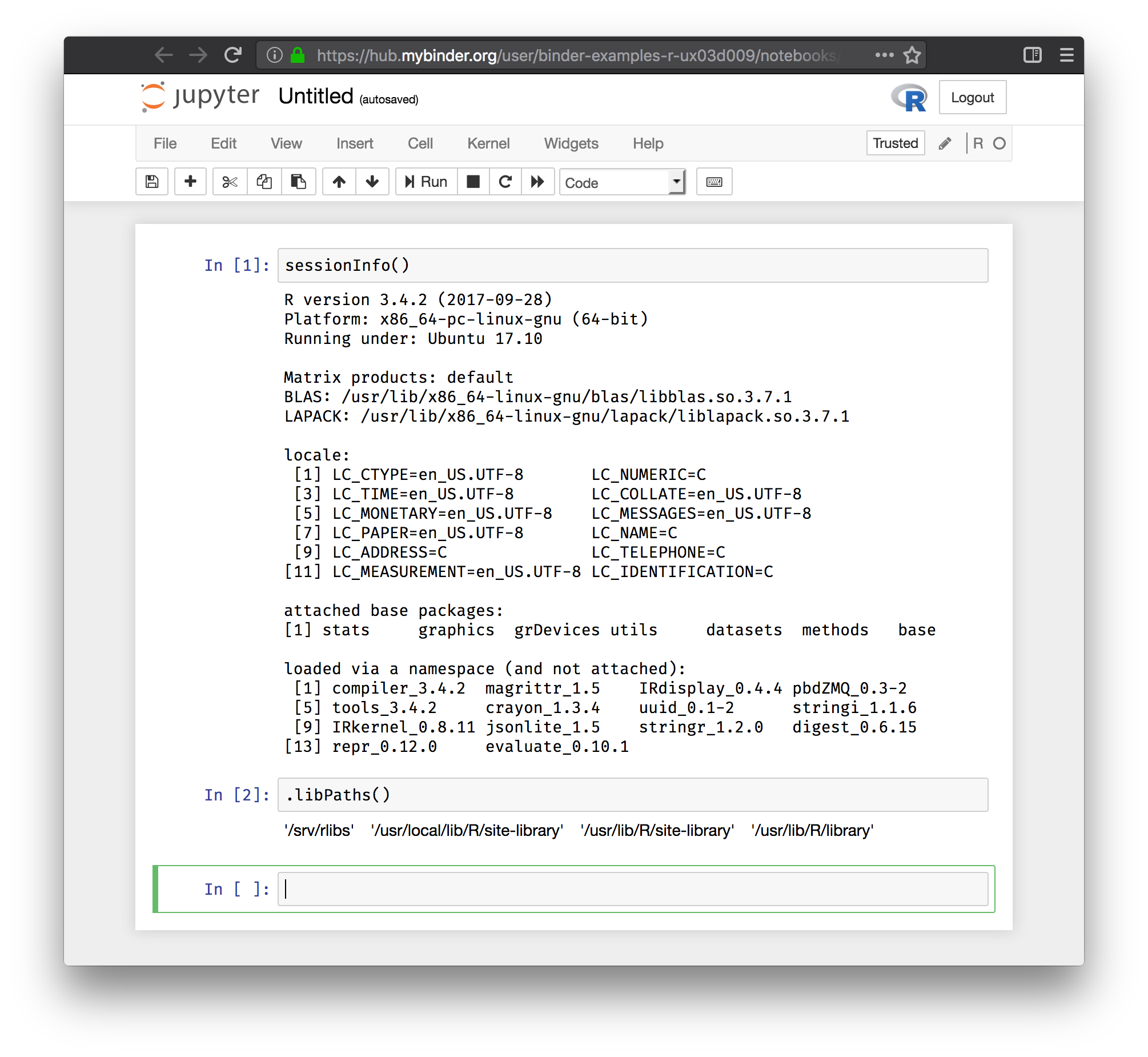
Jupyter Notebook
- Session Info shows all packages available (including ones via
install.R):
sessionInfo()
R version 3.4.2 (2017-09-28)
Platform: x86_64-pc-linux-gnu (64-bit)
Running under: Ubuntu 17.10

Matrix products: default
BLAS: /usr/lib/x86_64-linux-gnu/blas/libblas.so.3.7.1
LAPACK: /usr/lib/x86_64-linux-gnu/lapack/liblapack.so.3.7.1

locale:
 [1] LC_CTYPE=en_US.UTF-8       LC_NUMERIC=C
 [3] LC_TIME=en_US.UTF-8        LC_COLLATE=en_US.UTF-8
 [5] LC_MONETARY=en_US.UTF-8    LC_MESSAGES=en_US.UTF-8
 [7] LC_PAPER=en_US.UTF-8       LC_NAME=C
 [9] LC_ADDRESS=C               LC_TELEPHONE=C
[11] LC_MEASUREMENT=en_US.UTF-8 LC_IDENTIFICATION=C

attached base packages:
[1] stats     graphics  grDevices utils     datasets  methods   base

loaded via a namespace (and not attached):
 [1] compiler_3.4.2  magrittr_1.5    IRdisplay_0.4.4 pbdZMQ_0.3-2
 [5] tools_3.4.2     crayon_1.3.4    uuid_0.1-2      stringi_1.1.6
 [9] IRkernel_0.8.11 jsonlite_1.5    stringr_1.2.0   digest_0.6.15
[13] repr_0.12.0     evaluate_0.10.1
- Location of libraries:
.libPaths()
'/srv/rlibs' '/usr/local/lib/R/site-library' '/usr/lib/R/site-library' '/usr/lib/R/library'
- Screenshot:
RStudio
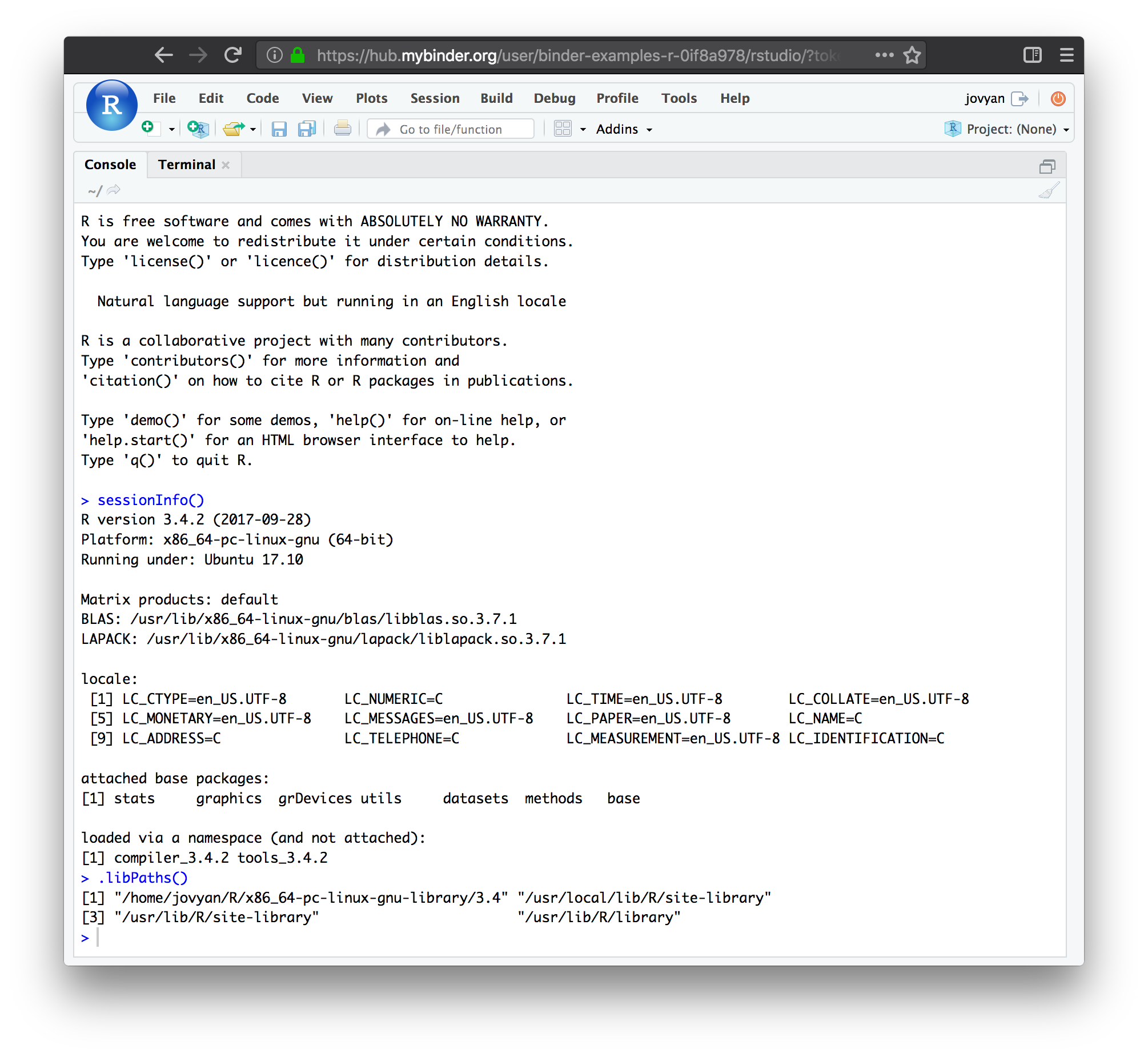
- Session Info does NOT shows packages available via
install.R:
sessionInfo()
R version 3.4.2 (2017-09-28)
Platform: x86_64-pc-linux-gnu (64-bit)
Running under: Ubuntu 17.10

Matrix products: default
BLAS: /usr/lib/x86_64-linux-gnu/blas/libblas.so.3.7.1
LAPACK: /usr/lib/x86_64-linux-gnu/lapack/liblapack.so.3.7.1

locale:
 [1] LC_CTYPE=en_US.UTF-8       LC_NUMERIC=C               LC_TIME=en_US.UTF-8        LC_COLLATE=en_US.UTF-8
 [5] LC_MONETARY=en_US.UTF-8    LC_MESSAGES=en_US.UTF-8    LC_PAPER=en_US.UTF-8       LC_NAME=C
 [9] LC_ADDRESS=C               LC_TELEPHONE=C             LC_MEASUREMENT=en_US.UTF-8 LC_IDENTIFICATION=C

attached base packages:
[1] stats     graphics  grDevices utils     datasets  methods   base

loaded via a namespace (and not attached):
[1] compiler_3.4.2 tools_3.4.2
- Location of libraries does not include
/srv/rlibs:
.libPaths()
[1] "/home/jovyan/R/x86_64-pc-linux-gnu-library/3.4" "/usr/local/lib/R/site-library"
[3] "/usr/lib/R/site-library"                        "/usr/lib/R/library"
- Screenshot:
Paging @cboettig, who might know more.
 RaoOfPhysics
on 19 Feb 2018
RaoOfPhysics
on 19 Feb 2018
Might be worth looking at documentation of .libPaths() to see how the paths are set: https://www.rdocumentation.org/packages/base/versions/3.4.3/topics/libPaths
Also:
RaoOfPhysics
on 19 Feb 2018
From within the notebook Sys.getenv("R_LIBS_USER") gives the expected /srv/rlibs but from within RStudio you get /home/jovyan/R/x86_64-pc-linux-gnu-library/3.4.
From the linked articles it seems like it should respect R_LIBS_USER :-/ One way to fix it is to create ~/.Renviron via echo R_LIBS_USER=$R_LIBS_USER > .Renviron. R wizards: Is this a hack or a real solution? If its a good solution we can add it to the buildpack.
 betatim
on 19 Feb 2018
betatim
on 19 Feb 2018
In Rocker we set R_LIBS and R_LIBS_USER in the system environment (rocker supports multi-user and root environments, hence we don't write gloal configs to ~/.Renviron, but otherwise I think this is basically the same solution as @betatim proposes).
e.g. see: https://github.com/rocker-org/rocker-versioned/blob/master/r-ver/Dockerfile#L110-L111
 cboettig
on 19 Feb 2018
cboettig
on 19 Feb 2018
@ryanlovett I wonder if you ran into these issues when you first set up RStudio w/ a Dockerfile. Do you remember if / how you resolved the problem of having the jupyter kernel + the RStudio kernel using the same path for R packages?
choldgraf
on 22 Feb 2018
I only came across this recently when I was integrating shiny into repo2docker/buildpacks/r.py. My solution at the time was to reinvent what @cboettig mentioned above and set R_LIBS_USER in /etc/R/Renviron. I blamed shiny but didn't check whether RStudio was affected as well.
Re:
the problem of having the jupyter kernel + the RStudio kernel using the same path for R packages?
We don't use an RStudio jupyter kernel per se -- I would describe them as the R processes with the jupyter IR kernel and RStudio respectively.
 ryanlovett
on 22 Feb 2018
ryanlovett
on 22 Feb 2018
🖐 question from the peanut gallery:
When this gets fixed, will it be available for all repos, or those built with a runtime.txt that presents a date after the fix?
Currently, my workaround is write writeLines("R_LIBS_USER=/srv/rlibs", "~/.Renviron") in my install.R step:
https://github.com/zkamvar/r/blob/aa87a40834978e6240e28b7f2ae23052eb687b1a/install.R#L3
 zkamvar
on 7 Mar 2018
zkamvar
on 7 Mar 2018
hey! yep all you'll need to do is re-build your binder repo (e.g. by making a new commit to your repo) and the fix will propagate!
choldgraf
on 7 Mar 2018
I started work on a PR for this.
betatim
on 11 Mar 2018
I can confirm that modifying .Renviron in postBuild works!
 ctb
on 11 Mar 2018
ctb
on 11 Mar 2018
@zkamvar `s solution did not work for me: https://mybinder.org/v2/gh/kwb-r/kwb.qmra/c50737ae738d12d7e0f1f34e1fee68dd2c8ea9ec?urlpath=rstudio
In addition also the postBuild fix proposed by @ctf also does not work for me (https://mybinder.org/v2/gh/kwb-r/kwb.qmra/7f6a1c49ae9a8d0a953969c8ece762f2bbac72e3?urlpath=rstudio), which I have already issued here: jupyterhub/binderhub#155
 mrustl
on 15 Mar 2018
mrustl
on 15 Mar 2018
hi @mrustl I took a look. One comment is that postBuild and install.R should maybe be in the top level directory - checking that now.
Am I correct in thinking that I should be able to do library('kwb.qmr') when this works?
ctb
on 15 Mar 2018
@ctb: if the documentation at http://mybinder.readthedocs.io/en/latest/using.html is still up to dae using a subdirectory "binder" should be ok. However, I also checked your suggestion putting the binder stuff to the top level here: https://mybinder.org/v2/gh/kwb-r/kwb.qmra/binder-postBuild-toplevel?urlpath=rstudio again without success.
Yes you should be able to do library('kwb.qmra') if the installation would be successfull!
@ctb is your postBuild example still working if you make a new commit?
mrustl
on 15 Mar 2018
@ctb @choldgraf I found the bug in my postBuild. It didn't succeed because of a missing empty line
https://github.com/KWB-R/kwb.qmra/commit/02426edb577481f1ced688b747bc51034d657512, now
https://mybinder.org/v2/gh/kwb-r/kwb.qmra/binder-postBuild-toplevel?urlpath=rstudio works!
mrustl
on 15 Mar 2018
blink that shouldn't have mattered! weird. but good to know :)
ctb
on 15 Mar 2018
Thanks @mrustl and @ctb
 willingc
on 15 Mar 2018
willingc
on 15 Mar 2018
@ctb @choldgraf adding an additional line was not the problem. But my Windows computer generated the wrong line endings (carriage return, Fig. below left) instead of (I not know ?? Fig. below right) which I only noticed comparing the files with my local SVN diff tool but was not visible by just looking at the Github diff.
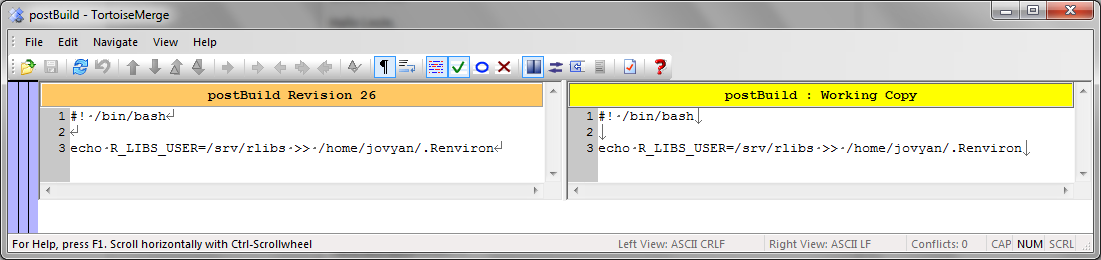
@ctb it also doesn't matter whether you place the binder files in the project root directory or in a "binder" subfolder. Both work like charm in case you set up the postBuild file with the right line endings.
mrustl
on 15 Mar 2018
thanks - excellent to know!
ctb
on 15 Mar 2018
Related issues
 bitnik
·
3Comments
bitnik
·
3Comments
 nuest
·
5Comments
choldgraf
·
4Comments
betatim
·
6Comments
nuest
·
5Comments
choldgraf
·
4Comments
betatim
·
6Comments
 minrk
·
3Comments
minrk
·
3Comments
Most helpful comment
In Rocker we set
R_LIBSandR_LIBS_USERin the system environment (rocker supports multi-user and root environments, hence we don't write gloal configs to~/.Renviron, but otherwise I think this is basically the same solution as @betatim proposes).e.g. see: https://github.com/rocker-org/rocker-versioned/blob/master/r-ver/Dockerfile#L110-L111