Renovate: Renovate's README in Docker Hub seems to be outdated
There's a link in Renovate's Docker Hub description which is broken:
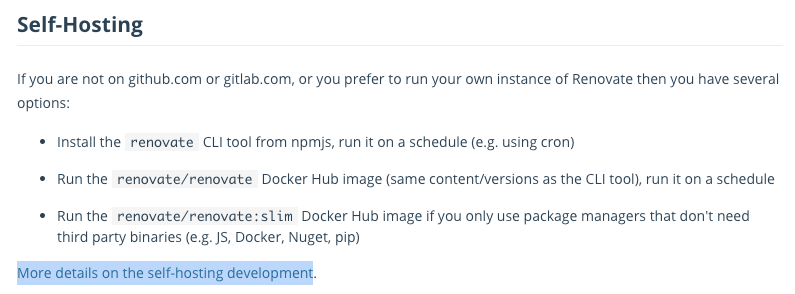
⚠️ https://github.com/renovatebot/renovate/blob/master/docs/development/self-hosting.md ⚠️
The right link should be:
https://github.com/renovatebot/renovate/blob/master/docs/usage/self-hosting.md
Checking REAME.md in master, the link is the right one so it looks something related to an outdated README.md in Docker Hub.
https://github.com/renovatebot/renovate/blob/master/readme.md#L62
Is this process automated but something failed or the process of updating the README.md is not automated and it should?
 dominguezcelada
All 6 comments
I think it was automatically updated back when it was auto-built using Docker Hub, but that stopped once we moved to our own build process. I manually edited/updated it - thanks for the heads-up
 rarkins
on 22 Sep 2020
rarkins
on 22 Sep 2020
I think it was automatically updated back when it was auto-built using Docker Hub, but that stopped once we moved to our own build process. I manually edited/updated it - thanks for the heads-up
Should I create a follow-up issue to automate it or you don't plan to automate it?
dominguezcelada
on 22 Sep 2020
@dominguezcelada do you know a way to automate it without using docker cloud build?
 viceice
on 22 Sep 2020
viceice
on 22 Sep 2020
I think let's not automate it for now. I also took the opportunity to remove some parts of the README that aren't applicable to the Docker Image (e.g. hosted app instructions) so it wouldn't be a simple 1:1 sync anyway. We might maybe want to have a standalone file in our docs/ folder that is sync'd to Docker Hub if it's possible.
rarkins
on 22 Sep 2020
@dominguezcelada do you know a way to automate it without using docker cloud build?
Nope... I was thinking about a Github Action (https://github.com/peter-evans/dockerhub-description <-- this could be an example) but if it's not a priority now as @rarkins pointed (plus this sync problem, etc). I guess the issue can be closed + keep maintaining it manually for the moment 👍🏽
dominguezcelada
on 22 Sep 2020
Ok, I've looked at the mentioned GitHub action an it seems to be easy to update the docker hub readme with a simple patch request.
So maybe we can open an issue with low prio to sync hub description from a file in docs folder.
viceice
on 22 Sep 2020
Related issues
 hutson
·
3Comments
hutson
·
3Comments
 Siilwyn
·
4Comments
Siilwyn
·
4Comments
 ChristianMurphy
·
4Comments
ChristianMurphy
·
4Comments
 zephraph
·
3Comments
zephraph
·
3Comments
 jeromelachaud
·
3Comments
jeromelachaud
·
3Comments