Renovate: Package-lock.json doesn't not update properly
What Renovate type are you using?
Self-Hosted Service
Describe the bug
When Renovate updates a version of a package (major upgrade), it updates the version of the package version in package-lock.json, but not its dependencies, causing our system to fail.
Example
A repository have dependencies on both Package A and B. Package B also have dependency on Package A at v2.0.0. When the repository gets updated, Package A is updated from ^2.0.0 to ^3.0.0. The package-lock.json is also updated. However, Package B still requires v2.0.0 and the version is not available in package-lock.json anymore. The lock file should contain both versions.
For example, Package B is missing a section similar to this:
"dependencies": {
  "eslint": {
      "version": "2.13.0",
      "resolved": "https://registry.npmjs.org/eslint/-/eslint-2.13.0.tgz"
  }
}
Expected behavior
The lock file should contain all versions that are needed. Is there an option to have Renovate commit a newly autogenerated package-lock.json instead of changing it?
 hi-larry
All 54 comments
We completely defer to npm for the lock file logic. I’ll need a repo that fully replicates the problem to be able to confirm it and determine if its possible to work around npm’s problem until it’s fixed.
 rarkins
on 16 May 2018
rarkins
on 16 May 2018
And please be sure to specify if you’re actually referring to peer dependencies anywhere because that would change the situation
rarkins
on 16 May 2018
It is going to be difficult to give you a repository as we are working with GHE.
However, I am interested with the list of npm commands that you use to rebuild/modify the package-lock. I could attempt to reproduce the issue myself using only npm commands.
hi-larry
on 16 May 2018
We just need (and in fact prefer) the smallest possible package.json before/after to reproduce the issue. What you’re describing is that npm is creating an invalid package lock for a package json, which is very surprising if so because big faults in npm are pretty rare. Hence I suspect it’s related to peerDependencies, which is definitely possible.
We basically just patch the package json with new version, copy the existing package lock beside it, and run npm install —package-lock-only. While it would be theoretically possible to skip copying the package lock it’s undesirable because:
- It would be only because there’s a bug in npm
- You would get a lot of lock file changes completely h related to the dependency you’re updating and increase the chance of breaking something else
rarkins
on 16 May 2018
I tried to reproduce the bug using the command that you provided, maybe minus the copying part as I already have an existing package-lock.json (not the one that is newly generated). I noticed that, not only Package B did not get its proper version of Package A, but it lost its dependency on Package A.
However, I tried running npm install [email protected] --package-lock-only and it works as intended (without manually updating package.json), with Package B having an older version of Package A and the repository itself gets the latest version.
Thus, I'm not sure which command would be the recommended way of updating the package-lock, but it seems like the second one is more efficient. What do you think?
hi-larry
on 16 May 2018
If this is true then a bug should be raised with npm ASAP. Please @ me when you do, or provide me with some example files so I can do it myself and try to get it prioritised by the npm team.
However, if the first approach produces an invalid result then that still doesn't make the second command "more efficient" - it just happens to be the one that is non-buggy. We don't currently run commands like npm install [email protected] --package-lock-only because one branch could contain potentially dozens of updates (if grouping updates weekly for example, or updating a large monorepo like babel or angular) and then it would be inefficient to run npm install dozens of times instead of once. The first command should produce a valid result. I will consider a temporary workaround like that only once I can confirm the bug with my own eyes.
rarkins
on 16 May 2018
By the way, one other test that would be useful is to try the first option again but without --package-lock-only, i.e. fully installing node_modules. It would be interesting to see if going through the full module install had any impact on the lock file generated.
It would also be useful to see if the same behaviour is occurring in 5.x and 6.x. For 5.x, it would be good to test something like 5.6.0 vs the current 6.0.1.
rarkins
on 16 May 2018
Thank you for your information, I will do more tests before I say anything absurd to you or to npm. I forgot to mention that this happens when Package B is a dependency of the repository while Package A (the package being updated) is a devDependency.
hi-larry
on 16 May 2018
In that case check the value of NODE_ENV on the systems you’re testing on too, in case that makes a difference. However it would still be strange to see different behaviour like you have
rarkins
on 17 May 2018
Please check out an example I made here. If you compared both package-lock.json (in different branches), you can see that one of them is missing the older version. Let me know if there are other things missing. The issue appeared in both v5.8.0 and v6.0.1 of npm.
hi-larry
on 17 May 2018
Renovate doesn’t support archived dependencies yet, so if that’s the only case that’s failing then it’s unfortunately not one we support regardless of whether there’s any bug in npm. If you instead reference the subdirectories that contain a package.json inside then you can use copyLocalLibs setting for that.
rarkins
on 17 May 2018
No, the subdirectories are only used for this example in order to reproduce the bug. Real packages are used in our GHE.
hi-larry
on 17 May 2018
Wouldn’t it work with just the package.json files on the example?
Also, when the package gets updated on your real repo, is it updated in more than one directory (package file) or only in one?
rarkins
on 17 May 2018
Only the packages on the real repo gets updated. You can see the difference between this lock file and that lock file
hi-larry
on 17 May 2018
The npm issue was reported here. Seems like they are saying that it is the expected behaviour.
hi-larry
on 17 May 2018
@hi-larry when I clone that repo and attempt to npm install from the LCS directory it doesn't work at all:
~/github/TestDep/LCS master
❯ npm install
Unhandled rejection Error: invalid config key requested: single/.npm/_locks/staging-e54d8647ddb4b5c8.lock for /Users/rhys/github/TestDep/LCS/node_modules/.staging
    at pudGet (/usr/local/lib/node_modules/npm/node_modules/figgy-pudding/index.js:31:11)
    at FiggyPudding.get (/usr/local/lib/node_modules/npm/node_modules/figgy-pudding/index.js:13:12)
    at Object.get (/usr/local/lib/node_modules/npm/node_modules/figgy-pudding/index.js:71:16)
    at _parse (/usr/local/lib/node_modules/npm/node_modules/ssri/index.js:138:12)
    at parse (/usr/local/lib/node_modules/npm/node_modules/ssri/index.js:125:12)
    at Object.checkData (/usr/local/lib/node_modules/npm/node_modules/ssri/index.js:216:9)
    at write (/usr/local/lib/node_modules/npm/node_modules/cacache/lib/content/write.js:34:31)
    at putData (/usr/local/lib/node_modules/npm/node_modules/cacache/put.js:25:10)
    at Object.x.put (/usr/local/lib/node_modules/npm/node_modules/cacache/locales/en.js:28:37)
    at readFileAsync.then.data (/usr/local/lib/node_modules/npm/node_modules/pacote/lib/fetchers/file.js:38:28)
    at tryCatcher (/usr/local/lib/node_modules/npm/node_modules/bluebird/js/release/util.js:16:23)
    at Promise._settlePromiseFromHandler (/usr/local/lib/node_modules/npm/node_modules/bluebird/js/release/promise.js:512:31)
    at Promise._settlePromise (/usr/local/lib/node_modules/npm/node_modules/bluebird/js/release/promise.js:569:18)
    at Promise._settlePromise0 (/usr/local/lib/node_modules/npm/node_modules/bluebird/js/release/promise.js:614:10)
    at Promise._settlePromises (/usr/local/lib/node_modules/npm/node_modules/bluebird/js/release/promise.js:693:18)
    at Promise._fulfill (/usr/local/lib/node_modules/npm/node_modules/bluebird/js/release/promise.js:638:18)
which npm and node version are you using? I cannot reproduce the error.
hi-larry
on 17 May 2018
I tested something else - removing the archives and pointing LCS package.json like this:
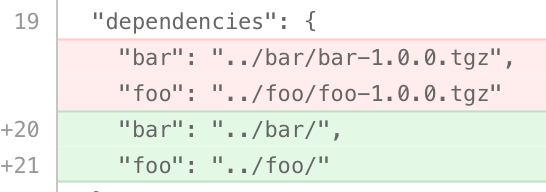
If I then replace ioredis version manually in LCS and run npm install --package-lock-only then all is well. e.g.
sed -i.bak -e "s/\^2.5.0/\^3.2.2/" package.json
npm i --package-lock-only
Conclusion: pointing LCS to the directory behaves differently than pointing it to the archive. Still seems like an npm bug to me, but only when pointing to archives.
rarkins
on 17 May 2018
Yes, I tried it and it doesn't result in the same behaviour. Archives are used to mimic the behaviour of having an actual published package.
BTW doesn't sed -i.bak -e "s/\^2.5.0/\^3.2.2/" package.json simply replaces the version matching the regex? Wouldn't it also change another package version with ^2.5.0? (It's for experimental purposes, I suppose?)
hi-larry
on 17 May 2018
Yes, it would change any string matching that. I'm just using it for this purpose and it may be more understandable to some instead of saying "manually update".
rarkins
on 17 May 2018
Also, as you mentioned earlier, I should run npm install without the flag. I did it in two different ways: one with deleting node_modules and package-lock.json, and the other way is without deleting anything. A fresh npm install indeed makes the proper package-lock.json (slightly different than the one generated by npm install [email protected] --package-lock-only, but still proper). Without deleting the generated files (package-lock.json and node_modules) results into the same as running npm install --package-lock-only
hi-larry
on 17 May 2018
So you think the following case would probably replicate it too?
your package.json
- dependencies: [email protected], [email protected]
- devDependencies: c@^1.0.0
- dependencies: c@^2.0.0
- dependencies: c@^1.0.0
And then upgrade the package.json devDependencies to c@^2.0.0 ?
rarkins
on 17 May 2018
Exactly, hopefully you'd be able to reproduce it.
hi-larry
on 17 May 2018
The
--package-lock-onlyargument will only update the package-lock.json, instead of checking node_modules and downloading dependencies.
I guess it would make sense why c@^1.0.0 in [email protected] is not included when updating c@^1.0.0 in my package.json
hi-larry
on 17 May 2018
You did well to isolate and replicate this bug - it's not easy. Here's my own observations:
- It always generates the wrong result if either
node_modulesorpackage-lock.jsonare present - It always generates the wrong result for
npm i --package-lock-only - It only generates a correct result if you run
npm iand deletenode_modulesandpackage-lock.jsonfirst
I found a way to narrow it down further - will comment in your npm issue
rarkins
on 17 May 2018
Actually I'll comment here:
- Move LCS
package.jsonandpackage-lock.jsoninto repo root - Move bar archive into repo root
- Update package.json:
  "dependencies": {
    "bar": "./bar-1.0.0.tgz"
  },
  "devDependencies": {
    "ioredis": "^3.2.2"
  }
i.e. foo is not necessary
rarkins
on 17 May 2018
Now that the issue is more clear, would it be possible for Renovate to delete node_modules and package-lock.json in order to generate the right result of package-lock.json?
hi-larry
on 17 May 2018
We would need two changes:
- deleting the
package-lock.jsonandnode_modules - running a full
npm installand not with--package-lock-only
rarkins
on 17 May 2018
Would you consider these changes as a workaround solution?
hi-larry
on 18 May 2018
I would consider this if no fix from npm is coming soon
rarkins
on 19 May 2018
There is a fix for this in [email protected] which I'll upgrade Renovate to soon
rarkins
on 24 May 2018
I'm not sure the fix covers our problem though
rarkins
on 24 May 2018
The --package-lock-only argument will only update the package-lock.json, instead of checking node_modules and downloading dependencies.
According to the npm documentation, node_modules won't be updated if the --package-lock-only flag is being used. Maybe our suggested solution (deleting node_modules and package-lock.json first) would be a reliable change for Renovate.
hi-larry
on 24 May 2018
Node modules are never present. Meanwhile removing the package-lock.json will cause instability, not stability. It means every ranged dependency can get updated - not just the one you think you’re upgrading in the PR. It would be a workaround with warnings and not a long term solution.
rarkins
on 24 May 2018
@hi-larry can you retest your real repo to see if the new npm fixed it? It’s possible the new version works that real packages but fails with local archives
rarkins
on 25 May 2018
I just tested with the latest npm, it still has the same behaviour.
hi-larry
on 25 May 2018
it would be inefficient to run npm install dozens of times instead of once.
It is possible to install multiple things at the same time with a single command
npm install [email protected] [email protected] --package-lock-only
I would +1 the suggestion of explicitly updating the desired version like that
 hrdwdmrbl
on 6 Jun 2018
hrdwdmrbl
on 6 Jun 2018
@hrdwdmrbl thanks, I'll see if that's feasible for us to do instead
rarkins
on 6 Jun 2018
Good morning,
Any progress on this ? This issue is what made us put the use of Renovate in our infrastructure on hold. I'd very much like to see it fixed or at least have a workaround we could use...
Thanks.
 NicolasPelletier
on 20 Jun 2018
NicolasPelletier
on 20 Jun 2018
The npm team thought they'd fixed the bug, but it seems they fixed something else similar. I think the next step is a reproduction for the npm team that uses "real" npm modules instead of the local archives reproduction provided previously, and they will hopefully respond quickly. I looked into changing how we generate/regenerate lock files from a CLI perspective and there are a bunch of edge cases that unfortunately would make this solution suggested by @hrdwdmrbl difficult to implement. I prefer not to re-architect a large amount of core logic as a workaround for another project's bug, but it's the worst-case scenario for now if it seems it won't get fixed on the npm end.
rarkins
on 20 Jun 2018
OK, I need help from someone to produce a simple reproduction of the problem using modules on npmjs.
I think I found the use case that npm fixed, because in 6.1.0 the following now works:
- Run
npm i chalk@^1.1.1 handlebars-chalk --package-lock-only - Manually update
chalkto^2.0.0inpackage.json - Run
npm i --package-lock-only
With the above steps, the package-lock.json is correct even though handlebars-chalk depends on the old chalk@^1.1.0. I need a non-working scenario.
rarkins
on 20 Jun 2018
Here's another even closer example that is working:
npm init -y && npm i koa-ioredis ioredis@^1.7.6
__manually update to `ioredis@^3.0.0` in package.json__
npm i --package-lock-only
You can see that the new package-lock.json correctly nests the old ioredis dependency of koa-ioredis:
    "koa-ioredis": {
      "version": "0.1.0",
      "resolved": "https://registry.npmjs.org/koa-ioredis/-/koa-ioredis-0.1.0.tgz",
      "integrity": "sha1-SficrcKvvwh7KZzV8lKvtTdCFUM=",
      "requires": {
        "debug": "^2.2.0",
        "ioredis": "^1.7.6"
      },
      "dependencies": {
        "bluebird": {
          "version": "2.11.0",
          "resolved": "https://registry.npmjs.org/bluebird/-/bluebird-2.11.0.tgz",
          "integrity": "sha1-U0uQM8AiyVecVro7Plpcqvu2UOE="
        },
        "ioredis": {
          "version": "1.15.1",
          "resolved": "https://registry.npmjs.org/ioredis/-/ioredis-1.15.1.tgz",
          "integrity": "sha1-UlJVzM1Ve904oO00ZhmfWesLnRw=",
          "requires": {
            "bluebird": "^2.9.34",
            "debug": "^2.2.0",
            "double-ended-queue": "^2.1.0-0",
            "flexbuffer": "0.0.6",
            "lodash": "^3.6.0"
          }
        }
      }
    },
The original example using archive dependencies (e.g. https://github.com/npm/npm/issues/20660#issuecomment-391728856) still seems to fail, but I can't find any cases that use "real" modules that's failing.
I need someone to confirm if they're still seeing the failure on "real" npm modules and if so then a way to reproduce that.
rarkins
on 20 Jun 2018
Here's something else new. It seems the non-working example is "half fixed".
If you git clone https://github.com/rarkins/package-lock-update && npm i --package-lock-only then you get this non-working package-lock.json:
diff --git a/package-lock.json b/package-lock.json
index a22925a..2735c14 100644
--- a/package-lock.json
+++ b/package-lock.json
@@ -6,73 +6,185 @@
   "dependencies": {
     "bar": {
       "version": "file:bar-1.0.0.tgz",
-      "integrity": "sha512-i0C/TLZdUgjs7IUGebzGMtmHD2OI63mrGNCT2Ck5fIerzvQrdmsIf0uCS2oMEn9+Vc7rpRADomeLwyx7YzcNrQ==",
-      "requires": {
-        "ioredis": "^2.5.0"
-      }
+      "integrity": "sha512-i0C/TLZdUgjs7IUGebzGMtmHD2OI63mrGNCT2Ck5fIerzvQrdmsIf0uCS2oMEn9+Vc7rpRADomeLwyx7YzcNrQ=="
     },
But if you remove the package-lock.json first (git clone https://github.com/rarkins/package-lock-update && rm -f package-lock.json && npm i --package-lock-only) then it's working:
diff --git a/package-lock.json b/package-lock.json
index a22925a..0baec8c 100644
--- a/package-lock.json
+++ b/package-lock.json
@@ -9,6 +9,23 @@
       "integrity": "sha512-i0C/TLZdUgjs7IUGebzGMtmHD2OI63mrGNCT2Ck5fIerzvQrdmsIf0uCS2oMEn9+Vc7rpRADomeLwyx7YzcNrQ==",
       "requires": {
         "ioredis": "^2.5.0"
+      },
+      "dependencies": {
+        "ioredis": {
+          "version": "2.5.0",
+          "resolved": "https://registry.npmjs.org/ioredis/-/ioredis-2.5.0.tgz",
+          "integrity": "sha1-+2/fChp+CXRhTGe25eETCKjPlbk=",
+          "requires": {
+            "bluebird": "^3.3.4",
+            "cluster-key-slot": "^1.0.6",
+            "debug": "^2.2.0",
+            "double-ended-queue": "^2.1.0-0",
+            "flexbuffer": "0.0.6",
+            "lodash": "^4.8.2",
+            "redis-commands": "^1.2.0",
+            "redis-parser": "^1.3.0"
+          }
+        }
       }
     },
Therefore I have the optimistic conclusion that:
- It's probably working already for most people already without any changes
- If you have archived dependencies then an option to not use existing
package-lock.jsonshould be enough to fix it
rarkins
on 20 Jun 2018
I just also realised that Renovate doesn't support local .tgz files yet, so therefore it appears to be working for all use cases that Renovate supports.
@NicolasPelletier when was the last time you tested this out, and can you verify that it's now working?
rarkins
on 20 Jun 2018
@rarkins I'm testing it out, and we don't use local .tgz files, it was an example for testing purpose.
hi-larry
on 20 Jun 2018
@hi-larry great. If you find that your "real" scenario is still broken, then we will need to work out a way to replicate it without the tgz files (assuming the npm cli team don't beat us to the fix thanks to the tgz example).
rarkins
on 20 Jun 2018
@rarkins So, after some thorough testing, unfortunately, my original repo is still having the same faulty behaviour. I'm not sure if it has anything to do with a package that is unpublished (like bar, that is a personal package), because with your examples, they're all real published packages. I also tried your chalk dependency example, installing handlebars-chalk as devDependencies and it still works fine. The commands you used are no different than what we used before, I already tested it when [email protected] was released. I doubt that npm fixed our problem.
hi-larry
on 21 Jun 2018
@hi-larry unfortunately if we can't get a working reproduction for Renovate using real packages and not tgz, there's little I can do because I can't test with tgz. Unless someone else can reproduce this, then we need to wait for npm to fix the example using .tgz and hope it fixes your use case too.
rarkins
on 21 Jun 2018
@hi-larry I have added a special environment variable in the latest release as an attempted workaround. If you set the environment variable RENOVATE_REUSE_PACKAGE_LOCK=false when running renovate then it will skip writing any package-lock.json files before calling npm install. Could you try this with your problematic config and confirm if it works?
rarkins
on 4 Jul 2018
Thanks @rarkins , I'll try it out !
hi-larry
on 4 Jul 2018
@rarkins I attempted to run renovate with the newly added environment variable, and it did make the changes accordingly! Thank you very much! Can you just clarify this?
it will skip writing any
package-lock.jsonfiles before callingnpm install
hi-larry
on 5 Jul 2018
Normally we write both the package.json and package-lock.json before then calling npm install --package-lock-only. But in this case npm has a fault where it's generating the wrong new package-lock.json if the old one is present, so this environment variable tells Renovate to skip writing the package-lock.json and write the package.json only.
rarkins
on 5 Jul 2018
Why do you have to write to package-lock.json ? Doesn't it only gets modified upon running npm install ?
hi-larry
on 5 Jul 2018
I don't mean we edit/modify package-lock.json, I mean that we write it to disk before running npm install so that npm can see the "before" version of the lock file instead of regenerating it from scratch.
Anyway, I'll keep this environment variable in place until npm fixes their bug.
rarkins
on 21 Jul 2018
Related issues
 jgarec
·
3Comments
jgarec
·
3Comments
 ptbrowne
·
3Comments
ptbrowne
·
3Comments
 jeromelachaud
·
3Comments
jeromelachaud
·
3Comments
 Flydiverny
·
4Comments
Flydiverny
·
4Comments
 ikatyang
·
4Comments
ikatyang
·
4Comments