Remote-ftp: Remote file tree does not open on startup or with Toggle
Prerequisites
- [ ] Put an X between the brackets on this line if you have done all of the following:
- Checked that your issue isn't already filed: https://github.com/icetee/remote-ftp/issues
Remote file tree does not open. Even after I connect... the Toggle function does not open the remote file tree either. Also, there is no indication for 'uploading' and 'uploading complete'. This is my first time using Remote-FTP so I am not sure if there is an actual icon or some indication that uploads are in progress or complete. Also, there are indicators(little green popup) when I am connecting/connected to the server, but no indication when I am disconnecting.
[Description of the issue]
I followed the Remote-FTP instructions in the package.
Expected behavior: Remote file tree opens
Actual behavior: Remote file tree does not open
Reproduces how often: [What percentage of the time does it reproduce?]
Versions
Atom : 1.23.0
Electron: 1.6.15
Chrome : 56.0.2924.87
Node : 7.4.0
Mac: OSX 10.12.6
Additional Information
The uploading actually works beautifully when I save a local file. I'm just not aware of what is happening as there is no remote file tree or indication that uploads are happening. I'm a newbie so would be great to learn how to fix this. I already tried rebuilding and also reinstalling.
 jeffconsi
All 9 comments
Please try the new release v2.1.2
https://github.com/icetee/remote-ftp/issues/1066#issuecomment-351403186
 icetee
on 13 Dec 2017
icetee
on 13 Dec 2017
just update to 2.12;
atom v1.23
no side panel at all; plugin connects via the packages menu but impossible to browse. Tried to uninstall/reinstall but nothing would fix it.
If that's any help only thing I might have done wrong is that "remote-ftp" was open and connected when the update happened
 signmeuptwice
on 13 Dec 2017
signmeuptwice
on 13 Dec 2017
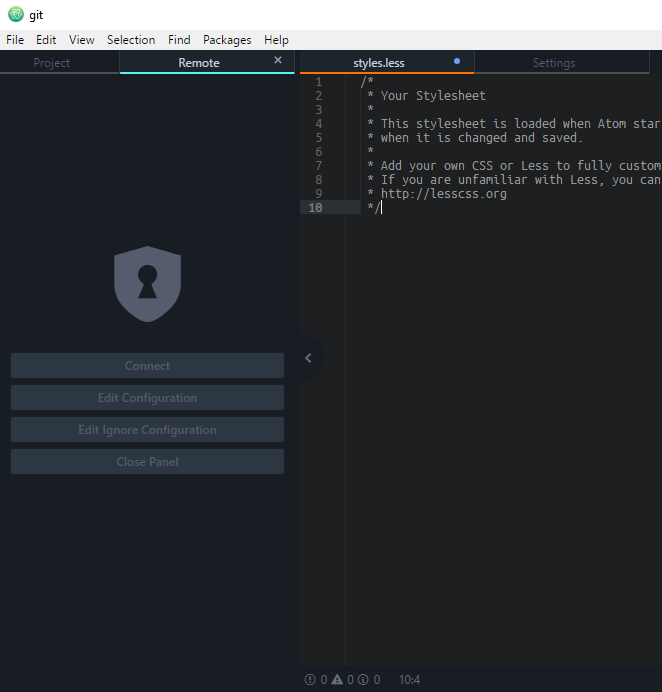
I had this same issue on both my (High Sierra) Mac and (Win 10) PC, and realized the remote-ftp tab appears in the same pane as the tree view panel, but toggling the Remote FTP panel only adds a tab to the tree-view tab bar, and does not switch to the tab.
This tab wasn't appearing for me because the ui theme I was using (City Lights) hid the tree panel tabs.
Without side panel tabs:

With side panel tabs:


It looks like quite a few themes do this, so you might try using the atom developer tools to figure out what rule is specifically hiding the tab bar. Once you do, you can add an override to your user style sheet. In my case, i just ended up doing a quick and dirty:
atom-pane .tab-bar {
    display: flex!important;
}
You can test this theory by switching to the default atom ui theme and toggling ftp remote again. for reference, the panel in context looks like this:
 jprusik
on 13 Dec 2017
jprusik
on 13 Dec 2017
Thanks that was it! just changed theme :)
signmeuptwice
on 13 Dec 2017
@icetee it might be worth thinking about how to solve the tab-bar as a requirement to use remote ftp; I suspect a lot of theme developers will see that tab-bar as "wasted space" and give unsuspecting users the impression that remote ftp is busted, when it actually works totally great ;-)
jprusik
on 14 Dec 2017
@jprusik There are many themes... full of issues. If the theme is not supported need to be changed or forks. Many (official) packages use dock, not only remote-ftp and any tab can be moved any sides.
In my humble opinion it is not my job to pay attention to this.
I sent a fix https://github.com/Yummygum/city-lights-ui-atom/pull/25
I hope it can be closed.
icetee
on 14 Dec 2017
lol - fair enough
jprusik
on 14 Dec 2017
Thank you kindly Jonathan and everyone. Worked a treat. Don't mind a dirty fix for now! And thanks icetee. Great package. If I may, please add some sort of status indicator if that is possible. Either way this works really well. Thanks.
jeffconsi
on 14 Dec 2017
The tab bar in the tree-view in my opinion is still a waste. I didn't knew the use case untill now. I'll try to make a config That show/hides the tab bar in the tree view.
Thank you @icetee for the contribution & the eye opener on the tab-bar.
 noudadrichem
on 18 Dec 2017
noudadrichem
on 18 Dec 2017
Related issues
 dkoppstein
·
5Comments
dkoppstein
·
5Comments
 JamesCoyle
·
7Comments
JamesCoyle
·
7Comments
 matthew-e-brown
·
6Comments
matthew-e-brown
·
6Comments
 joehagmann
·
3Comments
joehagmann
·
3Comments
 krkmzugur
·
7Comments
krkmzugur
·
7Comments