Remote-ftp: Connection without password
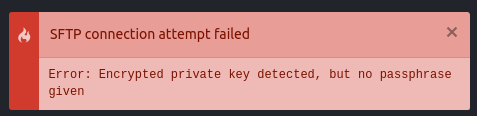
In config I selected "promptForPass": true to not to show my pass there. After update when connecting prompt is shown but also it tries to connect without password

 masiama
All 12 comments
I'm not sure that it's trying to connect, but it is seriously annoying that it's throwing that error everytime I connect even when promptForPass is set to true. Not enjoying this update at all.
 tominal
on 11 Oct 2017
tominal
on 11 Oct 2017
About IP you can setup what you want to be show at the top
masiama
on 11 Oct 2017
How can I change that at least?
tominal
on 11 Oct 2017
In package settings
masiama
on 11 Oct 2017
you rock, now just gotta kill this stupid thing. might revert to the last version
tominal
on 11 Oct 2017
Is there a better alternative?
masiama
on 11 Oct 2017
@masiama Please try my fix.
 icetee
on 11 Oct 2017
icetee
on 11 Oct 2017
@icetee, sorry for silly question but how?
masiama
on 11 Oct 2017
Go your Atom > packages > Remote-FTP folder and changes with commit https://github.com/icetee/remote-ftp/commit/4d91f689691b52ce58ad3aee061ec48f37c7cac1 in ~/.atom/packages/Remote-FTP/lib/client.js and restart Atom. (In v1.2.4)
If there is an old version then in command line:
apm uninstall remote-ftp
apm install [email protected]
@icetee thanks a lot. This works
masiama
on 11 Oct 2017
Thanks. The new version is coming soon.
icetee
on 11 Oct 2017
Thanks @icetee great support!
tominal
on 11 Oct 2017
Related issues
 xabispacebiker
·
5Comments
xabispacebiker
·
5Comments
 querysol
·
7Comments
querysol
·
7Comments
 fausto160792
·
7Comments
fausto160792
·
7Comments
 matthew-e-brown
·
6Comments
matthew-e-brown
·
6Comments
 JamesCoyle
·
7Comments
JamesCoyle
·
7Comments