Seams Break line not working as intended
I used react-markdown and break will not happened
Expected behavior
in our text as the document we expected to locate:
/n to 'break'
/n/n to 'newLine'
Actual behavior
but an actual break will not happen
Step to Repourduce
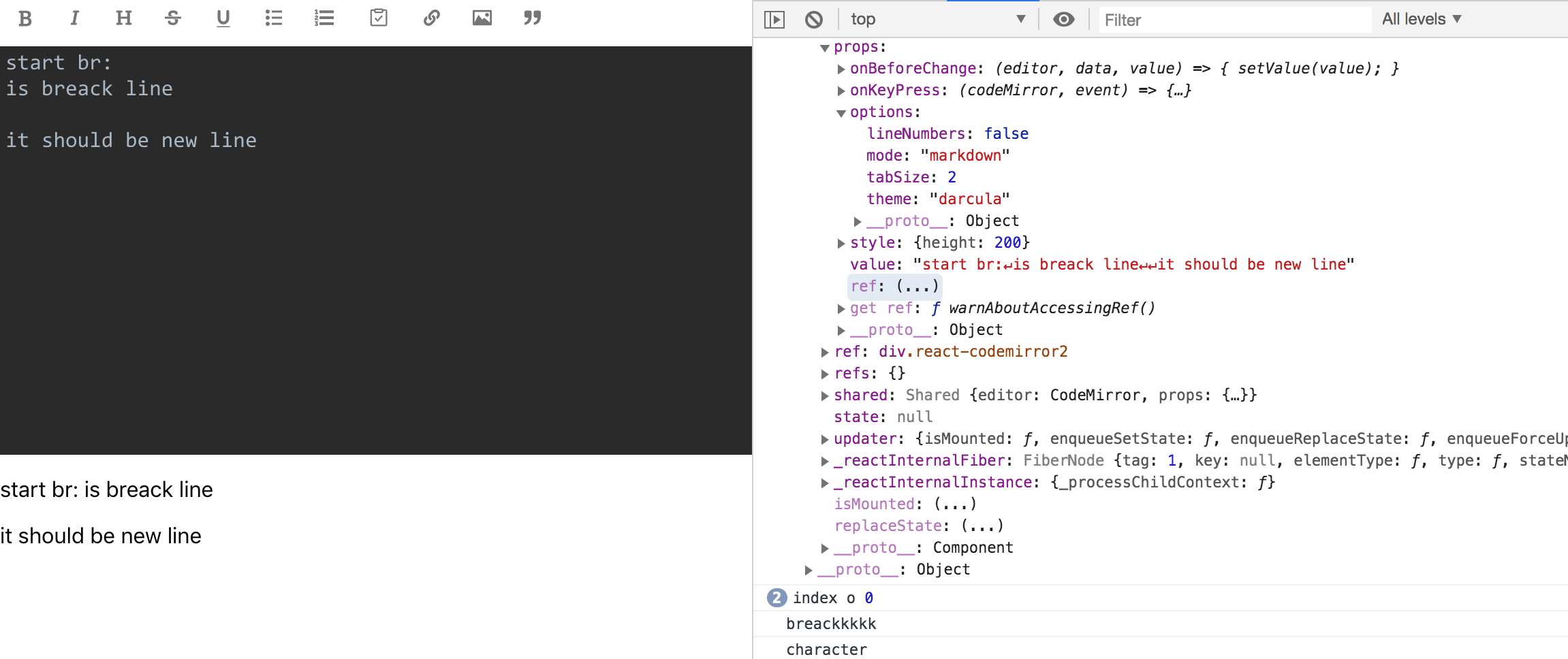
I Try To debug and understand what happened
on break parser Line 18 while it just runs one Time and index always be 1
so on the line 22 we will return
so break not happened
or it's not /n and on line 41 if (character !== ' ') { we will return so there is no chance to catch break
**Note
you can test here
https://uiwjs.github.io/react-markdown-editor/
 soroushm
All 6 comments
Testing in AST Explorer it appears that the parsing matches commonmark
Two paragraphs are extracted, and the SoftBreak (\n) is preserved.
@soroushm can you clarify where the remark parser is outputting an unexpected AST?
Might this be an issue with react-markdown or react-markdown-editor?
 ChristianMurphy
on 25 May 2019
ChristianMurphy
on 25 May 2019
@ChristianMurphy
this issue coming from remark-parse!
like this sample as you provide soft break not working as well
https://spec.commonmark.org/dingus/?text=start%20br%3A%0Ais%20break%20line%0A%0Ait%20should%20be%20newline
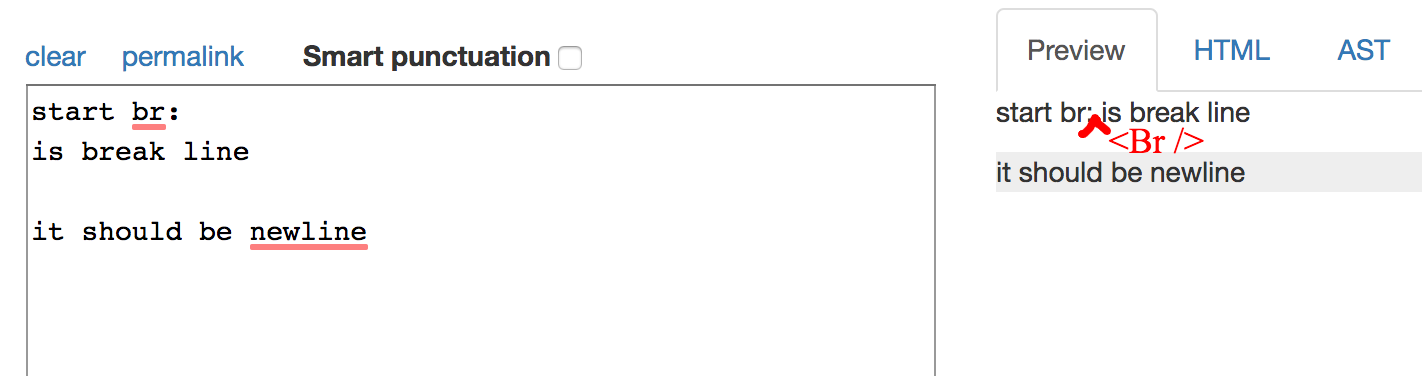
for each /n should be translate to
for double /n/n should be translate to new paragraph
but there is no br
there is no chanse this will go to index 2
 while (++index < length) {
    character = value.charAt(index)

    if (character ==='/n') {
      if (index < minBreakLength) { \\ if is enter key at the first will return
        return
      }

      /* istanbul ignore if - never used (yet) */
      if (silent) {
        return true
      }

      queue += character

      return eat(queue)({type: 'break'})
    }

    if (character !== ' ' ) { \\or here will be return
      return
    }

    queue += character
  }
this condition look is like
if(character === '/n ' || character !== ' '  ){
return true
}
NO make sance
for Example if chenge this condition
if (index < minBreakLength)
to
if (value.length < minBreakLength)
working as well
soroushm
on 25 May 2019
@soroushm That behavior is how markdown works.
The CommonMark specification offers some examples of paragraphs work in Markdown https://spec.commonmark.org/0.29/#paragraphs
Example 190 describes how to handle the case described above
https://spec.commonmark.org/0.29/#example-190
aaa
bbb

ccc
ddd
will be turned into
<p>aaa
bbb</p>
<p>ccc
ddd</p>
no <br> added.
To add a <br> tag, add two or more spaces after the line.
See: https://spec.commonmark.org/0.29/#example-196
E.G. https://astexplorer.net/#/gist/19a843b97e350aaa80733876c81c1bed/624db1531769ec5ba482276411eaf2812e0da6b4
ChristianMurphy
on 25 May 2019
It's also worth noting that if CommonMark's paragraph handling doesn't suit your needs.
The default CommonMark parser can be extended/modified through plugin(s), see https://github.com/remarkjs/remark/tree/master/packages/remark-parse#extending-the-parser for details.
ChristianMurphy
on 25 May 2019
@soroushm I believe the behaviour you are talking about is that any newline (line feed, carriage return, or combination thereof), should be transformed to a hard break, a <br> element.
This is not how Markdown works. But it is how Markdown work on GitHub inside Issues, Pull Requests, and comments.
With remark, you can enable this behaviour by using remark-breaks.
 wooorm
on 25 May 2019
wooorm
on 25 May 2019
it didnt work because its the wrong way lol
\n
 Nanoo-web
on 6 Jun 2020
Nanoo-web
on 6 Jun 2020
Related issues
 pd4d10
·
5Comments
pd4d10
·
5Comments
 lishid
·
5Comments
lishid
·
5Comments
 gengjiawen
·
4Comments
gengjiawen
·
4Comments
 niksurff
·
4Comments
niksurff
·
4Comments
 marcojakob
·
4Comments
marcojakob
·
4Comments
Most helpful comment
@soroushm I believe the behaviour you are talking about is that any newline (line feed, carriage return, or combination thereof), should be transformed to a hard break, a
<br>element.This is not how Markdown works. But it is how Markdown work on GitHub inside Issues, Pull Requests, and comments.
With remark, you can enable this behaviour by using
remark-breaks.