Remark: Suggestion: add head and footer div
A follow-up to #500
I'd like to suggest to add a <div class="remark-slide-head"></div> and similar for remark-slide-foot to the slide contents, so users can add styles.
This is what I have done in remark.js:
In function createSlideElement I have added these lines:
  var head = document.createElement('div')
  var foot = document.createElement('div')
  head.className = 'remark-slide-head'
  foot.className = 'remark-slide-foot'
  element.appendChild(head)
  element.appendChild(foot)
I have no idea if this is good or not, but it works for me, so I can style the head and foot.
I also had change the width and height of the slide for my purpose:
.remark-slide-content {
    width: inherit;
    height: inherit;
}
But that is specific to my use case (I assume).
You can just close this issue if you think this is stupid :)
 pgundlach
All 13 comments
@pgundlach, definitely not stupid :)
“I have no idea if this is good or not, but it works for me, so I can style the head and foot.”
An alternative (admittedly redundant, but also simpler, I think), is to add your header or footer like this in each and every slide:
.footer[Corp Inc., Oct 2017]
Then, style it once; eg:
.remark-slide-content .footer {
    position: absolute;
    bottom: 1rem;
    left: 2rem;
}
For an example, find .watermark on the source of this presentation (see it rendered).
This approach is not beautiful (the same header or footer may be repeated several times), but at least all content is together, there's no need to write JS, and this lets you have headers/footers just in some slides (not all), or to have different versions of footers on different slides, etc.
“I also had change the width and height of the slide for my purpose”
Have you checked configuration options? Perhaps you can change the display ratio of your presentation, instead of setting width and height like that. For example, remark.create({ratio: '16:9'}).
 tripu
on 11 Jan 2018
tripu
on 11 Jan 2018
Thank you for the hint with the inserted spans. As you write, it is not as convenient when using this as a style for every slide (say: corporate design), but it works fine. For the witdth and height setting I mention, I will open another issue, if this cannot be solved with the configuration options.
FWIW: you can close this issue.
pgundlach
on 15 Jan 2018
I'll leave it open for a while, in case others who are more knowledgeable (eg, @gnab) want to contribute and offer better solutions to these two questions (header/footer classes, and specific size of presentation).
tripu
on 16 Jan 2018
I've been doing header/footer like this, with no need to change/add JS code. Creates a color gradient "bar" across the top 30px using company colors and across the bottom is our logo to the left, copyright/year/name centered, and slide #'s in the right.
<body>
<textarea id="source">
layout: true
<div class="my-header"></div>
<div class="my-footer"><img src="logo_tiny.png" /><p>© 2018 MyCompany, Inc.</p></div>
---
class: center, middle
slide 1
---
slide 2...
CSS:
div.my-header {
    background-color: #F77A00;
    background: -webkit-gradient(linear, left top, right top, color-stop(0%,#ffb76b), color-stop(0%,#ffa73d), color-stop(0%,#ffffff), color-stop(10%,#ffffff), color-stop(25%,#F77A00), color-stop(100%,#F77A00));
    position: fixed;
    top: 0px;
    left: 0px;
    height: 30px;
    width: 100%;
    text-align: left;
}

div.my-footer {
    border-top: 1px solid #ccc;
    font-size: 10pt;
    text-align: center;
    position: fixed;
    bottom: 0px;
    left: 0px;
    height: 30px;
    width: 100%;
}

div.my-footer p {
    margin-top: 10px;
    height: 30px;
}

div.my-footer img {
    height: 30px;
    bottom: 0px;
    left: 0px;
    position: fixed;
}
 utdrmac
on 30 May 2018
utdrmac
on 30 May 2018
@utdrmac Thanks for your posted solution. I'm using the Xaringan package created by @yihui with RMarkdown (RStudio running on macOS). I'm new to css and html customizations. Could you help me implement your suggestion, please? I would like to insert a small logo to the bottom-left of each slide (barring the title slide). I've tried the following, but I'm clearly missing something. Any suggestions on what I must do next?
I've tried the following variations based on your suggestion above (maybe I've removed the wrong bits!):
layout: true
 <div class="my-footer"><img src="logo_tiny.png" /><p>
or
layout: true
footer: <img src="logo_tiny.png"/>
I've added this to my-theme.css too:
div.my-footer img {
    height: 30px;
    bottom: 0px;
    left: 0px;
    position: fixed;
}
Thanks for your help.
 jananiravi
on 26 Jul 2018
jananiravi
on 26 Jul 2018
@jananiravi First example looks correct but why do you have that <p> tag in there? Also, you didn't close the footer div.
layout: true
 <div class="my-footer"><img src="logo_tiny.png" /></div>

---

## slide 1
Here's the code version that I'm currently using @utdrmac I still don't see the logo appearing where it should. The div was a mistake, and I've fixed it.
Main .Rmd file
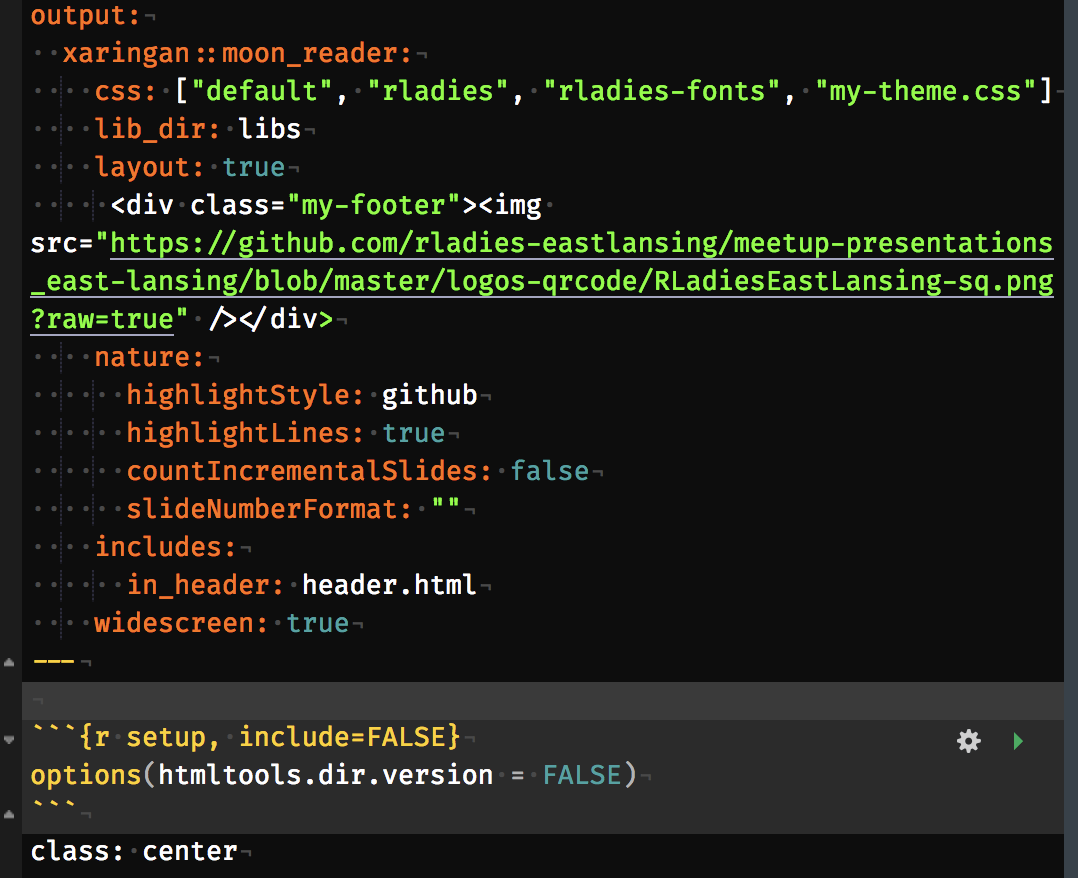
That long link contains my image.
my-theme.css

Thanks!
jananiravi
on 26 Jul 2018
@jananiravi: https://yihui.name/en/2017/08/source-code-as-screenshots :wink:
 mschilli87
on 27 Jul 2018
mschilli87
on 27 Jul 2018
@jananiravi What is all that other stuff? Where is your plain HTML file?
Here is a demo of what my code above looks like:
https://codepen.io/anon/pen/pZWZqX
utdrmac
on 27 Jul 2018
_Oooh!_ I'm sorry about the screenshots @mschilli87 and @utdrmac (and that's a good post by @yihui! :) I pasted the relevant snippets in my post above. So, to give a broader context of where my code snippet resides, I shared a screenshot. I 'assumed' that this was going to help! :) Let me clarify this further below.
@utdrmac To answer your question, I used .Rmd. That's why I'd shared the main .Rmd file's header section that was most relevant to this question. I use Xaringan, an R-package built for presentation based on remark. I use RStudio on Mac w/ the knitR package to generate the HTML file.
Below, I've converted the screenshot portions of my Rmd file to HTML (using knitr) and posted it in codepen. It provides the desired output in my preview pane in RStudio but not in the codepen preview (my first time using codepen & I couldn't find a way to paste/render RMarkdown file there directly) despite pasting the contents of all the relevant CSS dependencies into the CSS pane. Please let me know if there's a better way to do this.
Here are my original Rmd and generated HTML files as well. I do not write HTML/CSS scripts from scratch. I write in R/Rmd and use that to interface w/ HTML, CSS.
Please let me know if this helps. Thanks!
jananiravi
on 27 Jul 2018
Well, I don't know anything about .Rmd/Xaringan/RStudio/etc so I cannot help you there. Glancing over your original Rmd file, I think you have "layout:" in the wrong location. It is not a parameter you pass to RemarkJS. It is part of the slide content within the <textarea>. You need to put this, LITERALLY THIS:
layout: true
     <div class="my-footer"><img src="https://github.com/rladies-eastlansing/meetup-presentations_east-lansing/blob/master/logos-qrcode/RLadiesEastLansing-sq.png?raw=true" /></div>
before the first --- of your textarea. You can see my codepen works and, from what I can tell, does exactly what you want: a logo in the footer. You need to make sure whatever html is output that it matches the pattern. (BTW, codepen doesn't do RMarkdown, it only does standard html/css/js, again, refer to my example to understand the 3 window panes and the contents therein)
utdrmac
on 28 Jul 2018
Thanks a lot, @utdrmac Works like a charm. :) I used it in the header area simply because I wanted it to work across all slides. Didn't realize that I could do this in the slide area before the first slide and still get it to work. I really appreciate your help. 👍
jananiravi
on 30 Jul 2018
It looks fixed and it's now documented, so I'm closing the issue.
https://github.com/gnab/remark/wiki/HTML-CSS-JS-samples
Thanks to all!
 abelards
on 29 Dec 2019
abelards
on 29 Dec 2019
Related issues
 sinedied
·
5Comments
sinedied
·
5Comments
 dvberkel
·
5Comments
dvberkel
·
5Comments
 benjie
·
4Comments
benjie
·
4Comments
 fladd
·
7Comments
fladd
·
7Comments
 amueller
·
7Comments
amueller
·
7Comments