Reicast-emulator: No way to press LT and RT at the same time.
Hello, I'm using a Xiaomi Redmi Note 3 with Android 5.1.1, trying the last "ca837e1" CI Build.
The controller used is a SNES30 (8BitDo). I'm having a major issue with the emulator.
· Pressing single LT or RT works perfect, but the moment you try to press them simultaneously (at the same time) the "combo" does not work, only one button remains pushed. This is a complete pain in games like Metropolis Street Racer (You can't pretend to control the car with the triggers configured as accel/brake) and Fighting games (Like Capcom vs Snk 2 or Marvel vs Capcom). If I don't have misunderstood, the dreamcast input method allows to have single (not pressure) switch L and R buttons (designated for arcade sticks). That will fix the fighting games's issue, but not the racing ones :-(
Is there any other way to map manually the inputs? (Ini file or something like that)
Thanks a lot in advance, it's just like a dream to have dreamcast games portable thanks to this emulator. Keep it going! I only miss an option to render all the dreamcast's video frames (accurate rendering, i miss lots of frames with the autoframeskip, but it shows 60 fps all the time), something like a "frameskip 0 with 60 fps limit" and a Manual-and-all-inputs controller mapping configurator.
Want to back this issue? Post a bounty on it! We accept bounties via Bountysource.
 DaRKSlaiN
All 18 comments
https://github.com/reicast/reicast-emulator/issues/1014#issuecomment-299268215
The question is a bit different, but the answer explains part of the reason triggers are problematic.
 AbandonedCart
on 4 May 2017
AbandonedCart
on 4 May 2017
Does this works with any gamepad on Android? Tried 3 different gamepads and none could press both lt and rt at the same time, only works with the touchscreen overlay and analog triggers are not mappable, this affects a bunch of fighting games like MvsC2.
 blackman91
on 16 Aug 2018
blackman91
on 16 Aug 2018
That is the current state of the issue.
AbandonedCart
on 16 Aug 2018
If anyone else is having this issue I just realised you can press both lt and rt buttons at the same time on the reicast RetroArch core for Android and you can map analog triggers too. This issue is fixed on the reicast libretro core, maybe someone from the libretro team can help solve this on standalone.
@flyinghead
@twinaphex
blackman91
on 16 Aug 2018
The first revision is merged in https://github.com/reicast/reicast-emulator/pull/1295
AbandonedCart
on 17 Aug 2018
Assuming by all of the emojis this has been resolved. Please reopen if it is not.
AbandonedCart
on 17 Aug 2018
How do I reopen? Using latest reicast beta 1bcffb5 if you move the analog stick or the dpad on a gamepad reicast goes back to the game selection ui for some reason, also this issue still remains the same.
blackman91
on 17 Aug 2018
Still an issue in a412935, please reopen you can test this by touching the screen during gameplay so the touchscreen overlay appears and press both LT and RT and mantain them pressed, you can see how LT doesn't keep pressed even when you are still pressing both buttons on the gamepad.
blackman91
on 18 Aug 2018
Reopend because of user feedback.
 baka0815
on 18 Aug 2018
baka0815
on 18 Aug 2018
Resolved by #1319
AbandonedCart
on 25 Aug 2018
Just tested latest beta 40624ad and the same issue is still present, I made a quick video showing how my gamepad button presses show in the touchscreen controls:
https://youtu.be/CAOi9vNj0PQ
As you can see in the video maintaining LT pressed and then pressing RT makes LT lose its input even if you are still pressing both, the reverse is also true. Also tested how those buttons react when you move the analog while keeping lt and rt pressed.
You can reproduce this in a game like Marvel vs Capcom 2 where you need to press both lt and rt at the same time to make a team special.
blackman91
on 25 Aug 2018
https://www.youtube.com/watch?v=5i9RzZI-R3U
It must be something with your particular hardware, since you can plainly see it is not being reproduced.
AbandonedCart
on 25 Aug 2018
That's weird, could you try to reproduce it with only the option enable custom key layout in the controller settings enabled? That's the option that makes LT and RT work on my gamepad otherwise they don't work even if you remap them.
blackman91
on 25 Aug 2018
That's your problem then. You must have a controller that defines L / R as a button rather than axis.
AbandonedCart
on 25 Aug 2018
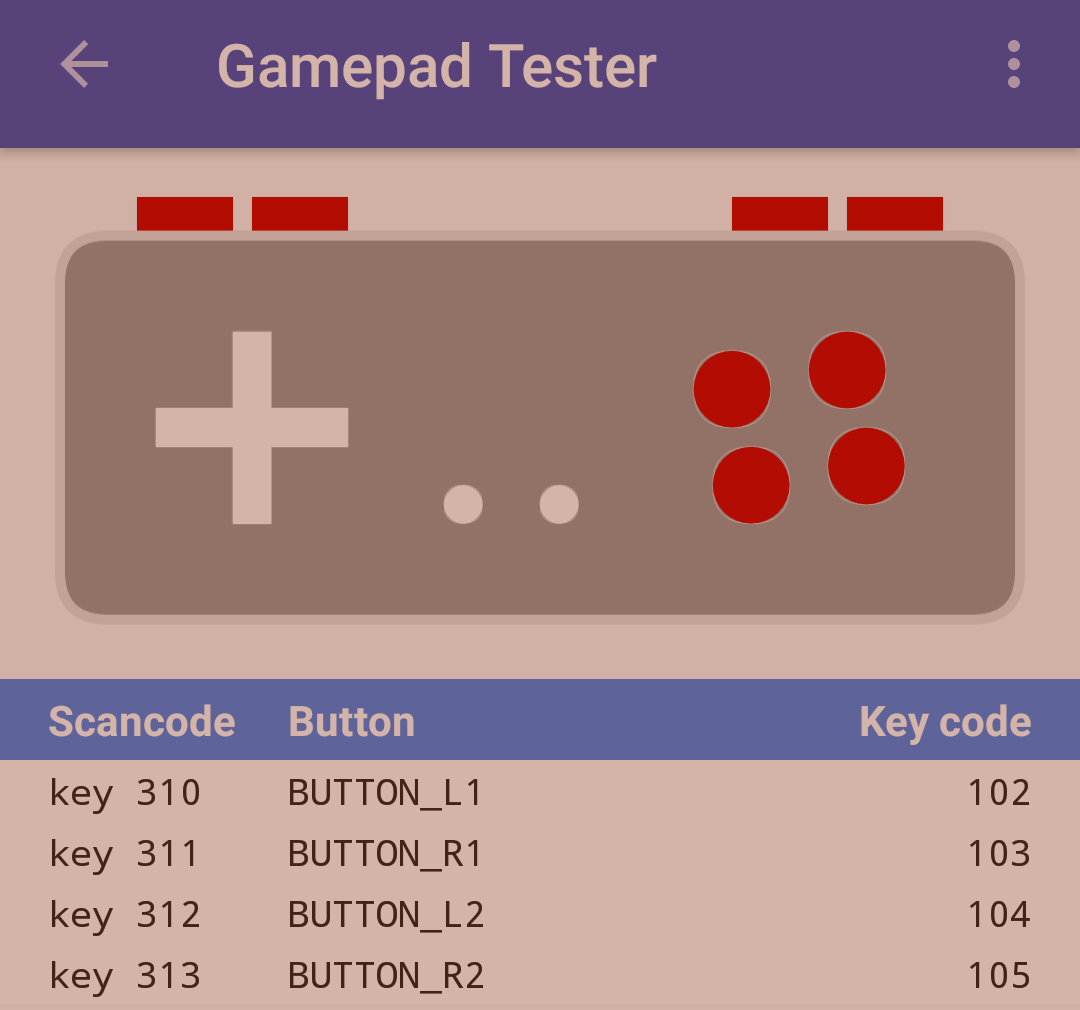
You are right just tested using an xbox360 gamepad that has analog triggers and it works correctly without that option enabled, it seems the bug only happens if you have a gamepad without analog triggers and you enable the option enable custom key layout to make the buttons work on reicast, though I would argue that a lot of portable gamepads for Android have these keys rather than analog triggers:
blackman91
on 25 Aug 2018
Unfortunately, it is a far smaller number than you think unless you are talking primarily low-end controllers. Assigning the L / R triggers as the L / R buttons through the configuration does allow you to use them as buttons, but also comes with the restrictions of being a button. While it may be possible to improve the situation, it may not be possible to resolve it.
AbandonedCart
on 25 Aug 2018
https://github.com/reicast/reicast-emulator/pull/1325 should help minimize the issue, but is the extent of what can really be done. The keys can't be broken down or overlapped any more than being independent of each other and verified separately.
AbandonedCart
on 25 Aug 2018
Nice! The button triggers now can be pressed at the same time in MvC2, great job!
blackman91
on 25 Aug 2018
Related issues
AbandonedCart
·
25Comments
 skmp
·
20Comments
skmp
·
29Comments
skmp
·
20Comments
skmp
·
29Comments
 RinMaru
·
33Comments
skmp
·
42Comments
RinMaru
·
33Comments
skmp
·
42Comments
Most helpful comment
https://github.com/reicast/reicast-emulator/pull/1325 should help minimize the issue, but is the extent of what can really be done. The keys can't be broken down or overlapped any more than being independent of each other and verified separately.