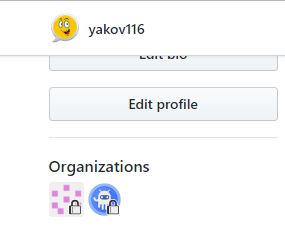
Refined-github: If no private orgs are found the lock will show on all orgs
looks like the issue this line since orgPath will be undefined...
_Originally posted by @yakov116 in https://github.com/sindresorhus/refined-github/pull/1616/review_comment/create_
 yakov116
All 3 comments
I just checked your profile and all your orgs are private, unless you changed the privacy since making the issue. I tried making all my own orgs public, and I cannot reproduce your issue.
--
If it's really an issue, the 3 lines above the one you linked should skip the iteration if orgPath is undefined, as you suggested.
https://github.com/sindresorhus/refined-github/blob/c5118b12475579a9cb8f61af316f2f53b239213c/source/features/mark-private-orgs.js#L24-L29
My guess is that there are two possible points of failure:
Either the call to get your public orgs returns an empty list, https://github.com/sindresorhus/refined-github/blob/c5118b12475579a9cb8f61af316f2f53b239213c/source/features/mark-private-orgs.js#L8-L12
Or the format of the URLs as received in the API call and the href attribute of the org icons is different,
 aramperes
on 12 Nov 2018
aramperes
on 12 Nov 2018
@momothereal ok I think I misunderstood how organizations work. The organizations I am part of are public however viewing the members are private. (I have made myself public on one to test how it will work)
I thought that the feature was supposed to highlight the private organizations.
Is there such a thing as a private org?
yakov116
on 12 Nov 2018
Not that I am aware of. Organizations are essentially user accounts, so while you can make all repositories private, you cannot hide the existence of the profile.
The point of the feature is to let the user know their private organization membership. That could be made more evident in the feature description.
aramperes
on 12 Nov 2018
Related issues
 hkdobrev
·
3Comments
hkdobrev
·
3Comments
 olso
·
3Comments
olso
·
3Comments
 vanniktech
·
3Comments
vanniktech
·
3Comments
 Celthi
·
3Comments
Celthi
·
3Comments
 shivapoudel
·
3Comments
shivapoudel
·
3Comments
Most helpful comment
Not that I am aware of. Organizations are essentially user accounts, so while you can make all repositories private, you cannot hide the existence of the profile.
The point of the feature is to let the user know their private organization membership. That could be made more evident in the feature description.