Refined-github: Make issue status always visible when viewing an issue
I often find myself scrolling to the top to check whether an issue has been closed.
Even if I visit the issue at the top, I often don't notice the open/closed, or I forget by the time I have read through some comments because I am looking for a specific bug fix or mention of something.
And then there is the case where you navigate to a comment directly.
I also find that when there is a referenced issue at the bottom of the issue I confuse it with the status of the current issue, the "Open" badge next to the referenced issue could be made less prominent/lighter color.
We should add the status to the bar on the right.
 vjpr
vjpr
All 9 comments
Making the current issue status more visible sounds good, but making the others less visibile doesn’t.
 fregante
on 7 May 2018
fregante
on 7 May 2018
Something like this ?
| 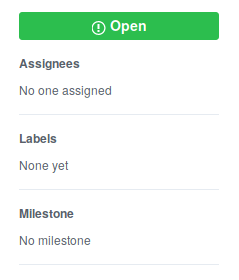 |
| 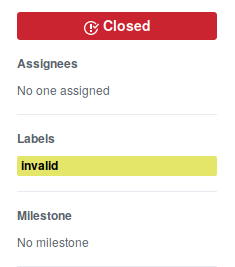 |
|
|:-:|:-:|
If we're making issue status sticky,
- Should we also make the right sidebar sticky ?
- What should we do about the issue status and (the related pull request reference) at the top ?
- Is this change applicable to pull request pages ?
 salmanulfarzy
on 10 May 2018
salmanulfarzy
on 10 May 2018
Sticky sidebar has been talked about in a separate thread (more info there)
I think it should not be a full replacement of the one in the header because we don’t want race conditions with our extend-issue-status feature. Perhaps showing a red/green/purple circle/corner somewhere would be preferrable.
fregante
on 10 May 2018
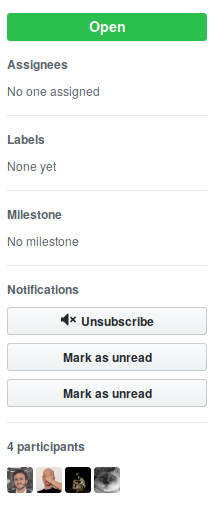
I created a userscript that adds the issue status similar to @salmanulfarzy's screenshots, but without the icon.

 Mottie
on 12 May 2018
Mottie
on 12 May 2018
Awesome @Mottie :clap: . But looks like it duplicates the mark as unread button.
salmanulfarzy
on 12 May 2018
Hmm, that appears to be an issue with Refined GitHub. When the discussion sidebar is modified, it adds the mark unread button without checking to see if one is already there (ref).
Mottie
on 12 May 2018
I solved this for myself by making the entire header "sticky" using the following CSS.
CSS
#partial-discussion-header {
  position: sticky;
  top: 0px;
  z-index: 1;
  background: #fff;
}

.gh-header-meta {
  border-bottom:0px;
}

.gh-header-meta:before {
  content: "";
  position: absolute;
  left: 0;
  bottom: 0;
  height: 1px;
  width: 700px;
  margin-left: 60px;
  border-bottom: 1px solid #e6ebf1;
}
Screenshot
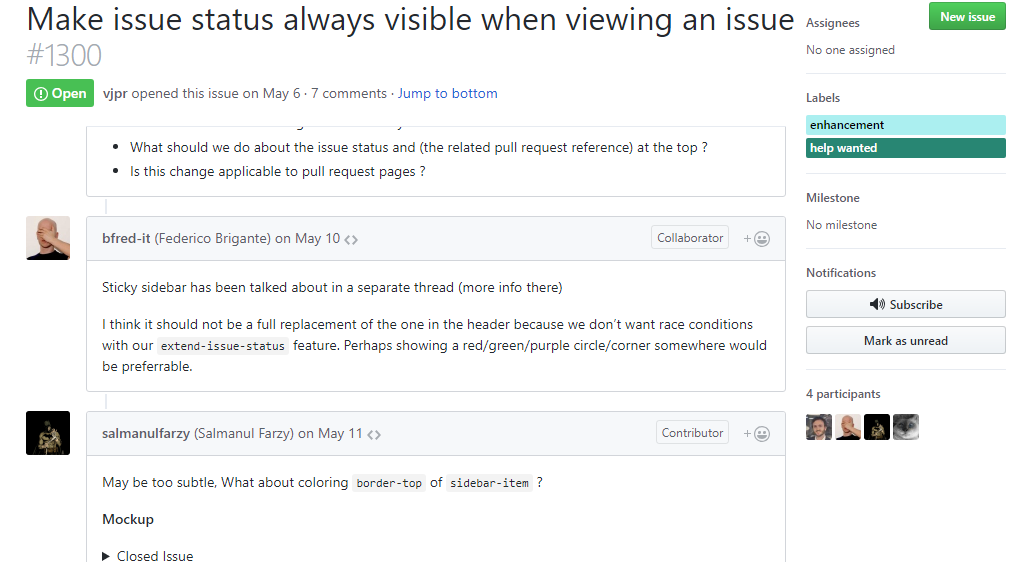
Note the "Make issue status always visible when viewing an issue" title and the "Open" indicator stick to the top as you scroll down 😄
 styfle
on 28 Jun 2018
styfle
on 28 Jun 2018
Well, look at this beauty by GitHub :)

It doesn't seem to be always enabled (they're probably a/b testing it)
fregante
on 13 Dec 2018
Well, look at this beauty by GitHub :)
[image]
Hehe, you got us 😉.
Just shipped!: https://blog.github.com/changelog/2019-01-04-sticky-coversation-headers/ 🚀
Thanks (as ever) to y'all for helping to inspire us with this one 💛
 lukehefson
on 4 Jan 2019
lukehefson
on 4 Jan 2019
Related issues
 mischah
·
3Comments
mischah
·
3Comments
 MilesBHuff
·
3Comments
MilesBHuff
·
3Comments
 sindresorhus
·
3Comments
sindresorhus
·
3Comments
 sompylasar
·
3Comments
sompylasar
·
3Comments
 Celthi
·
3Comments
Celthi
·
3Comments
Most helpful comment
Hehe, you got us 😉.
Just shipped!: https://blog.github.com/changelog/2019-01-04-sticky-coversation-headers/ 🚀
Thanks (as ever) to y'all for helping to inspire us with this one 💛