Redwood: `yarn rw setup tailwind` fails if packages already installed or if imports exist in `index.css`
Continued from https://github.com/redwoodjs/redwood/issues/1223
Note: --force option does not resolve the issue
Error output:
$ yarn rw setup tailwind
yarn run v1.22.4
$ C:\Users\tobbe\dev\redwood\rw20\node_modules\.bin\rw setup tailwind
  √ Installing packages...
  √ Configuring PostCSS...
  × Initializing Tailwind CSS...
    → info Visit https://yarnpkg.com/en/docs/cli/run for documentation about this command.
    Adding imports to index.css...
    One more thing...
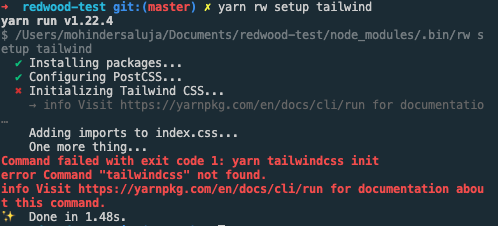
Command failed with exit code 1: yarn tailwindcss init
error Command "tailwindcss" not found.
info Visit https://yarnpkg.com/en/docs/cli/run for documentation about this command.
Done in 25.85s.
What's happening is that either:
- the installed packages are already present
...and/or... - the tailwind imports already exist in
index.css
Note: if either of the config files exist, the error output makes sense and states the issue accurately. But the error given above is confusing and inaccurate.
Way to reproduce:
- Successfully run yarn rw setup tailwind
- Remove the postcss config file rm web/config/postcss.config.js
- Remove the tailwind config file rm web/tailwind.config.js
- Run yarn rw setup tailwind again
From @Tobbe
Now it might seem like a strange/contrived thing to do to remove the config files. But say you're new, and screw something up with the config. You decide to delete the config files to try to start over again. It won't work.
So I think yarn rw setup tailwind should re-create any missing config files (it does for the postcss config file already).
And it could also have a --force option to recreate/override config files even if they already exist
How to improve
- In case of only packages already existing but no files or imports present, this command should work
- In case of imports already present, the command should fail but give accurate explanation
- Using
--forceshould allow the command to run regardless of what is present
 thedavidprice
All 26 comments
@thedavidprice , I want to work on this issue but not sure how to tackle this. Can you help me get started ?
 mohinderps
on 9 Oct 2020
mohinderps
on 9 Oct 2020
@mohinderps happy to help! There are a few nuances with this one that will affect your local development workflow.
Some tips to get started:
- If you haven't read it already, this Issue will help you orient. And lots of community support is available as well -- don't just rely on me or commenting in this Issue or PR, ask the community when/if needed!
- At the last meetup, I did a demo of local setup for framework package development. This video section might be of help as well.
- Lastly, there's one hiccup with the local dev workflow --> if you have the Framework repo and local test Project linked, _any_ command that invokes
yarn installwill break the "link". See this Issue for details.
- How I handle this is to separate the "install" step in the command, make sure it works, and then disable it (comment out) for working on the rest of the steps in the command. Make sense?
Setup
You'll want to reference these docs:
To Do
There are several issues colliding with this command. Here's the end goal we'd like to achieve:
- [ ] as a default, command should run successfully _in the case it's never been run before_
- [ ] _if_ the command has been run before, _or_ if the files/code already exists and running the command would be destructive, the command should refuse to run and output an error message to the affect "files exist... would overwrite existing code...". (Note: this can be handled at each individual step as needed)
- [ ] we provide a
--forceoption. In the case the files/codes exists, the user has the option to use--forceto run the command and overwrite files/config.
Current issues
- For some reason, if _no_ files exists _but_ the packages are already installed, the command fails with a strange, unhelpful error. You can duplicate this by running the command, reverts files and file changes, and then trying to run again. I do not know what's going on here. One possible workaround is to check if packages are already installed and then just _not_ re-install. Note: it's important the packages are pinned for compatibility, so this should be a part of the "check" if you implement this way.
- "do files/code already exist?" check isn't working correctly for each step. So this needs to be fixed.
--forceisn't working correctly for each step- The "adding imports to index.css" step will keep adding the same code to the file on additional runs, which creates redundancy and breaks things.
As a reference, @amorriscode just did a _major_ overhaul of the Auth generator to fix similar issues for an even more complicated case. So there are some good reference examples in this code:
https://github.com/redwoodjs/redwood/blob/main/packages/cli/src/commands/generate/auth/auth.js
All that said, would you like me to assign this to you? Here to help as you go if so!
thedavidprice
on 10 Oct 2020
Thank you @thedavidprice for helping me get started on this. Yes please, you can assign the issue to me.
mohinderps
on 11 Oct 2020
Great! Happy to help. And do keep me posted.
thedavidprice
on 11 Oct 2020
@thedavidprice, I am able to do the tailwind local setup for framework package development.
_Lastly, there's one hiccup with the local dev workflow --> if you have the Framework repo and local test Project linked, any command that invokes yarn install will break the "link". See this Issue for details.
How I handle this is to separate the "install" step in the command, make sure it works, and then disable it (comment out) for working on the rest of the steps in the command. Make sense?_
To handle this, I commented the yarn install command which install tailwindcss, autoprefixer and postcss-loader in the handler of commands/setup/tailwind/tailwind.js:
await execa('yarn', [
           'workspace',
           'web',
           'add',
           '-D',
           '[email protected]',
           'tailwindcss',
           '[email protected]',
         ])
Installed these packages in my test repo first and then started the copy:watch process and now everything seems to work fine. Link is maintained between the framework and my test repo. Also yarn rw setup tailwind executed successfully.
mohinderps
on 12 Oct 2020
@thedavidprice, I am unable to reproduce the issue though.
I followed the following steps:
- Successfully run yarn rw setup tailwind
- Remove the postcss config file rm web/config/postcss.config.js
- Remove the tailwind config file rm web/tailwind.config.js
- Run yarn rw setup tailwind again
After the step 4, I got a success message
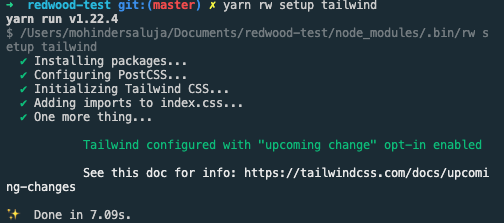
That's weird :D
mohinderps
on 12 Oct 2020
Oh okay, I am able to reproduce it now.
I had to delete the config files(postcss and talwind), yarn install -D postcss-loader tailwindcss autoprefixer, yarn rw copy:watch <redwood-framework-path>, yarn rw setup tailwind to reproduce it.
mohinderps
on 12 Oct 2020
@thedavidprice , I noticed something very strange going on right now which may be the root cause of this entire thing.
- Create a fresh redwood app:
yarn create redwood-app redwood-test. - Install tailwindcss:
yarn workspace web add -D tailwindcss. This adds tailwind in thenode_modulesfolder. - Repeat step 2 i.e. reinstall tailwindcss what
yarn rw setup tailwindcommand does internally.
Step 3 actually removes the tailwindcss from node_modules, which is really strange.
Now if we connect the dots here, whenever we rerun the yarn rw setup tailwind command, it tries to reinstall the tailwindcss package, which actually removes the tailwindcss package. Hence the setup command fails stating '_tailwindcss not found_'.
mohinderps
on 12 Oct 2020
Happy to see you're making progress here @mohinderps 🙂
What happens if you install tailwindcss twice in a non-redwood project?
What happens if you reinstall some other package (not tailwindcss)?
 Tobbe
on 12 Oct 2020
Tobbe
on 12 Oct 2020
@Tobbe , This is what I am upto right now. Following are my key observations.
I have come to the following conclusion after numerous attempts on a non-redwood but a yarn workspaces project.
- Install x does not add x.
- Reinstall x does not add x.
- Install y adds x but not y.
- Reinstall y still doesn't add y, but x remains in the node_modules.
- install z, adds y also, so we have both x and y, but z is not added.
I tried with x: tailwindcss, y: grommet and z: rebass interchangeably.
So it comes down to some issue with the installation of any new package to yarn workspace project.
FYI: This is not the case with a normal yarn project. Applies only to a yarn workspaces project.
mohinderps
on 12 Oct 2020
Okay another important point to consider.
So it comes down to some issue with the installation of any new package to yarn workspace project.
It holds true if the package is already defined in package.json. Otherwise it behaves normally.
So to say with an example:
- tailwindcss is not in package.json
- Add tailwindcss using yarn workspace add command, every thing will work fine.
- Now remove node_modules folder.
- Again add tailwindcss, it does not show up in node_modules.
- Now remove node_modules as well as remove tailwindcss from package.json file which was added a result of Step 2.
- Again add tailwindcss, everything works fine.
mohinderps
on 12 Oct 2020
Okay, the above does not hold for styled-components library :(. Still cannot come to a conclusion. Need to analyse more.
mohinderps
on 12 Oct 2020
@mohinderps Wow, some strange behavior indeed! Thank you for being persistent here. And thank you @Tobbe for jumping in to help as well.
- Now remove node_modules folder.
- Again add tailwindcss, it does not show up in node_modules.
^^ Ok, so definitely hints at what's happening in our case when the setup command is run _and_ tailwindcss already exists. Not exactly our case, but indeed Yarn Workspaces is being finicky.
Note: I don't think this is the case, but something else could be happening based on the directory from which we're running the yarn tailwindcss command.
Here's my recommendation for the next steps:
- After installing via setup command, maybe we need to run
yarn install --check-files. If that doesn't work, as an experiment tryyarn install --force. Both commands are more thorough and complete than the defaultyarn install. - Another way forward, which might be best, would be to first check if the packages are already installed in _either_ root or
web/package.json. If not, then install. If so, skip.
- note: it's still very important to pin the versions of '[email protected]' and '[email protected]' due to compatibility issues. Since those don't seem to be the issue, maybe it's only tailwindcss package that needs to be checked if already installed?
thedavidprice
on 12 Oct 2020
@thedavidprice @Tobbe I reached yarn discord channel seeking explanation for this strange behaviour.
This is what I got:
_yarn 1 had various bugs like that, you could try upgrading to yarn 2_
_Keep in mind that v2 by default does not use node_modules, so you need to be aware of that. However, you could switch to the node_modules linker though and probably get your project running straight away. See: https://yarnpkg.com/getting-started (and Migration)_
And somehow I am unable to oversee this issue :(. Anyways will look into what you suggested @thedavidprice. That makes sense.
Should I go ahead and check yarn v2 ?
mohinderps
on 12 Oct 2020
Sounds good!
Should I go ahead and check yarn v2 ?
^^ no, unfortunately. Yarn 2 is a beast and not supported much at all. For reference see:
thedavidprice
on 12 Oct 2020
After installing via setup command, maybe we need to run yarn install --check-files. If that doesn't work, as an experiment try yarn install --force. Both commands are more thorough and complete than the default yarn install
@thedavidprice yarn install --check-files is able to add tailwindcss and [email protected](which was installed as [email protected] due to reinstalling) back in the node_modules folder. Should I go ahead with this ?
Or should I check with the following?
Another way forward, which might be best, would be to first check if the packages are already installed in either root or web/ package.json. If not, then install. If so, skip.
Also, how does the user upgrade tailwincss ?
mohinderps
on 13 Oct 2020
yarn install --check-files is able to add tailwindcss and [email protected](which was installed as [email protected] due to reinstalling) back in the node_modules folder.
^^ To make sure I understand, you're first running the yarn add ...packages ... and then running yarn --checkfiles. And, in this case, if the packages already exist, things are working correctly. Yes?
Also, how does the user upgrade tailwindcss?
^^ Tailwind will install at the most recent version. And upgrading is the same for any installed packages in package.json — the developer will be manually managing package versions and upgrades. (Redwood does not manage 3rd party packages.) Does that make sense?
thedavidprice
on 13 Oct 2020
^^ To make sure I understand, you're first running the yarn add ...packages ... and then running yarn --checkfiles. And, in this case, if the packages already exist, things are working correctly. Yes?
Yes.
^^ Tailwind will install at the most recent version. And upgrading is the same for any installed packages in package.json — the developer will be manually managing package versions and upgrades. (Redwood does not manage 3rd party packages.) Does that make sense?
Makes Sense.
mohinderps
on 13 Oct 2020
Got it. I'd say go for it using yarn --check-files 🚀
thedavidprice
on 13 Oct 2020
Cool ! Will do that.
- For some reason, if no files exists but the packages are already installed, the command fails with a strange, unhelpful error. You can duplicate this by running the command, reverts files and file changes, and then trying to run again. I do not know what's going on here. One possible workaround is to check if packages are already installed and then just not re-install. Note: it's important the packages are pinned for compatibility, so this should be a part of the "check" if you implement this way.
- "do files/code already exist?" check isn't working correctly for each step. So this needs to be fixed.
- --force isn't working correctly for each step
- The "adding imports to index.css" step will keep adding the same code to the file on additional runs, which creates redundancy and breaks things.
This will fix Point 1. Will take on rest of the points as the next steps.
mohinderps
on 13 Oct 2020
@thedavidprice How would I be fixing 4 ?
As I can see in the code, the whole comment is one string.
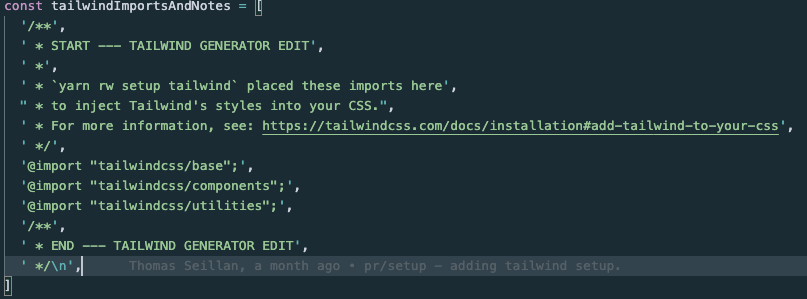
We should ideally check for each import here. This will require me to create variables for each import statement then create Listr tasks to check if the import is already present in the css file. If so, skip adding import to the file.
But then how do i handle the start comment and end comment? Should that too be done through variables like in the case of imports?
But obviously downside to this approach is that this implementation is prone to bugs. Any minor string modification by user can produce undesirable results.
Let me know what you think.
mohinderps
on 13 Oct 2020
Here are some ideas:
- do use auth.js for reference as there's similar steps/logic and perhaps an available helper that will be useful
- I don't think you need to be concerned about parsing the entire string; just approach this as "all or none"
- using regex, check if _all three_ imports already exist
- IF all three exist, skip step
- Else if, run the step (which will result in redundancy for edge cases, but it won't continue to add this code string on sequential runs)
I think there is also an option for checking the imports and, in the case there is one or two but not all three, you could output a message about that step failing and user needs to manually 1) remove existing or 2) add all three before trying again. But that might be more work than it's worth.
thedavidprice
on 13 Oct 2020
@thedavidprice, added a check for tailwindcss imports like you said.
Coming to the following:
"do files/code already exist?" check isn't working correctly for each step. So this needs to be fixed.
For Step 2: Configuring PostCSS
Right now, if postcss config does not exists, a new config is added. Now what happens if the config exists(currently we throw an error saying that config already exists), which can have various scenarios(different permutations of tailwindcss and autoprefixer) ?
How should we handle this ? And also how does --force act here ?
mohinderps
on 18 Oct 2020
Now what happens if the config exists(currently we throw an error saying that config already exists), which can have various scenarios(different permutations of tailwindcss and autoprefixer) ?
As for most of our generators that create files, the default behavior is either:
- in case of an existing file, refuse to overwrite and quit process (but mention the file can be completely overwritten using
--force) - in case of
--force, completely overwrite the file
This setup command is not intended to do more than this.
Make sense?
thedavidprice
on 22 Oct 2020
Yes, makes sense @thedavidprice. Thank you.
mohinderps
on 23 Oct 2020
@thedavidprice, created PR https://github.com/redwoodjs/redwood/pull/1407. This is just to show you the work. Feel free to suggest any kind of changes. Would be more than happy to work on them.
mohinderps
on 27 Oct 2020
Related issues
 Ameobea
·
3Comments
Ameobea
·
3Comments
 zwl1619
·
3Comments
zwl1619
·
3Comments
 wispyco
·
3Comments
wispyco
·
3Comments
 balaji-balu
·
3Comments
balaji-balu
·
3Comments
 jtoar
·
4Comments
jtoar
·
4Comments