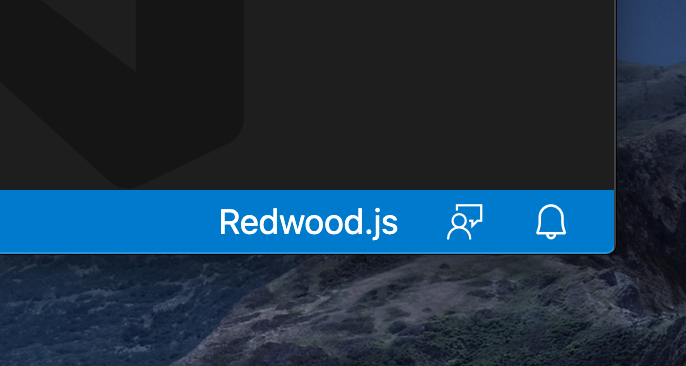
Redwood: Add Redwood.js version to VSCode's status bar
- Currently, the status bar only says "Redwood.js" when Redwood is detected
- It would be helpful it if also stated the detected version (ex: "Redwood.js 0.19.1"). Other languages do this (including TypeScript) and, at least personally, I rely on it constantly
 aldonline
All 4 comments
@thedavidprice
- I think this one should be tagged "vscode"
- From the user's POV, it is experienced as a VSCode issue
- Code-wise, this has to be fixed in my private repo
aldonline
on 2 Oct 2020
@thedavidprice you can file an issue to transform Redwood.js to "Redwood"
aldonline
on 2 Oct 2020
@aldonline Once upon a time we started down the route of the CLI watching for new versions and messaging the user accordingly. Turns out I didn't find a simple way to "check for more recent version" at the time. Might be a good next step after this feature is implemented.
Note: one important implementation detail is that there are often breaking changes or code mods required between minor versions (as you know well). So the priority UX became 1) alert user about a new version and 2) direct user to release notes URL VS. _make it super simple to upgrade_. We give upgrade instructions in Release Notes. In the future post v1, we'll want to just "make it simple to upgrade".
 thedavidprice
on 3 Oct 2020
thedavidprice
on 3 Oct 2020
Implemented in 0.0.12
@thedavidprice I also added an 'info' icon if there is a new version. you can click on the version to learn more

aldonline
on 4 Oct 2020
Related issues
 balaji-balu
·
3Comments
balaji-balu
·
3Comments
 cannikin
·
3Comments
thedavidprice
·
3Comments
cannikin
·
3Comments
thedavidprice
·
3Comments
 hemildesai
·
4Comments
hemildesai
·
4Comments
 freddydumont
·
3Comments
freddydumont
·
3Comments