Redwood: Errors from code splitting with Redwood Router (potentially)
Hi All, first of this is going to be a deep an obscure post, so bear with me!
Whats the problem?
We have bugsnag enabled on our RW site, and every now and then I see an error related to loading chunks. The bug is incredibly difficult to reproduce, but from looking at the logs, _it only happens when trying to navigate with redwood router_, and the chunks need to be loaded. A few examples:
Example 1: (chunk is definitely there on the server)
ChunkLoadError Loading chunk 7 failed.
(missing: https://www.tape.sh/static/js/7.e9f522d7.chunk.js)
Example 2:
SyntaxError Unexpected token '<'
    https://www.tape.sh/static/js/7.e9f522d7.chunk.js:1:1
 ```
Syntax error, really?

Example 3: (similar to above)
Error Network error: JSON Parse error: Unrecognized token '<'
    ../../node_modules/apollo-client/bundle.esm.js:63:32 ApolloError
```
Other info that may be relevant
- We are using cloudflare in front of netlify, but I disabled netlify's asset optimisation for JS because it does the weird thing of moving it into a different path on cloudfront. I want to let cloudflare handle all the caching
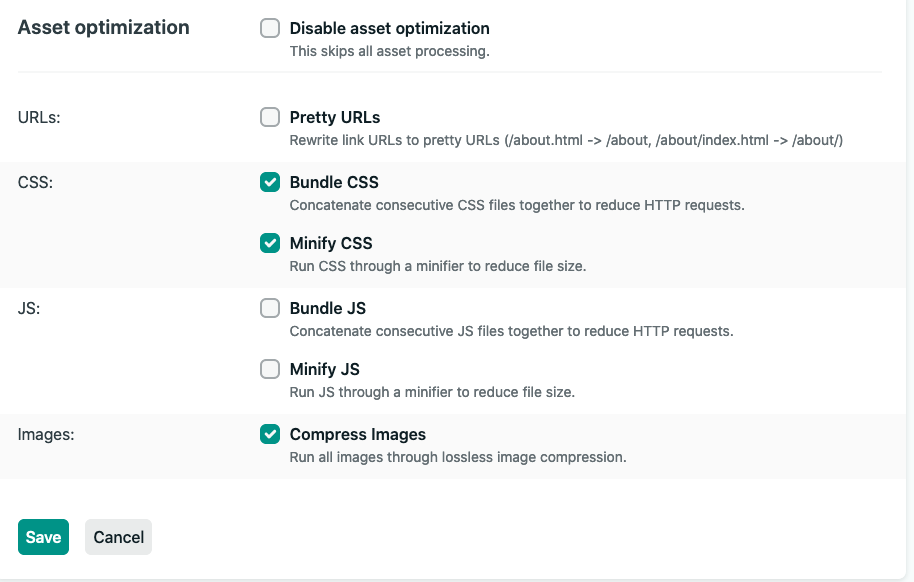
I'm not sure if its something that's happening between cloudflare and netlify, but right now leaning towards RR/Webpack doing something
The unexpected token
<error, I wonder if the server is returning html - but why would it do this and why would it happen so rarely?I'm going to try disabling the automatic code splitting on RR, and see if it makes a difference.
Redwood version: 0.12
 dac09
dac09
All 12 comments
I just mentioned in the Discord as well, but
Error Network error: JSON Parse error: Unrecognized token '<'
../../node_modules/apollo-client/bundle.esm.js:63:32 ApolloError
The unexpected token < error, I wonder if the server is returning html - but why would it do this and why would it happen so rarely?
That was my first instinct as well -- maybe from a 401, 404 or 500 or 502.
Saw a discussion here: https://github.com/apollographql/apollo-feature-requests/issues/153 that seems to say that Apollo doesn't handle http errors very well (or did not at the time).
Netlify can send 502's if the body of a function isn't JSON.stringified.
why would it happen so rarely
Total out there guess. Not sure what database you use, but can still see connection limit errors even with the Primsa connection_limit=1 setting. Not often but I have. Especially if it is a low limit database and I connect via other places (even db clients like Postico or TablePlus) or db is being used by other processes.
Curious - does the message coincide with some request when say a Cell makes a gql call and it is empty or error?
 dthyresson
on 26 Jul 2020
dthyresson
on 26 Jul 2020
Update: Are you able to tell what devices are causing these errors? My gut feeling is that these are browsers that are unsupported by your browsers lists configuration.
 peterp
on 26 Jul 2020
peterp
on 26 Jul 2020
Curious - does the message coincide with some request when say a Cell makes a gql call and it is empty or error?
No I don't believe so. But the apollo error may be a different issue, hard to tell!
This seems to be the common flow where it happens. In the app, it looks like users are going from Dashboard to Profile (which is where RR navigate is being called)
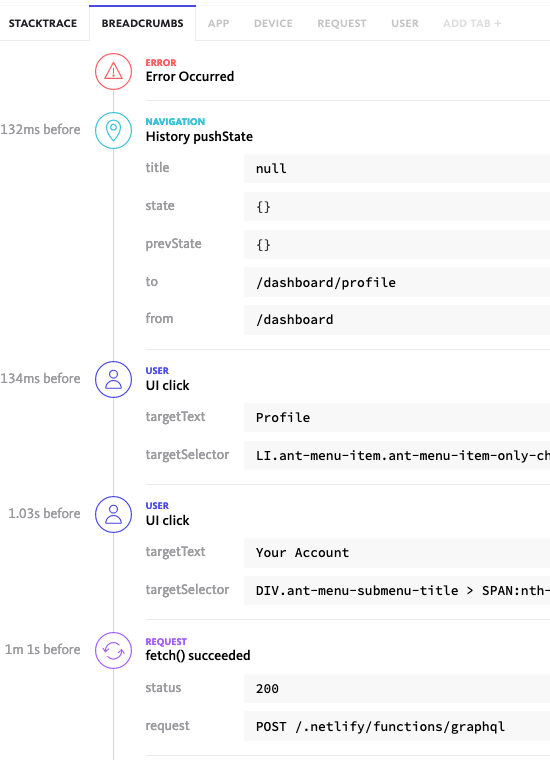
Are you able to tell what devices are causing these errors?
- Chrome 83.0.4103
- Chrome 84.0.4147
- Firefox 78.0.0
and I managed to reproduce once (and only once!) on firefox 78.0.0 (stable)
dac09
on 27 Jul 2020
Maybe we should prefetch these chunked modules? https://webpack.js.org/guides/code-splitting/#prefetchingpreloading-modules
I think this is likely a failure to fetch the chunk (for some reason)
peterp
on 27 Jul 2020
OOO, update. Found one instance of the graphql error (not the navigation one) where it receives a 522, then throws the JSON parse error. Let's take the apollo one separately, I think it's a different issue - but you can imagine that if the server throws a 400 or 522 when it tries to load chunks, its the same issue.
I'm actually worried Netlify (or less likely my Cloudflare settings, which is just pass thru) is doing something funky now!
dac09
on 27 Jul 2020
Maybe we should prefetch these chunked modules?
I think this would be a nice feature to have anyway, right? Worth a shot :)
dac09
on 27 Jul 2020
it receives a 522
Might be worth checking out:
Saw this note on Netlify Community about 522s + Netlify + Cloudflare: https://community.netlify.com/t/522-error-connection-timed-out/8138 ...
522 is usually reported via Cloudflare, and if you are seeing it from Cloudflare, the only way you’d get it on a Netlify site is if that site were misconfigured as described in
dthyresson
on 27 Jul 2020
@dthyresson - thank you, this is extremely helpful. I'll look at trying this out in our staging env today.
dac09
on 27 Jul 2020
A little update @dthyresson, just followed the guide you shared, and managed to configure netlify properly - fingers crossed now, will keep an eye out for the errors over the next week or so.
For anyone else trying this and worrying about bringing prod down, the key is in the timing!
- Disable cloudflare proxying in your dashboard (edit the entry and click the orange icon... weird, I know)
- Wait 5 mins
- Trigger renewal/provision of certificate on netlify (assuming you already have the domain configured)
- If its successful, in another 5-10 mins, the certificate will switch over seamlessly (you know this by inspecting the certificate and seeing its issued/verified by Let's Encrypt instead of Cloudflare)
Thanks DNS recursive caching for allowing zero downtime 🎉
dac09
on 27 Jul 2020
Hi both, just a quick update. Looks like the error doesn't seem to be happening very much anymore after the cloudflare/netlify change - but that doesn't mean it's not there, I've seen it happening on staging! As discussed with peter, this is important because we get the white screen of death on chunk load failure
I'll be working on the PR to help mitigate, this week
dac09
on 3 Aug 2020
Closing this issue as #929 will prevent the white screen of death now! Going to add some more functionality to this later
dac09
on 5 Aug 2020
Death to the white screen of death!
peterp
on 5 Aug 2020
Related issues
 jeliasson
·
3Comments
jeliasson
·
3Comments
 freddydumont
·
3Comments
freddydumont
·
3Comments
 thedavidprice
·
3Comments
thedavidprice
·
3Comments
 Ameobea
·
3Comments
Ameobea
·
3Comments
 josteph
·
3Comments
josteph
·
3Comments