Redwood: Implement Role-based Authorization
Design and Implementation Goals
Role-baed authorization aims to extend the current design pattern defined in useAuth and routes and AuthContextInterface to enforce a check to see if the currentUser belongs to a role that is permitted access to a route, page, api side function, etc.
Note: role-base authorization is different that permissions or plans -- two other potential mechanisms of limiting or granting access. Permissions define if you can perform operation, or have the "ability", for example: an admin and superuser may be able to edit a user, but only a superuser can delete.
Plans, like 'trial' may be time limited and an auth check here may have to take that into account.
Current Authentication
The AuthContextInterface of each supported AuthClient (auth0, netlify, firebase, magiclink, custom, etc) provides a way to login, logout, fetch the currentUser, and check if that user isAuthenticated.
If the currentUser isAuthenticated, then access is allowed to Private routes on the web side; this check is provided by useAuth which exposes the AuthContext (ie, the functions defined in the AuthContextInterface) to see if isAuthenticated.
Thus, on the web side, routes are defined as:
<Router>
  <Route path="/" page={HomePage} name="home" />
  <Route path="/sorry" page={SorryPage} name="sorry" />
  <Private unauthenticated="sorry">
    <Route path="/secret" page={SecretPage} name="secret" />
  </Private>
  <Route notfound page={NotFoundPage} />
</Router>
and in pages, components, layouts, etc:
const { currentUser, isAuthenticated } = useAuth()

...

{isAuthenticated && currentUser && (
  <Box>
    <Image src={currentUser.picture} />
    <Text>{currentUser.email}</Text>
  </Box>
)}
can check authentication.
On the api side, requireAuth can be used to check if the the user is permitted to continue an api task.
import { requireAuth } from 'src/lib/auth.js'

export const getWeather = async ({ zip }) => {
  requireAuth()

 // fetch weather
}
JWT Assumption
For this implementation, assume that the roles are set on the JWT and each auth client implementation determines where they are, perhaps: 1) root 2) in app_metadata 3) in user_metadata.
It sill be the job of the AuthClient implementation on the api side to extract and set roles on the currentUser.
Note: might be a good idea when setting the roles to not only verify the token but also check that the currentUser's sub (aka id) is the same.
{
  "iss": "https://example.com/",
  "sub": "mysecretuserid",
  "aud": "sOMEcLIENTId",
  "iat": 1594200625,
  "exp": 1594236625,
  "roles": ['admin']
}
Note: typically, roles would not be stored at the same level in the JWT as these claims, but rather separately in app_metadata.
  app_metadata: {
    authorization: {
      roles: ['admin']
    }
  }
Proposed Changes
Routes
<Router>
  <Route path="/" page={HomePage} name="home" />
  <Route path="/noaccess" page={NoAccessPage} name="sorry" />
  <Route path="/sorry" page={SorryPage} name="sorry" />
  <Private unauthenticated="sorry">
    <Route path="/secret" page={SecretPage} name="secret" />
  </Private>
  <Private forbidden="noaccess" isRole="member">
    <Route path="/membersonly" page={MembersOnlyPage} name="membersonly" />
  </Private>
  <Private forbidden="noaccess" isRole="['admin', 'superuser']">
    <Route path="/admin" page={AdminPage} name="admin" />
  </Private>
  <Route notfound page={NotFoundPage} />
</Router>
- Adds
hasRolethat takes either a String or array of String to define the permitted role(s) allowed access to route - Adds
forbiddento define the route to redirect to if user lacks the role. Term "forbidden" taken from a 403 http status error naming. - Support
hasRoletoPrivatePageLoaderto check for permitted role access
Question:
isRolevshasRole(note: decided on hasRole)- probably just keep
unauthenticatedand not add "forbidden" on Private route for simplicity of implementation and consistency. Or! we changeunauthenticatedtoforbiddenwhich is easier to type ;)
AuthProvider
To AuthContextInterface, add hasRole to check if the currentUser belongs the the requested role. Thus useAuth will expose hasRole on the web side.
      <AuthContext.Provider
        value={{
          ...this.state,
          logIn: this.logIn,
          logOut: this.logOut,
          getToken: this.rwClient.getToken,
          getCurrentUser: this.getCurrentUser,
          hasRole: this.hasRole,
          reauthenticate: this.reauthenticate,
          client,
          type,
        }}
      >
        {children}
      </AuthContext.Provider>
  hasRole = async (role: string | Array<string>) => {
    let currentUser = null
    if (isAuthenticated) {
      currentUser = await this.getCurrentUser()
    }
    const result = // do some check on currentUser to see if has role
    return result
  }
Note: the check should also check if authenticated as well, not just check roles.
API side
Each AuthClient (aka provider) implements its requireAuth, such as:
export const requireAuth = () => {
  if (!context.currentUser) {
    throw new AuthenticationError("You don't have permission to do that.")
  }
}
Can extend requireAuth to consider a role check as well by passing in a string or array of string to define permitted roles; then check the currentUser is both authenticated and belongs to the role.
Note: when requireAuth used in a function, may want to try/catch are return a HTTP status of 403 Forbidden
Auth Client-specific Info
Auth0
- Auth0 will have to have a Rule setup to set the role to the root of JWT
function (user, context, callback) {
  getRoles(user.user_id, (err, roles) => {
    if (err) return callback(err);

    context.idToken['https://example.com/roles'] = roles;

    return callback(null, user, context);
  });
}
Netlify / GoTrue
Confusing: role vs app_metadata roles?
{
  "data": {
    "id": "example-id",
    "aud": "",
    "role": "",
    "email": "[email protected]",
    "confirmed_at": "2018-05-09T06:52:58Z",
    "app_metadata": {
      "provider": "email",
      "roles": [
        "superstar"
      ]
    },
    "user_metadata": {},
    "created_at": "2018-05-09T06:52:58Z",
    "updated_at": "2018-05-11T00:26:27.668465915Z"
  }
}
MagicLink
Are roles in a user's metadata?
see: https://docs.magic.link/admin-sdk/node-js/sdk/users-module/getmetadatabytoken
Firebase
See: https://firebase.google.com/docs/reference/admin/node/admin.auth.UserRecord
`The user's custom claims object if available, typically used to define user roles and propagated to an authenticated user's ID token.```
Thus, the firebase.auth.js auth template may also need to provide those custom claims:
export const getCurrentUser = async (decoded, { token, authType }) => {
  const { email, uid } = await adminApp.auth().verifyIdToken(token)
  return { email, uid }
}
But uncertain if https://firebase.google.com/docs/reference/admin/node/admin.auth.DecodedIdToken has those customClaims.
This may work (see: https://firebase.google.com/docs/auth/admin/custom-claims):
// Verify the ID token first.
admin.auth().verifyIdToken(idToken).then((claims) => {
  if (claims.admin === true) {
    // Allow access to requested admin resource.
  }
});
or may need to fetch the user itself and check:
// Lookup the user associated with the specified uid.
admin.auth().getUser(uid).then((userRecord) => {
  // The claims can be accessed on the user record.
  console.log(userRecord.customClaims['admin']);
});
Considerations
- Always define role strings in env
- Going to view https://reactsecurity.io/advanced-react-security-patterns to see how role checks are implemented
 dthyresson
All 23 comments
This looks great!
You mentioned that we "assume that the roles are set on the JWT", and whilst we can use those roles, I don't think we should need them to be required, since a user might define roles in their own database, we should require that the user returns a "roles" key via the api side's getCurrentUser function.
Questions
- I really like the
forbiddenroute onPrivate, and I think it makes sense since a user might be super confused if they're constantly redirected to a login page if they're already authenticated. - I like
isRole.
 peterp
on 8 Jul 2020
peterp
on 8 Jul 2020
Question:
- isRole vs hasRole
- probably just keep unauthenticated and not add "forbidden" on Private route for simplicity of implementation and consistency. Or! we change unauthenticated to forbidden which is easier to type ;)
I prefer hasRole. is* would work if we had isAdmin or isSuperuser, but you have a role, so hasRole makes more sense to me.
I think we should have both unauthenticated and forbidden as they're used for different things (not logged in vs not the required role)
 Tobbe
on 8 Jul 2020
Tobbe
on 8 Jul 2020
After a ☕ , and reading @peterp's comment:
we should require that the user returns a "roles" key via the api side's getCurrentUser function
I'm rethinking the JWT assumption.
It doesn't matter if the AuthClient's api auth implementation puts them on the root or on app_metadata (or maybe even user_metadata); that's its job to extract.
If currentUser has a key of roles, the auth implementation simply assigns the roles to that key.
If so, then I'll update that "assumption".
dthyresson
on 8 Jul 2020
@Tobbe
I prefer hasRole. is* would work if we had isAdmin or isSuperuser, but you have a role, so hasRole makes more sense to me.
hasRole feels right to me as well.
And I think that's what GoTrue uses, too:
https://godoc.org/github.com/netlify/gotrue/models#User.HasRole
func (*User) HasRole
func (u *User) HasRole(roleName string) bool
HasRole returns true when the users role is set to roleName
The more I dig into Netlify and GoTrue, it appears roles are on app_metadata.
This is maybe not the best example of using GoTrue or Identity, but it demonstrates Netlify's role condition redirects:
https://github.com/futuregerald/netlify-auth-example/blob/master/functions/auth.js
const userData = {
  id: uuid(),
  exp: Math.floor(Date.now() / 1000) + (60 * 60),
  app_metadata: {
    authorization: {
      roles: ['admin'],
    },
  },
};

app.get('/.netlify/functions/auth/anon', (_, res) => {
  return res
    .cookie('nf_jwt', sign(userData, process.env.JWT_SECRET))
    .redirect('/');
});
and then the toml enforces on a redirect:
[[redirects]]
  from = "/*"
  to = "/index.html"
  status = 200
  conditions = {Role = ["*"]}
So, Gerald seems to show here that Netlify will be looking into the app_metadataand inside and authorization key as part of its redirects, so imagine its identity product will set them there.
dthyresson
on 8 Jul 2020
Ok, let's go with hasRole, could we make it the same in useAuth: const { hasRole } = useAuth()?
peterp
on 8 Jul 2020
Ok, let's go with
hasRole, could we make it the same inuseAuth:const { hasRole } = useAuth()?
Updated main issue to reflect hasRole decision.
dthyresson
on 8 Jul 2020
Ok, so I think a decent plan of completion could be the following:
useAuth hooks (1st PR)
- [ ] add
hasRoleto theuseAuthcontext. - [ ] add a test for
hasRole - [ ] Update docs
Router (2nd PR)
- [ ] Add
hasRoleto thePrivate Route - [ ] Add forbidden prop.
- [ ] Update docs
- [ ] Update types
peterp
on 8 Jul 2020
Hello everyone!
I have successfully used graphql-shield in Redwood and I would really like to have this baked in Redwood.
To give you an example:
in the graphql sdl export an object to define the permissions too:
export const permissions = {
  Query: {
    users: isAdmin, // isAdmin returns a boolean by checking the authenticated user roles
  },
  Mutation: {},
};
new file lib/permissions.js:
import _merge from "lodash.merge";
import { deny, shield } from "graphql-shield";
import importAll from "@redwoodjs/api/importAll.macro";

const schemas = importAll("api", "graphql");

let allPermissions = {
  Query: {
    "*": deny,
  },
  Mutation: {
    "*": deny,
  },
};

Object.entries(schemas).forEach(([_, value]) => {
  if (value.permissions) {
    _merge(allPermissions, value.permissions);
  }
});

export const permissions = shield(allPermissions, {
  fallbackError: (thrownThing, parent, args, context, info) => {
    console.log(thrownThing);
    console.log(args);
    throw new Error("Not authorized!");
  },
});
in functions/graphql.js:
import { applyMiddleware } from "graphql-middleware";
import { permissions } from "src/lib/permissions";

const schema = makeMergedSchema({
  schemas,
  services: makeServices({ services }),
});

export const handler = createGraphQLHandler({
  schema: applyMiddleware(schema, permissions),
  db,
});
That's it!
I think that this is perfect with the role-based authorization suggested here.
Would you like to have this in Redwood?
 liberatiluca
on 9 Jul 2020
liberatiluca
on 9 Jul 2020
@liberatiluca This does seem to fit role-based authorization -- at the enforcement side.
Seems to me that there are several places where "halting" or "obscuring" info or "conditionally" performing a task can be done if the user has/lacks the role:
Web side
- Protect a Private route
- In a component, layout, or page present info to the user if he/she hasRole or not
Api Side
- in requireAuth, raise an exception halting access to a w/in a function or service
- do something conditionally based on role access
And this PR provides the plumbing for that ... but you bring up performing a check w/ graphql itself.
So one could perhaps do in a service
export const users = () => {
  requireAuth() // with something has says hasRole=admin
  return db.user.findMany()
}

export const user = ({ id }) => {
  requireAuth() // with something has says hasRole=admin
  return db.user.findOne({
    where: { id },
  })
}
by defining
export const permissions = {
  Query: {
    users: isAdmin, // isAdmin returns a boolean by checking the authenticated user roles
  },
  Mutation: {},
};
that would enforce? I guess maybe it wouldn't even touch the service so the requireAuths would not be need ... unless you called a service from say a function or something else. I think I would want both ... to protect the service/function independently. Hm. and now I have to keep those rules in sync in two+ places.
Also: See
- https://v1.prisma.io/tutorials/best-practices-for-permissions-in-graphql-servers-ct07
- and Apollo discusses using
graphql-shieldhere: https://www.apollographql.com/blog/setting-up-authentication-and-authorization-with-apollo-federation/
... another option is to abstract authorization into a separate layer and add it to the schema as middleware, allowing us to check permissions before a resolver function is invoked. This is the approach we’ll choose and we’ll implement it using a library called GraphQL Shield.
Maybe something along this is PR3 or 4 @peterp ... enforcing role access at the service/function/gql level?
dthyresson
on 10 Jul 2020
@chris-hailstorm looping you in if interested/available. Peter and I looked back through your initial docs as well.
 thedavidprice
on 10 Jul 2020
thedavidprice
on 10 Jul 2020
@peterp I'm starting to implement hasRole in https://github.com/dthyresson/redwood/tree/dt-add-has-role-to-auth.
Because the role data is stored differently for different AuthProviders, I am considering having the decoder not just decode token, but also extract the roles from the decoded token. For example, the role data might be:
  app_metadata: {
    authorization: {
      roles: ['admin'],
    },
  },
or
  app_metadata: {
      roles: ['admin'],
  },
or
role: ['admin'],
depending on where stored on the JWT.
Given that we decode ...
export const decodeToken = async (
  type: SupportedAuthTypes,
  token: string,
  req: {
    event: APIGatewayProxyEvent
    context: GlobalContext & LambdaContext
  }
): Promise<null | string | object> => {
  if (!typesToDecoders[type]) {
    throw new Error(
      `The auth type "${type}" is not supported, we currently support: ${Object.keys(
        typesToDecoders
      ).join(', ')}`
    )
  }
  const decoder = typesToDecoders[type]
  return decoder(token, req)
}
So, the auth0 decoder would
export const auth0 = async (token: string): Promise<null | object> => {
   const roles = // extract out roles from app_metadata
  return verifyAuth0Token(token), {roles}
}
That way an app's auth.js could perhaps
const requireAccessToken = (decoded, { type, token }) => {
  if (token || type === 'auth0' || decoded?.sub) {
    return
  } else {
    throw new Error('Invalid token')
  }
}

export const getCurrentUser = async (decoded, { type, token }) => {
  try {
    requireAccessToken(decoded, { type, token })
    return await userByUserId(decoded.sub)
  } catch (error) {
    return decoded
  }
}
might have access to
async (decoded, { type, token, roles })
and also an app's
// Use this function in your services to check that a user belongs to role and
// optionally raise an error if they're not.

export const hasRole = async (role, decoded, { type, token, roles })) => {
  if (!context.currentUser) {
    throw new AuthenticationError("You don't have permission to do that.")
  }
 // check if role in roles[]
}
Becasue I think but not sure that graphql might need to have hasRole?
Or ...
getCurrentUser would always add a .roles() or .roles[] on the User based on the decode token role info?
That way I imagine people could persist the role info if need be -- but "roles" would always be an attribute of curentUser just with (null, [], [string]).
Then
export const hasRole = (role) => {
  if (!context.currentUser) {
    throw new AuthenticationError("You don't have permission to do that.")
  }
 // check if role in context.currentUser.roles[]
}
I think the latter approach (ie, context.currentUser.roles[]) is simpler.
But still the roles list should likely be extracted by the AuthProvider decoder, I think.
Last - I cannot tell if Magic link supports RBAC. I imagine then its decoder (which we don't have b/c its already decoded) or roles would just be null and currentUser roles would be null, too.
dthyresson
on 30 Jul 2020
Chatted with @peterp and @dac09 and we decided that:
- Setting the collection of
roleswould be done as part of thegetCurrentUser
currentUser.roles = someFunctionToGetTolesFrom(decoded)
This way a developer is responsible for knowing how the roles are defined in the JWT or other method based on their provider.
- We'll add comments to the auth generator to suggest how to set the roles, similar to the way it suggests for the the get user from the database.
We'll have
- hasRole(role)
but also consider adding an optional role to
export const requireAuth = (_role) => {
  if (!context.currentUser || !hasRole(_role)) {
    throw new AuthenticationError("You don't have permission to do that.")
  }
because very often in a function or service you'll check role but also check auth. Or vice versa. Or we could add requireAuth when checking hasRole().
That might be better.
export const hasRole = (role) => {
  requireAuth()
  return context.currentUser.roles.includes(role))
I just want to avoid in a function or service having to do
requireAuth()
hasRole('edit:post`)
Though maybe context.currentUser?.roles?.includes(role)) might work too.
dthyresson
on 31 Jul 2020
Some comments with setting roles in app_metadata with Auth0 ...
- You can create and manage roles within Auth0

- You can assign roles to users there as well
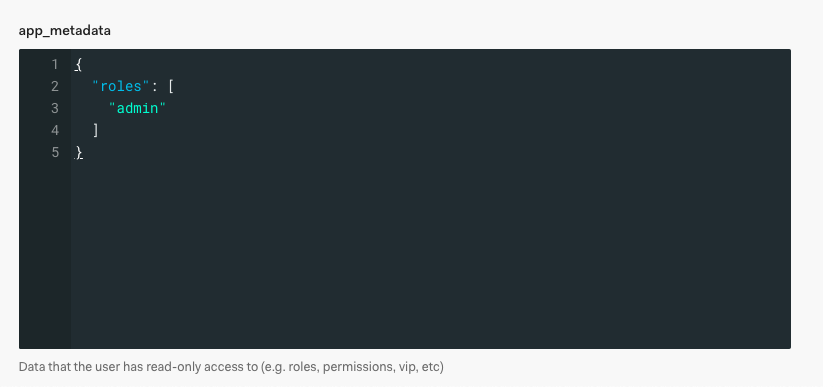
- In order to set the roles and app_metadata to the JWT, you must create a Rule and the app_metadata must be namespaced.
function (user, context, callback) {
  var namespace = 'https://example.com/';

  context.idToken[namespace + 'app_metadata'] = {};
  context.idToken[namespace + 'app_metadata'].authorization = {
    groups: user.app_metadata.groups,
    roles: user.app_metadata.roles,
    permissions: user.app_metadata.permissions
  };

  context.idToken[namespace + 'user_metadata'] = {};

  return callback(null, user, context);
}
- Your decoded token will then include
"https://example.com/app_metadata": {
  "authorization": {
    "roles": [
      "admin"
    ]
  }
},
"https://example.com/user_metadata": {},
"nickname": "someone",
"name": "[email protected]",
"picture": "https://s.gravatar.com/avatar/photo.png",
"updated_at": "2020-08-03T17:21:08.030Z",
"email": "[email protected]",
"email_verified": true,
"iss": "https://app.us.auth0.com/",
"sub": "email|XXXXXXXX",
"aud": "XXXXXXXX",
"iat": 1596475268,
"exp": 1596511268,
"nonce": "XXXXXXXXXXXX=="
Therefore, given that the roles data is definitely going to be stored differently not only between providers, but even between apps/tenants, it really seems that it is best that the fetching of roles and assigning to currentUser be done in the app's auth.
dthyresson
on 3 Aug 2020
Correction.
In order for the app and user_metadata to be on the decoded token in Auth0, the rule must set this to the accessToken not idToken.
This means the rule is:
function (user, context, callback) {
  var namespace = 'https://example.com/';

  // idToken
  context.idToken[namespace + 'app_metadata'] = {};
  context.idToken[namespace + 'app_metadata'].authorization = {
    groups: user.app_metadata.groups,
    roles: user.app_metadata.roles,
    permissions: user.app_metadata.permissions
  };

  context.idToken[namespace + 'user_metadata'] = {};

  // accessToken
  context.accessToken[namespace + 'app_metadata'] = {};
  context.accessToken[namespace + 'app_metadata'].authorization = {
    groups: user.app_metadata.groups,
    roles: user.app_metadata.roles,
    permissions: user.app_metadata.permissions
  };

  context.accessToken[namespace + 'user_metadata'] = {};

  return callback(null, user, context);
}
api | POST /graphql 200 422.506 ms - 518
api | {
api |   'https://example.com/app_metadata': { authorization: { roles: [Array] } },
api |   'https://example.com/user_metadata': {},
api |   iss: 'https://app.us.auth0.com/',
api |   sub: 'email|1234',
api |   aud: [
api |     'https://example.com',
api |     'https://app.us.auth0.com/userinfo'
api |   ],
api |   iat: 1596481520,
api |   exp: 1596567920,
api |   azp: '1l0w6JXXXXL880T',
api |   scope: 'openid profile email'
api | }
So - more learnings and findings about roles and Auth0.
Remember this rule mentioned above?
unction (user, context, callback) {
  var namespace = 'https://example.com/';

  // idToken
  context.idToken[namespace + 'app_metadata'] = {};
  context.idToken[namespace + 'app_metadata'].authorization = {
    groups: user.app_metadata.groups,
    roles: user.app_metadata.roles,
    permissions: user.app_metadata.permissions
  };

  context.idToken[namespace + 'user_metadata'] = {};

  // accessToken
  context.accessToken[namespace + 'app_metadata'] = {};
  context.accessToken[namespace + 'app_metadata'].authorization = {
    groups: user.app_metadata.groups,
    roles: user.app_metadata.roles,
    permissions: user.app_metadata.permissions
  };

  context.accessToken[namespace + 'user_metadata'] = {};

  return callback(null, user, context);
}
Turns out that
- if you store the in
idTokenthen are accessible via auth0's getUser akauserMetadata
// packages/auth/src/AuthProvider.tsx
const userMetadata = await this.rwClient.getUserMetadata()
// packages/auth/src/authClients/auth0.ts
    getUserMetadata: async () => {
      const user = await client.getUser()
      return user || null
    },
- if you store the in
accessTokenthen are accessible via in the decoded token
@peterp Can you explain how userMetadata and currentUser are intended to be different?
Should role checks still be done on currentUser? (I think so).
FYI - I have the hasRoleworking, but am just learning how to write tests and it was the test mocks in packages/auth/src/__tests__/AuthProvider.test.tsx that got me wondering about userMetadata:
  // Replace "getUserMetadata" with actual data, and login!
  mockAuthClient.getUserMetadata = jest.fn(async () => {
    return {
      sub: 'abcdefg|123456',
      username: 'peterp',
    }
  })
because that's what was being mocked, but it isn't really currentUser here.
I figure I should mock getCurrentUser and return data that includes a collection of roles.
dthyresson
on 4 Aug 2020
@peterp When adding hasRole to the private route, do you think there should be an option to define a forbidden or not_permitted page (similar to the unauthenticated) to route when the user is authenticated, but not allowed? Or simply re-use the unauthenticated page for now?
Private.propTypes = {
  /**
   * The page name where a user will be redirected when not authenticated.
   */
  unauthenticated: PropTypes.string.isRequired,
}
Edit: Well after implementing and using hasRole on a Private route, I like the simplicity of just authenticated.
I created a ForbiddenPage and use tha:
      <Private unauthenticated="forbidden" role="admin">
        <Route path="/settings" page={SettingsPage} name="settings" />
        <Route path="/sites" page={SitesPage} name="sites" />
      </Private>

      <Route notfound page={NotFoundPage} />
      <Route path="/forbidden" page={ForbiddenPage} name="forbidden" />
@dthyresson Sorry, I only saw this now. I like the option of been able to say "you are authenticated, but you lack the rights to access this page."
My concern is also that someone might redirect you away from the unauthenticated page if you are authenticated; which could lead to some crazy redirect loops.
Maybe we can add a search flag to the redirect; ?forbidden=true and a person could figure it out from there?
peterp
on 5 Aug 2020
I like the option of been able to say "you are authenticated, but you lack the rights to access this page."
No problem @peterp.
Just to clarify, does that mean you would like a:
- dedicated
Forbiddenpage likenotfound
or
- reuse
unauthenticatedand send to any page, like a customForbiddenPage
or
- add
forbiddenprop that acts likeunauthenticatedbuts sends to its specified page ifhasRole(role) == false
FYI - I have a working implementation in https://github.com/dthyresson/redwood/tree/dt-add-has-role-to-auth
I am working on some docs for Auth0 specifics and will do a PR today.
I've been having some issues with writing tests, though. So, they may fail in the PR.
dthyresson
on 5 Aug 2020
I have a working implementation
Amazing!
Just to clarify...
reuse unauthenticated and send to any page, like a custom ForbiddenPage
I like this, but maybe we could add /link-to-unauthenticated-page?reason=forbidden or ?reason=incorrectRole
peterp
on 5 Aug 2020
Does that make sense or seem a bit gross?
peterp
on 5 Aug 2020
@peterp I just wrote up docs and actually got the Private route tests working so I am going to add a PR that way we can track these changes there.
Not sure if gross or not ... I think I will have to implement.
Part of me doesn't want to tell people why the cannot do something (hacking) and if I have a custom Forbidden page per Private routes, I can customize my message there as needed.
Like, "You need to be an admin".
dthyresson
on 5 Aug 2020
Moving discussion to PR https://github.com/redwoodjs/redwood/pull/939
dthyresson
on 5 Aug 2020
Related issues
thedavidprice
·
3Comments
 wispyco
·
3Comments
wispyco
·
3Comments
 hemildesai
·
4Comments
hemildesai
·
4Comments
 slavakurilyak
·
4Comments
slavakurilyak
·
4Comments
 josteph
·
3Comments
josteph
·
3Comments