Redwood: Following tutorial and getting "ReferenceError: AboutPage is not defined"
All 15 comments
OK so I tried to go back a step to when the tutorial asked to make the first commit to a repo here.
Here's my repo and when I clone it and run yarn I can bring up the initial state of the redwood app. However there are errors after running yarn and then yarn redwood dev:
yarn run v1.22.4
$ /home/davidrhoderick/Development/redwoodjs-tutorial/redwoodblog/node_modules/.bin/redwood dev
$ /home/davidrhoderick/Development/redwoodjs-tutorial/redwoodblog/node_modules/.bin/dev-server
$ /home/davidrhoderick/Development/redwoodjs-tutorial/redwoodblog/node_modules/.bin/prisma generate --watch
$ /home/davidrhoderick/Development/redwoodjs-tutorial/redwoodblog/node_modules/.bin/webpack-dev-server --config ../node_modules/@redwoodjs/core/config/webpack.development.js
13:57:06 api | Running at 'http://localhost:8911'
13:57:06 api | Watching files in '/home/davidrhoderick/Development/redwoodjs-tutorial/redwoodblog/api/src/functions'
13:57:07 web | ℹ 「wds」: Project is running at http://localhost:8910/
13:57:07 web | ℹ 「wds」: webpack output is served from /
13:57:07 web | ℹ 「wds」: Content not from webpack is served from /home/davidrhoderick/Development/redwoodjs-tutorial/redwoodblog/web
13:57:07 web | ℹ 「wds」: 404s will fallback to /index.html
13:57:07 api | /home/davidrhoderick/Development/redwoodjs-tutorial/redwoodblog/node_modules/.prisma/client/index.js:3
13:57:07 api |     throw new Error(
13:57:07 api |     ^
13:57:07 api |
13:57:07 api | Error: @prisma/client did not initialize yet. Please run "prisma generate" and try to import it again.
13:57:07 api | In case this error is unexpected for you, please report it in https://github.com/prisma/prisma-client-js/issues/390.
13:57:07 api |     at new PrismaClient (/home/davidrhoderick/Development/redwoodjs-tutorial/redwoodblog/node_modules/.prisma/client/index.js:3:11)
13:57:07 api |     at Object.<anonymous> (/home/davidrhoderick/Development/redwoodjs-tutorial/redwoodblog/api/src/lib/db.js:6:19)
13:57:07 api |     at Module._compile (internal/modules/cjs/loader.js:1158:30)
13:57:07 api |     at Module._compile (/home/davidrhoderick/Development/redwoodjs-tutorial/redwoodblog/node_modules/pirates/lib/index.js:99:24)
13:57:07 api |     at Module._extensions..js (internal/modules/cjs/loader.js:1178:10)
13:57:07 api |     at Object.newLoader [as .js] (/home/davidrhoderick/Development/redwoodjs-tutorial/redwoodblog/node_modules/pirates/lib/index.js:104:7)
13:57:07 api |     at Module.load (internal/modules/cjs/loader.js:1002:32)
13:57:07 api |     at Function.Module._load (internal/modules/cjs/loader.js:901:14)
13:57:07 api |     at Module.require (internal/modules/cjs/loader.js:1044:19)
13:57:07 api |     at require (internal/modules/cjs/helpers.js:77:18)
13:57:07  db |
13:57:07  db | Watching... /home/davidrhoderick/Development/redwoodjs-tutorial/redwoodblog/api/
13:57:07  db | prisma/schema.prisma
13:57:07  db |
13:57:07  db | Get config {"is_panic":false,"message":"error: Environment variable not found: B
13:57:07  db | INARY_TARGET.\n  -->  schema.prisma:8\n   | \n 7 |   provider      = \"prisma-cl
13:57:07  db | ient-js\"\n 8 |   binaryTargets = env(\"BINARY_TARGET\")\n   | \n\nValidation Er
13:57:07  db | ror Count: 1","meta":{"full_error":"error: Environment variable not found: BINAR
13:57:07  db | Y_TARGET.\n  -->  schema.prisma:8\n   | \n 7 |   provider      = \"prisma-client
13:57:07  db | -js\"\n 8 |   binaryTargets = env(\"BINARY_TARGET\")\n   | \n\nValidation Error
13:57:07  db | Count: 1"},"error_code":"P1012"}
13:57:07  db |
13:57:07  db |
error Command failed with exit code 1.
info Visit https://yarnpkg.com/en/docs/cli/run for documentation about this command.
13:57:07 api | cd "/home/davidrhoderick/Development/redwoodjs-tutorial/redwoodblog/api" && yarn dev-server exited with code 1
13:57:07 api | cd "/home/davidrhoderick/Development/redwoodjs-tutorial/redwoodblog/api" && yarn dev-server restarted
$ /home/davidrhoderick/Development/redwoodjs-tutorial/redwoodblog/node_modules/.bin/dev-server
13:57:08 api | Running at 'http://localhost:8911'
13:57:08 api | Watching files in '/home/davidrhoderick/Development/redwoodjs-tutorial/redwoodblog/api/src/functions'
13:57:10 api | /home/davidrhoderick/Development/redwoodjs-tutorial/redwoodblog/node_modules/.prisma/client/index.js:3
13:57:10 api |     throw new Error(
13:57:10 api |     ^
13:57:10 api |
13:57:10 api | Error: @prisma/client did not initialize yet. Please run "prisma generate" and try to import it again.
13:57:10 api | In case this error is unexpected for you, please report it in https://github.com/prisma/prisma-client-js/issues/390.
13:57:10 api |     at new PrismaClient (/home/davidrhoderick/Development/redwoodjs-tutorial/redwoodblog/node_modules/.prisma/client/index.js:3:11)
13:57:10 api |     at Object.<anonymous> (/home/davidrhoderick/Development/redwoodjs-tutorial/redwoodblog/api/src/lib/db.js:6:19)
13:57:10 api |     at Module._compile (internal/modules/cjs/loader.js:1158:30)
13:57:10 api |     at Module._compile (/home/davidrhoderick/Development/redwoodjs-tutorial/redwoodblog/node_modules/pirates/lib/index.js:99:24)
13:57:10 api |     at Module._extensions..js (internal/modules/cjs/loader.js:1178:10)
13:57:10 api |     at Object.newLoader [as .js] (/home/davidrhoderick/Development/redwoodjs-tutorial/redwoodblog/node_modules/pirates/lib/index.js:104:7)
13:57:10 api |     at Module.load (internal/modules/cjs/loader.js:1002:32)
13:57:10 api |     at Function.Module._load (internal/modules/cjs/loader.js:901:14)
13:57:10 api |     at Module.require (internal/modules/cjs/loader.js:1044:19)
13:57:10 api |     at require (internal/modules/cjs/helpers.js:77:18)
error Command failed with exit code 1.
info Visit https://yarnpkg.com/en/docs/cli/run for documentation about this command.
13:57:10 api | cd "/home/davidrhoderick/Development/redwoodjs-tutorial/redwoodblog/api" && yarn dev-server exited with code 1
13:57:10 api | cd "/home/davidrhoderick/Development/redwoodjs-tutorial/redwoodblog/api" && yarn dev-server restarted
$ /home/davidrhoderick/Development/redwoodjs-tutorial/redwoodblog/node_modules/.bin/dev-server
13:57:11 api | Running at 'http://localhost:8911'
13:57:11 api | Watching files in '/home/davidrhoderick/Development/redwoodjs-tutorial/redwoodblog/api/src/functions'
13:57:12 api | /home/davidrhoderick/Development/redwoodjs-tutorial/redwoodblog/node_modules/.prisma/client/index.js:3
13:57:12 api |     throw new Error(
13:57:12 api |     ^
13:57:12 api |
13:57:12 api | Error: @prisma/client did not initialize yet. Please run "prisma generate" and try to import it again.
13:57:12 api | In case this error is unexpected for you, please report it in https://github.com/prisma/prisma-client-js/issues/390.
13:57:12 api |     at new PrismaClient (/home/davidrhoderick/Development/redwoodjs-tutorial/redwoodblog/node_modules/.prisma/client/index.js:3:11)
13:57:12 api |     at Object.<anonymous> (/home/davidrhoderick/Development/redwoodjs-tutorial/redwoodblog/api/src/lib/db.js:6:19)
13:57:12 api |     at Module._compile (internal/modules/cjs/loader.js:1158:30)
13:57:12 api |     at Module._compile (/home/davidrhoderick/Development/redwoodjs-tutorial/redwoodblog/node_modules/pirates/lib/index.js:99:24)
13:57:12 api |     at Module._extensions..js (internal/modules/cjs/loader.js:1178:10)
13:57:12 api |     at Object.newLoader [as .js] (/home/davidrhoderick/Development/redwoodjs-tutorial/redwoodblog/node_modules/pirates/lib/index.js:104:7)
13:57:12 api |     at Module.load (internal/modules/cjs/loader.js:1002:32)
13:57:12 api |     at Function.Module._load (internal/modules/cjs/loader.js:901:14)
13:57:12 api |     at Module.require (internal/modules/cjs/loader.js:1044:19)
13:57:12 api |     at require (internal/modules/cjs/helpers.js:77:18)
error Command failed with exit code 1.
info Visit https://yarnpkg.com/en/docs/cli/run for documentation about this command.
13:57:12 api | cd "/home/davidrhoderick/Development/redwoodjs-tutorial/redwoodblog/api" && yarn dev-server exited with code 1
13:57:12 api | cd "/home/davidrhoderick/Development/redwoodjs-tutorial/redwoodblog/api" && yarn dev-server restarted
$ /home/davidrhoderick/Development/redwoodjs-tutorial/redwoodblog/node_modules/.bin/dev-server
13:57:13 api | Running at 'http://localhost:8911'
13:57:13 api | Watching files in '/home/davidrhoderick/Development/redwoodjs-tutorial/redwoodblog/api/src/functions'
13:57:14 api | /home/davidrhoderick/Development/redwoodjs-tutorial/redwoodblog/node_modules/.prisma/client/index.js:3
13:57:14 api |     throw new Error(
13:57:14 api |     ^
13:57:14 api |
13:57:14 api | Error: @prisma/client did not initialize yet. Please run "prisma generate" and try to import it again.
13:57:14 api | In case this error is unexpected for you, please report it in https://github.com/prisma/prisma-client-js/issues/390.
13:57:14 api |     at new PrismaClient (/home/davidrhoderick/Development/redwoodjs-tutorial/redwoodblog/node_modules/.prisma/client/index.js:3:11)
13:57:14 api |     at Object.<anonymous> (/home/davidrhoderick/Development/redwoodjs-tutorial/redwoodblog/api/src/lib/db.js:6:19)
13:57:14 api |     at Module._compile (internal/modules/cjs/loader.js:1158:30)
13:57:14 api |     at Module._compile (/home/davidrhoderick/Development/redwoodjs-tutorial/redwoodblog/node_modules/pirates/lib/index.js:99:24)
13:57:14 api |     at Module._extensions..js (internal/modules/cjs/loader.js:1178:10)
13:57:14 api |     at Object.newLoader [as .js] (/home/davidrhoderick/Development/redwoodjs-tutorial/redwoodblog/node_modules/pirates/lib/index.js:104:7)
13:57:14 api |     at Module.load (internal/modules/cjs/loader.js:1002:32)
13:57:14 api |     at Function.Module._load (internal/modules/cjs/loader.js:901:14)
13:57:14 api |     at Module.require (internal/modules/cjs/loader.js:1044:19)
13:57:14 api |     at require (internal/modules/cjs/helpers.js:77:18)
error Command failed with exit code 1.
info Visit https://yarnpkg.com/en/docs/cli/run for documentation about this command.
13:57:14 api | cd "/home/davidrhoderick/Development/redwoodjs-tutorial/redwoodblog/api" && yarn dev-server exited with code 1
I've tried running prisma generate but it returns that prisma: command not found.
And when I run yarn generate home just like in the tutorial, I get "ReferenceError: HomePage is not defined". Am I creating a repo incorrectly?
 davidrhoderick
on 30 May 2020
davidrhoderick
on 30 May 2020
Looks like the .env file isn't included by default by the .gitignore file, so restoring a project via the repo won't work without recreating that file. The thing is, in learning this, I don't know what should be in the .env so I'll have to rebuild the project to figure it out.
davidrhoderick
on 30 May 2020
Even after restoring .env to the following I get the same error:
# These environment variables will be used by default if you do not create any
# yourself in .env. This file should be safe to check into your version control
# system. Any custom values should go in .env and .env should *not* be checked
# into version control.

DATABASE_URL=file:./dev.db
BINARY_TARGET=native
I also tried to run yarn prisma generate and I get the following:
yarn run v1.22.4
$ /home/davidrhoderick/Development/redwoodjs-tutorial/redwoodblog/node_modules/.bin/prisma generate
Error: Get config {"is_panic":false,"message":"error: Environment variable not found: BINARY_TARGET.\n  -->  schema.prisma:8\n   | \n 7 |   provider      = \"prisma-client-js\"\n 8 |   binaryTargets = env(\"BINARY_TARGET\")\n   | \n\nValidation Error Count: 1","meta":{"full_error":"error: Environment variable not found: BINARY_TARGET.\n  -->  schema.prisma:8\n   | \n 7 |   provider      = \"prisma-client-js\"\n 8 |   binaryTargets = env(\"BINARY_TARGET\")\n   | \n\nValidation Error Count: 1"},"error_code":"P1012"}
error Command failed with exit code 1.
info Visit https://yarnpkg.com/en/docs/cli/run for documentation about this command.
I am also getting this, it appears that there is a bug with redwood 0.8.
Links:
 rockymeza
on 30 May 2020
rockymeza
on 30 May 2020
Thanks for the links, I was able to workaround the issue by downgrading from 0.8.1 to 0.7.0. Here is a commit that shows all the files that need to be tweaked: https://github.com/redwoodjs/create-redwood-app/commit/852dce2648a31428ead295f1416969f70bc7b029
 haroldhues
on 30 May 2020
haroldhues
on 30 May 2020
I tried those workarounds and upgraded to 0.8.1 but it still didn't work.
How does someone "downgrade" to 0.7.0? I tried yarn create [email protected] ./redwoodblog but I get the following errors:
yarn create v1.22.4
[1/4] Resolving packages...
[2/4] Fetching packages...
[3/4] Linking dependencies...
[4/4] Building fresh packages...
success Installed "[email protected]" with binaries:
      - create-redwood-app
[##############################################################] 238/238/bin/sh: 1: /home/davidrhoderick/.yarn/bin/[email protected]: not found
error Command failed.
Exit code: 127
Command: /home/davidrhoderick/.yarn/bin/[email protected]
Arguments: ./downgradedblog
Directory: /home/davidrhoderick/Development/redwoodjs-tutorial
Output:

info Visit https://yarnpkg.com/en/docs/cli/create for documentation about this command.
I also tried adding [email protected] globally by using yarn add --global [email protected] and it still doesn't work.
davidrhoderick
on 30 May 2020
Hi All -- thanks again for reporting this and sorry for the trouble. I can confirm the core team has replicated the error and we're (still) working on it!
Current Fix: downgrade to v0.7.0
We have also downgraded the installation to v0.7.0. So if you start a new project via yarn create ... you should be fine.
What's going on?
As we transition to support Typescript and Jest testing, we have been rewriting modules for Babel and Webpack (which is where a lot of the magic happens, ahem, when it works 😉). There's currently an error introduced with the way auto-imports are handled that affects the Router.
 thedavidprice
on 30 May 2020
thedavidprice
on 30 May 2020
ErrorBoundary browser output
ReferenceError: HomePage is not defined
Routes
src/Routes.js:15
  12 | const Routes = () => {
  13 |   return (
  14 |     <Router>
> 15 |       <Route path="/" page={HomePage} name="home" />
  16 |       <Route notfound page={NotFoundPage} />
  17 |     </Router>
  18 |   )
View compiled
▶ 16 stack frames were collapsed.
Module../src/index.js
src/index.js:9
   6 |
   7 | import './index.css'
   8 |
>  9 | ReactDOM.render(
  10 |   <FatalErrorBoundary page={FatalErrorPage}>
  11 |     <RedwoodProvider>
  12 |       <Routes />
View compiled
__webpack_require__
/Users/price/Repos/xx-delete-test/xx-delete-test/web/webpack/bootstrap:853
  850 | };
  851 |
  852 | // Execute the module function
> 853 | modules[moduleId].call(module.exports, module, module.exports, hotCreateRequire(moduleId));
      | ^  854 |
  855 | // Flag the module as loaded
  856 | module.l = true;
View compiled
fn
/Users/price/Repos/xx-delete-test/xx-delete-test/web/webpack/bootstrap:150
  147 |         );
  148 |         hotCurrentParents = [];
  149 |     }
> 150 |     return __webpack_require__(request);
      | ^  151 | };
  152 | var ObjectFactory = function ObjectFactory(name) {
  153 |     return {
View compiled
1
http://localhost:8910/static/js/app.chunk.js:74753:18
__webpack_require__
/Users/price/Repos/xx-delete-test/xx-delete-test/web/webpack/bootstrap:853
  850 | };
  851 |
  852 | // Execute the module function
> 853 | modules[moduleId].call(module.exports, module, module.exports, hotCreateRequire(moduleId));
      | ^  854 |
  855 | // Flag the module as loaded
  856 | module.l = true;
View compiled
checkDeferredModules
/Users/price/Repos/xx-delete-test/xx-delete-test/web/webpack/bootstrap:45
  42 |  }
  43 |  if(fulfilled) {
  44 |      deferredModules.splice(i--, 1);
> 45 |      result = __webpack_require__(__webpack_require__.s = deferredModule[0]);
     | ^  46 |  }
  47 | }
  48 |
View compiled
Array.webpackJsonpCallback [as push]
/Users/price/Repos/xx-delete-test/xx-delete-test/web/webpack/bootstrap:32
  29 |  deferredModules.push.apply(deferredModules, executeModules || []);
  30 |
  31 |  // run deferred modules when all chunks ready
> 32 |  return checkDeferredModules();
     | ^  33 | };
  34 | function checkDeferredModules() {
  35 |  var result;
View compiled
(anonymous function)
http://localhost:8910/static/js/app.chunk.js:1:57
OK thanks @thedavidprice recreating the app works now.
davidrhoderick
on 30 May 2020
Hey @thedavidprice just checking here. You said...
Current Fix: downgrade to v0.7.0
We have also downgraded the installation to v0.7.0. So if you start a new project via
yarn create ...you should be fine.
But the install comes through as v0.8.1. Just wanting to make sure i'm not missing something.
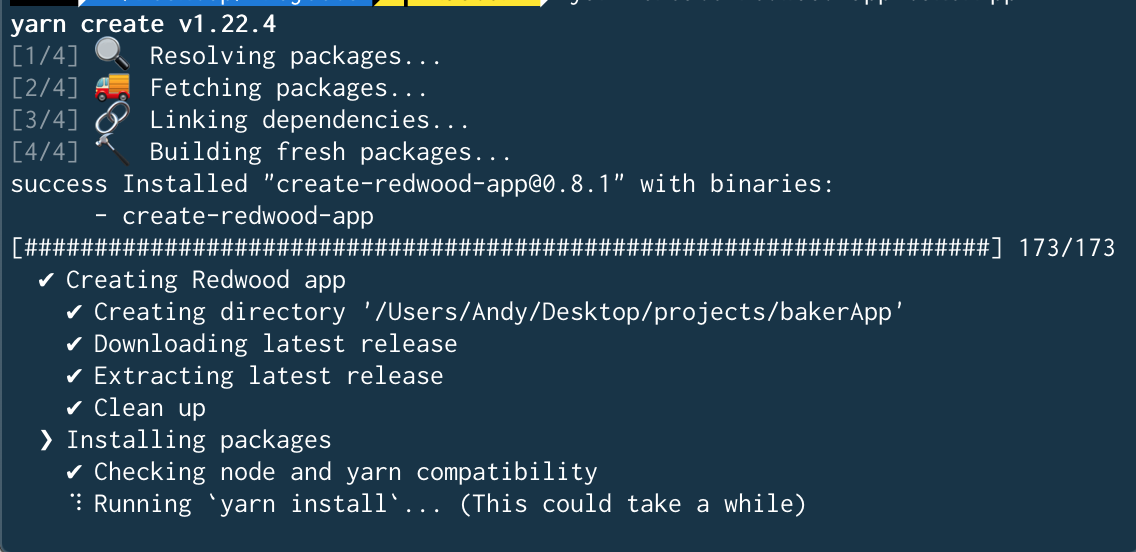
It works now, so I'm assumming v0.8.1 === v0.7.0. Just don't want anyone else to be confused.
 pickleat
on 30 May 2020
pickleat
on 30 May 2020
@pickleat this is a GREAT question. Correct, the _installation script_ is at v0.8.1.
But, could you open the code and confirm the following packages include the four @redwoodjs/* at v0.7.0:
package.json(dir root)web/package.jsonapi/package.json
?
thedavidprice
on 30 May 2020
@thedavidprice
Confirmed. All 3 show "@redwoodjs/*": "^0.7.0"
*web, api, router...
Thanks!
pickleat
on 30 May 2020
Just a heads up that I'll be testing this a bit before releasing 0.8.2
 peterp
on 31 May 2020
peterp
on 31 May 2020
v0.8.2 is released and fixes this problem, please upgrade by running yarn rw upgrade
peterp
on 31 May 2020
@peterp I upgraded and can confirm that it is fixed
rockymeza
on 1 Jun 2020
Related issues
 tmeasday
·
4Comments
tmeasday
·
4Comments
 weaversam8
·
4Comments
weaversam8
·
4Comments
 jtoar
·
4Comments
thedavidprice
·
3Comments
jtoar
·
4Comments
thedavidprice
·
3Comments
 jeliasson
·
3Comments
jeliasson
·
3Comments
Most helpful comment
v0.8.2is released and fixes this problem, please upgrade by runningyarn rw upgrade