Redwood: Improve console output when port is taken
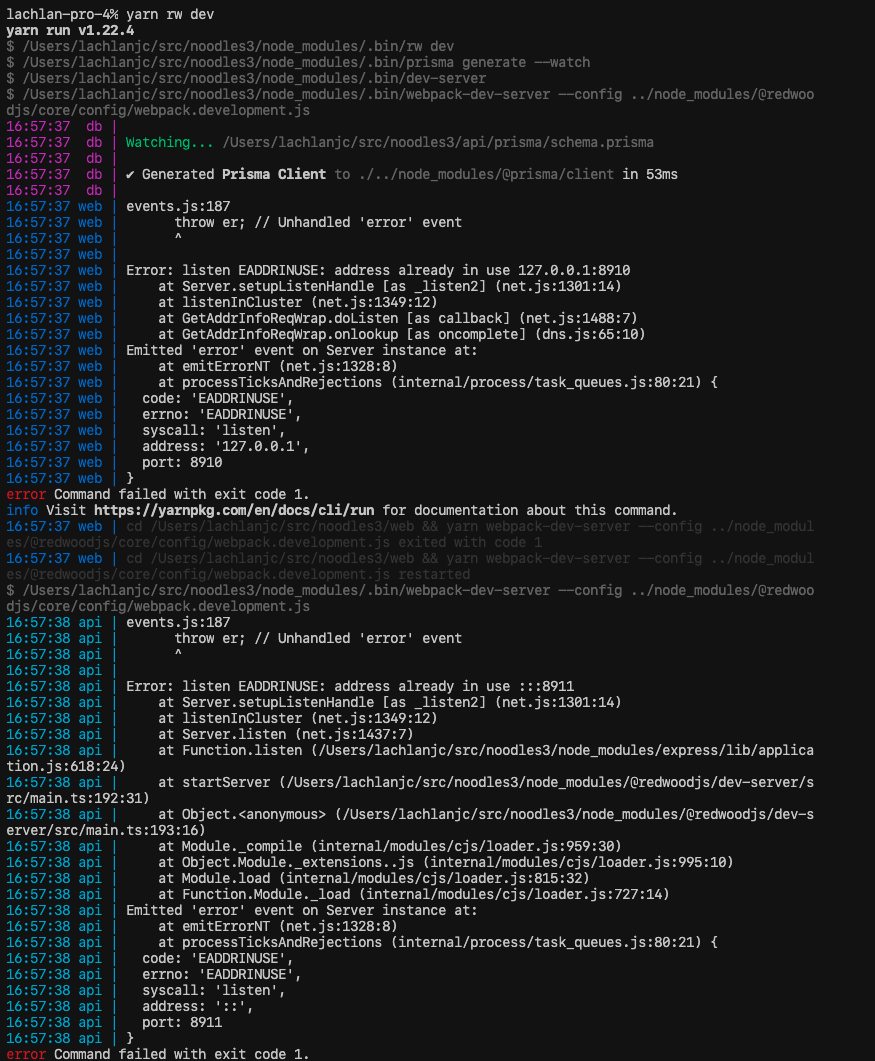
If you've got another Redwood app running, it'd be great to show a one- or two-line error that the port is taken, instead of two huge network errors, one for each port, that re-print every few seconds.
(Bonus: prompt to automatically switch to a different port, the way Next & some other projects do!)
 lachlanjc
All 9 comments
I can take this up. let me know if nobody is working on this.
 vikash-eatgeek
on 3 May 2020
vikash-eatgeek
on 3 May 2020
@vikash-eatgeek go for it!
 peterp
on 3 May 2020
peterp
on 3 May 2020
This is a great suggestion, at the moment the dev-servers run via concurrently. It tries to re-run each dev-server 3x before failing.
I think it might be a nice idea to add a "pre-boot" step to check if the ports are available before attempting to start the servers.
If they aren't available we could offer that they can be killed, via something like kill-port, we could:
1) check if the ports are available and exit with an error to let the user know.
2) add a flag that will kill the ports if they're in use, something like --kill-servers or --kill-ports. I'm open to less dramatic verb if someone has a suggestion.
peterp
on 3 May 2020
Thanks, @peterp. pre-boot is a good idea. I would suggest in the first step we can ask the user to choose some different port. Something like, Port 8910 is already in use. Would you like to run redwood on a different port? that way, he can go with his work, without looking for the commands/flags to start the server.
Another way is to ask Port 8910 is already taken. Do you want to run redwood on this same port? (n/y)
I am just thinking aloud. Let me know which one is better, or we can use the way you suggested.
vikash-eatgeek
on 3 May 2020
How about we just use a different port and inform the user that the default port is not available hence a different port is used? No extra interaction would be required from the user.
 satyarohith
on 7 May 2020
satyarohith
on 7 May 2020
@satyarohith that makes sense. Could we at least ask the user? that Default port is not available. Do you want to run on a different port? so in this case, The user is aware of the port change. because with time developers start remembering the default ports and they start going directly to to the port in the browser. xD It will be better to let these kind of developers know about port change( I am also one of them). 😄
vikash-eatgeek
on 7 May 2020
I really like the DX-first approach you all are considering here!
However, in my career, I can't think of a single time I actually _meant_ to run multiple Apps at once on the same port. It's almost always been a case of "I left a dev server running somewhere and forgot about it or closed a terminal without shutting down the process first". In which case the Error is a helpful reminder to clean up running processes and try again.
Granted, I have to know what the error means. And that can be confusing if you don't know. And downright frustrating to figure out the first time around.
1) are there cases/reasons where this behavior is likely intentional/necessary?
2) could we add Text to remind the user this most often happens because RW dev-server is already running on their system?
3) maybe there is a prompt asking if they need more information and helpful links to diagnose, change ports in the redwood.toml, read an article about how to kill 'runaway' processes, etc. "Would you like more information about diagnosing possible reasons for this error? y/n" Yes reply responds with links to more information.
Thinking on the fly here. Definitely open to thoughts otherwise.
 thedavidprice
on 7 May 2020
thedavidprice
on 7 May 2020
I agree with @thedavidprice, I think it could be confusing to automatically use a different port. By far the most likely reason this is an issue is forgetting to shut down a previous process. For cases where you want to run on a different port we should have a —port option. I’m a big fan of clear error messages and I think that is the better route here.
 mojombo
on 7 May 2020
mojombo
on 7 May 2020
thanks for the suggestion @mojombo @thedavidprice. I think, having a flag --port is a good idea to deal with the port availability failure for now. I also agree with @peterp giving the ability to kill the port. Killing the port might be a little bit long pr. First I am thinking to go with the --port option.
Then I think I can take the --kill-port command in a different PR. And the verb having kill in the command is good. I like it. it's literally telling what it is going to do.xD
vikash-eatgeek
on 8 May 2020
Related issues
 hemildesai
·
4Comments
hemildesai
·
4Comments
 jtoar
·
4Comments
jtoar
·
4Comments
 freddydumont
·
3Comments
freddydumont
·
3Comments
 weaversam8
·
4Comments
weaversam8
·
3Comments
weaversam8
·
4Comments
weaversam8
·
3Comments
Most helpful comment
I agree with @thedavidprice, I think it could be confusing to automatically use a different port. By far the most likely reason this is an issue is forgetting to shut down a previous process. For cases where you want to run on a different port we should have a
—portoption. I’m a big fan of clear error messages and I think that is the better route here.