Redwood: Allow `apiProxyPath` configuration to work with external hosts
The dev-server allows user's to specify their own apiProxyPath, it would be great if it could support relative and absolute paths.
 peterp
All 14 comments
@peterp do you know where in the code the proxy URL in constructed? I might be able to unblock myself by hard-coding something temporarily.
I'm actually surprised this doesn't work out of the box since I'm assuming you're leveraging the webpack devserver which supports this use case.
 crtr0
on 29 Apr 2020
crtr0
on 29 Apr 2020
Here’s the Production Webpack config:
https://github.com/redwoodjs/redwood/blob/dfbe322825980abdecdcd8c7e6f866ab7bcff096/packages/core/config/webpack.common.js#L103-L108
And the proxy for Development Webpack:
https://github.com/redwoodjs/redwood/blob/dfbe322825980abdecdcd8c7e6f866ab7bcff096/packages/core/config/webpack.development.js#L20-L27
getConfig is defined here:
https://github.com/redwoodjs/redwood/blob/master/packages/internal/src/config.ts
Which references getConfigPath() from here:
https://github.com/redwoodjs/redwood/blob/master/packages/internal/src/paths.ts
I think that's what you’re looking for. And, from the original conversation in the forums here, it doesn’t look like anything has changed with the Webpack or internal/**/config.ts files in the last 3 months. But internal/*/paths.ts has been updated several times in the past 2 weeks, however, nothing obvious pops out to me at first glance:
https://github.com/redwoodjs/redwood/commits/dfbe322825980abdecdcd8c7e6f866ab7bcff096/packages/internal/src/paths.ts
 thedavidprice
on 29 Apr 2020
thedavidprice
on 29 Apr 2020
@crtr0 I just looked at your forum example code again and these Webpack Docs. Given the Development Webpack config, I’m frankly surprised you were ever able to get this to work locally. E.g. if you set apiProxyPath = "https://foo-bar-staging.herokuapp.com”, then your local dev would have still ended up as http://localhost:8910 with the pathRewrite… correct?
@peterp I could take a stab at this provided your guidance on a way forward. Seems like we could do something like:
- check to see if value is path or full URL (e.g. starts with http*)
…or... - offer a new toml config, like apiProxyURL, which, if given, would be used instead of apiProxyPath value
?
thedavidprice
on 29 Apr 2020
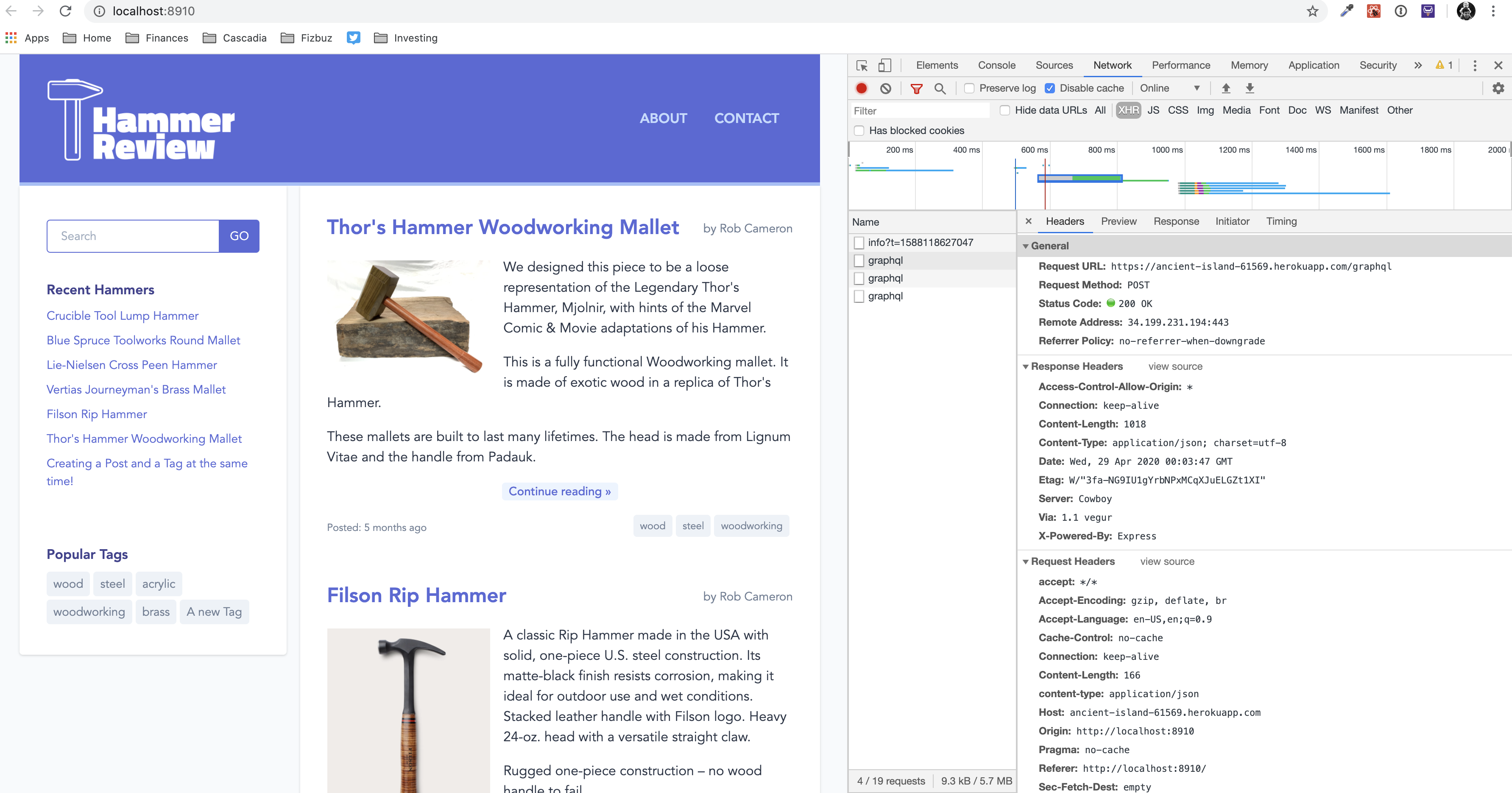
So, I just confirmed that this worked back in Redwood 0.4.0. Here's the link to my fork of the Example Blog app and the commit that I made to point to a different apiProxyPath:
https://github.com/crtr0/rw-example-blog/commit/4ea3a19b61d27f861c2f12f77669d8d38ef4edea
I have this running locally right now and it's pulling data from the remote server.
crtr0
on 29 Apr 2020
Screenshot. Notice the dev tools on the right and the XHR to the remote server.
crtr0
on 29 Apr 2020
It looks like this might require webpack-dev-server to be restarted - I'm going to close this issue and create a new one that details that work.
peterp
on 29 Apr 2020
@peterp just to be clear, restarting yarn rw dev does not fix this issue for me. I still can’t set apiProxyPath to a fully qualified URL. It seems like this was once possible in RedwoodJS 0.4.0.
crtr0
on 29 Apr 2020
@peterp Re-opening as there are two topics here:
- watch redwood.toml file (now in #481)
- whether or not we want to provide a way to handle URLs in apiProxyPath (or equivalent)
My comments above were an attempt to address number 2.
thedavidprice
on 29 Apr 2020
@crtr0 re: “it was working previously…
It’s unclear to me how the recent changes to paths.ts could have affected this behavior. I’d put more money on an update to Webpack being the cause for a change. Either way, it seems that being able to previously set the apiProxyPath to a full URL was accidental. So I’d prefer to add intentional functionality.
In the near-term, do you think it would work to create custom Webpack config in your App to override the current settings (included in my previous comment) and set the URL? See docs here for Webpack config.
A brute force example/sketch… something like:
const baseConfig = merge(webpackConfig('development'), {
  devServer: {
    proxy:  {
      customUrl: {
        target: `https://yourURLHere`,
...
@thedavidprice thanks, I'll give that a look. I tried pasting a more complete version of that snippet into my webpack.config.js and got a bunch of errors about "merge" and "webpackConfig", so I'll have to dig in.
Being able to proxy API requests to an external server is a core part of Webpack and an important part of the DevX of Create React App. I know that Redwood is a full-stack framework, but being able to proxy to different environments (staging, production, etc) during the course of development is an important affordance for front-end developers. I hope you all can figure out how to support this natively in Redwood.
crtr0
on 29 Apr 2020
I just encountered this issue after deploying to serverless on a subdomain. Here's my solution:
// web/config/webpack.config
module.exports = (config, { env }) => {
  config.devServer.proxy = {
    '/.netlify/functions': {
      target: 'http://[::1]:8911',
      pathRewrite: { '^/\\.netlify/functions': '' },
      headers: { Connection: 'keep-alive' },
    },
  }
  return config
}
 jmcmullen
on 1 Oct 2020
jmcmullen
on 1 Oct 2020
Oh wow @jmcmullen If this isn't working for subdomains, that's a bug we need to fix! I want to make sure I understand correctly. The code above is referring to devServer but you mention deploying.
Do you mean:
- if you deploy on Netlify to 'domain.com', everything works fine
- if you deploy on Netlify to 'sub.domain.com', the path is broken unless you add the webpack.config code to your project
Yes?
If so, could you please open a new issue including this code and a title like "apiProxyPath breaks when using subdomain". And please also loop me in.
Thanks in advance!
thedavidprice
on 3 Oct 2020
Thanks, @thedavidprice but that's not quite the issue. I'm deploying to AWS via Serverless and want to host only the API on a subdomain. I've made a more detailed post on the RedwoodJS forums here: https://community.redwoodjs.com/t/deploying-to-aws-and-hosting-the-api-on-a-subdomain/1251
jmcmullen
on 7 Oct 2020
@jmcmullen Ah, understood. And I replied to your topic along with David T. It's my understanding that up until now we've assumed the API will be on the same host as Web, which is _not_ a good assumption.
We'll keep this moving forward!
thedavidprice
on 8 Oct 2020
Related issues
 zwl1619
·
3Comments
zwl1619
·
3Comments
 slavakurilyak
·
4Comments
slavakurilyak
·
4Comments
 Ameobea
·
3Comments
Ameobea
·
3Comments
 wispyco
·
3Comments
wispyco
·
3Comments
 jtoar
·
4Comments
jtoar
·
4Comments