redux keep telling me: You are currently using minified code outside of NODE_ENV === 'production'.
Do you want to request a feature or report a bug?
BUG
What is the current behavior?
Whenever I use Redux, I get this:
You are currently using minified code outside of NODE_ENV === 'production'. This means that you are running a slower development build of Redux. You can use loose-envify (https://github.com/zertosh/loose-envify) for browserify or DefinePlugin for webpack (http://stackoverflow.com/questions/30030031) to ensure you have the correct code for your production build.
If the current behavior is a bug, please provide the steps to reproduce and if possible a minimal demo of the problem via https://jsfiddle.net or similar.
I build with Webpack. I have the EnvironmentPlugin who set the NODE_ENV to "production", I tried it in the DefinePlugin too. I know that React have a similar warning, but it didn't show up. It should show this message for both if it was incorrect.
I tried to run NODE_ENV=production webpack -p --define process.env.NODE_ENV='\"production\"' to be sure it build in production mode. But nothing works for Redux only.
When I check into the package at [My Project]/node_modules/redux/dist/redux.js, I see this:
if ("development" !== 'production' && typeof isCrushed.name === 'string' && isCrushed.name !== 'isCrushed') {
  warning('You are currently using minified code outside of NODE_ENV === \'production\'. ' + 'This means that you are running a slower development build of Redux. ' + 'You can use loose-envify (https://github.com/zertosh/loose-envify) for browserify ' + 'or DefinePlugin for webpack (http://stackoverflow.com/questions/30030031) ' + 'to ensure you have the correct code for your production build.');
}
It's probably the installation who won't put my real NODE_ENV in place of "development".
let clientPlugins = [
  new webpack.EnvironmentPlugin({
    NODE_ENV: 'production',
  }),
  new webpack.optimize.CommonsChunkPlugin({
    name: 'packages',
    filename: 'packages.min.js',
    minChunks: function(module) {
      return module.resource && (/node_modules/).test(module.resource);
    }
  }),
];
What is the expected behavior?
It should not print this warning.
Which versions of Redux, and which browser and OS are affected by this issue? Did this work in previous versions of Redux?
Version: "redux": "^3.7.2",
 DWboutin
All 8 comments
You're not importing the right version of Redux. The one at dist/redux.js is the UMD development build. Since you're using webpack, make sure you're doing import { createStore } from 'redux' or const { createStore } = require('redux').
Direct imports from the npm package will be going away in 4.0.
 timdorr
on 18 Dec 2017
timdorr
on 18 Dec 2017
There's all the imports of redux in my project.
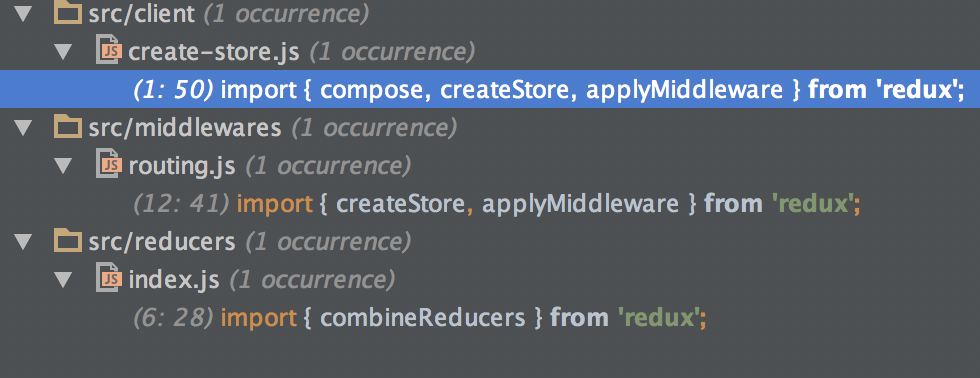
DWboutin
on 18 Dec 2017
I have the same issue in my project and my import looks in that way:
import { createStore, applyMiddleware, combineReducers, compose } from 'redux';
 ahanusek
on 22 Feb 2018
ahanusek
on 22 Feb 2018
any follow ups?
 adeelibr
on 2 Mar 2018
adeelibr
on 2 Mar 2018
@timdorr Will be any alternative for devs using umd?
 stat92
on 12 Mar 2018
stat92
on 12 Mar 2018
@stat92 UMD isn't going away. https://unpkg.com/[email protected]/dist/
timdorr
on 12 Mar 2018
Came across same issue, initially had the exact same issue as described in issue description. For future reference would like to leave the description of my case here.
After trying to reproduce the issue in a new project realized that we had
// webpack.config.js
module.exports = {
  // ...
  resolve: {
    mainFields: ['unpkg', 'main', 'module']
  }
}
Since unpkg version from dist/redux.js had this warning regardless of having NODE_ENV, the warning was present in the production bundle. Simply removing mainFileds or replacing the line to mainFields: ['module', 'main', 'unpkg'] fixes the issue and also improves the treeshaking done by the minifier.
 antonk52
on 28 Nov 2019
antonk52
on 28 Nov 2019
@antonk52 It works, But It might lead to a series of problems, such as resolution strategy for another module changes. Here is a better solution.
// webpack.config.js
module.exports = {
  // ...
  rules: [{
    test: /redux$/,
    resolve: {
      mainFields: ['module', 'main', 'unpkg']
    }
  }]
}
 liuliangsir
on 26 Dec 2019
liuliangsir
on 26 Dec 2019
Related issues
 jbri7357
·
3Comments
jbri7357
·
3Comments
 vslinko
·
3Comments
vslinko
·
3Comments
 elado
·
3Comments
elado
·
3Comments
 olalonde
·
3Comments
olalonde
·
3Comments
 mickeyreiss-visor
·
3Comments
mickeyreiss-visor
·
3Comments
Most helpful comment
I have the same issue in my project and my import looks in that way:
import { createStore, applyMiddleware, combineReducers, compose } from 'redux';