Redux-toolkit: Question: How to use this with redux-persist?
I've been experimenting with getting redux-persist to integrate with my current project that's using react-starter-kit but I'm already hitting some walls and obscure errors.
First issue is a middleware that doesn't seem to know how to handle the register call for the persist middleware (which is caused by serializable-state-invariant-middleware).
Second issue is that PersistGate never renders, I can only assume this is because rehydrate is never called? I'm not really sure what's going on there, it's probably by own fault.
If this isn't the place to ask I'm sorry, but using redux-persist seems like a very common use case.
Update 1:
I solved the serializable-state-invariant-middleware issue by simply adding thunk myself. (Note it needs to be manually installed!)
Here's my store.ts:
import logger from "redux-logger";
import { configureStore } from "redux-starter-kit";
import thunk from "redux-thunk";
import rootReducer from "./reducers";

const store = configureStore({
    reducer: rootReducer,
    middleware: [thunk, logger],
});

export default store;
 SeedyROM
All 46 comments
I haven't used redux-persist myself. What does this "register" call involve?
 markerikson
on 7 Mar 2019
markerikson
on 7 Mar 2019
Hey @SeedyROM where you able to figure this out?
 omorhefere
on 30 Mar 2019
omorhefere
on 30 Mar 2019
Hi I was able to get these two working elegantly
It appears you already solved issue 1
For issue 2:
We want to avoid some automation provided by starter-kits configureStore
Instead, we used redux's combineReducers, call persistReducer on that, and then pass it to configureStore
Example:
// These can come from starter-kits createSlice, which is nice
import reducerOne from './reducerOne'
import reducerTwo from './reducerTwo'

const reducers = combineReducers({
  reducerOne,
  reducerTwo
})

const persistConfig = {
  key: 'root',
  storage
}

const persistedReducer = persistReducer(persistConfig, reducers)
...

const store = configureStore({
  reducer: persistedReducer,
  ...
})
 Vigrond
on 7 Apr 2019
Vigrond
on 7 Apr 2019
Interesting, I solved my problem by simply creating the persistStore in my StoreWrapper component module . I have no idea why this worked.
Maybe your solution is the actual right way to handle this!
SeedyROM
on 12 Apr 2019
this is excellent, thanks @SeedyROM solved my problem.
 johnantoni
on 27 Apr 2019
johnantoni
on 27 Apr 2019
Seems to be resolved, so closing.
markerikson
on 28 Apr 2019
@SeedyROM Hi, I want to use redux-persist along with rsk too , but I'm just too dump to know how :(. for your first issue, you seem to have a store.ts file, (seems you are using typescript but I'm using js) but rsk only has configureStore.js at src/store. Can you help me how to do this?
 FareheSoheil
on 9 Aug 2019
FareheSoheil
on 9 Aug 2019
This thread solved my problems! Thanks for sharing your two solutions @SeedyROM & @Vigrond
 brandtnewww
on 26 Sep 2019
brandtnewww
on 26 Sep 2019
Hello, I've tried your guys solutions as shown here:
const persistConfig = {
  key: 'root',
  storage: createSecureStore(),
  whitelist: ['authReducer', 'pageReducer'], //Things u want to persist
  blacklist: [], //Things u dont
};

// Middleware: Redux Persist Persisted Reducer
const persistedReducer = persistReducer(persistConfig, rootReducer)

const store = configureStore({
  reducer: persistedReducer,
  middleware: [applyMiddleware(
    createLogger(),
  )],
  devTools: process.env.NODE_ENV !== 'production',
});

let persistor = persistStore(store);
But I'm getting the following error:
TypeError: createStore.apply is not a function.
(In 'createStore.apply(void 0, arguments)',
'createStore.apply' is undefined
is it possibly something to do with me using redux-persist-expo-securestore ?
 CallumHemsley
on 13 Jan 2020
CallumHemsley
on 13 Jan 2020
That makes it seem as if Redux isn't isn't installed correctly, because createStore should be coming from the redux package (which is a straight dependency of @reduxjs/toolkit).
Check your app's installation and see if Redux was actually installed.
markerikson
on 13 Jan 2020
Thanks for the fast reply Mark as usual. Here's my dependencies package.json:
"dependencies": {
    "@expo/samples": "~36.0.0",
    "@expo/vector-icons": "~10.0.0",
    "@react-navigation/web": "~1.0.0-alpha.9",
    "@reduxjs/toolkit": "^1.2.1",
    "automerge": "^0.12.1",
    "expo": "~36.0.0",
    "expo-asset": "~8.0.0",
    "expo-constants": "~8.0.0",
    "expo-font": "~8.0.0",
    "expo-google-app-auth": "^8.0.0",
    "expo-secure-store": "~8.0.0",
    "expo-web-browser": "~8.0.0",
    "immer": "^5.2.1",
    "react": "~16.9.0",
    "react-dom": "~16.9.0",
    "react-native": "https://github.com/expo/react-native/archive/sdk-36.0.0.tar.gz",
    "react-native-elements": "^1.2.7",
    "react-native-gesture-handler": "~1.5.0",
    "react-native-reanimated": "~1.4.0",
    "react-native-screens": "2.0.0-alpha.12",
    "react-native-web": "~0.11.7",
    "react-navigation": "~4.0.10",
    "react-navigation-stack": "~1.10.3",
    "react-navigation-tabs": "~2.6.2",
    "react-redux": "^7.1.3",
    "redux": "^4.0.5",
    "redux-persist": "^6.0.0",
    "redux-persist-expo-securestore": "^2.0.0"
  }
Before installing redux toolkit I was able to use createStore fine. Any ideas?
CallumHemsley
on 13 Jan 2020
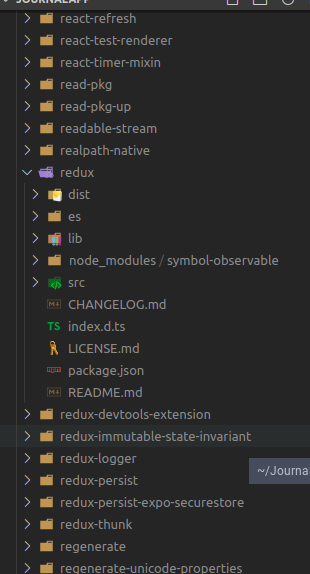
I'm asking if there's actually a redux folder in your node_modules.
markerikson
on 13 Jan 2020
Yes, there is a redux folder.
CallumHemsley
on 13 Jan 2020
Hmm. In that case, I don't have any good answers.
Can you provide a complete stack trace for this? Any chance of posting the whole repo?
markerikson
on 13 Jan 2020
@markerikson Thank you anyway. I'll see what I can do tonight and if I can't find the answer, I'll post the stack etc tomorrow. Thanks again!
CallumHemsley
on 13 Jan 2020
@CallumHemsley please give it a try with just () => 0 as a reducer and without your persistedReducer and other redux-persists specific things. Just plain Redux Toolkit. If the error persists, there might be a problem with your node resolution or bundler. Are you using webpack, rollup, something else or just a script tag with our UMD build?
 phryneas
on 14 Jan 2020
phryneas
on 14 Jan 2020
@phryneas I can confirm that without the persist stuff redux starts working again. However, the persist stuff works with redux, just not with the toolkit. I'm using expo-cli which is kinda like create-react-app but for react native
UPDATE:
I have managed to get it working with the following code. The reason was that I was still using applyMiddleware... Terribly sorry Mark and phryneas, I hope I can help someone if they come across this too.
const persistConfig = {
  key: 'root',
  storage: createSecureStore(),
  whitelist: ['authReducer', 'pageReducer'], //Things u want to persist
  blacklist: [], //Things u dont
};

// Middleware: Redux Persist Persisted Reducer
const persistedReducer = persistReducer(persistConfig, rootReducer)

const store = configureStore({
  reducer: persistedReducer,
  middleware: [createLogger()],
});

let persistor = persistStore(store);

export {
  store,
  persistor,
};
@CallumHemsley, how did you determine the string names for your RTK reducers that you whitelisted?
I'm generating my reducers from RTK's createSlice(), as an example:
export const appSlice = createSlice({
  name: 'app',
  initialState: { username: '' },
  reducers: {
    setUsername: (state, action: PayloadAction<string>) => {
      state.username = action.payload;
    },
  },
});
And then I use this, along the lines of your example:
const persistConfig = {
  key: 'root',
  storage: AsyncStorage,
  whitelist: ['appReducer'], // TODO: determine where to get my appSlice's reducer name from
  blacklist: [],
};

// Middleware: Redux Persist Persisted Reducer
const persistedReducer = persistReducer(persistConfig, rootReducer);

const store = configureStore({
  reducer: persistedReducer,
});

let persistor = persistStore(store);
What's the resolution for the TODO comment?
 jkoutavas
on 9 Apr 2020
jkoutavas
on 9 Apr 2020
@jkoutavas : I assume that should be the keys that you're using to define your root state, either by calling combineReducers yourself or passing them as an object argument to configureStore:
const rootReducer = combineReducers({
  // use "posts" to persist this slice
  posts: postsReducer,
  comments: commentsReducer,
})

const store = configureStore({
  reducer: rootReducer
})
I think I see... say we have this:
const rootReducer = combineReducers({
  app: appSlice.reducer,
  pets: petsSlice.reducer,
});
And I wanted to only whitelist 'app', I would pass the string 'appSlice.reducer' as a whitelisted reducer's name?
jkoutavas
on 9 Apr 2020
@jkoutavas : no. Redux-Persist wants to know the name of the state keys to persist, not the names of assorted variables in your app logic.
For example, if I have a root state that looks like:
{
  posts: {},
  comments: {},
  users: {}
}
I got that because my store setup looked like:
const rootReducer = combineReducers({
  posts: postsReducer,
  comments: commentsReducer,
  users: usersReducer
})
(Note that it doesn't matter whether the reducers are being passed in as postsReducer or postsSlice.reducer - that's literally the exact same function reference either way).
So if I want to persist the posts and comments keys in that state object, you'd do:
whitelist: ["posts", "comments"]
and that will persist state.posts and state.comments.
markerikson
on 9 Apr 2020
Ahh! Got it. showAsyncStorageContentInDev() in the debugger tells me It's persisting. Thanks. Now, I just have to understand this new red-box warning when I launch my app.

jkoutavas
on 9 Apr 2020
markerikson
on 9 Apr 2020
Thank you so much, @markerikson. Everything is running fantastically well now.
jkoutavas
on 9 Apr 2020
Hey, I'm getting this error when trying to use redux-persist. Not sure why this is happening, can anyone help?

This is my store.js:
import { configureStore, getDefaultMiddleware } from "@reduxjs/toolkit"
import { combineReducers } from "redux"
import {
  persistStore,
  persistReducer,
  FLUSH,
  REHYDRATE,
  PAUSE,
  PERSIST,
  PURGE,
  REGISTER,
} from "redux-persist"
import storage from "redux-persist/lib/storage"

import mainReducer from "./slices/main"
import cartReducer from "./slices/cart"

const rootReducer = combineReducers({
  main: mainReducer,
  cart: cartReducer,
})

const persistConfig = {
  key: "root",
  version: 1,
  storage,
}

const persistedReducer = persistReducer(persistConfig, rootReducer)

const store = configureStore({
  reducer: persistedReducer,
  middleware: getDefaultMiddleware({
    serializableCheck: {
      ignoredActions: [FLUSH, REHYDRATE, PAUSE, PERSIST, PURGE, REGISTER],
    },
  }),
})

let persistor = persistStore(store)

export default { store, persistor }
and this is my wrap-with-provider.js file, since I'm using Gatsby:
import React from "react"
import { Provider } from "react-redux"
import { PersistGate } from "redux-persist/integration/react"
import { store, persistor } from "./src/store"

// eslint-disable-next-line react/display-name,react/prop-types
export default ({ element }) => {
  return (
    <Provider store={store}>
      <PersistGate loading={null} persistor={persistor}>
        {element}
      </PersistGate>
    </Provider>
  )
}
 KumailP
on 1 May 2020
KumailP
on 1 May 2020
Your `store' variable is undefined. You are also importing it from './src/store', but from the source code you provided you are never actually setting/exporting it.
phryneas
on 1 May 2020
My bad. Wasn't exporting it correctly...
KumailP
on 1 May 2020
@vigrond @SeedyRom
I am using redux-persist with redux toolkit.
here is my store configuration.
I haven't implemented or configured store before.
I intend to persist user state after login.
Currently after login, if I reload app in emulator it always goes back to login screen.
is my store configured properly?
import {configureStore} from '@reduxjs/toolkit';
import authReducer from '../features/login/authSlice';
import AsyncStorage from '@react-native-community/async-storage';
import {persistReducer, persistStore} from 'redux-persist';
import {combineReducers} from 'redux';
import hardSet from 'redux-persist/lib/stateReconciler/hardSet';
import autoMergeLevel2 from 'redux-persist/lib/stateReconciler/autoMergeLevel2';

const reducers = combineReducers({
  auth: authReducer,
  // other reducers goes here...
});

const persistConfig = {
  key: 'root',
  storage: AsyncStorage,
//  stateReconciler: hardSet,
};

const _persistedReducer = persistReducer(persistConfig, reducers);

export const store = configureStore({
  reducer: _persistedReducer,
});
export const persistor = persistStore(store);
Here in index.js, I use PersistGate
import React from 'react';
import {AppRegistry} from 'react-native';
import App from './App';
import {name as appName} from './app.json';
import {store, persistor} from './src/stores/store';
import {Provider} from 'react-redux';
import {storeUser, storeRefreshToken} from './src/features/login/authSlice';
import {PersistGate} from 'redux-persist/lib/integration/react';

const RNRedux = () => (
  <Provider store={store}>
    <PersistGate loading={null} persistor={persistor}>
      <App />
    </PersistGate>
  </Provider>
);
AppRegistry.registerComponent(appName, () => RNRedux);
 rikinshah23
on 2 Jun 2020
rikinshah23
on 2 Jun 2020
@rikinshah23 you might want to take a look at the state reconciler - by default it only merges at the top level - which from my understanding often is directly overridden by more granular initial states. So something like autoMergeLevel2 or hardSet might work out better for you.
phryneas
on 2 Jun 2020
@phryneas Thanks for your reply. I have updated the store file and also index.js file in my comment above. I think problem is with my configuration somewhere. Although I tried to use stateReconciler: hardSet and autoMergeLevel2but didnt work as well.
Error I get is :

rikinshah23
on 2 Jun 2020
@phryneas Thanks for your reply. I have updated the store file and also index.js file in my comment above. I think problem is with my configuration somewhere. Although I tried to use
stateReconciler: hardSet and autoMergeLevel2but didnt work as well.Error I get is :
try it:
const persistedReducer = persistReducer(
  {
    key: "root",
    storage,
    whitelist: ["layout"],
  },
  rootReducer,
);

export const store = configureStore({
  reducer: persistedReducer,
  middleware: getDefaultMiddleware({ serializableCheck: false, }),
});
 max10rogerio
on 19 Jun 2020
max10rogerio
on 19 Jun 2020
@max10rogerio Thanks for your reply.
I solved it using similar solution from another post.
const persistedReducer = persistReducer(persistConfig, rootReducer);

const store = configureStore({
  reducer: persistedReducer,
  middleware: getDefaultMiddleware({
    serializableCheck: {
      ignoredActions: [FLUSH, REHYDRATE, PAUSE, PERSIST, PURGE, REGISTER]
    }
  })
});
How would something like await persistor.flush() be called in a slice? It seems that if I import persistor from the store, the reducer no longer works.
 clarkkozak
on 4 Jul 2020
clarkkozak
on 4 Jul 2020
@clarkkozak reducers in redux must never have side effects - this is a side effect.
In addition to that, making the reducer async like that would make the reducer not return the new state, but a promise of a new state, completely messing up everything. A side effect like that needs to be triggered outside of the reducer - from a middleware or a component.
phryneas
on 4 Jul 2020
@phryneas Good point! Reducers need to be pure functions. I need to be more clear. I created a function in the same file as the slice. This way I don't need to export the actions and create side effect outside of the reducer. Something like:
export const someEffect = async (dispatch) => {
  dispatch(slice.actions.someActionFromaSlice())
  await persistor.flush()
}
Are their any anti-patterns here? Does that make sense?
clarkkozak
on 4 Jul 2020
@clarkkozak Not really an antipattern, but why not just add some custom middleware that flushes on a list of actions you define?
Also, why do you want to prevent exporting the actions creators? Dispatching actions is kind of the point of redux, I wouldn't hide that detail.
phryneas
on 5 Jul 2020
@phryneas :open_mouth: oh that's a good point. I like that; yet what if I want it to be conditional? Additionally, I want to combine actions together. For example:
export const someEffect = async (dispatch, data) => {
  dispatch(slice.actions.setLoading(true))
 if (data.error) {
  await persistor.flush()
  dispatch(slice.actions.setError())
}
  dispatch(slice.actions.someActionFromaSlice())
  dispatch(slice.actions.setLoading(false))
}
I'm still learning redux, rtk, and react-persist. I appreciate your time; yet perhaps I should read the docs more and see more examples. Do you have any examples of custom middleware similar to the one you describe.
clarkkozak
on 5 Jul 2020
@clarkkozak just out of my head, might need some fixing here & there ;)
const persistAfter = [someSlice.actions.setLoading, otherSlice.actions.setLoading]

const persistMw = api => next => action {
    const result = next(action);
    if (persistAfter.some(actionCreator => actionCreator.match(action))) {
        persistor.flush();
    }
    return result;
}
@phryneas any ideas why the reducer wouldn't load if the persistor introduce? Do you think the middleware approach would resolve the issue? I think it's a great idea and seems more maintainable.
clarkkozak
on 5 Jul 2020
@clarkkozak well, as I said above, introducing the persistor within the reducer like you did changed the return value of the reducer and thus made the state into a promise.
phryneas
on 5 Jul 2020
@phryneas Thank you I appreciate your help!
clarkkozak
on 5 Jul 2020
Not sure if it still might be helpful for anyone, but I wrote a blog post about integrating redux-persist into redux-toolkit codebase.
https://edvins.io/how-to-use-redux-persist-with-redux-toolkit
 ummahusla
on 31 Jan 2021
ummahusla
on 31 Jan 2021
import { createStore } from 'redux';
^^^^^^
SyntaxError: Cannot use import statement outside a module
While using redux persist with next-redux-wrapper and @redux/toolkit. I'm getting an error which I mentioned above. Can any say why it's occurring and the solution. I have tried almost everything... Thanks in advance
 nanthakumaran-s
on 23 Apr 2021
nanthakumaran-s
on 23 Apr 2021
See:
https://github.com/vercel/next.js/tree/canary/examples/with-redux-wrapper
Or:
https://github.com/vercel/next.js/tree/canary/examples/with-redux-toolkit-typescript
https://github.com/vercel/next.js/tree/canary/examples/with-redux-toolkit
max10rogerio
on 23 Apr 2021
My bad. Wasn't exporting it correctly...
How did you do it? I have the same problem but I cannot find how to fix it... Thanks! @KumailP
 Javier1177
on 29 Apr 2021
Javier1177
on 29 Apr 2021
By now, this Issue contains about 20 people doing completely different stuff and having completely different errors and even more people jumping on board.
@Javier1177 please move this question over to StackOverflow, where usage questions belong. Also, please provide context there (code, error mesages, etc)), because I'm very certain that you do not have the exact same problem as KumaiIP and it is pretty impossible to help you otherwise.
I am going to lock this conversation to prevent further people piling onto this.
The initial issue has been solved.
Usage Questions belong onto StackOverflow or into #redux on Reactiflux, not in a BugTracker.
phryneas
on 29 Apr 2021
Related issues
 SoYoung210
·
4Comments
SoYoung210
·
4Comments
 cole-robertson
·
3Comments
cole-robertson
·
3Comments
 ouweiya
·
3Comments
ouweiya
·
3Comments
 Izhaki
·
3Comments
Izhaki
·
3Comments
 fdjones
·
4Comments
fdjones
·
4Comments
Most helpful comment
Hi I was able to get these two working elegantly
It appears you already solved issue 1
For issue 2:
We want to avoid some automation provided by starter-kits
configureStoreInstead, we used redux's
combineReducers, callpersistReduceron that, and then pass it toconfigureStoreExample: