Redux-persist: PersistGate: animate loading component
Hi, is there a way I can animate loading component, I know I can start an animation on life cycle events such as componentDidMount, but is there a way I can set up any other transition? or wait for it to be finished before lifting the gate?
Thanks!
 wachunei
All 14 comments
Did you find yourself already a solution to this ? I am searching for something similar. I did an application fade in on reHydrated = true in v4 but searching for something similar with v5 persistGate.
 freshcoat
on 15 Jan 2018
freshcoat
on 15 Jan 2018
@klasver I did exactly the same, in that case it seems like the best alternative is to not use PersistGate and render a component that renders a splash screen before hydration (checking state._persist.rehydrated) and then animate and render main navigation component. Have not tried to implement that yet though.
wachunei
on 15 Jan 2018
@wachunei Thanks, did the same trick, works great! 👍
freshcoat
on 15 Jan 2018
right if you want to animate loading away that is probably going to require some custom connections (ala https://github.com/rt2zz/redux-persist/issues/655#issuecomment-357700158). Anything that was possible in v4 is certainly achievable in v5 - PersistGate is just a convenience.
I dont want to make PersistGate more complex but its possible we could do one of the following:
- create a new module
PersistGateAnimatedor something like that - expose an alternate api where instead of having a loading prop, it uses function children a la:
<PersistGate persistor={persistor}>
  {(bootstrapped) => {
    // return fancy animation components here based on the value of bootstrapped
  }}
</PersistGate>
Open to suggestions, but it seems like 2 could be a good option that mirrors how react-router works.
 rt2zz
on 1 Feb 2018
rt2zz
on 1 Feb 2018
I kinda like the idea of option 2, but in that case, where the main components of the app go? I think is a little bit confusing.
In the same direction, we could achieve something like loading but with a render prop.
  <Provider store={store}>
    <PersistGate
      persistor={persistor}
      loading={({ hydrated, liftGate, ...otherProps }) => <MyAnimatedComponent hydrated={...} liftGate={...} />}
    >
      <MyAppGoesHere />
    </PersistGate>
  </Provider>
I this case MyAnimatedComponent can start an animation on hydration and lift gate as it ends.
PS: I really have no deep understanding of how possible to do is this, but I can dive in if this goes through
wachunei
on 1 Feb 2018
@wachunei well again taking the react router analogy option 2 would work like this:
<PersistGate persistor={persistor}>
  {(bootstrapped) => {
     return [
        <AnimatedLoader visible={!bootstrapped} />,
        bootstrapped && <MyAppGoesHere />
     ]
  }}
</PersistGate>
i.e. it puts the responsibility for rendering the loader and main app into the hands of the implementor, but the common pattern would be basically bootstrapped && <MyAppGoesHere />
The approach you describe here: https://github.com/rt2zz/redux-persist/issues/655#issuecomment-362416964 is problematic to me because a) it does not solve as many use cases and b) it overloads the meaning of loading prop which may confuse users.
If I can elaborate on (a) consider this use case where you want to initialize a component to get some heavy lifting done immediately but still need to know when boostrap is complete to do additional work:
<PersistGate persistor={persistor}>
  {(bootstrapped) => {
    return <MyAppGoesHere bootstrapped={bootstrapped} />
  }}
</PersistGate>
Of course this is all somewhat straight forward to replicate using a custom component which listens to the persistor, but I like that this pattern preserves the onBeforeLift pattern.
rt2zz
on 1 Feb 2018
I get it now, I'd like to contribute on this
wachunei
on 2 Feb 2018
@rt2zz I'm sorry to bother with this question, but I was going to begin working on this when I ran into Metro Bundler does not support symlinks inside ./node_modules (I was using yarn link to link my local branch of redux-persist to a RN test app).
So I've decided to move on to a create-react-app app. After linking the package I realized it has an entry point that only works after build (lib), but I started working on src files. What's your development setup? Am I doing something wrong or missing something in order to grab modules from src instead of built files?
Thanks!
wachunei
on 4 Feb 2018
@wachunei there are a few ways to do it. In my case with react native I always do one of the following (depending on the scale of changes):
- in your app import from
src(e.g.import { persistStore } from 'redux-persisit/src') then edit the files in place and when you are done you copy the files back into your local git repo. - use wml for create a "hardlink" alternative to yarn link.
Both options are a bit tedious :/
Or if you use create-react-app then yarn link should work but you need to be sure to build after every change. i.e. literally run yarn build. You can run the build in watch mode for convenience: yarn build:es --watch but be sure to run the right build for your environment (i.e. es vs lib)
Now that I write this out I realize how frustratingly complex it is!
rt2zz
on 4 Feb 2018
I will try with those options, thanks!
Would it work to have an entry point that imports from src or lib depending on dev environment variable?
On Feb 4, 2018, 2:35 PM -0300, Zack Story notifications@github.com, wrote:
@wachunei there are a few ways to do it. In my case with react native I always do one of the following (depending on the scale of changes):
- in your app import from src (e.g. import { persistStore } from 'redux-persisit/src') then edit the files in place and when you are done you copy the files back into your local git repo.
- use wml for create a "hardlink" alternative to yarn link.
Both options are a bit tedious :/
Or if you use create-react-app then yarn link should work but you need to be sure to build after every change. i.e. literally run yarn build. You can run the build in watch mode for convenience: yarn build:es --watch but be sure to run the right build for your environment (i.e. es vs lib)
Now that I write this out I realize how frustratingly complex it is!
—
You are receiving this because you were mentioned.
Reply to this email directly, view it on GitHub, or mute the thread.
wachunei
on 4 Feb 2018
Would it work to have an entry point that imports from src or lib depending on dev environment variable?
I am not sure how that would work - but open to suggestion. We use package.json module field to opt es users into the es build: https://github.com/rt2zz/redux-persist/blob/master/package.json#L6
rt2zz
on 4 Feb 2018
I spent last few hours trying to make this work, this is what I got:
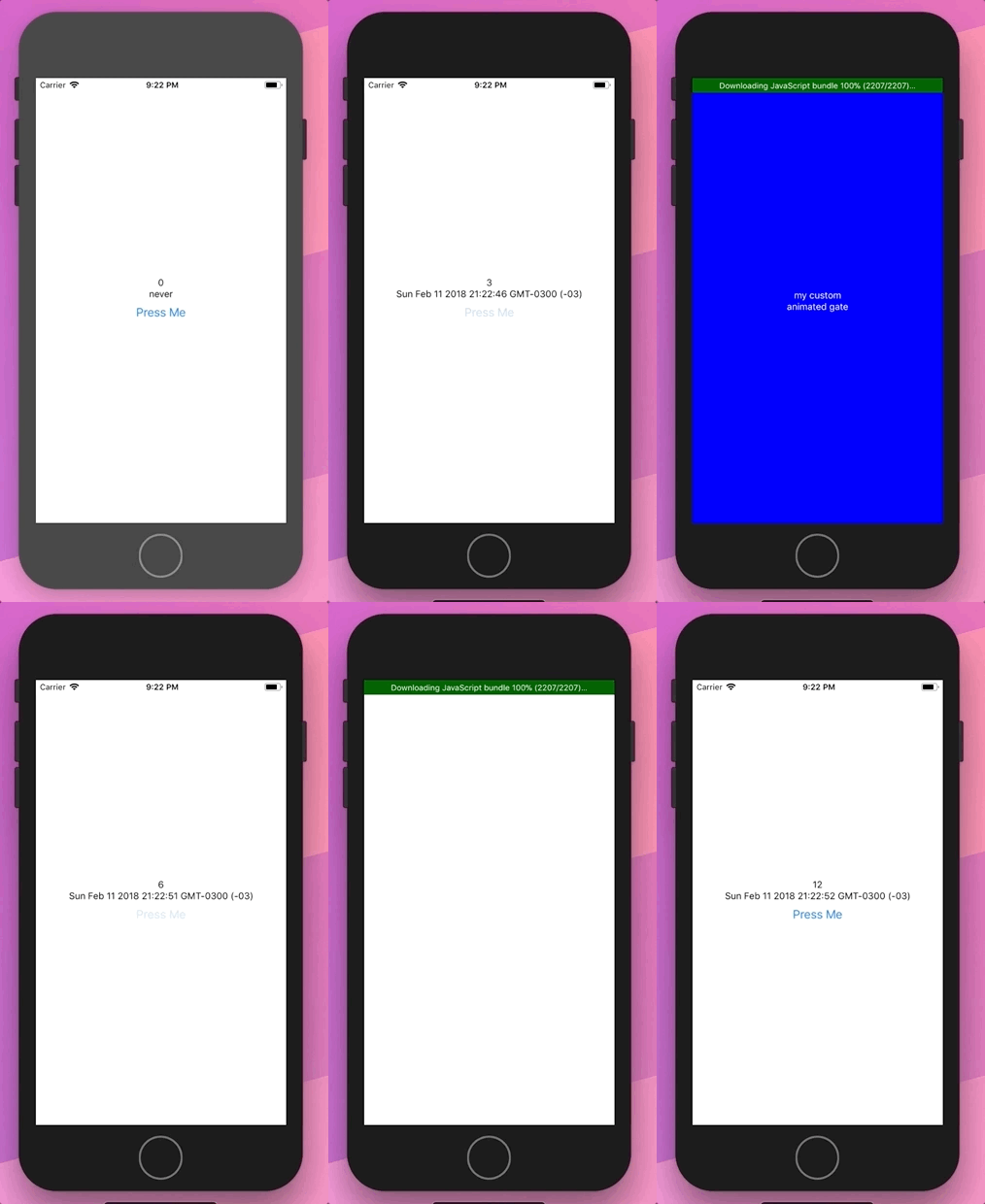
The code for the end user would be basically changing this
<Provider store={store}>
  <PersistGate loading={ /* loading component */ } persistor={persistor}>
    <App />
  </PersistGate>
</Provider>
to
<Provider store={store}>
  <PersistGate persistor={persistor}>
    {bootstraped => (
      // custom component
    )}
  </PersistGate>
</Provider>
in the previous gif case it was:
<Provider store={store}>
  <PersistGate persistor={persistor}>
    {bootstraped => (
      <AnimatedGate bootstraped={bootstraped}>
        <App />
      </AnimatedGate>
    )}
  </PersistGate>
</Provider>
On the source the changes are 5 lines in PersistGate component, what do you think?
https://github.com/wachunei/redux-persist/commit/608c4ea46ce6bf06fc7a88c9cc18a6046746c286
wachunei
on 12 Feb 2018
awesome, that looks perfect - mind opening a PR?
rt2zz
on 12 Feb 2018
@wachunei I used your code animatedgate.js but Image do not transparent(background color visible as light blue color). why is that ?

 isurugajasinghe
on 11 Mar 2018
isurugajasinghe
on 11 Mar 2018
Related issues
 ucarion
·
4Comments
ucarion
·
4Comments
 Clumsy-Coder
·
3Comments
Clumsy-Coder
·
3Comments
 scic
·
3Comments
scic
·
3Comments
 thenewt15
·
3Comments
thenewt15
·
3Comments
 umairfarooq44
·
3Comments
umairfarooq44
·
3Comments