Redux-form-material-ui: Unknown props `hintText`, `floatingLabelText` on <div> tag
I try to customize a TextField, using hintText, floatingLabelText attributes. I tried to pass them as
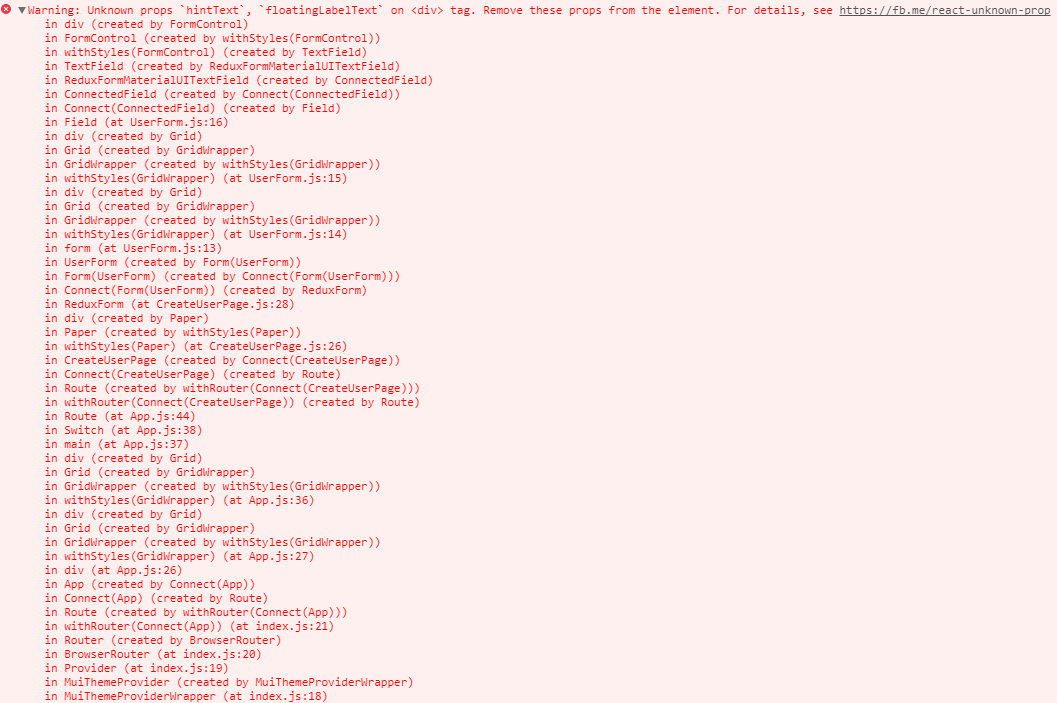
Sample code that doesn't work:
import {Field} from 'redux-form';
import { TextField, Switch } from 'redux-form-material-ui';

const UserForm = ({ onSubmit}) => {
    return (
        <form onSubmit={handleSubmit(onSubmit)} className="userForm">
            <Grid container style={{ width: '50%' }}>
                <Grid item lg={6} md={12}>
                    <Field name="username" component={TextField} hintText="Name" floatingLabelText="Name"/>
                </Grid>
            </Grid>
        </form>
    );
};
Used versions:
"redux-form": "^7.1.2",
"redux-form-material-ui": "^5.0.0-beta.2",
 uxon123
All 4 comments
I could be very wrong as I cannot test your configuration / your component in my current development environment, but first things first, the error log you provided indicates that it cannot recognize your prop types are not recognized, you could/should include import React, { PropTypes } from 'react'; or import React from 'react'; & import PropTypes from 'prop-types'; above your import statements. Perhaps you omitted this from your example?
Also, you are using Material-UI 1.0 v1.0.0-beta.xx, the TextField API for the beta does not appear to have hintText or floatingLabelText as an available prop/attribute value. These _are_ however, valid in Material-UI v0.19.4. It appears/I am assuming that the difference may be that the TextField component in the beta populates the rendered DOM element with label and helperText (unless helperText correlates to HTML5 spec alt attribute)
EDIT - buried in the material-ui-next docs, there is an examples page that is easy to miss- defaultValue in the beta appears to replace hintText from v0.19.4. You need to utilize label and defaultValue for the version of MUI you are using.
 lexparsimonet
on 13 Nov 2017
lexparsimonet
on 13 Nov 2017
I do have
import React from 'react';
import PropTypes from 'prop-types';
in my code, I just ommited them in my sample.
You are right, I was looking at the wrong version of material-ui api. After using attributes from beta api (material-ui-next) the features are working. Thank you!
Isn't there a way though, to the error message being more descriptive, I mean why this error is about \
uxon123
on 14 Nov 2017
The error message is appropriately descriptive/of correct context- the element that is rendered at the root of each component is an un-classed/unnamed <div> - the props were invalid, so your compiler told you as such. You were/did not interpret the error message in relation to the rendered DOM element's context. Glad you figured it out, hopefully I did help some.
lexparsimonet
on 14 Nov 2017
OK, thanks for your help.
uxon123
on 21 Nov 2017
Related issues
 bertdeterd
·
3Comments
bertdeterd
·
3Comments
 jeongsd
·
7Comments
jeongsd
·
7Comments
 EssamTarik
·
3Comments
EssamTarik
·
3Comments
 EduardoAC
·
7Comments
EduardoAC
·
7Comments
 jampy
·
6Comments
jampy
·
6Comments
Most helpful comment
I could be very wrong as I cannot test your configuration / your component in my current development environment, but first things first, the error log you provided indicates that it cannot recognize your prop types are not recognized, you could/should include
import React, { PropTypes } from 'react';orimport React from 'react';&import PropTypes from 'prop-types';above yourimportstatements. Perhaps you omitted this from your example?Also, you are using Material-UI 1.0 v1.0.0-beta.xx, the TextField API for the beta does not appear to have
hintTextorfloatingLabelTextas an available prop/attribute value. These _are_ however, valid in Material-UI v0.19.4. It appears/I am assuming that the difference may be that the TextField component in the beta populates the rendered DOM element withlabelandhelperText(unlesshelperTextcorrelates to HTML5 spec alt attribute)EDIT - buried in the material-ui-next docs, there is an examples page that is easy to miss-
defaultValuein the beta appears to replacehintTextfrom v0.19.4. You need to utilizelabelanddefaultValuefor the version of MUI you are using.