Switched to ubuntu 17.10 and installed redshift-gtk via
apt-get install redshift-gtk
After launch it just doesn't do anything. Am I being stupid here or is this
a gnome thing?
 vertexLord
All 14 comments
This is probably because Ubuntu 17.10 defaults to Wayland which Redshift cannot support at the moment. If you're using GNOME you can try the built-in Night Light feature instead of using Redshift.
 jonls
on 20 Oct 2017
jonls
on 20 Oct 2017
Hey thanks, but I really wish I had redshift back. The gamma and brighness settings made quite a difference :D
 select
on 3 Nov 2017
select
on 3 Nov 2017
I had the same problem on my system (Debian). The issue is with geoclue-2.0 package and I resolved my issue by manually creating a redshift.conf file under $HOME/.config directory with my own settings.
UPDATE as of 30-04-2017: As @ciskeboekelo has kindly suggested to mention it here, to clarify one thing: please provide your country's latitude and longitude right below
[manual], after you copy the config settings.
Now I can use it without depending on geoclue-2.0:
; Global settings for redshift
[redshift]
; Set the day and night screen temperatures
temp-day=5700
temp-night=3500

; Enable/Disable a smooth transition between day and night
; 0 will cause a direct change from day to night screen temperature.
; 1 will gradually increase or decrease the screen temperature.
transition=1

; Set the screen brightness. Default is 1.0.
;brightness=0.9
; It is also possible to use different settings for day and night
; since version 1.8.
;brightness-day=0.7
;brightness-night=0.4
; Set the screen gamma (for all colors, or each color channel
; individually)
gamma=0.8

;gamma=0.8:0.7:0.8
; This can also be set individually for day and night since
; version 1.10.
;gamma-day=0.8:0.7:0.8
;gamma-night=0.6

; Set the location-provider: 'geoclue', 'geoclue2', 'manual'
; type 'redshift -l list' to see possible values.
; The location provider settings are in a different section.
location-provider=manual

; Set the adjustment-method: 'randr', 'vidmode'
; type 'redshift -m list' to see all possible values.
; 'randr' is the preferred method, 'vidmode' is an older API.
; but works in some cases when 'randr' does not.
; The adjustment method settings are in a different section.
adjustment-method=randr

; Configuration of the location-provider:
; type 'redshift -l PROVIDER:help' to see the settings.
; ex: 'redshift -l manual:help'
; Keep in mind that longitudes west of Greenwich (e.g. the Americas)
; are negative numbers.
[manual]
lat=<your country's latitude>
lon=<your country's longitude>
; Find more about your country's / city's geolocation from http://www.geonames.org/
; Configuration of the adjustment-method
; type 'redshift -m METHOD:help' to see the settings.
; ex: 'redshift -m randr:help'
; In this example, randr is configured to adjust screen 1.
; Note that the numbering starts from 0, so this is actually the
; second screen. If this option is not specified, Redshift will try
; to adjust _all_ screens.
[randr]
screen=0
 stefanos82
on 7 Nov 2017
stefanos82
on 7 Nov 2017
See also
Settings > Devices > Displays > Night Light
 Russell-Jones
on 2 Jan 2018
Russell-Jones
on 2 Jan 2018
I have the same problem. I couldn't even turn of the geoclue-2.0 provider, because redshift just takes the built-in default values (meaning it does not create a config file at ~/.config/redshift.conf), tries to start, fails and shows this error:
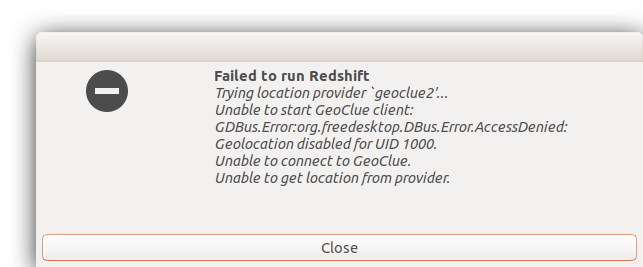
Suggestion: Copy the default config file to the users dir if it does not exist, before even running. This way users can change the defaults if redshift should crash because of those.
Solution for Wayland Problems: If you can ditch Wayland permanently like me, see this answer.
 MaxValue
on 15 Jan 2018
MaxValue
on 15 Jan 2018
Thank you @stefanos82 ! your config worked for me :-)
Might be good to mention that you've left the latitude and longitude up to the user to insert /edit it. I blindly copied your config and it took me a while before I realized that that was causing it not to run.
 ciskeboekelo
on 30 Apr 2018
ciskeboekelo
on 30 Apr 2018
No worries mate. Oh I have mentioned that right below [manual].
stefanos82
on 30 Apr 2018
Oh, yeah I meant mention it above or below of the config file paste, since people like me, looking for the quickest possible fix, won't read a whole config file like that until we're desperate. ;-)
ciskeboekelo
on 30 Apr 2018
@ciskeboekelo Done.
stefanos82
on 30 Apr 2018
@stefanos82 Awesome.
ciskeboekelo
on 30 Apr 2018
I used your script and now it starts. also the information page sais color temperature should be now at 3500 but it doesn't work!
the color is not changing!
Do I have to restart the computer for it to work?
 rubo77
on 8 May 2018
rubo77
on 8 May 2018
When I made changes in the config file I did find that I needed to close
and restart redshift for the changes to take effect. I didn't need to
restart my computer.
Op di 8 mei 2018 om 23:46 schreef Ruben Barkow notifications@github.com:
I used your script and now it starts. also the information page sais color
temperature should be now at 3500 but it doesn't work!the color is not changing!
Do I have to restart the computer for it to work?
—
You are receiving this because you were mentioned.
Reply to this email directly, view it on GitHub
https://github.com/jonls/redshift/issues/543#issuecomment-387552723, or mute
the thread
https://github.com/notifications/unsubscribe-auth/AAdd81GXuUKGqAZ2cUYX_WjyAC_kjfQ6ks5twhIzgaJpZM4QA5Sn
.
ciskeboekelo
on 9 May 2018
It doesn't work at my laptop using Wayland.
If I log out and use xorg desktop, it works fine as expected.
rubo77
on 9 May 2018
@rubo77 This is expected, Wayland doesn't support Redshift: https://github.com/jonls/redshift/blob/master/README.md#faq. Both the Wayland issue and then geoclue issue should be documented in the FAQ now.
jonls
on 9 May 2018
Related issues
 cbcoutinho
·
6Comments
cbcoutinho
·
6Comments
 gamalan
·
4Comments
gamalan
·
4Comments
 planemad
·
6Comments
planemad
·
6Comments
 fogelton
·
4Comments
fogelton
·
4Comments
 Avispa
·
4Comments
Avispa
·
4Comments
Most helpful comment
This is probably because Ubuntu 17.10 defaults to Wayland which Redshift cannot support at the moment. If you're using GNOME you can try the built-in Night Light feature instead of using Redshift.