Hello,
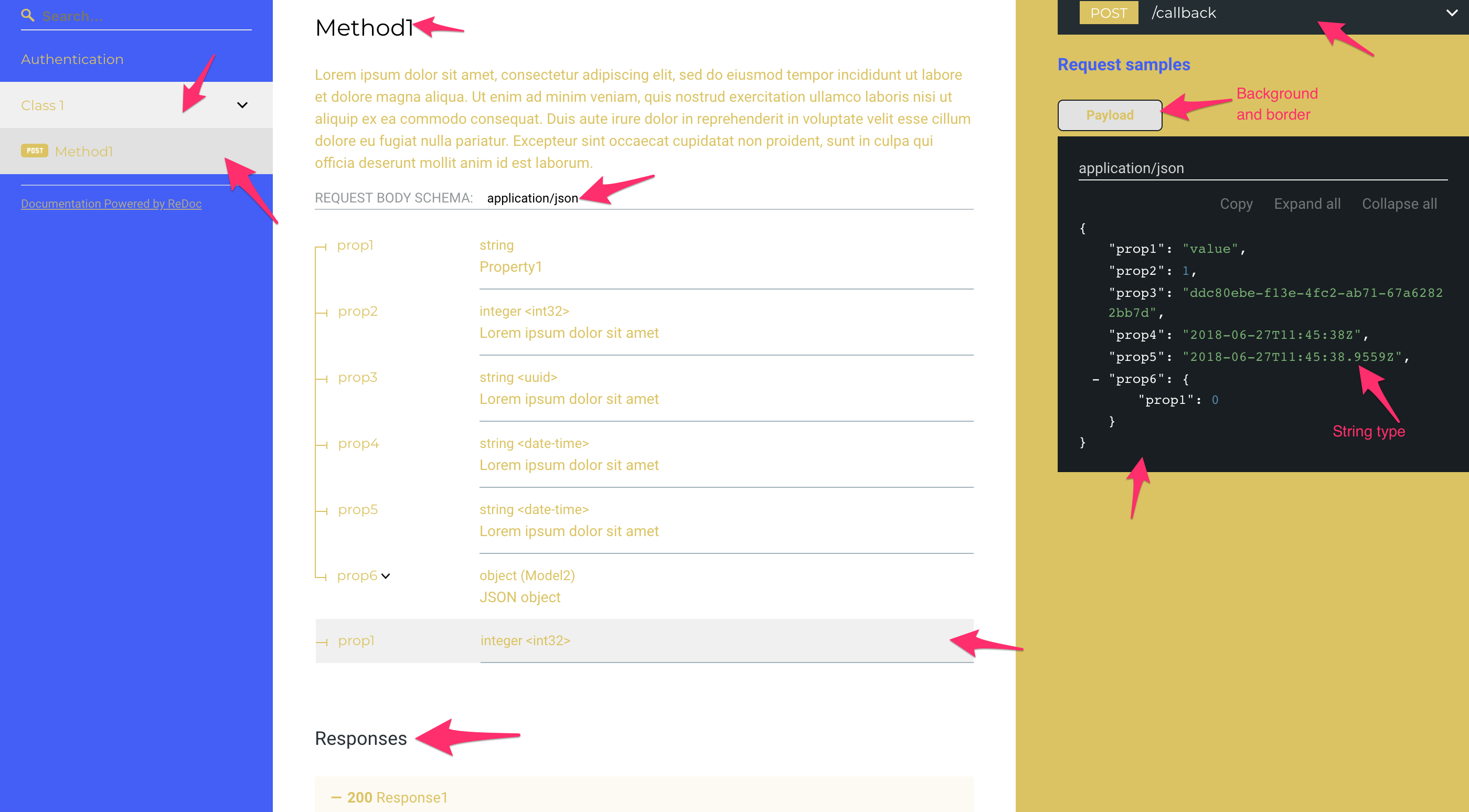
I played with Theme settings in order to set custom color scheme. While it worked perfectly for objects, that you could configure, some of them seem to be not configurable.
I took the default theme object from https://github.com/Rebilly/ReDoc/blob/master/src/theme.ts, and changed all colors to blue and yellow (so that it is contrast) like below:
{
    colors: {
        main: '#DFC350',
        success: '#DFC350',
        redirect: '#DFC350',
        error: '#DFC350',
        info: '#DFC350',
        text: '#DFC350',
        code: '#DFC350',
        codeBg: 'rgba(223, 195, 80, 1)',
        warning: '#DFC350',
        http: {
            get: '#DFC350',
            post: '#DFC350',
            put: '#DFC350',
            options: '#DFC350',
            patch: '#DFC350',
            delete: '#DFC350',
            basic: '#DFC350',
            link: '#DFC350',
            head: '#DFC350'
        }
    },
    schemaView: {
        linesColor: '#DFC350',
        typeNameColor: '#DFC350',
        typeTitleColor: '#DFC350',
        requireLabelColor: '#DFC350',
        nestingSpacing: '#DFC350'
    },
    links: {
        color: '#DFC350',
        visited: '#DFC350',
        hover: '#DFC350'
    },
    menu: {
        backgroundColor: '#445AFF'
    },
    rightPanel: {
        backgroundColor: '#DFC350',
        textColor: '#445AFF'
    }
}
On the screenshots below you can see a lot of changed colors, but things that were not configurable remained in default colors and are marked with arrows.
Could you please add options to set colors for those objects?
Thanks!

Api Spec in case you need to see what are the defined elements:
api_spec.txt
 anton-fedorov
All 7 comments
Thanks for detailed issue report.
I am aware of this and working to cover all the colors.
PRs are welcome!
 RomanHotsiy
on 10 Sep 2018
RomanHotsiy
on 10 Sep 2018
I am trying to understand how to use custom themes. @anton-fedorov can you show how you pass the new theme file in? Documentation is super unclear on that subject.
 lezhnev74
on 28 Jan 2019
lezhnev74
on 28 Jan 2019
@lezhnev74
I did this, if this is what you mean:
<script>
  Redoc.init('/api/v2/api-docs', {
      hideDownloadButton: true,
      theme: {
        colors: {
          main: '#000000'
        },
        baseFont: {
          size: '15px'
        },
        code: {
          fontSize: '13px'
        },
        menu: {
          backgroundColor: '#E9EDEE'
        },
        logo: {
          maxWidth: '150px'
        },
        rightPanel: {
          backgroundColor: '#1F2018'
        }
      }
    },
    document.getElementById("redoc-container"), onRedocReady)
</script>
Any chance this will be improved soon? I wanted to use a light theme for the right panel and it's not possible to change the text colors for the code examples to make them look nice with a light background.
 hpinkos
on 4 Apr 2019
hpinkos
on 4 Apr 2019
This worked for me, where the element in which Redox renders is <main id="api-doc"></main>:
Redoc.init('./api.yaml', {
    suppressWarnings: true,
    requiredPropsFirst: true,
    sortPropsAlphabetically: true,
    pathInMiddlePanel: true,
    theme: {
        typography: {
            fontFamily: '"Open Sans", Helvetica, Arial, sans-serif',
            headings: {
                fontFamily: '"Roboto Condensed", sans-serif'
            },
            code: {
                fontFamily: '"Source Code Pro", "Courier", monospace'
            }
        },
        rightPanel: {
            width: '50%',
            backgroundColor: '#6c757d',
            textColor: '#f8f9fa'
        },
        codeSample: {
            backgroundColor: '#343a40'
        }
    }
}, document.getElementById('api-doc'));
Fonts are loaded in the document header from Google fonts with:
<link rel="stylesheet" href="https://fonts.googleapis.com/css?family=Open+Sans:300,400,700|Roboto+Condensed:300,400,700|Source+Code+Pro:300,400,700&display=swap&subset=latin-ext">
 svanpoeck
on 28 Jun 2019
svanpoeck
on 28 Jun 2019
I am using redoc-cli. Does anyone know how to entirely remove the right panel? I tried below approaches, both not working:
- Set the rightPanel width to 0% like this:
redoc-cli bundle -o test.html spec-tst.yaml --options.expandSingleSchemaField --options.expandResponses="all" --options.hideDownloadButton=true --options.theme.rightPanel.width="0%"but it did not remove it, but pushed the right panel further into the right side of the Chrome browser, giving me a horizontal scroll bar. Not what I wanted. - I thought I could modify the https://github.com/Rebilly/ReDoc/blob/master/src/theme.ts and remove the rightPanel object and any references to it, save it with a new filename, like mytheme.ts. But how do I include this "mytheme.ts" file as an option for the
redoc-cli bundle -o test.html spec-tst.yamlcommand? Appreciate any insight! Thanks!
 c3rajkaramchedu
on 19 Apr 2020
c3rajkaramchedu
on 19 Apr 2020
@RomanHotsiy any updates on this issue? We're attempting to support a light/dark mode and the ability to customize all colors would be amazing. Thanks!
 sserrata
on 10 Nov 2020
sserrata
on 10 Nov 2020
Related issues
 dwilding
·
4Comments
dwilding
·
4Comments
 RamakrishnaChilaka
·
3Comments
RamakrishnaChilaka
·
3Comments
 ahshum
·
3Comments
ahshum
·
3Comments
 typekpb
·
4Comments
typekpb
·
4Comments
 gauravmokhasi
·
4Comments
gauravmokhasi
·
4Comments
Most helpful comment
Thanks for detailed issue report.
I am aware of this and working to cover all the colors.
PRs are welcome!