Redash: Y-axis autoscale fails when min == 0
Issue Summary
Y-axis auto scaling doesn't work if the user forces the minimum Y-axis value to a constant. It seems to be all-or-nothing: use auto for min and max or not at all.
I reproduced this issue in our preview instance.
Original Visualization
There are three traces. Fully auto scaled.
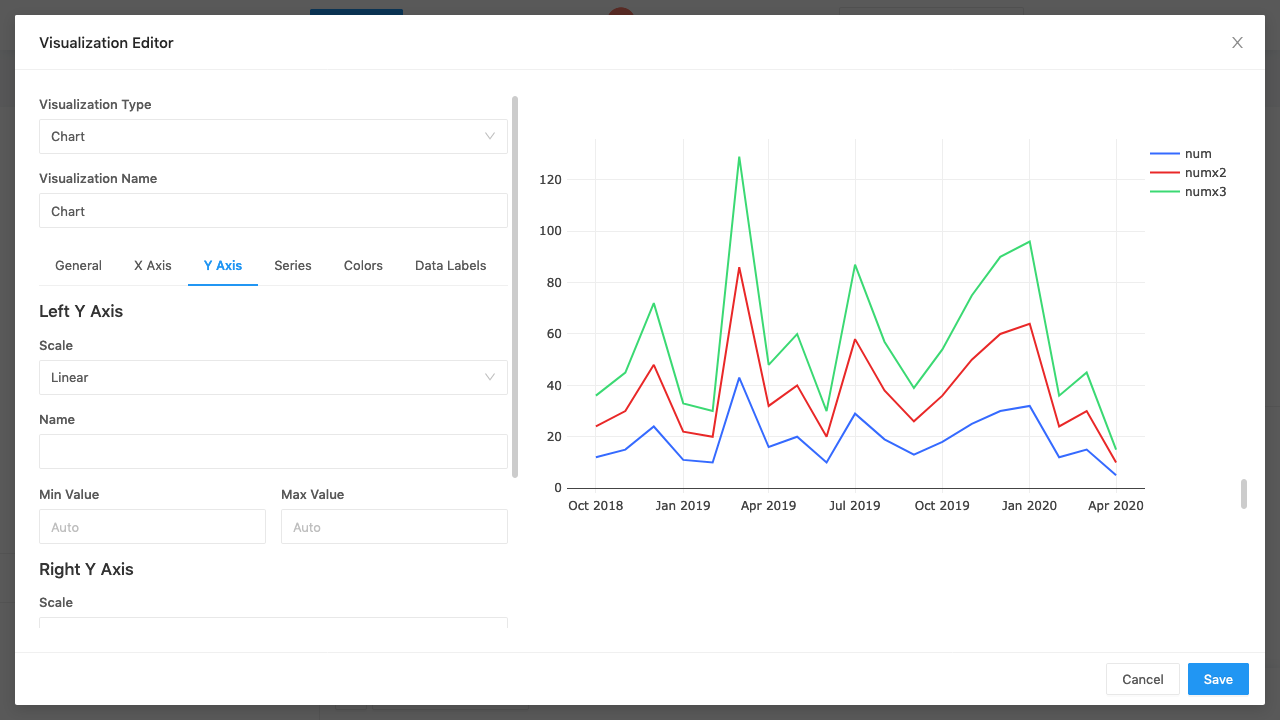
With full auto-scaling
I've clicked to hide the highest number (green line). The Y-axis re-scales to show more precision on the blue and red lines.
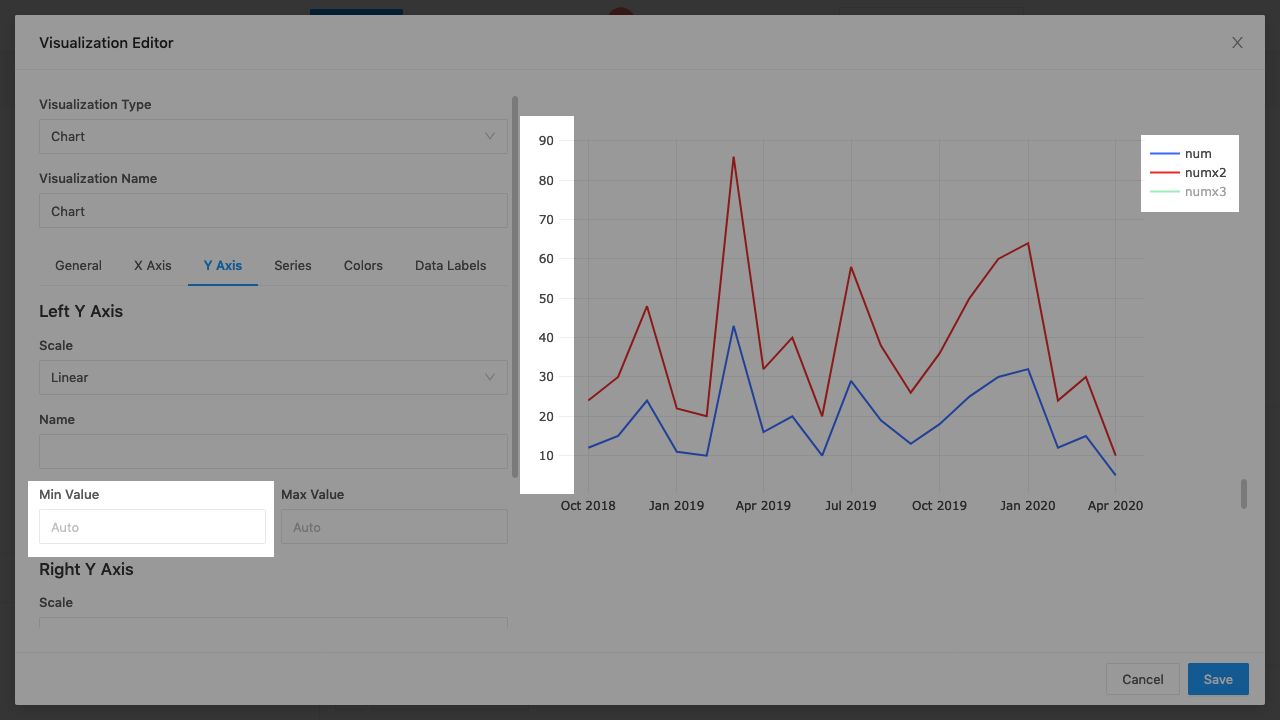
With auto-scale max and min forced to 0
I've clicked to hide the highest number (green line). The Y-axis does not re-scale. So the lines are inexplicably flat compared to how they would appear if the green line were not there in the first place.

Steps to Reproduce
- Write a query that returns at least two lines
- Force the Y-axis to be minimum of 0
- Click the legend to hide the higher numbered line
- Observe that the Y-axis does not re-scale to accommodate the only line being displayed.
Technical details:
- Redash Version: v9 Alpha
- Browser/OS: FF and Chrome
- How did you install Redash: SaaS
 susodapop
All 7 comments
Hey redash team. I’m new to the project but would love to help. Is someone already looking into this or could I help investigate further?
 reiff12
on 15 Apr 2020
reiff12
on 15 Apr 2020
@reiff12 you're welcome to take a stab at this! Thanks 🙇
 arikfr
on 16 Apr 2020
arikfr
on 16 Apr 2020
Hey @arikfr, so im getting started with this. Is it possible to hook into the preview backed in order to have populated data? I understand to connect the dev UI to an existing back-end use REDASH_BACKEND="http://preview-backend.redashapp.com" which i get to the login screen. I tried to create my own user using the preview admin account but when i follow the invite link the page is not found.
What would you recommend for a client dev env setup? Thanks for the help.
reiff12
on 17 Apr 2020
Creating user flow is a bit broken. You need to change the url you get in the invite. Replace the Netlify domain with http://preview-backend.redashapp.com.
Another option is to use one of the default users. Check the login page source to get the username/password. :)
Arik
On Fri, Apr 17 2020 at 6:38 AM, Tyler Reiff < [email protected] > wrote:
Hey @arikfr ( https://github.com/arikfr ) , so im getting started with
this. Is it possible to hook into the preview backed in order to have
populated data? I understand to connect the dev UI to an existing back-end
use REDASH_BACKEND="http://preview-backend.redashapp.com" which i get to
the login screen. I tried to create my own user using the preview admin
account but when i follow the invite link the page is not found.What would you recommend for a client dev env setup? Thanks for the help.
—
You are receiving this because you were mentioned.
Reply to this email directly, view it on GitHub (
https://github.com/getredash/redash/issues/4784#issuecomment-615020894 ) ,
or unsubscribe (
https://github.com/notifications/unsubscribe-auth/AAAROLCX7TQPMQXBJELL7K3RM7FLFANCNFSM4MDO5N3A
).
arikfr
on 17 Apr 2020
Hello @arikfr and @susodapop , I believe I've narrowed down this issue to not generating a new plotlyLayout object when the "plotly_restyle" event is fired. My proposed fix is when the chart container fires the "plotly_restyle" event, create a new layout object with the data filtered for what is visible. Does this make sense as a fix? If so I'll make a PR for review.
i.e.
const nextPlotlyLayout = {
    ...plotlyLayout,
    ...prepareLayout(
        container,
        options,
        plotlyData.filter(i => i.visible === true)
    ),
};

updateData(plotlyData, options);
Plotly.relayout(container, nextPlotlyLayout);
The file in question client/app/visualizations/chart/Renderer/PlotlyChart.jsx Line: 46
reiff12
on 18 Apr 2020
The current handler supposed to take care of this, but I think something is indeed wrong with the implementation:
We call updateData (which does the visibility filtering) but ignore its results. @kravets-levko does it has some side effects we want to trigger here?
arikfr
on 19 Apr 2020
We call updateData (which does the visibility filtering) but ignore its results. @kravets-levko does it has some side effects we want to trigger here?
updateData updates series in place. Plotly also holds a reference to layout and series, so no need to pass new data after updating. Also, no need to filter out invisible series - Plotly uses visible flag to hide unused series.
I'll check what may be wrong there, maybe something has changed in new Plotly version, or maybe it didn't work properly even before - I cant tell yet.
 kravets-levko
on 19 Apr 2020
kravets-levko
on 19 Apr 2020
Related issues
 alison985
·
3Comments
alison985
·
3Comments
 idoDavid
·
3Comments
idoDavid
·
3Comments
 hereischris
·
4Comments
arikfr
·
3Comments
arikfr
·
4Comments
hereischris
·
4Comments
arikfr
·
3Comments
arikfr
·
4Comments
Most helpful comment
Hey redash team. I’m new to the project but would love to help. Is someone already looking into this or could I help investigate further?