Red: Cannot drag face when display is scaled (Win10)
Transparent faces filled by a draw box cannot dragged if Windows 10 display scaled (display setting scale > 100%)
view [
    base loose with [color: none] draw [
        fill-pen   white
        box        10x10 82x82
    ]
]
If 82x82 changed to 81x81 then it can be dragged.
Expected behavior
Base face should be draggable by mouse.
Actual behavior
Face cannot be dragged.
Steps to reproduce the problem
On Windows 10
Right click on desktop, select Display Settings
Change Scale and Layout setting to 125%
Execute the above script and try to click & drag the face.
Red version and build date, operating system with version.
Red 0.6.3 Build date: 21-Dec-2017/23:39:43+03:00
Windows 10 (x64)
 endo64
All 7 comments
If the box is rounded then it works: box 10x10 82x82 1
endo64
on 24 Dec 2017
I can reproduce it on Win10, but no problems on Win7.
 qtxie
on 28 Dec 2017
qtxie
on 28 Dec 2017
Can someone please test and confirm that this works now.
I tested on Red 0.6.4 for Windows built 11-Jan-2019/5:18:27+03:00 commit #5e37a10
@greggirwin Then we can close this issue.
endo64
on 16 Jan 2019
No, it's still buggy on W7 x64.
Red 0.6.4 for Windows built 11-Jan-2019/5:18:27+03:00 commit #5e37a10
This is 80x80, draggable, all ok:
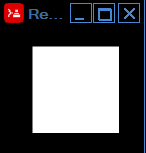
But this is what I get from 82x82 and 125% scaling factor:
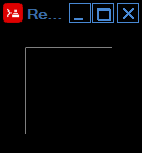
It's still draggable but I have to aim at the thin white line to do so. draw bug?
 hiiamboris
on 17 Jan 2019
hiiamboris
on 17 Jan 2019
@hiiamboris Thanks for testing.
It is funny a year ago @qtxie said I can reproduce it on Win10, but no problems on Win7. now it is the opposite :)
endo64
on 17 Jan 2019
If developing software was easy, everyone would do it.
 greggirwin
on 18 Jan 2019
greggirwin
on 18 Jan 2019
It's an MS GDI+ bug. The one we know already (it craps with alpha=0). We just didn't know it also happens in this scenario.
When scaling is set to 125%, the bug seems to appear when:
- both box corners are at coordinates (4N+2), which makes them appear at half a pixel. Whatever happens there internally in GDI+, it makes the box transparent. (Just a thought: maybe they have some float-to-byte casting, where the alpha value transcends from high 255.99999s into 256.00000001 something, and becomes 0)
- box color should be fully opaque (alpha = 0)
Anyway. We can only work around this as long as we're using GDI+.
To test:
repeat x 10 [view compose/deep [box 200x200 loose draw [fill-pen white box 10x10 (161 + x * 1x1) ]]]
Every 4th box drawn is transparent
hiiamboris
on 9 Oct 2019
Related issues
 9214
·
3Comments
9214
·
3Comments
 Skrylar
·
6Comments
Skrylar
·
6Comments
 rebolek
·
3Comments
rebolek
·
3Comments
 tmpbci
·
8Comments
hiiamboris
·
5Comments
tmpbci
·
8Comments
hiiamboris
·
5Comments