Recyclerlistview: [Maybe a bug] Rendering issue
I am using this great library to do my project. The thing is it fires componentWillUpdate instead of constructor in the first place. I found that when it wont fire Constructor, it will use an old state and props of random previous item, so it makes my logic wrong. Sorry for my bad English. Here is my codes:
It is how i set dataProvider, i never add statbleID but i saw it on the blog so i try to add it into, but it is still not working.

Here is my custom component class:

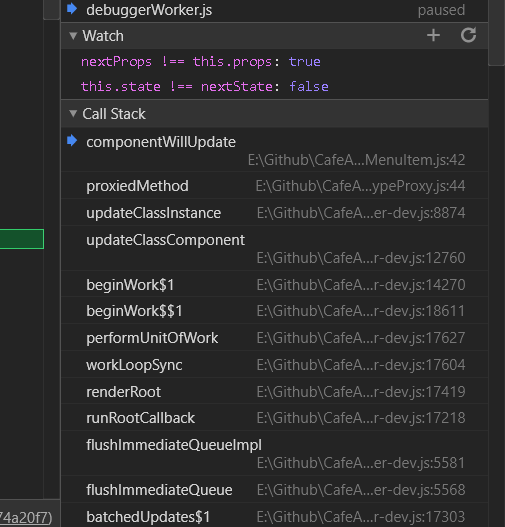
And here is the screenshot from Chrome Debugger, this.props contains some value of random previous item. The first 8 items when RCL displays in the first place goes into Constructor and not go to componentWillUpdate. I dont know why it happens
Thanks for reading, please help me !
 maxakak1998
All 32 comments
Hi, This is not a bug but the way recycling works as explained in #200 . When a list item which has been mounted gets recycled to render a new item, it does not unmount but instead only updated by changing the data being passed to it. Therefore since the same component is being reused, its constructor would not be called. You should not be storing a local state while recycling and instead pass that data as well in the dataProvider. Make sure to modify the rowHasChanged method of the dataProvider accordingly in order to render the items which have changed.
 arunreddy10
on 14 Nov 2019
arunreddy10
on 14 Nov 2019
Hi, This is not a bug but the way recycling works as explained in #200 . When a list item which has been mounted gets recycled to render a new item, it does not unmount but instead only updated by changing the data being passed to it. Therefore since the same component is being reused, its constructor would not be called. You should not be storing a local state while recycling and instead pass that data as well in the dataProvider. Make sure to modify the rowHasChanged method of the dataProvider accordingly in order to render the items which have changed.
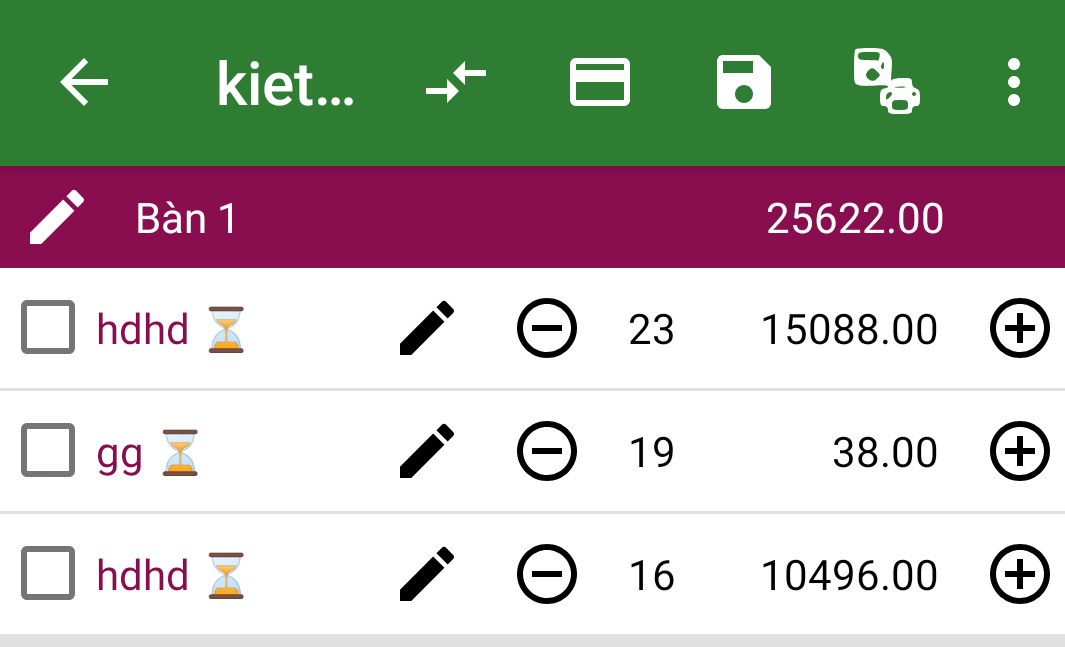
So, it is how my item look like. I want to press plus button and minus button and then the state of this item will be changed. If i cant hold the local state like you said. So how to do it ? Can you provide a good set up to avoid my case ? Thanks
maxakak1998
on 14 Nov 2019
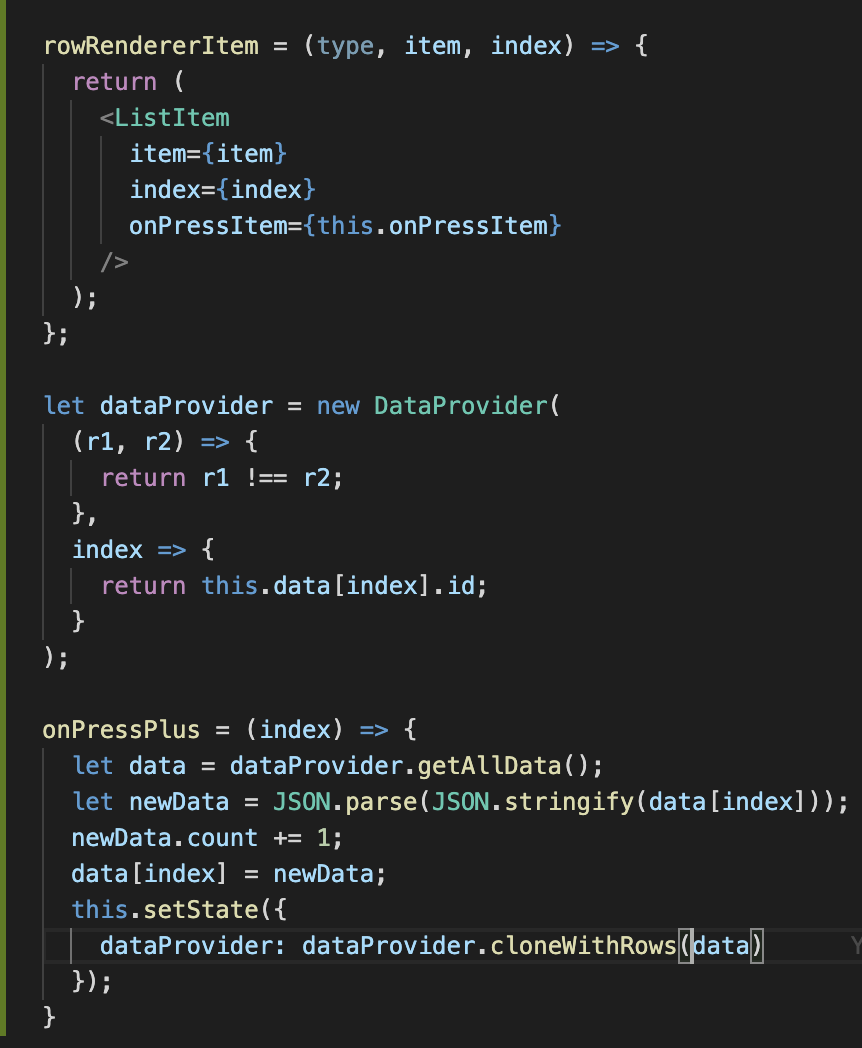
You could something similar to this. The idea is to pass the state as part of the data to each item and callbacks to handle the changes as well. You could update the data item in the callback and trigger a setState for the update. Make sure to create a deep copy of the object and then make your changes to the new object before assigning it back to the data array.
arunreddy10
on 14 Nov 2019
Closing due to inactivity
arunreddy10
on 17 Nov 2019
I want to reopen this issue. Arun, I have tried the implementation that you've asked, but still even after I change the count (or in my case _a like_) , The list does not re-render I am getting the changed value in the data, when I console it, but the list doesn't respond to this change, can you have a look at the following and let me know where I made a blunder?
Here is my data provider:
 let dataProvider = new DataProvider((r1, r2) => {
            if(r1 === r2){
                return r1.isLiked !== r2.isLiked
            }
            return r1 !== r2;
        });
And the data is nothing but an array of objects each object have three keys, title, id and isLiked.
My rendered card that I am using looks somewhat like this.
 _rowRenderer(type, data, index) {
        //You can return any view here, CellContainer has no special significance
        switch (type) {
            case "LikeableCard":
                return (
                    <StatefulCard title='Sometitle' index={index} isLiked={data.isLiked} content={data.title} onLike={() => this.handleLike(index)}/>
                );
            default:
                return null;
        }
    }
And here is how I handle like press on the stateful card
    handleLike(index) {
        console.log('This was liked ' + JSON.stringify(index) );
        let data = this.state.dataProvider.getAllData();
        console.log(data)
        data[index].isLiked = true
        this.setState({
            dataProvider: this.state.dataProvider.cloneWithRows(data)
        }, () => console.log('The data is' + JSON.stringify(data) ))
    }
In my console I am able to find that after clicking the like the data array is changed but the component is not re rendered, can you help?
 Wraith722
on 12 Dec 2019
Wraith722
on 12 Dec 2019
An update on this, Now I can see the change but only after I scroll up and down once/twice, so the user needs to scroll down one or two times and come back to the same card to see the liked status changed, any ideas?
Wraith722
on 12 Dec 2019
Hii, Let me look into the issue and get back to you.
arunreddy10
on 12 Dec 2019
Sure, let me know if I can be of any assistance.
Wraith722
on 12 Dec 2019
So, I just wanted to conclude what has been happening in this thread, there is not much to conclude but, you can NOT set the state in the any of the components or even on the page level itself because that causes recycled state persistence problems, I don't want to be use extendedState as my list goes on to almost 10K list items, _extendedState re-renders are performance degrading_, that is a no go. So if I have cards that change their state like _they get elevated_ or _they change colours_ or anything on one particular card, then how do I reflect that instantly without any scrolls. Can this be achieved in this RLV library?
In summary (TLDR):
- You can not play with state in this RLV, if you do then changing a state on one component will also show that the other component that is reusing the original component will also have the same applied state on it.
Even if you try to break down the components and try to set the state internally within them it still won't work as that very component is being reused itself and still the problem prevails.
If anyone has any other alternatives to add please feel free, and Arun, I am desperately waiting for your reply on this thread.
Wraith722
on 12 Dec 2019
Hii @Wraith722 , I have looked into the issue and i don't see a reason why it shouldn't work. If the rowHasChanged method is correct, then the item should re-render with the new data. Could you put together a sample expo which we could use to debug the issue?
arunreddy10
on 12 Dec 2019
rowHasChanged, is that a prop of RLV?? , I can't seem to find that method, can you please redirect me to the documentation for that, I need to learn about that right now.
Wraith722
on 12 Dec 2019
It is the method which is passed as the first parameter to the dataProvider when it is created.
arunreddy10
on 12 Dec 2019
I need to know more about this as of now I only have this in my dataProvider, which, I think is completely wrong, since I have not written rowHasChanged anywhere, my bad, please assist me by redirecting me towards some documentation or any video I can refer to to learn more about this rowHasChanged, and thankyou for shining a light of hope, here is the code I have:
  let dataProvider = new DataProvider((r1, r2) => {
            if(r1 === r2){
                return r1.isLiked !== r2.isLiked
            }
            return r1 !== r2;
        });
The method which you have passed to the dataProvided is the rowHasChanged method. It compares the older and the newer data item and returns whether the item has changed or not. It appears that your implementation is correct. Could you provide an expo so that we can debug the issue?
arunreddy10
on 12 Dec 2019
Arun, I am a little confused, let me get back to you on this, I need to relearn the lib, I think I have missed out on a couple of things.I will surely set up the expo and get back to you, is it ok if I take a while (sometime to setup expo and relearn) or are you closing this?
Wraith722
on 12 Dec 2019
The issue will remain open. Please do provide an expo so that we can debug the issue further.
arunreddy10
on 12 Dec 2019
@arunreddy-flipkart https://snack.expo.io/@arunreddy10/19bb8e this extendedState method can't work too, need scroll up and down.
 mingxin-yang
on 20 Dec 2019
mingxin-yang
on 20 Dec 2019
https://snack.expo.io/@arunreddy10/rlv-extendedstate-demo. also this
mingxin-yang
on 20 Dec 2019
Hii @mingxin-yang , The demo appears to be working fine. When the user clicks on the item to be added to wishlist, the extendedState is updated triggering a re-render of the entire list. It appears to be working as expected on expo - https://snack.expo.io/@arunreddy10/rlv-extendedstate-demo
arunreddy10
on 20 Dec 2019
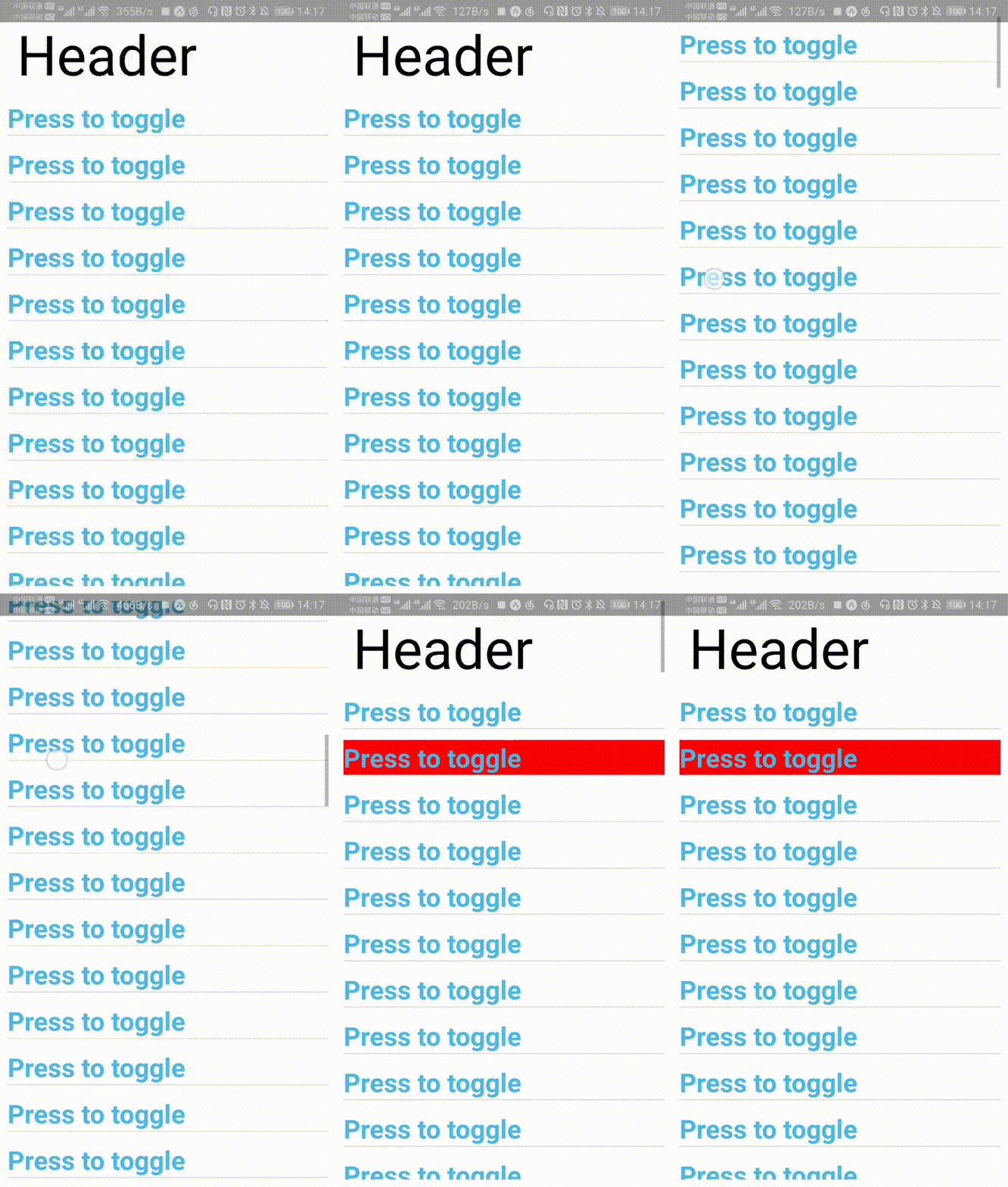
@arunreddy-flipkart is it fine?
mingxin-yang
on 20 Dec 2019
Hii, Please check https://snack.expo.io/@arunreddy10/rlv-extendedstate-demo. The other link appears to have an old version of the code. I will update the link in the readme.
arunreddy10
on 20 Dec 2019
Yes, this gif is work on https://snack.expo.io/@arunreddy10/rlv-extendedstate-demo
mingxin-yang
on 20 Dec 2019
Hii, Please check now - https://snack.expo.io/@arunreddy10/rlv-extendedstate-demo. It appears the changes were not saved which i have done now.
arunreddy10
on 20 Dec 2019
Thank you! It works now!
mingxin-yang
on 20 Dec 2019
Have you shown examples of how to use partial refresh?
I use like this,
let dataProvider = new DataProvider((r1, r2) => {
            if(r1 === r2){
                return r1.isLiked !== r2.isLiked
            }
            return r1 !== r2;
        });
but it can't work
mingxin-yang
on 20 Dec 2019
Have you checked if the list item is a pure component because if it were, a shallow check in the shouldComponentUpdate would prevent it from re-rendering.
arunreddy10
on 20 Dec 2019
@arunreddy-flipkart don't have pure component
mingxin-yang
on 20 Dec 2019
@arunreddy-flipkart https://snack.expo.io/@miiii/rlv-extendedstate-demo This is my code to how to use dataProvider in my project. You see where is the problem. Thank you!
mingxin-yang
on 23 Dec 2019
@mingxin-yang I will look into the issue.
arunreddy10
on 23 Dec 2019
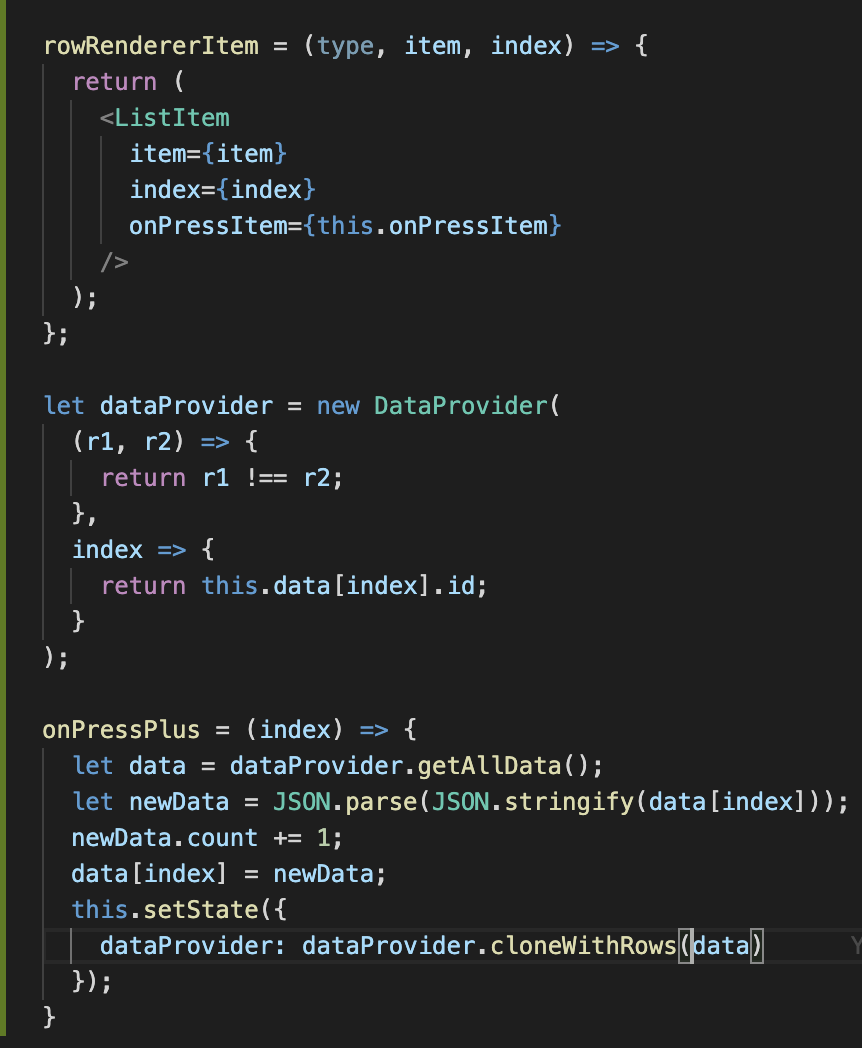
@mingxin-yang, @Wraith722 I have identified the issue. While making changes to any item in the data array, create a deep copy of the object and assign the new object as the item at that index. This is because mutating the same object results in inconsistencies due to which the rowHasChanged method won't work as expected. Please find this expo as well - https://snack.expo.io/@arunreddy10/36f8f1
arunreddy10
on 23 Dec 2019
It works, Thank you!
mingxin-yang
on 23 Dec 2019
Closing as the issue has been resolved
arunreddy10
on 1 Jan 2020
Related issues
 abrenoch
·
6Comments
abrenoch
·
6Comments
 h-asadollahi
·
8Comments
h-asadollahi
·
8Comments
 ErHarinderSingh
·
6Comments
ErHarinderSingh
·
6Comments
 VilleKokkarinen
·
6Comments
VilleKokkarinen
·
6Comments
 sm2017
·
5Comments
sm2017
·
5Comments
Most helpful comment
@arunreddy-flipkart https://snack.expo.io/@arunreddy10/19bb8e this extendedState method can't work too, need scroll up and down.