Realsense-ros: How to get RGB Depth stream in python ROS
Hi @doronhi,
Actually, I am getting RGB-D from the stream but it is in black color can you please help me with that here I am posting my code and Image of the output.
#!/usr/bin/env python3
import rospy
from sensor_msgs.msg import Image
from cv_bridge import CvBridge
import cv2
import numpy as np

def callback(data):
  br = CvBridge()
  rospy.loginfo("receiving video frame")
  current_frame = br.imgmsg_to_cv2(data)
  cv_image_array = np.array(current_frame, dtype = np.dtype('f8'))
  cv_image_norm = cv2.normalize(cv_image_array, cv_image_array, 0, 1, cv2.NORM_MINMAX)
  cv2.imshow("camera", cv_image_norm)
  print(cv_image_norm.shape)
  cv2.waitKey(1)

def receive_message():
  rospy.init_node('video_sub_py', anonymous=True)
  rospy.Subscriber('/camera/aligned_depth_to_color/image_raw', Image, callback)
  rospy.spin()
  cv2.destroyAllWindows()

if __name__ == '__main__':
  receive_message()
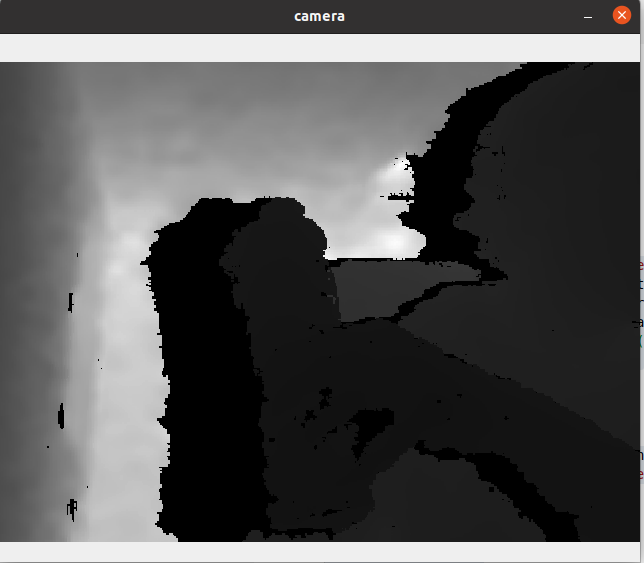
Thank you so much for the help
question
 ranjitkathiriya
All 3 comments
Hi @ranjitkathiriya I wonder if you need to define a Colorizer filter in your ROS launch.
 MartyG-RealSense
on 19 Nov 2020
MartyG-RealSense
on 19 Nov 2020
👍1
Thanks, Solved::
by running this ros command:
roslaunch realsense2_camera rs_camera.launch enable_pointcloud:=true filters:=colorizer align_depth:=true
ranjitkathiriya
on 20 Nov 2020
Great news, thanks for the update!
MartyG-RealSense
on 20 Nov 2020
👍1
Was this page helpful?
0 / 5 - 0 ratings
Related issues
 KentaKawamata
·
6Comments
KentaKawamata
·
6Comments
 antoan
·
3Comments
antoan
·
3Comments
 LEGO999
·
4Comments
LEGO999
·
4Comments
 ELDEMIRY
·
5Comments
ELDEMIRY
·
5Comments
 jlysnantel
·
7Comments
jlysnantel
·
7Comments