Realm-js: iOS build error: realm-js-ios/jsc_init.h file not found
Goals
Successfully build on iOS device using Realm version 10.3.0 after upgrading from version 10.1.4
Expected Results
No errors when building on an iOS device.
Actual Results
When compiling/building in XCode, the build fails with the message:
node_modules/realm/react-native/ios/RealmReact/RealmReact.mm:22:9: fatal error: 'realm-js-ios/jsc_init.h' file not found
Steps to Reproduce
- Upgrade realm from version 10.4.1 to 10.3.0 using yarn:
yarn upgrade realm@latest - Run pod install with
--repo-updateflag iniosdirectory:pod install --repo-update - Open XCode, plug iOS device into Mac, and start the build
Code Sample
N/A
Version of Realm and Tooling
- Realm JS SDK Version: 10.3.0
- Node or React Native: React Native 0.63.4
- Client OS & Version: iOS 14.4
- Which debugger for React Native: None
 abandisch
All 21 comments
Between 10.2.1 and 10.3.0 we migrated to a new build system and how we consume our primary dependencies. We should have been more explicit in our release notes about this. For iOS, we are now distributing binaries in the npm package to speed up your build time.
My best guess is that our migration and--repo-update might actually not work well together. Does it work if you omit --repo-update?
 kneth
on 7 Apr 2021
kneth
on 7 Apr 2021
@kneth I’m also experiencing this issue and with or without the —repo-update flag makes no difference, at least in my situation.
 devo2540
on 7 Apr 2021
devo2540
on 7 Apr 2021
@kneth I also experiencing the same issue without -repo-update
 sergetk
on 7 Apr 2021
sergetk
on 7 Apr 2021
@kneth tried without --repo-update and as others have said, still seeing the same issue.
abandisch
on 8 Apr 2021
Thank you for the updates. Our best guess is that the changes in how we distribute the binaries prevent an easy upgrade. We need to investigate a bit more in order to come up with suggestions.
kneth
on 8 Apr 2021
@abandisch have you tried cleaning your build folder in xcode? (⇧⌘K)
 steffenagger
on 9 Apr 2021
steffenagger
on 9 Apr 2021
@steffenagger I have tried cleaning the build folder, but still get the same error when building. I've also tried adding the location to the missing header file under Build Settings -> Search Paths and doing a clean/build, but get the same error as well.
abandisch
on 9 Apr 2021
@abandisch ok, just making sure - we'll investigate.
steffenagger
on 9 Apr 2021
@steffenagger
Build Step:
clean/build -> rm -rf Pods && pod install
But I also had the same problem.
 nsh96hp
on 12 Apr 2021
nsh96hp
on 12 Apr 2021
Ditto, same issue here. Downgrading for the time being.
 tedi
on 19 Apr 2021
tedi
on 19 Apr 2021
This patch works for me (both on device and simulator):
diff --git a/node_modules/realm/RealmJS.podspec b/node_modules/realm/RealmJS.podspec
index 00470a8..e038bd2 100644
--- a/node_modules/realm/RealmJS.podspec
+++ b/node_modules/realm/RealmJS.podspec
@@ -63,7 +63,8 @@ Pod::Spec.new do |s|
                               }

   # TODO: Consider providing an option to build with the -dbg binaries instead
-  s.ios.vendored_frameworks = 'react-native/ios/realm-js-ios.xcframework'
+  s.ios.vendored_libraries = 'react-native/ios/realm-js-ios.xcframework/ios-arm64_armv7/librealm-js-ios.a'
+  s.ios.public_header_files = ['react-native/ios/realm-js-ios.xcframework/ios-arm64_armv7/Headers/realm-js-ios/jsc_init.h', 'react-native/ios/realm-js-ios.xcframework/ios-arm64_armv7/Headers/realm-js-ios/rpc.hpp']

   s.dependency 'React'
   # TODO: Ensure the same version of GCDWebServer is used for Android
diff --git a/node_modules/realm/react-native/ios/RealmReact/RealmReact.mm b/node_modules/realm/react-native/ios/RealmReact/RealmReact.mm
index 7583668..016efa0 100644
--- a/node_modules/realm/react-native/ios/RealmReact/RealmReact.mm
+++ b/node_modules/realm/react-native/ios/RealmReact/RealmReact.mm
@@ -19,7 +19,7 @@
 #import "RealmReact.h"
 #import "RealmAnalytics.h"

-#import <realm-js-ios/jsc_init.h>
+#import "jsc_init.h"

 #import <React/RCTBridge+Private.h>
 #import <React/RCTJavaScriptExecutor.h>
@@ -31,7 +31,7 @@
 #import <net/if.h>

 #if DEBUG
-#include <realm-js-ios/rpc.hpp>
+#include "rpc.hpp"
 #import "GCDWebServer.h"
 #import "GCDWebServerDataRequest.h"
 #import "GCDWebServerDataResponse.h"
If applying manually, please note vendored_frameworks is changed to vendored_libraries.
 Przytua
on 23 Apr 2021
Przytua
on 23 Apr 2021
Thank you for sharing @Przytua 🙏
steffenagger
on 26 Apr 2021
@abandisch abandisch remove your yarn.lock or package.lock. Resolved this issue for me.
 cakesoft-utkarsh
on 28 Apr 2021
cakesoft-utkarsh
on 28 Apr 2021
@Przytua - thanks for the suggested patch. I've tried to implement it but for some reason it still can't find the header file. I cleaned my build folder before trying to build. I'll keep trying ...
Build output:

My RealmJS.podspec:
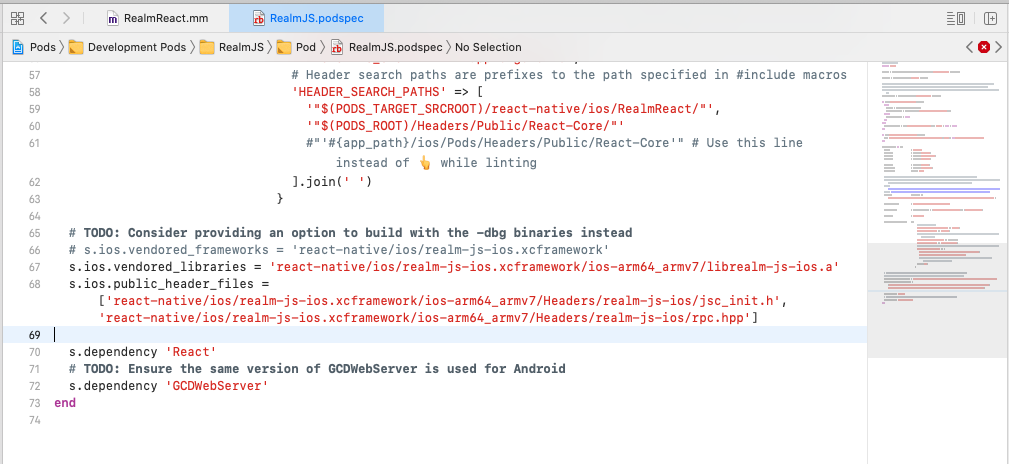
My RealmReact.mm:

abandisch
on 29 Apr 2021
@abandisch did you do pod install after updating the podspec? Sorry, I forgot to mention it.
Przytua
on 29 Apr 2021
@Przytua - thanks again. I initially did this:
yarn upgrade realm@latest- in the ios directory,
pod install - update files, per your patch
- open xcode, clean build folder, build, and it failed with the missing header error
Per your recommendation, I've since done it this way:
yarn upgrade realm@latest- update files, per your patch
- in the ios directory,
pod install - open xcode, clean build folder, and build
Now it successfully finds the missing header file, which is great, but I ran into this error now after it finished building:
ld: warning: ignoring file /path/to/project/node_modules/realm/react-native/ios/realm-js-ios.xcframework/ios-arm64_armv7/librealm-js-ios.a, missing required architecture x86_64 in file /path/to/project/node_modules/realm/react-native/ios/realm-js-ios.xcframework/ios-arm64_armv7/librealm-js-ios.a (2 slices)
Undefined symbols for architecture x86_64:
  "_RJSInvalidateCaches", referenced from:
      -[RealmReact invalidate] in libRealmJS.a(RealmReact.o)
  "realm::rpc::RPCServer::perform_request(std::__1::basic_string<char, std::__1::char_traits<char>, std::__1::allocator<char> > const&, std::__1::basic_string<char, std::__1::char_traits<char>, std::__1::allocator<char> > const&)", referenced from:
      ___22-[RealmReact startRPC]_block_invoke in libRealmJS.a(RealmReact.o)
  "realm::rpc::RPCServer::~RPCServer()", referenced from:
      std::__1::default_delete<realm::rpc::RPCServer>::operator()(realm::rpc::RPCServer*) const in libRealmJS.a(RealmReact.o)
  "_RJSInitializeInContext", referenced from:
      _initializeOnJSThread(OpaqueJSContext* () block_pointer) in libRealmJS.a(RealmReact.o)
  "realm::rpc::RPCServer::RPCServer()", referenced from:
      std::__1::__unique_if<realm::rpc::RPCServer>::__unique_single std::__1::make_unique<realm::rpc::RPCServer>() in libRealmJS.a(RealmReact.o)
ld: symbol(s) not found for architecture x86_64
clang: error: linker command failed with exit code 1 (use -v to see invocation)
Following your patch, I updated RealmJS.podspec with the x86_64 equivalent library and headers:
  s.ios.vendored_libraries = ['react-native/ios/realm-js-ios.xcframework/ios-arm64_i386_x86_64-simulator/librealm-js-ios.a']
  s.ios.public_header_files = ['react-native/ios/realm-js-ios.xcframework/ios-arm64_i386_x86_64-simulator/Headers/realm-js-ios/jsc_init.h', 'react-native/ios/realm-js-ios.xcframework/ios-arm64_i386_x86_64-simulator/Headers/realm-js-ios/rpc.hpp']
Ran pod install, opened the project in XCode, clean build folder, run the build and it successfully built!
abandisch
on 29 Apr 2021
@abandisch yes, pod install must be ran after doing changes in the RealmJS.podspec sorry for not pointing that out before.
Regarding the Undefined symbols for architecture x86_64: issue - for me it works when I use the ios-arm64_armv7 lib. Works both on simulator, and on device (running or archiving). I assume this error was thrown when you built for simulator - in this situation ios-arm64_i386_x86_64 seems an obvious pick, as it combines all simulator architectures. But please try if it works for you when building for device, or archiving.
I'm not really sure how and why it works for me on both device and sim, but I checked that in projects Build Settings i have only standard archs set:

I assumed while building for simulator, it automatically changes these archs to simulator archs, and somehow also changes the paths and links proper librealm-js-ios.a library - but I might be wrong here.
If it works for you both on device and simulator, then all good 👍
Przytua
on 29 Apr 2021
@Przytua - sorry for the late response.
I tried building for on an iOS device and it failed with the following error, which I guess, was to be expected:
ld: in /path/to/project/node_modules/realm/react-native/ios/realm-js-ios.xcframework/ios-arm64_i386_x86_64-simulator/librealm-js-ios.a(platform.o), building for iOS, but linking in object file built for iOS Simulator, file '/path/to/project/node_modules/realm/react-native/ios/realm-js-ios.xcframework/ios-arm64_i386_x86_64-simulator/librealm-js-ios.a'
Checking my Build Settings, I also have the standard archs:

I might revert back to your original patch, because I think your assumption that it somehow automagically switches between the appropriate path/library makes a lot of sense. I'll try debug my project settings from there and post back here if I get somewhere. Thanks for your help.
abandisch
on 4 May 2021
@abandisch my assumption was obviously wrong, after cleaning Derived Data I can't build for simulator any more (so I had some old simulator intermediate stuff there probably). But I just noticed that I was using old CocoaPods version (1.9.3 precisely) and latest version (1.10.1) has some fixes related to Frameworks. After updating to this version, removing all the changes from my patch, and running pod install again, it works perfectly even after cleaning derived data, both on device and simulator.
@steffenagger so the fix is to use CocoaPods version at least 1.10.1. Would be great if you could add this info to the readme. Thanks!
Przytua
on 6 May 2021
Thanks again @Przytua - our readme is quite thin (linking to the docs), but this should definitely go in our docs. I'll pass it along!
steffenagger
on 6 May 2021
A minimum CocoaPods version has been added to the docs (1.10.1) : https://docs.mongodb.com/realm/sdk/react-native/install/ - and I'll discuss with the team, if prerequisites shouldn't just be listed in the readme.
Just to sum up: Update CocoaPods to version 1.10.1 (thanks again to @Przytua).
steffenagger
on 7 May 2021
Related issues
 ugendrang
·
3Comments
ugendrang
·
3Comments
 laznrbfe
·
3Comments
laznrbfe
·
3Comments
 Chris-Petty
·
3Comments
Chris-Petty
·
3Comments
 timanglade
·
3Comments
timanglade
·
3Comments
 CrystalRanita
·
3Comments
CrystalRanita
·
3Comments