
I can rebuild app only after I delete Pods and build folders
Expected Results
build process is finished and app is running
Actual Results
building is failed
ld: symbol(s) not found for architecture x86_64
clang: error: linker command failed with exit code 1 (use -v to see invocation)
Steps to Reproduce
- react-native run-ios --simulator="iPhone 8"
- build and run app second time: react-native run-ios --simulator="iPhone 8"
Version of Realm and Tooling
- Realm JS SDK Version: 3.6.3
- Node or React Native: 0.61.5
- Client OS & Version: macos mojave, iOS
- Which debugger for React Native: None
 v0lume
All 10 comments
Also this is not reproduced on previous versions of realm-js
v0lume
on 26 Jan 2020
We have the same issue and only deleting all Pods and re-installing those helps.
However, I did not see this issue re-appearing when setting default node version to 10.
Can you try with nvm alias default 10 (if you use nvm) or just making sure that your PATH points to node 10 first?
 bimusiek
on 28 Jan 2020
bimusiek
on 28 Jan 2020
@bimusiek im using v10.16.0 as default
v0lume
on 28 Jan 2020
Got this issue after doing pod install with node v12 in PATH.
Fixed after doing rm -rf ios/Pods and later pod install
 olessavluk
on 3 Feb 2020
olessavluk
on 3 Feb 2020
@v0lume I assume that the advices from @bimusiek and @olessavluk fixed your issue. If not, please reopen the issue.
 kneth
on 3 Feb 2020
kneth
on 3 Feb 2020
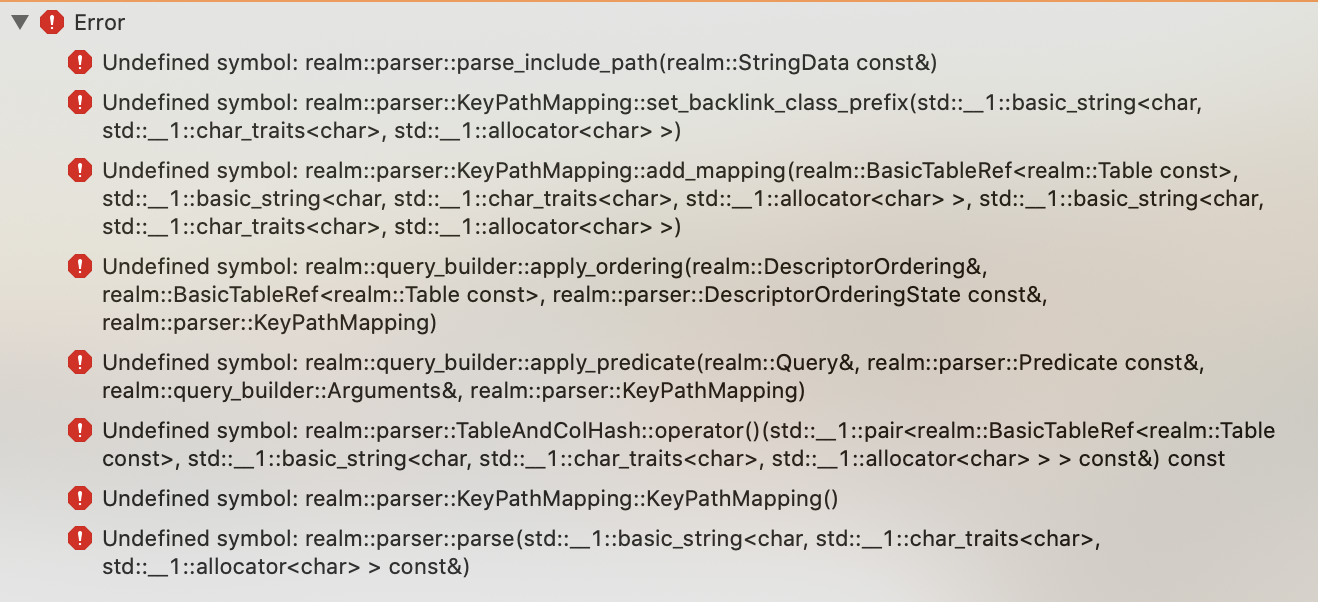
I keep getting similar errors from RealmJS every time I install a Cocoapod. Whenever I install a Cocoapod, I need to build my project again with XCode. Realm will give me the same errors and I will then need to pod install again. The errors go away the second time. Here's what the errors look like:
 EricWiener
on 8 Apr 2020
EricWiener
on 8 Apr 2020
I've update realmjs from 3.6.3 to 5.0.3 to support node lts. Unfortunately after this update, I also have been faced with this issue. It works fine if I delete Pods folder and reinstall pods but it's pretty annoying especially on ci. Normally I use cached one in order to reduce the build time if there is no change. However I can't use the cache strategy anymore due to this issue.
 kyo504
on 13 Apr 2020
kyo504
on 13 Apr 2020
@EricWiener & @kyo504 please open your own issues (with instructions on how to reproduce them and ideally a sample git repository showing off the issue). This issue is closed as it seems the original author got their issue resolved.
 kraenhansen
on 14 Apr 2020
kraenhansen
on 14 Apr 2020
@kraenhansen Thanks for your response. I've issued a new ticket and linked this one.
kyo504
on 14 Apr 2020
Got this issue after doing
pod installwith node v12 inPATH.Fixed after doing
rm -rf ios/Podsand laterpod install
This also solved my problem, thanks @olessavluk !
 zabojad
on 30 Apr 2020
zabojad
on 30 Apr 2020
Related issues
 MihaelIsaev
·
3Comments
MihaelIsaev
·
3Comments
 emrehayirci
·
3Comments
emrehayirci
·
3Comments
 arshbot
·
3Comments
arshbot
·
3Comments
 jmartindivmedianet
·
3Comments
jmartindivmedianet
·
3Comments
 timanglade
·
3Comments
timanglade
·
3Comments
Most helpful comment
Got this issue after doing
pod installwith node v12 inPATH.Fixed after doing
rm -rf ios/Podsand laterpod install