Realm-js: Missing Realm constructor. Did you run "react-native link realm"?
2019-10-12 18:12:48.003275+0800 mlmlApp[28520:193898] [] nw_socket_handle_socket_event [C5.1:1] Socket SO_ERROR [61: Connection refused]
2019-10-12 18:12:48.008963+0800 mlmlApp[28520:193898] [] nw_socket_handle_socket_event [C5.2:1] Socket SO_ERROR [61: Connection refused]
2019-10-12 18:12:48.017092+0800 mlmlApp[28520:193888] [] nw_connection_get_connected_socket [C5] Client called nw_connection_get_connected_socket on unconnected nw_connection
2019-10-12 18:12:48.017465+0800 mlmlApp[28520:193888] TCP Conn 0x6000020f1680 Failed : error 0:61 [61]
2019-10-12 18:12:48.222 [error][tid:com.facebook.react.JavaScript] Error: Missing Realm constructor. Did you run "react-native link realm"? Please see https://realm.io/docs/react-native/latest/#missing-realm-constructor for troubleshooting
2019-10-12 18:12:48.226 [fatal][tid:com.facebook.react.ExceptionsManagerQueue] Unhandled JS Exception: Error: Missing Realm constructor. Did you run "react-native link realm"? Please see https://realm.io/docs/react-native/latest/#missing-realm-constructor for troubleshooting
2019-10-12 18:12:48.253 [error][tid:com.facebook.react.JavaScript] Invariant Violation: Module AppRegistry is not a registered callable module (calling runApplication)
2019-10-12 18:12:48.256 [fatal][tid:com.facebook.react.ExceptionsManagerQueue] Unhandled JS Exception: Invariant Violation: Module AppRegistry is not a registered callable module (calling runApplication)
Version of Realm and Tooling
- Realm JS SDK Version: 3.2.0
- Node or React Native: 0.61.2
- Client OS & Version: Mac10.14.6
- Which debugger for React Native: xCode
I have followed the documentation ‘https://realm.io/docs/javascript/latest/#missing-realm-constructor’ but it not work
 Yieron
All 55 comments

Yieron
on 12 Oct 2019
Android is ok
Yieron
on 12 Oct 2019
error React Native CLI uses autolinking for native dependencies, but the following modules are linked manually:
- react-native-gesture-handler (to unlink run: "react-native unlink react-native-gesture-handler")
- react-native-screens (to unlink run: "react-native unlink react-native-screens")
- realm (to unlink run: "react-native unlink realm")
This is likely happening when upgrading React Native from below 0.60 to 0.60 or above. Going forward, you can unlink this dependency via "react-native unlink" and it will be included in your app automatically. If a library isn't compatible with autolinking, disregard this message and notify the library maintainers.
Read more about autolinking: https://github.com/react-native-community/cli/blob/master/docs/autolinking.md
Yieron
on 12 Oct 2019
same issue for me as well. android is ok, iOS does not work after upgrading from 0.59.9 to 0.61.2. realm 3.2.0
 manithin
on 13 Oct 2019
manithin
on 13 Oct 2019
I believe it is related to #2460 - and we are working on it.
 kneth
on 15 Oct 2019
kneth
on 15 Oct 2019
@kneth, so let us know, the developers are waiting for their projects to be developed and so on.
 alpamys-qanybet
on 16 Oct 2019
alpamys-qanybet
on 16 Oct 2019
We have identified a bug in v3.2.0, and we hope to have a fix ready tomorrow or Monday. Please use v3.1.0.
kneth
on 17 Oct 2019
I have verified that Realm JS 3.1.0 builds and runs successfully with the latest React Native 0.61.2. The bug @kneth mentions is unrelated to this particular issue. After installing Realm you should perform the manual linking (react-native link realm), until we've fixed https://github.com/realm/realm-js/issues/2460 - but it works if you just proceed as normal, for now.
 kraenhansen
on 17 Oct 2019
kraenhansen
on 17 Oct 2019
@Yieron did you update an existing project or start from scratch? Can you try with Realm JS 3.1.0 (which is now latest)?
kraenhansen
on 17 Oct 2019
@kraenhansen, you get it working for both iOS and Android on RN0.61.2 and realm v3.1.0, am I right?
alpamys-qanybet
on 17 Oct 2019
@kraenhansen can you elaborate on how you were able to get RN 0.61.2 working with 3.1.0? It looks like there is still an open bug (https://github.com/realm/realm-js/issues/2562) that contradicts your reply here.
Upon further thought, it appears that the error in https://github.com/realm/realm-js/issues/2562 is caused by using cocoapods to link the project dependencies. Are you still linking react and your other dependencies manually in the Link Binary with Libraries build phase on iOS?
 ahood12
on 17 Oct 2019
ahood12
on 17 Oct 2019
@Yieron did you update an existing project or start from scratch? Can you try with Realm JS 3.1.0 (which is now latest)?
I start from scratch. I will try with Realm JS 3.1.0. I'll give you feedback later.
Yieron
on 18 Oct 2019
We have identified a bug in v3.2.0, and we hope to have a fix ready tomorrow or Monday. Please use v3.1.0.
ok,I will try, thank you very much!
Yieron
on 18 Oct 2019
@Yieron did you update an existing project or start from scratch? Can you try with Realm JS 3.1.0 (which is now latest)?
My other app uses
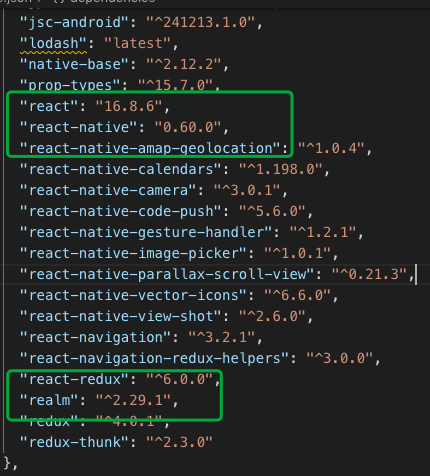
it is perfect!
Yieron
on 18 Oct 2019
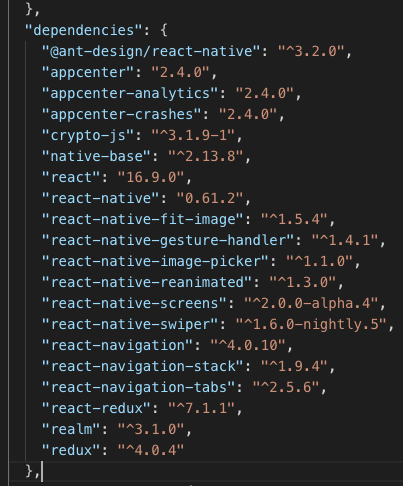
@kraenhansen @kneth
Realm JS SDK Version: 3.1.0
Node or React Native: 0.61.2
Client OS & Version: Mac10.14.6
Which debugger for React Native: xCode
npm install --save realm
react-native link realm
the same error.

Yieron
on 18 Oct 2019
@Yieron Please try to clear the build folder and verify that you have installed v3.1.0 (^3.1.0 might have installed v3.2.0).
kneth
on 18 Oct 2019
@Yieron Please try to clear the build folder and verify that you have installed v3.1.0 (
^3.1.0might have installed v3.2.0).
1 I delete node_modules
2 I close all simulators
3 I clean xCode
4 "realm": "^3.1.0",
4 npm install
5 react-native link
I am sure I have installed v3.1.0
When I comment out the following code, I can run it.
// const Realm = require('realm');
// class Person extends Realm.Object { }; //登录用户信息
// Person.schema = {
// name: 'Person',
// primaryKey: 'userID',
// properties: {
// userName: { type: 'string', default: '', optional: false },
// userID: { type: 'string', default: '', optional: false }, //optional:true 等价于 serID: 'string?', // optional property
// }
// }
// export default new Realm({
// schema: [Person],
// schemaVersion: 1
// });
The same error occurs when I let go of the code
Yieron
on 18 Oct 2019
Im getting the same error on react-native 0.59.8 so doesnt seem to be related to autolinking
 dakkafex
on 20 Oct 2019
dakkafex
on 20 Oct 2019
Im getting the same error on react-native 0.59.8 so doesnt seem to be related to autolinking
My other app uses "react-native": "0.60.0", "realm": "^2.29.1", its ok.
Yieron
on 20 Oct 2019
if i try to downgrade i end up with
"could not read data from /node_modules/realm/tests/ios/Info.plist': The file “Info.plist” couldn’t be opened because there is no such file."
originating from the RealmJSTests target
dakkafex
on 20 Oct 2019
I was able to make it work for me.
dependencies: {
"react": "16.8.6",
"react-native": "0.60.5",
"realm": "3.2.0", // 3.3.0 not working
}Create file _react-native.config.js_ in root folder (I think this step is not necessary, but it prevent error messages)
module.exports = {
    dependencies: {
        'realm': {
            platforms: {
                ios: null,
            },
        },
    },
}
In xcode:
- Add libraries:
node_modulesrealm\react-native\ios\RealmReact.xcodeproj
node_modulesrealm\src\RealmJS.xcodeproj
Deal with issue with signing in target RealmJSTests. I choose the Team for Sign certificate, but I think also the option is simple delete this target.
Link binary from pervious added libraries:
libRealmJS.a and libRealmReact.a
Thanks this https://github.com/realm/realm-js/issues/2549#issuecomment-539239010 and this https://github.com/realm/realm-js/issues/2460#issuecomment-543905035 messages
 msotnikov
on 20 Oct 2019
msotnikov
on 20 Oct 2019
I was able to make it work for me.
dependencies: {
"react": "16.8.6",
"react-native": "0.60.5",
"realm": "3.2.0", // 3.3.0 not working
}
- Create file _react-native.config.js_ in root folder (I think this step is not necessary, but it prevent error messages)
module.exports = {
    dependencies: {
        'realm': {
            platforms: {
                ios: null,
            },
        },
    },
}
In xcode:
- Add libraries:
node_modulesrealm\react-native\ios\RealmReact.xcodeproj
node_modulesrealm\src\RealmJS.xcodeproj
- Deal with issue with signing in target RealmJSTests. I choose the Team for Sign certificate, but I think also the option is simple delete this target.
- Link binary from pervious added libraries:
libRealmJS.a and libRealmReact.aThanks this #2549 (comment) and this #2460 (comment) messages
ok,thanks ,I will try later
Yieron
on 21 Oct 2019
@Yieron any results?
dakkafex
on 22 Oct 2019
@Yieron any results?
No result,I tried, failed
Yieron
on 22 Oct 2019
@Yieron any results?
No result,I tried, failed
But it works. Can you make xcode screenshots?
msotnikov
on 26 Oct 2019
I have verified that Realm JS 3.1.0 builds and runs successfully with the latest React Native 0.61.2. The bug @kneth mentions is unrelated to this particular issue. After installing Realm you should perform the manual linking (
react-native link realm), until we've fixed #2460 - but it works if you just proceed as normal, for now.
Could you give an android example? As far as I know I need to disable Hermes engine... Is it enough for successful run in android?
 MIREX
on 28 Oct 2019
MIREX
on 28 Oct 2019
If your problem is on iOS, try:
Close all simulators/device builds
Stop the package manager running in terminal (or better yet, just restart terminal)
Open the ios folder in your app root in finder
Go into the build folder (note: you won’t see this build folder in atom, so just right click ios and click open in finder)
Delete everything inside of the build folder (just move to trash and keep trash around in case you’re worried)
Run react-native run-ios to rebuild the whole thing
Can you provide detailed screenshots of the steps?
Yieron
on 29 Oct 2019
I got the same problem too...
I have environment likes below:
nodejs: v10.16.3
react-native-cli: 2.0.1
react-native: 0.61.2
realm: 2.23.0-hotfix.1
os: windows 10 64 bit
and got error:
Error: Missing Realm constructor. Did you run "react-native link realm"?.....
I solved by:
- downgrading the realm version from
2.23.0-hotfix.1to2.23.0 - npm install
- cd android & gradlew clean
- run android (it was running, the error was gone)
- upgrading again from
2.23.0to2.23.0-hotfix.1 - npm install
- cd android & gradlew clean
- run android again (it was successfully)
 rudiw
on 29 Oct 2019
rudiw
on 29 Oct 2019
I got the same problem too...
I have environment likes below:nodejs: v10.16.3 react-native-cli: 2.0.1 react-native: 0.61.2 realm: 2.23.0-hotfix.1 os: windows 10 64 bitand got error:
Error: Missing Realm constructor. Did you run "react-native link realm"?.....I solved by:
- downgrading the realm version from
2.23.0-hotfix.1to2.23.0- npm install
- cd android & gradlew clean
- run android (it was running, the error was gone)
- upgrading again from
2.23.0to2.23.0-hotfix.1- npm install
- cd android & gradlew clean
- run android again (it was successfully)
Android is ok iOS not work
Yieron
on 30 Oct 2019
I give up, I used version 2.29.1
finally I succeeded
 kenbusy
on 31 Oct 2019
kenbusy
on 31 Oct 2019
I give up, I used version 2.29.1
finally I succeeded
Can you provide the steps to how you achieved a successful build?
 kmvkrish
on 31 Oct 2019
kmvkrish
on 31 Oct 2019
Having the same issue here and failed to even install or build realm. The hotfix file is not available.
npm install --save realm

> [email protected] install /home/user/app/my.ReactNative/node_modules/realm
> node-pre-gyp install --fallback-to-build

node-pre-gyp WARN Using request for node-pre-gyp https download
node-pre-gyp WARN Tried to download(404): https://static.realm.io/node-pre-gyp/2.23.0-hotfix.1/realm-v2.23.0-hotfix.1-node-v72-linux-x64.tar.gz
node-pre-gyp WARN Pre-built binaries not found for [email protected] and [email protected] (node-v72 ABI, glibc) (falling back to source compile with node-gyp)
make: Entering directory '/home/r.../ReactNative/node_modules/realm/build'
... and many build errors follow
$ node -v
v12.13.0
$ react-native -v
react-native-cli: 2.0.1
react-native: 0.61.1
 rasos
on 31 Oct 2019
rasos
on 31 Oct 2019
@rasos We don't yet support node v12. Try to downgrade to node v10.
kneth
on 31 Oct 2019
I got it working by: for both iOS AND android
having the auto-linking disabled in the config file
OSX 10.15
RN 0.61.2
REALM 3.2.0
dragged this two XCODE and deleted the test target in RealmJS.xcodeproj
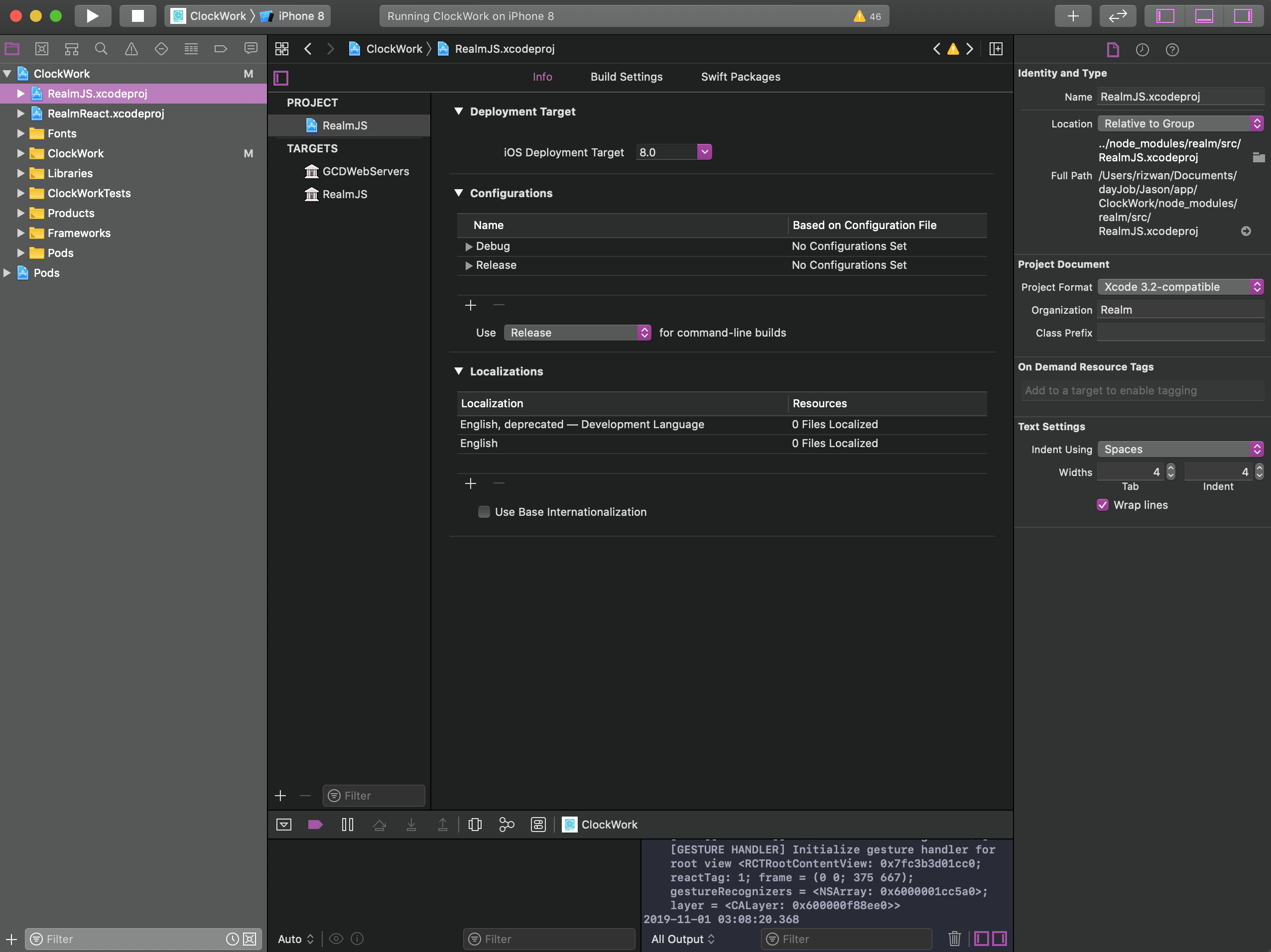
added the libRealmReact.a file in link binaries with libraries

 rizwanatta
on 31 Oct 2019
rizwanatta
on 31 Oct 2019
Downgrading to node 10 allowed me to install realm
sudo n 10
npm install --save realm
https://github.com/realm/realm-js/issues/2582#issuecomment-548282235
rasos
on 31 Oct 2019
@rizwanatta Thank you for the recipe.
kneth
on 1 Nov 2019
@rizwanatta Thank you for the recipe.
I got it working by: for both iOS AND android
having the auto-linking disabled in the config file
OSX 10.15 RN 0.61.2 REALM 3.2.0
dragged this two XCODE and deleted the test target in RealmJS.xcodeproj
added the libRealmReact.a file in link binaries with libraries
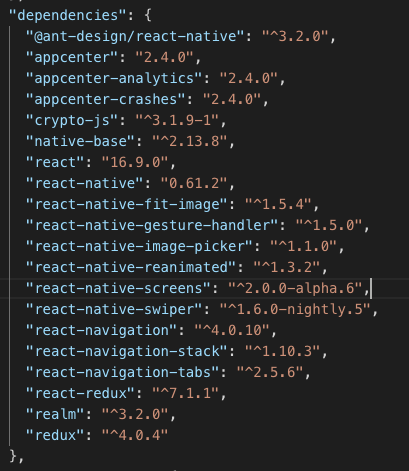
Do it according to your documents. It's OK. Thank you!
Yieron
on 4 Nov 2019
My app uses "react-native": "0.59.0", "realm": "^3.3.0 has the same problem.
 zpz5789
on 9 Nov 2019
zpz5789
on 9 Nov 2019
@zpz5789 Are you on iOS or Android?
kneth
on 11 Nov 2019
@kneth iOS Platform.
zpz5789
on 12 Nov 2019
@zpz5789 Could you try to upgrade to v3.4.0? We have added CocoaPod support which could help you.
kneth
on 14 Nov 2019
@kneth I tried installing v3.4.0 now and facing the same issues. Removed all the manual linking code in ios as now we have CocoaPod support.
 Malikkhoja
on 14 Nov 2019
Malikkhoja
on 14 Nov 2019
It might be required to clear the build folder when upgrading.
kneth
on 15 Nov 2019
you should add a migration guide for >3.4.0
I'm still trying to figure it out, but it throws error of double symbols
or shows Missing Realm constructor
 davidlondono
on 15 Nov 2019
davidlondono
on 15 Nov 2019
It seems that, in addition to @rizwanatta's recipe, libRealm.js must be linked in order to archive for iOS.
 kdo1234
on 1 Dec 2019
kdo1234
on 1 Dec 2019
As @davidlondono said, if we don't add libRealmReact.a app would be throw an error that missing Realm constructor. And in case libRealmReact.a is added, this is failed to build app with error xxx duplicated symbols .... What should I do now?
 hauhuynh1208
on 4 Dec 2019
hauhuynh1208
on 4 Dec 2019
@hauhuynh1208 If you are using Realm JS >= 3.4.0, you should use CocoaPod to build for iOS. If you are upgrading from a previous version, it is likely that you need to clear ios/build before building.
kneth
on 4 Dec 2019
@kneth I am using Realm JS 3.1.0 and suddenly experience this error. So I decide to upgrade Realm JS package:
- remove
realmfrompackage.json - remove
ios/buildandPodfile.lock - remove
yarn.lockandnode_modules - yarn cache clean
- yarn install
- cd ios/ && pod install
It's still fail to build iOS. Android working properly.
P/s As my thread (comment #2634 ), I believe there might be the package conflict
hauhuynh1208
on 5 Dec 2019
@kneth I am using Realm JS 3.1.0 and suddenly experience this error. So I decide to upgrade Realm JS package:
- remove
realmfrompackage.json- remove
ios/buildandPodfile.lock- remove
yarn.lockandnode_modules- yarn cache clean
- yarn install
- cd ios/ && pod install
It's still fail to build iOS. Android working properly.
If this is referring to https://github.com/realm/realm-js/issues/2634 - let's keep the conversation there instead of communicating on a closed issue. Thanks! 👍
kraenhansen
on 5 Dec 2019
"react-native": "0.61.2",
"realm": "^3.5.0",
If run $ react-native run-ios - its ok
If run project in xCode to simmulator - Error: Missing Realm constructor. Did you run "pod install"? Please see https://realm.io/docs/react-native/latest/#missing-realm-constructor for troubleshooting
If remove folder ios/build and again run project in xCode - again Error "Missing Realm constructor" and folder ios/build is empty
UPD: Go to xCode menu Product -> Clean Build Folder - Yesssss YO!
Its work
 ruslanaplid
on 12 Dec 2019
ruslanaplid
on 12 Dec 2019
Good day guys.
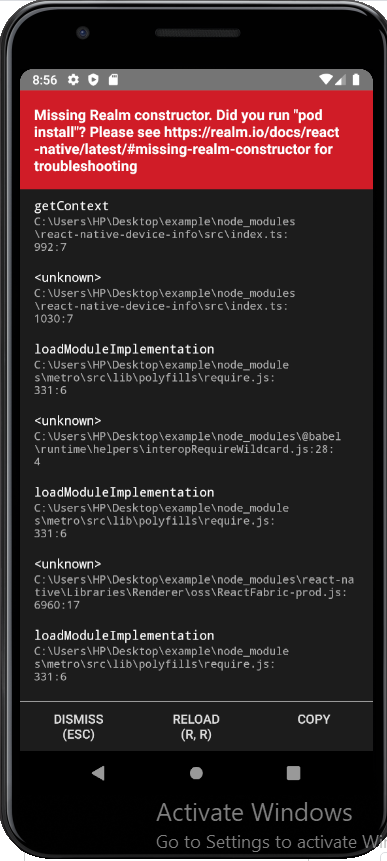
I am having this error on an android simulator. what's wrong?
 JakinTayo
on 9 Apr 2020
JakinTayo
on 9 Apr 2020
I fixed it by cleaning the Gradle. Go into the android folder of your react-native app
// the android folder
cd android

// clean
gradlew.bat clean

// when finished
npm run android
 insidert
on 4 May 2020
insidert
on 4 May 2020
you should add a migration guide for >3.4.0
I'm still trying to figure it out, but it throws error of double symbols
or showsMissing Realm constructor
Have this as well
 enigmablue
on 7 May 2020
enigmablue
on 7 May 2020
I am also facing the same issue, anyone found some solution ??
 tusharmutreja200
on 14 Jun 2020
tusharmutreja200
on 14 Jun 2020
I deleted the build directory under the android directory, ran react-native run-android and it cleared up the error.
 michaelklem
on 23 Jan 2021
michaelklem
on 23 Jan 2021
Related issues
 CrystalRanita
·
3Comments
CrystalRanita
·
3Comments
 jmartindivmedianet
·
3Comments
jmartindivmedianet
·
3Comments
 arshbot
·
3Comments
arshbot
·
3Comments
 matt2legit
·
3Comments
matt2legit
·
3Comments
 MihaelIsaev
·
3Comments
MihaelIsaev
·
3Comments
Most helpful comment
Good day guys.
I am having this error on an android simulator. what's wrong?