Realm-js: Unable to build Realm with React Native 0.61.2
Does RealmJS currently support React Native 0.60 and above?
Unable to build ios project with realm 3.2.0 integrated on React-Native v0.61.2.
Error:
node_modules/realm/react-native/ios/RealmReact/RealmReact.mm:27:9: 'React/RCTBridge+Private.h' file not found
Environment:
React Native: 0.61.2
React: 16.9.0
Realm-js: 3.2.0
Goals
The project builds successfully and runs on an iOS device without any Realm DB issues.
Expected Results
Existing app functions without any errors with the realm DB.
Actual Results
The app crashed at the launch on the iPad. Below is the error:
React/RCTBridge+Private.h file not found in node_modules/realm/react-native/ios/RealmReact/RealmReact.mm:27:9
Steps to Reproduce
- Create a new app with react-native init RNDeamo
- npm install --save [email protected]
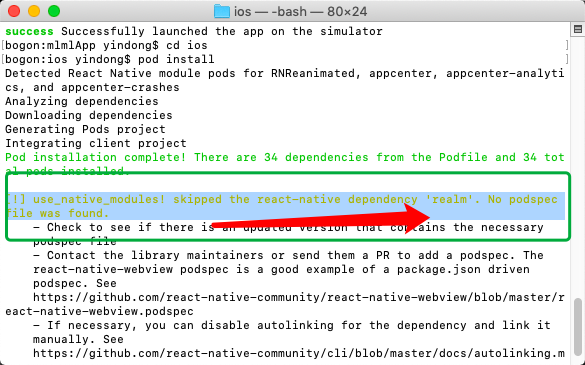
- react-native link realm --platforms ios. Run "pod install"
- Open RNDemo.xcworkspace and clean the project. Then build the app.
Build fails with the above-mentioned error.
Version of Realm and Tooling
- Realm JS SDK Version: 3.2.0
- Node or React Native: React Native 0.61.2
- Client OS & Version: macOS Mojave
- Which debugger for React Native: None
 kmvkrish
All 4 comments
 aljs
on 11 Oct 2019
aljs
on 11 Oct 2019
 Yieron
on 12 Oct 2019
Yieron
on 12 Oct 2019
Please take a look at #2554. It is not completely done yet but you are welcome to help us iterate faster.
 kneth
on 15 Oct 2019
kneth
on 15 Oct 2019
- drop
RealmJS.xcodeprojto project - add
$(SRCROOT)/../../../ios/Pods/Headers/PublicrecursiveinRealmReact.xcodeprojHeader Search Paths
 mokai
on 30 Oct 2019
mokai
on 30 Oct 2019
Related issues
 CrystalRanita
·
3Comments
CrystalRanita
·
3Comments
 camslaz
·
4Comments
camslaz
·
4Comments
 kontinuity
·
3Comments
kontinuity
·
3Comments
 blagoev
·
3Comments
blagoev
·
3Comments
 matt2legit
·
3Comments
matt2legit
·
3Comments
Most helpful comment
RealmJS.xcodeprojto project$(SRCROOT)/../../../ios/Pods/Headers/PublicrecursiveinRealmReact.xcodeprojHeader Search Paths