Realm-js: Realm JavaScript Realm.Open() does not support 'return' statement
Hi,
I am using Realm JavaScript for mobile data base, and while using the below code for quarry the schema, I found that, _return info.name_ is not working.
Realm.open(dbOptions).then(realm => {
try {
let info=realm.objectForPrimaryKey('RealmSchema1', '123');
return info.name;
} catch(e) {
console.log(e);
}
})
.catch(e => {
console.log(e);
});
So if return is not working, then how to resolve and reject using Realm.open() ?
Please look in to this issue.
 Louies89
All 10 comments
@Louies89 This seems to be more a problem with your understanding of asynchronous work rather than a problem with Realm.
Are you using ES6 await/async? If so you can resolve the promise like this (inside an async function):
const realm = await Realm.open(dbOptions).catch(e => {
  console.log(e);
});
let info = realm.objectForPrimaryKey('RealmSchema1', '123');
return info.name;
Else you should not use return, but rather provide a callback to handle the result:
function getNameFromRealm(callback) {
  Realm.open(dbOptions).then(realm => {
    try {
      let info=realm.objectForPrimaryKey('RealmSchema1', '123');
      callback(info.name);
    } catch(e) {
      console.log(e);
    }
  });
}
And if you absolutely don't care about asynchrony just go ahead and use the synchronous open :P
let realm = new Realm(dbOptions);
let info = realm.objectForPrimaryKey('RealmSchema1', '123');
return info.name;
 stigi
on 21 Feb 2018
stigi
on 21 Feb 2018
Hello @stigi ,
Yes You are right, I tried your ways, I had misunderstanding regarding asynchronous process.
Thank you for your help. :) :+1:
I think I should close the issue.
Louies89
on 23 Feb 2018
@stigi thanks for the useful examples. How would use your ES6 await/async example with import/export? In the current example they open the realm synchronously:
js
export default new Realm({schema: [Todo, TodoList]});
The realm can then be used in other files with:
js
import realm from './realm';
Do you know how import/export could be used with the async Realm.open?
 MrHubble
on 13 Mar 2018
MrHubble
on 13 Mar 2018
@MrHubble
Create service APIs using Realm async open as explained by @stigi in the api "getNameFromRealm" to write into your db and use
export default new Realm({schema: [Todo, TodoList]}); to read the data directly from the db.
Louies89
on 13 Mar 2018
@Louies89 thanks for taking the time to respond. I don't completely follow. new Realm will:
create a realm instance by simply invoking the constructor and passing a configuration object to it
https://realm.io/docs/javascript/latest/#realms
How would this read directly from the opened realm?
Are you able to share a more complete example?
MrHubble
on 13 Mar 2018
@MrHubble
My 2nd example adapted for ES6 async/await:
const getNameFromRealm = async () => {
  const realm = await Realm.open(dbOptions)
  let info = realm.objectForPrimaryKey('RealmSchema1', '123');
  return info.name
}
@MrHubble Please watch this
Louies89
on 14 Mar 2018
@Louies89 thanks for sharing that very useful video. The author is also using a synchronous realm (not async) for import / export:
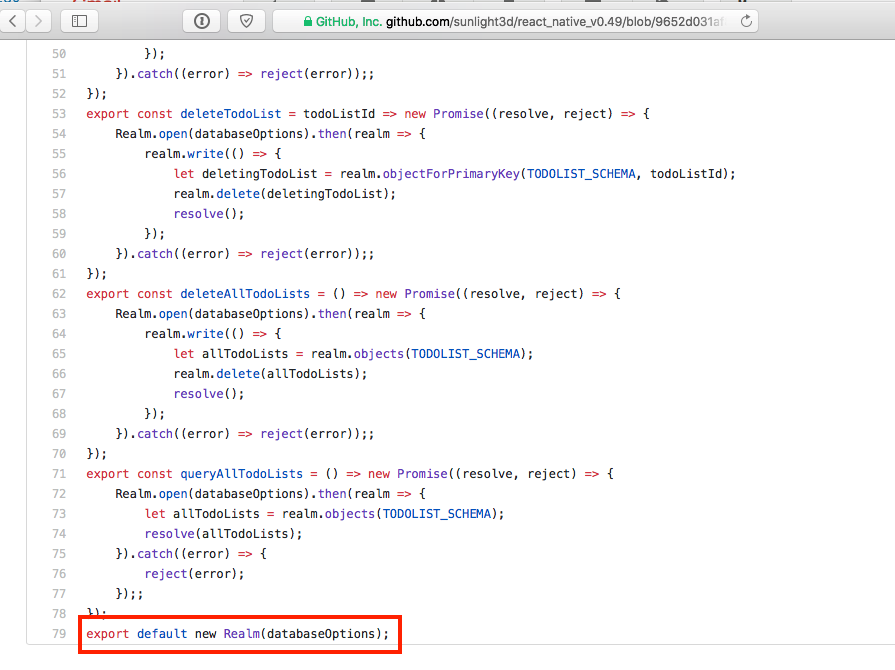
I can see from the examples above and in the video that it's possible to export async functions for operating on the realm, but I still can't find a way to export the Realm when opening asynchronously with Realm.open.
MrHubble
on 15 Mar 2018
Hi @MrHubble ,
Th function deleteTodoList, deleteAllTodoList, queryAllTodoList all are using Realm async function. Realm.open(). And the export default new Realm(databaseOption) is Synchronous.
So in the example, where ever the author has called the functions, he uses promises. And as Realm objects load live, the author uses the synchronous object to read the values from database.
What I suggest you, to check the subsequent videos. You will understand clearly. Do not forward the videos while watching.
:)
Louies89
on 16 Mar 2018
@stigi I was not aware that there is any sync way for Realm instance. Thanks, it works for me. :)
 abhisharkjangir
on 25 Mar 2018
abhisharkjangir
on 25 Mar 2018
Related issues
 jmartindivmedianet
·
3Comments
jmartindivmedianet
·
3Comments
 kevinnguy
·
3Comments
kevinnguy
·
3Comments
 max-zu
·
3Comments
max-zu
·
3Comments
 Chris-Petty
·
3Comments
Chris-Petty
·
3Comments
 camslaz
·
4Comments
camslaz
·
4Comments
Most helpful comment
@Louies89 This seems to be more a problem with your understanding of asynchronous work rather than a problem with Realm.
Are you using ES6 await/async? If so you can resolve the promise like this (inside an
asyncfunction):Else you should not use return, but rather provide a callback to handle the result:
And if you absolutely don't care about asynchrony just go ahead and use the synchronous open :P