Realm-java: Random native crashes signal
We have received a reasonable number of native crashes related to realm and we are having difficulties pinpointing what the cause is.
We are unable to reproduce the problem so anything that could help us would be appreciated.
signal 11 (SIGSEGV), code 2 (SEGV_ACCERR)
libskia.so

signal 7 (SIGBUS), code 1 (BUS_ADRALN)
libskia.so
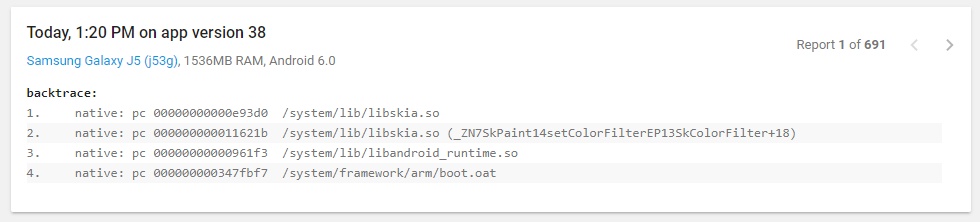
signal 11 (SIGSEGV), code 1 (SEGV_MAPERR)
_ZN8SkMatrix5resetEv

 RooyeKhat
All 34 comments
Hmm, looks like it might be the same issue as https://github.com/realm/realm-java/issues/5056
Which version of Realm are you using?
 cmelchior
on 20 Sep 2017
cmelchior
on 20 Sep 2017
@cmelchior
Now v3.7.2 , and even we downgrade to version v3.5.0 and v3.0.0 but Random errors continue to occur
We old time used
https://github.com/thorbenprimke/realm-recyclerview
From the version we've changed to
https://github.com/realm/realm-android-adapters
These errors have occurred
RooyeKhat
on 20 Sep 2017
So you are saying you have seen the same errors happening when you used Realm 3.0.0?
cmelchior
on 20 Sep 2017
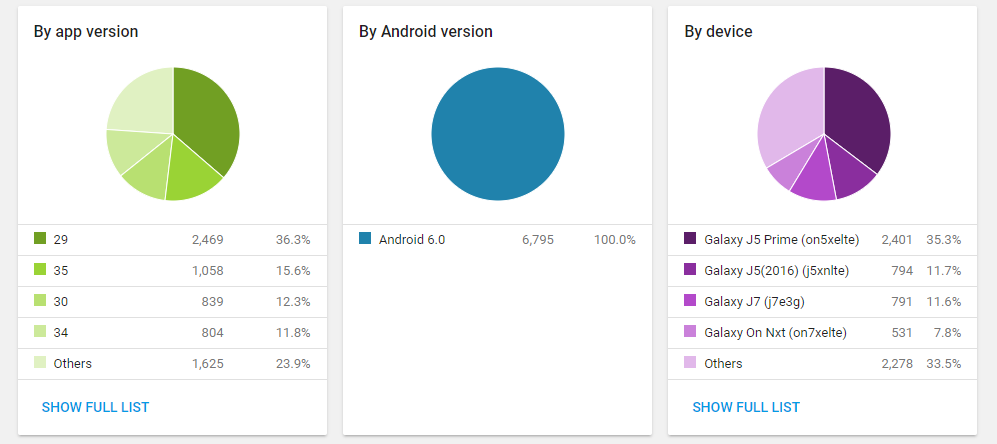
Details :
signal 11 (SIGSEGV), code 2 (SEGV_ACCERR)
libskia.so
RooyeKhat
on 20 Sep 2017
Which app versions are using which versions of Realm?
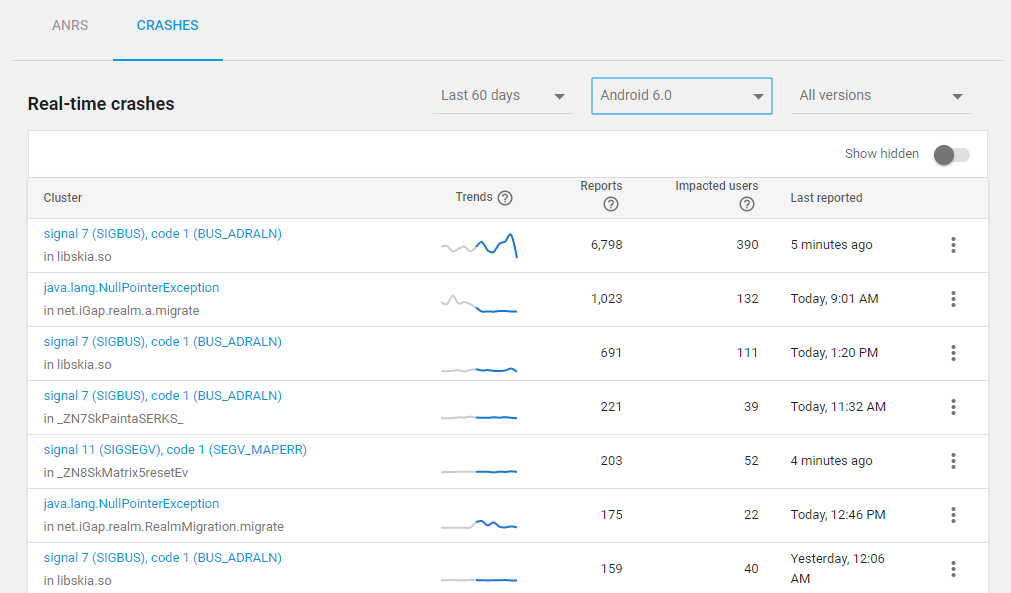
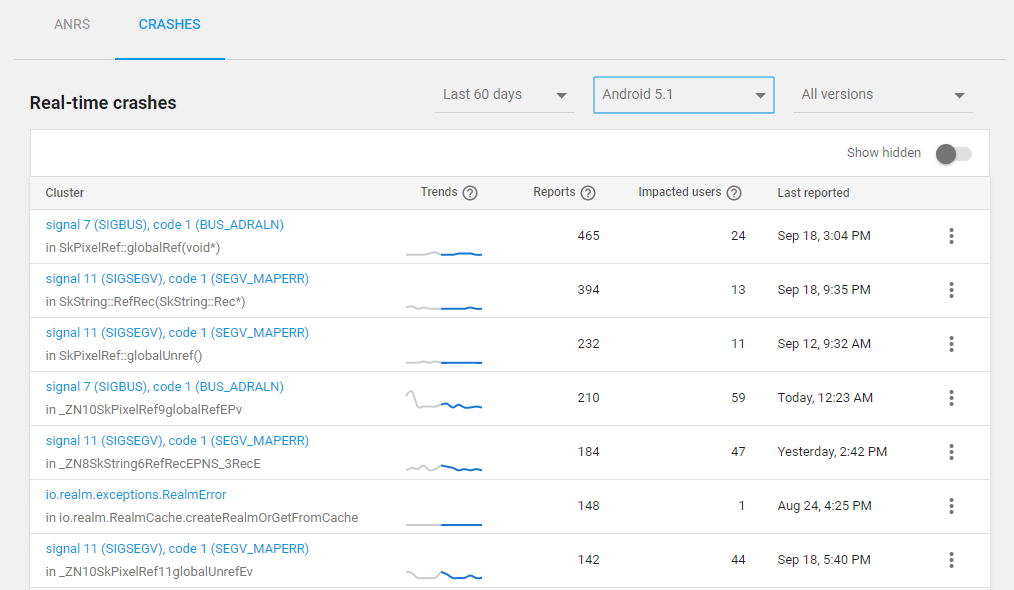
But interesting that it is only happening on Marshmellow
cmelchior
on 20 Sep 2017
@cmelchior
_But interesting that it is only happening on Marshmellow_
Not exactly
V 6.0
V 5.1
V 5.0
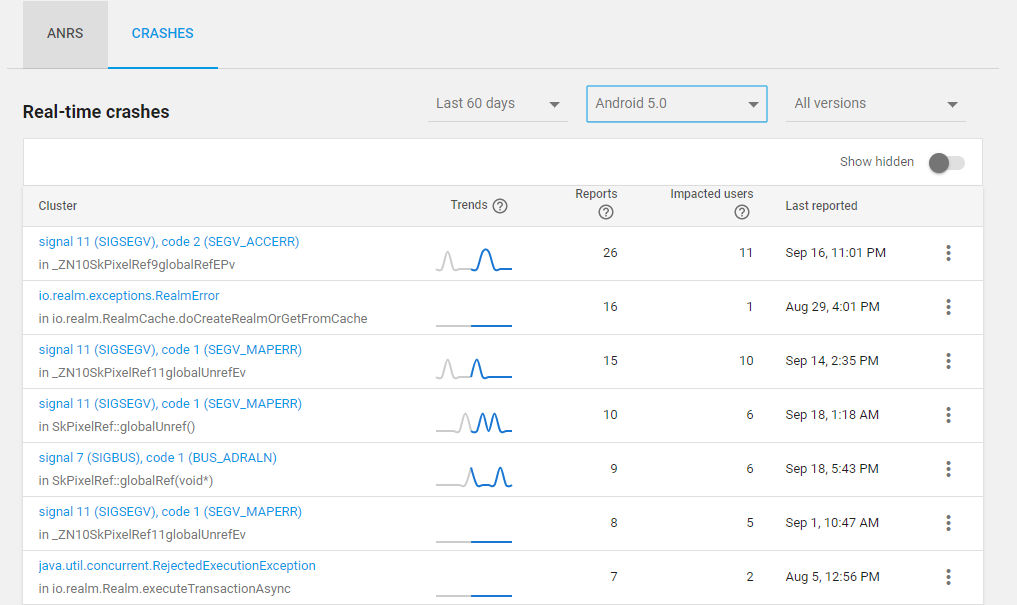
V 4.4
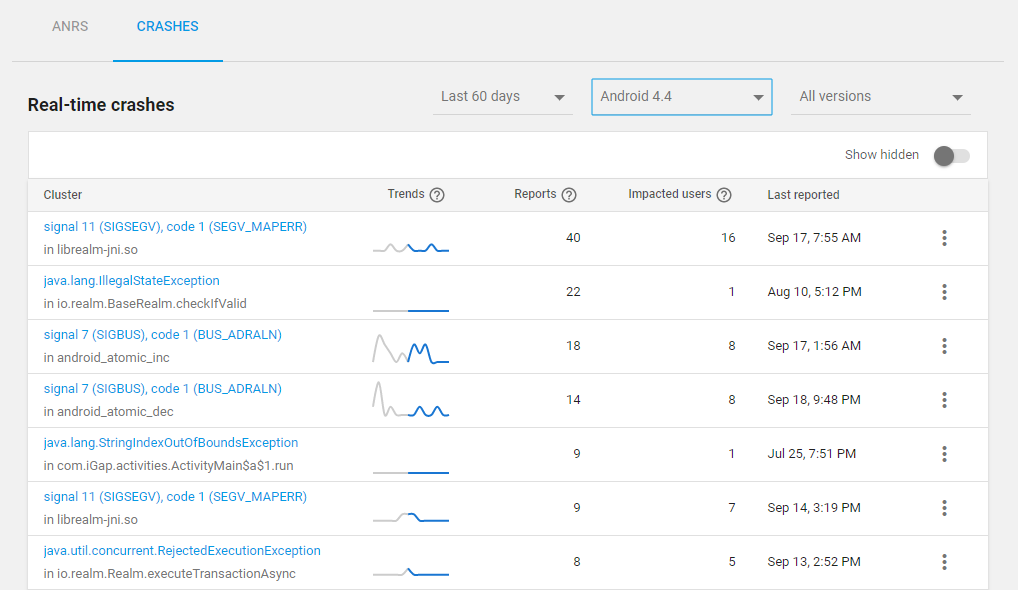
V 4.3
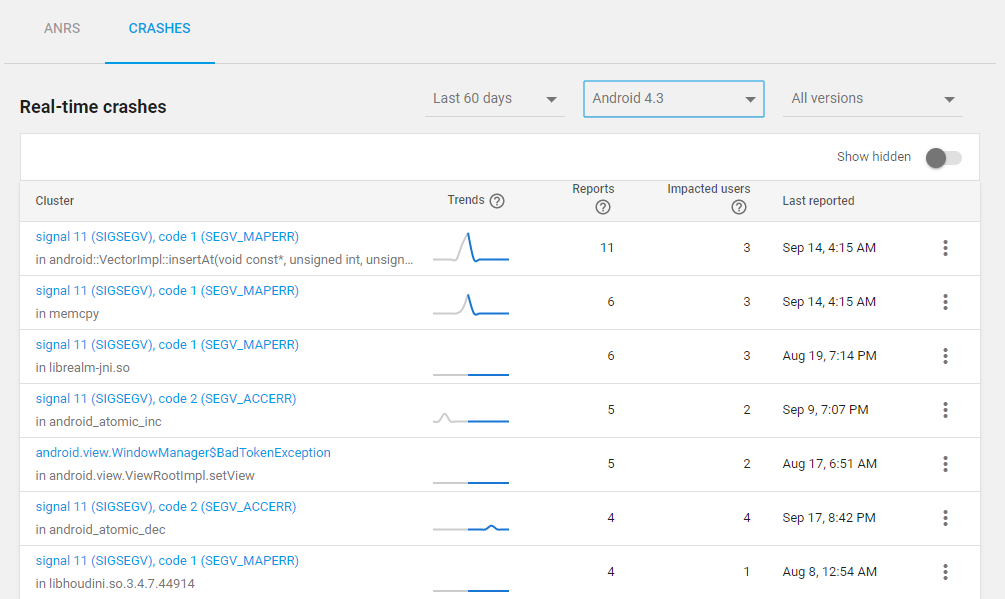
RooyeKhat
on 20 Sep 2017
@beeender the libskia is back and it's getting worse 😨
 Zhuinden
on 20 Sep 2017
Zhuinden
on 20 Sep 2017
@cmelchior
Realm-java Core Version
V27 -> 3.3.1
V34 -> 3.5.0
V38 -> 3.7.2
Realm adapters version and package
V1-V27 -> com.github.thorbenprimke:realm-recyclerview:0.9.25
V28 -> 'io.realm:android-adapters:2.0.0'
V31-V38 -> io.realm:android-adapters:2.1.0
27 -> "io.realm:realm-gradle-plugin:3.3.1" & "com.github.thorbenprimke:realm-recyclerview:0.9.25"
28 -> "io.realm:realm-gradle-plugin:3.3.1" & "io.realm:android-adapters:2.0.0"
29 -> "io.realm:realm-gradle-plugin:3.3.1" & "io.realm:android-adapters:2.0.0"
30 -> "io.realm:realm-gradle-plugin:3.3.1" & "io.realm:android-adapters:2.0.0"
31 -> "io.realm:realm-gradle-plugin:3.3.1" & "io.realm:android-adapters:2.1.0"
32 -> "io.realm:realm-gradle-plugin:3.3.1" & "io.realm:android-adapters:2.1.0"
33 -> "io.realm:realm-gradle-plugin:3.3.1" & "io.realm:android-adapters:2.1.0"
34 -> "io.realm:realm-gradle-plugin:3.5.0" & "io.realm:android-adapters:2.1.0"
35 -> "io.realm:realm-gradle-plugin:3.5.0" & "io.realm:android-adapters:2.1.0"
36 -> "io.realm:realm-gradle-plugin:3.5.0" & "io.realm:android-adapters:2.1.0"
37 -> "io.realm:realm-gradle-plugin:3.5.0" & "io.realm:android-adapters:2.1.0"
38 -> "io.realm:realm-gradle-plugin:3.7.2" & "io.realm:android-adapters:2.1.0"
We have very little error signal error in version 27 and older
RooyeKhat
on 20 Sep 2017
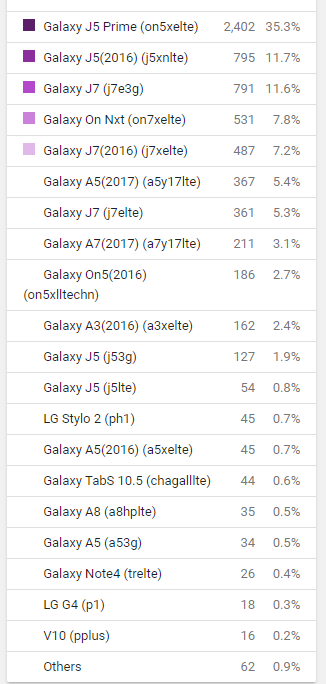
@RooyeKhat Do you have a full list of devies effect (the 33% others). I don't think we have any of the devices listed as the worst offenders?
cmelchior
on 20 Sep 2017
@cmelchior
Yes sure
signal 11 (SIGSEGV), code 2 (SEGV_ACCERR)
libskia.so
signal 7 (SIGBUS), code 1 (BUS_ADRALN)
libskia.so
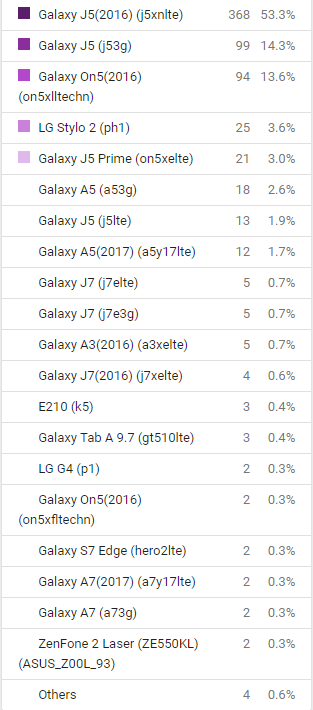
signal 7 (SIGBUS), code 1 (BUS_ADRALN)
SkPixelRef::globalRef(void*)
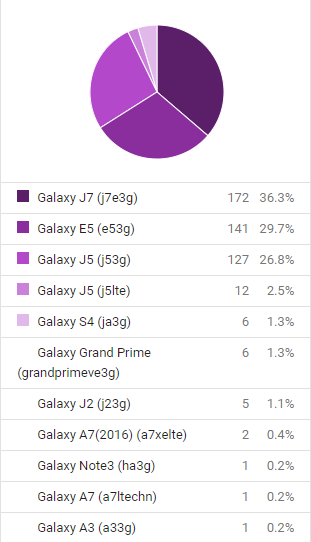
signal 11 (SIGSEGV), code 1 (SEGV_MAPERR)
SkString::RefRec(SkString::Rec*)
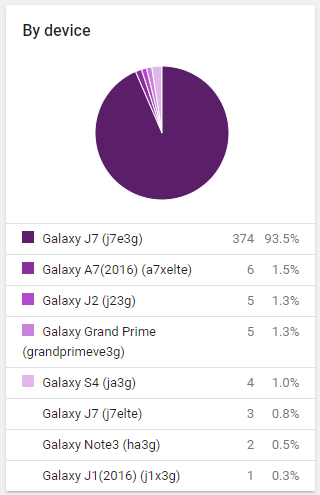
RooyeKhat
on 20 Sep 2017
We update project in latest version
any one can tested and debugging and may can help us for this issue
RooyeKhat
on 20 Sep 2017
@RooyeKhat @beeender has been able to reproduce this, so hopefully, we soon have some news around this.
In the meantime. I will fold this issue into #5056 so we don't have multiple issues for the same bug. Thanks a ton for the detailed information.
cmelchior
on 21 Sep 2017
Tried the iGap apk with a few hours monkey test, no luck to reproduce it. continue trying.
 beeender
on 21 Sep 2017
beeender
on 21 Sep 2017
@beeender the only lead I have is that a person previously told me they got libskia crash by "executing the same query many times in a for loop", but I don't know more. :|
Zhuinden
on 21 Sep 2017
@cmelchior
We tested in Realm 3.0.0
After the test, we still had errors
RooyeKhat
on 23 Sep 2017
@beeender
Thank you so much
Did the investigation have any results?
RooyeKhat
on 23 Sep 2017
@RooyeKhat nope.
We tested in Realm 3.0.0
After the test, we still had errors
So you can reproduce this with 3.0.0? Do you have any reproducible steps?
beeender
on 25 Sep 2017
@beeender
We now manually update list and removed the use "io.realm:android-adapters:2.1.0"
Please check https://github.com/RooyeKhat-Media/iGap-Android/ Release : iGap - v0.3.0
And the interesting result is that we minimize signal errors in new release .
So you can reproduce this with 3.0.0? Do you have any reproducible steps?
We did not reproduce, we just tested
RooyeKhat
on 28 Sep 2017
@RooyeKhat
When the notifications come to the UI thread, we are using a native ALooper to call java method to update the UI. I doubt there might an issue with refreshing some kind of Android view from a native Alooper.
I am building stress testing for this case now, so far it is fine with recycle view of TextViews.
Could you please tell me, when the problem happens, what kind of view do you have in the recycleview/listview which was using the realm adapter?
beeender
on 29 Sep 2017
@beeender considering the crash comes from libskia, my vote goes for some kind of image view.
Now the question is the image loader library used.
Zhuinden
on 29 Sep 2017
@beeender , @Zhuinden , In this source code six fragment is exist which used from RealmAdapter, and all of them used from RecyclerView. also all elements that used in the adapter items as follows:
- LinearLayout
- ImageView
- TextView
- net.iGap.module.MaterialDesignTextView
- net.iGap.module.CircleImageView
- net.iGap.module.EmojiTextViewE
- net.iGap.module.CustomTextViewMedium
and 'com.nostra13.universalimageloader:universal-image-loader:1.9.5' used for load image. for example in FragmentBlockedUser the following code is used
HelperAvatar.getAvatar(registeredInfo.getId(), HelperAvatar.AvatarType.USER, false, new OnAvatarGet() {
                @Override
                public void onAvatarGet(final String avatarPath, long ownerId) {
                    G.handler.post(new Runnable() {
                        @Override
                        public void run() {
                            // image loader
                            G.imageLoader.displayImage(AndroidUtils.suitablePath(avatarPath), viewHolder.image);
                        }
                    });
                }

                @Override
                public void onShowInitials(final String initials, final String color) {
                    G.handler.post(new Runnable() {
                        @Override
                        public void run() {
                            viewHolder.image.setImageBitmap(net.iGap.helper.HelperImageBackColor.drawAlphabetOnPicture((int) viewHolder.image.getContext().getResources().getDimension(R.dimen.dp60), initials, color));
                        }
                    });
                }
            });
you can see following fragments for more details, and see complete code for each adapter
- Fragment Main (RoomAdapter) --> viewInCode
- Fragment Call (CallAdapterA)--> viewInCode
- RegisteredContactsFragment (ContactListAdapterA) --> viewInCode
- FragmentShowMember (MemberAdapterA)
- FragmentMapUser (MapUserAdapterA)
- FragmentBlockedUser (BlockedUser)
and as indicated above the view of three adapter items is made programmatically with code for example in FragmentCall the following code is used
 public static View getViewItemCall() {

        LinearLayout linearLayout_205 = new LinearLayout(G.context);
        linearLayout_205.setId(R.id.mainContainer);
        LinearLayout.LayoutParams layout_218 = new LinearLayout.LayoutParams(ViewGroup.LayoutParams.MATCH_PARENT, ViewGroup.LayoutParams.WRAP_CONTENT);
        linearLayout_205.setLayoutParams(layout_218);

        CircleImageView fcsl_imv_picture = new CircleImageView(G.context);
        fcsl_imv_picture.setId(R.id.fcsl_imv_picture);
        LinearLayout.LayoutParams layout_856 = new LinearLayout.LayoutParams(i_Dp(R.dimen.dp48), i_Dp(R.dimen.dp48));
        layout_856.setMargins(i_Dp(R.dimen.dp6), i_Dp(R.dimen.dp6), i_Dp(R.dimen.dp6), i_Dp(R.dimen.dp6));
        layout_856.gravity = Gravity.CENTER;

        fcsl_imv_picture.setLayoutParams(layout_856);
        linearLayout_205.addView(fcsl_imv_picture);

        LinearLayout linearLayout_71 = new LinearLayout(G.context);
        linearLayout_71.setOrientation(VERTICAL);
        LinearLayout.LayoutParams layout_794 = new LinearLayout.LayoutParams(ViewGroup.LayoutParams.MATCH_PARENT, i_Dp(R.dimen.dp68));
        linearLayout_71.setLayoutParams(layout_794);

        LinearLayout linearLayout_470 = new LinearLayout(G.context);
        linearLayout_470.setOrientation(HORIZONTAL);
        LinearLayout.LayoutParams layout_822 = new LinearLayout.LayoutParams(ViewGroup.LayoutParams.MATCH_PARENT, 0, 1);
        linearLayout_470.setPadding(0, i_Dp(R.dimen.dp12), 0, 0);
        linearLayout_470.setLayoutParams(layout_822);

        LinearLayout linearLayout_983 = new LinearLayout(G.context);
        linearLayout_983.setOrientation(VERTICAL);
        LinearLayout.LayoutParams layout_313 = new LinearLayout.LayoutParams(0, ViewGroup.LayoutParams.MATCH_PARENT, 1);
        layout_313.leftMargin = i_Dp(R.dimen.dp6);
        linearLayout_983.setLayoutParams(layout_313);

        EmojiTextViewE fcsl_txt_name = new EmojiTextViewE(G.context);
        fcsl_txt_name.setId(R.id.fcsl_txt_name);
        fcsl_txt_name.setPadding(0, 0, 0, dpToPixel(1));
        fcsl_txt_name.setText("Name");
        fcsl_txt_name.setSingleLine(true);
        fcsl_txt_name.setTextColor(G.context.getResources().getColor(R.color.black90));
        setTextSize(fcsl_txt_name, R.dimen.dp15);
        fcsl_txt_name.setTypeface(G.typeface_IRANSansMobile_Bold);
        LinearLayout.LayoutParams layout_415 = new LinearLayout.LayoutParams(ViewGroup.LayoutParams.WRAP_CONTENT, ViewGroup.LayoutParams.WRAP_CONTENT);
        layout_415.gravity = Gravity.START;
        fcsl_txt_name.setLayoutParams(layout_415);
        linearLayout_983.addView(fcsl_txt_name);

        LinearLayout linearLayout_976 = new LinearLayout(G.context);
        linearLayout_976.setOrientation(HORIZONTAL);
        LinearLayout.LayoutParams layout_106 = new LinearLayout.LayoutParams(ViewGroup.LayoutParams.MATCH_PARENT, ViewGroup.LayoutParams.WRAP_CONTENT);
        linearLayout_976.setLayoutParams(layout_106);

        TextView fcsl_txt_time_info = new TextView(G.context);
        fcsl_txt_time_info.setId(R.id.fcsl_txt_time_info);
        fcsl_txt_time_info.setGravity(Gravity.START);
        fcsl_txt_time_info.setSingleLine(true);
        fcsl_txt_time_info.setText("(4) 9:24 am");
        fcsl_txt_time_info.setTextColor(G.context.getResources().getColor(R.color.gray_5c));
        setTextSize(fcsl_txt_time_info, R.dimen.dp12);
        fcsl_txt_time_info.setTypeface(G.typeface_IRANSansMobile);
        if (Build.VERSION.SDK_INT >= Build.VERSION_CODES.JELLY_BEAN_MR1) {
            fcsl_txt_time_info.setTextDirection(View.TEXT_DIRECTION_LOCALE);
        }
        LinearLayout.LayoutParams layout_959 = new LinearLayout.LayoutParams(0, ViewGroup.LayoutParams.WRAP_CONTENT, 1);

        fcsl_txt_time_info.setLayoutParams(layout_959);
        linearLayout_976.addView(fcsl_txt_time_info);
        linearLayout_983.addView(linearLayout_976);
        linearLayout_470.addView(linearLayout_983);

        LinearLayout linearLayout_202 = new LinearLayout(G.context);
        linearLayout_202.setOrientation(VERTICAL);
        LinearLayout.LayoutParams layout_803 = new LinearLayout.LayoutParams(ViewGroup.LayoutParams.WRAP_CONTENT, ViewGroup.LayoutParams.MATCH_PARENT);
        layout_803.rightMargin = i_Dp(R.dimen.dp8);
        layout_803.leftMargin = i_Dp(R.dimen.dp8);
        linearLayout_202.setLayoutParams(layout_803);

        MaterialDesignTextView fcsl_txt_icon = new MaterialDesignTextView(G.context);
        fcsl_txt_icon.setId(R.id.fcsl_txt_icon);
        fcsl_txt_icon.setText(G.context.getResources().getString(R.string.md_call_made));
        fcsl_txt_icon.setTextColor(G.context.getResources().getColor(R.color.green));
        setTextSize(fcsl_txt_icon, R.dimen.dp18);
        LinearLayout.LayoutParams layout_178 = new LinearLayout.LayoutParams(ViewGroup.LayoutParams.WRAP_CONTENT, ViewGroup.LayoutParams.WRAP_CONTENT);
        layout_178.gravity = Gravity.END;
        fcsl_txt_icon.setLayoutParams(layout_178);
        linearLayout_202.addView(fcsl_txt_icon);

        TextView fcsl_txt_dureation_time = new TextView(G.context);
        fcsl_txt_dureation_time.setId(R.id.fcsl_txt_dureation_time);
        fcsl_txt_dureation_time.setText("2:24");
        fcsl_txt_dureation_time.setTextColor(G.context.getResources().getColor(R.color.btn_start_page5));
        setTextSize(fcsl_txt_dureation_time, R.dimen.dp12);
        fcsl_txt_dureation_time.setTypeface(G.typeface_IRANSansMobile);
        LinearLayout.LayoutParams layout_483 = new LinearLayout.LayoutParams(ViewGroup.LayoutParams.WRAP_CONTENT, ViewGroup.LayoutParams.WRAP_CONTENT);
        fcsl_txt_dureation_time.setLayoutParams(layout_483);
        linearLayout_202.addView(fcsl_txt_dureation_time);
        linearLayout_470.addView(linearLayout_202);
        linearLayout_71.addView(linearLayout_470);

        View textView_316 = new View(G.context);
        textView_316.setBackgroundColor(G.context.getResources().getColor(R.color.gray_3c));
        LinearLayout.LayoutParams layout_241 = new LinearLayout.LayoutParams(ViewGroup.LayoutParams.MATCH_PARENT, 1);
        textView_316.setLayoutParams(layout_241);
        linearLayout_71.addView(textView_316);
        linearLayout_205.addView(linearLayout_71);

        return linearLayout_205;
    }
 saeedmozaffari
on 2 Oct 2017
saeedmozaffari
on 2 Oct 2017
@saeedmozaffari so you are saying if Adapter.notifyDataSetChanged() is called instead of relying on OrderedRealmCollectionChangeSet then the crashes no longer occur?
Zhuinden
on 2 Oct 2017
@Zhuinden NO , i don't have any idea why this error happens with RealmAdapter.
of course now i don't use from Adapter.notifyDataSetChanged() , for better performance i get an item and use from notifyItemChange(position) , and when before used from RealmAdapter this update happened automatically.
also now RealmAdapter completely removed from code , not just OrderedRealmCollectionChangeSet
saeedmozaffari
on 2 Oct 2017
@saeedmozaffari
I was trying to reproduce this crash with our adapter example, you can see the source code here https://github.com/realm/realm-android-adapters/pull/128
So what i tried:
- Repeatedly trigger realm notifications to refresh a
TextView+ImageViewwith some big png file - with JPG files
- use the
CirecleImageVIewfrom your project and refresh repeatedly with PNG/JPG files
Still no luck to reproduce.
So,
- if you have time, please take a look at the project, to see if there is anything you can add to make it similar to your logic which may help to add the chance to reproduce the issue.
- what kind of images could you use when it crashed? gif? any sample image files we can try?
beeender
on 3 Oct 2017
@beeender , Thank you for your follow up , Yes I will try.
saeedmozaffari
on 3 Oct 2017
@beeender
So you can reproduce this with 3.0.0? Do you have any reproducible steps?
how can downgrade realm version without need to delete before data?
i want to use from realm version "io.realm:realm-gradle-plugin:3.0.0" instead of "io.realm:realm-gradle-plugin:3.7.2". but users should not erase their information.
now when i try for this action following error will be happend
Caused by: io.realm.exceptions.RealmFileException: Unable to open a realm at path '/data/data/co.rooyekhat.realmtest/files/RealmTest.realm': Unsupported Realm file format version. (Unsupported Realm file format version) (/data/data/co.rooyekhat.realmtest/files/RealmTest.realm) in /Users/cm/Realm/realm-java/realm/realm-library/src/main/cpp/io_realm_internal_SharedRealm.cpp line 109 Kind: ACCESS_ERROR.
   at io.realm.internal.SharedRealm.nativeGetSharedRealm(Native Method)
   at io.realm.internal.SharedRealm.<init>(SharedRealm.java:187)
   at io.realm.internal.SharedRealm.getInstance(SharedRealm.java:229)
   at io.realm.internal.SharedRealm.getInstance(SharedRealm.java:204)
   at io.realm.RealmCache.createRealmOrGetFromCache(RealmCache.java:124)
   at io.realm.Realm.getDefaultInstance(Realm.java:210)
   at co.rooyekhat.realmtest.MainActivity.onCreate(MainActivity.java:29)
   at android.app.Activity.performCreate(Activity.java:6910)
   at android.app.Instrumentation.callActivityOnCreate(Instrumentation.java:1123)
   at android.app.ActivityThread.performLaunchActivity(ActivityThread.java:2746)
   at android.app.ActivityThread.handleLaunchActivity(ActivityThread.java:2864)
   at android.app.ActivityThread.-wrap12(ActivityThread.java)
   at android.app.ActivityThread$H.handleMessage(ActivityThread.java:1567)
   at android.os.Handler.dispatchMessage(Handler.java:105)
   at android.os.Looper.loop(Looper.java:156)
   at android.app.ActivityThread.main(ActivityThread.java:6523)
   at java.lang.reflect.Method.invoke(Native Method)
   at com.android.internal.os.ZygoteInit$MethodAndArgsCaller.run(ZygoteInit.java:941)
   at com.android.internal.os.ZygoteInit.main(ZygoteInit.java:831)
is there any way for downgrade realm without clear previous data?
saeedmozaffari
on 3 Oct 2017
@RooyeKhat you need to go back to Realm 3.1.0 <=, so I recommend 3.1.4
Zhuinden
on 3 Oct 2017
@Zhuinden it worked, but due to the https://github.com/realm/realm-java/issues/5056#issuecomment-319374806 and https://github.com/realm/realm-java/issues/5056#issuecomment-325361920 we want come back to Realm 3.0.0 for check this native error, also due to the https://github.com/realm/realm-java/issues/5056#issuecomment-324841850 Realm 3.1.4 was not useful for solve this error.
so is there any way for return to Realm 3.0.0?
saeedmozaffari
on 4 Oct 2017
@Zhuinden @beeender ??
RooyeKhat
on 12 Oct 2017
@RooyeKhat there was a file format upgrade in 3.1.0.
So Realm files created by 3.1.0+ cannot be read by 3.0.0.
Zhuinden
on 12 Oct 2017
@Zhuinden ?
any update for https://github.com/realm/realm-android-adapters/pull/128
RooyeKhat
on 12 Oct 2017
@RooyeKhat
No. Last week was holiday here.
https://github.com/realm/realm-android-adapters/pull/128 was not intended to fix anything. It was my testing to try to reproduce the crash.
For anyone who is suffering from this, please take a look at https://github.com/realm/realm-android-adapters/pull/128 and try to things which might be similar to your code like different images types in the image view, recycleview in the fragment and etc..
Another thing i planed to test is to update the NDK. Will do it soon.
beeender
on 12 Oct 2017
+1 any news ?
RooyeKhat
on 23 Oct 2017
beeender
on 30 Nov 2017
Related issues
 pawlo2102
·
3Comments
pawlo2102
·
3Comments
 yuwu
·
3Comments
yuwu
·
3Comments
 CNyezi
·
3Comments
CNyezi
·
3Comments
 mithrann
·
3Comments
mithrann
·
3Comments
 aschrijver
·
3Comments
aschrijver
·
3Comments
Most helpful comment
We update project in latest version
any one can tested and debugging and may can help us for this issue
https://github.com/RooyeKhat-Media/iGap-Android