Realm-java: Fatal Exception: java.lang.UnsatisfiedLinkError while loading realm
Goal
Fix for realm which crashing for some users.
Expected Results
It should not crash and load realm for every user.
Actual Results
Fatal Exception: java.lang.UnsatisfiedLinkError: dlopen failed: "/data/data/com.lbe.parallel.intl/parallel_intl/0/com.x.x/app_lib/librealm-jni.so.2.2.2" is 64-bit instead of 32-bit
at java.lang.Runtime.load0(Runtime.java:908)
at java.lang.System.load(System.java:1505)
at com.getkeepsafe.relinker.SystemLibraryLoader.loadPath(SourceFile:29)
at com.getkeepsafe.relinker.ReLinkerInstance.loadLibraryInternal(SourceFile:198)
at com.getkeepsafe.relinker.ReLinkerInstance.loadLibrary(SourceFile:136)
at com.getkeepsafe.relinker.ReLinker.loadLibrary(SourceFile:70)
at com.getkeepsafe.relinker.ReLinker.loadLibrary(SourceFile:57)
at io.realm.internal.RealmCore.loadLibrary(SourceFile:61)
at io.realm.Realm.init(SourceFile:187)
Steps & Code to Reproduce
I have tried to reproduce but not able to found these crashes on Crash reporting service.
Version of Realm and tooling
Realm version(s): 2.2.2 (currently but was happening on 1.1.1 before it too)
Realm sync feature enabled: no
Android Studio version: 2.2.2
Which Android version and device: after update only one user seems to have this problem which is using Nexus6p on 7.1.1
 AamirAbro
All 22 comments
It looks like you are mixing 32 and 64 bits .so file, and you might have to exclude 64 bit: https://realm.io/docs/java/latest/#couldnt-load-librealm-jniso
 kneth
on 27 Jan 2017
kneth
on 27 Jan 2017
thanks will check the link but just FYI we are not splitting apk on ABIs.
AamirAbro
on 27 Jan 2017
@AamirAbro Do you include other libraries with native code? Many libraries are supporting 32 bit ARM only, so you can easily get this error message on a 64 bit device (Realm has support for 64 bit ARM). Until your other libraries support 64 bit, you will have revert to 32 bit. The link explains how to do that.
If you're uncertain about libraries, you can unzip the apk file and examine the included .so files.
kneth
on 27 Jan 2017
@kneth Yes we do have other native libs, we have added card.io. I have analyzed apk using android studio and its showing all the native libs (.so files) in x86_64 and also in arm64-v8a. Except for mips and armeabi which only have like one-two libs.
AamirAbro
on 27 Jan 2017
@AamirAbro Thanks for the update. I can see that card.io supports both 32 and 64 bit ARM, so we need to investigate a bit more. Does it only happen on the Nexus 6P or can you reproduce it on every 64 bit ARM device?
kneth
on 28 Jan 2017
@kneth its not happening on all of the Nexus 6Ps. For now this has app is crashing for only one user after we updated to realm 2.2.2 having nexus 6P on the live version.
AamirAbro
on 28 Jan 2017
Was the user able to restart the app without the crash?
kneth
on 29 Jan 2017
@kneth No don't think that the user was able to run the app. App crashed 16 times for that user and cant find any other activity by him.
AamirAbro
on 29 Jan 2017
In that case, it sounds like the .so files are corrupted. From the crash report, can you see if the user was running out of disk space? What if the user uninstalled and installed the app?
kneth
on 30 Jan 2017
User had 18.3% RAM free, and 18.7% Disk free which I think should be sufficient on a Nexus 6P. or not? @kneth
AamirAbro
on 30 Jan 2017
also this happened to an other Samsung user too.
OS Version: 7.0
Device: SM-G935F
RAM Free: 34.6%
Disk Free: 42.4%
app crashed for him 26 times :( .
AamirAbro
on 30 Jan 2017
@AamirAbro Looks like enough space - just wished to rule out a simple cause if I could.
So it's only hitting Android 7 devices?
Have you been able to reproduce it yourself?
kneth
on 30 Jan 2017
@kneth Not able to reproduce, also there is Z10 device with Android version 4.3 which is crashing
AamirAbro
on 30 Jan 2017
I put on the backlog until I get a proper device.
kneth
on 31 Jan 2017
@kneth Do you really thing this is device specific? as there are a-lot of Nexus 6P users where app is working fine.
AamirAbro
on 31 Jan 2017
By Z10, do you mean Blackberry Z10, right? It has a Krait as CPU and that's a 32 bit CPU. On the other hand, that device isn't an Android device (only an emulation layer running on top of QNX and not Linux), and we have seen many issues with it over time.
It might not be device specific but the error message you posted indicates that it is related to 64 bit ARM.
kneth
on 1 Feb 2017
@AamirAbro I have blackberry Z10. if you can share your apk, i can try to check what the problem is. You can put the apk file anywhere we can get, or send it privately to [email protected].
 beeender
on 13 Feb 2017
beeender
on 13 Feb 2017
I had the same issue. The app crashes constantly for some users on some devices. Bought a few test devices and wasn't able to reproduce.
Finally figured out. It was because the user is trying to launch the app using Parallel Space and didn't install the Parallel Space 64 bit support app. And Android doesn't seem to mix 32 bit and 64 bit native library well. The solution is to ignore the 64 bit .so file. See: https://corbt.com/posts/2015/09/18/mixing-32-and-64bit-dependencies-in-android.html.
 aaronweihe
on 16 Feb 2017
aaronweihe
on 16 Feb 2017
@aaronhe42 Thanks a million for your information!! We will add this to our doc page.
beeender
on 17 Feb 2017
@aaronhe42 I have created a list of known libraries etc. which can be make troubles. We will expand the list as we learn about others. See https://realm.io/docs/java/latest/#couldnt-load-librealm-jniso
kneth
on 23 Feb 2017
@kneth I've been a couple of days fighting with this issue.
I'm getting Fatal Exception: java.lang.UnsatisfiedLinkError
dlopen failed: "/data/data/com.lbe.parallel.intl/parallel_intl/0/com.(package).(package)/app_lib/librealm-jni.so.3.5.0" is 64-bit instead of 32-bit.
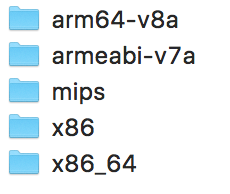
The first thing I did was check my APK to see which *.so files were there and I found just librealm-jni.so files in every folder you can see in the next image:
I tried this:
android {
    //...
    packagingOptions {
        exclude "lib/arm64-v8a/librealm-jni.so"
    }
    //...
}
... but it didn't work.
The weird thing is just 1 user with 5K crashes (??) with a Galaxy S7 running Android Nougat.
Any idea what is going on? I thought as far as I wasn't including any other *.so in my APK I wouldn't have this problem but looks like I am.
I'm running:
Android Studio 3.0 Preview 8 with
classpath "io.realm:realm-gradle-plugin:3.5.0"
classpath 'com.android.tools.build:gradle:3.0.0-alpha8'
Thanks!
 Sottti
on 29 Jul 2017
Sottti
on 29 Jul 2017
@Sottti Can you tell if the S7 user is running with a customized ROM? Looks something wrong with the ROM... So it happens even when you removed the 64bit so? Sounds impossible :(
beeender
on 31 Jul 2017
Related issues
 jjorian
·
3Comments
jjorian
·
3Comments
 David-Kuper
·
3Comments
David-Kuper
·
3Comments
 cmelchior
·
3Comments
cmelchior
·
3Comments
 AAChartModel
·
3Comments
AAChartModel
·
3Comments
 Merlin1993
·
3Comments
Merlin1993
·
3Comments
Most helpful comment
I had the same issue. The app crashes constantly for some users on some devices. Bought a few test devices and wasn't able to reproduce.
Finally figured out. It was because the user is trying to launch the app using Parallel Space and didn't install the Parallel Space 64 bit support app. And Android doesn't seem to mix 32 bit and 64 bit native library well. The solution is to ignore the 64 bit .so file. See: https://corbt.com/posts/2015/09/18/mixing-32-and-64bit-dependencies-in-android.html.