Realm-dotnet: Can't compile for iOS after upgrading to Realm 4.0
We have a Xamarin.Forms app developed using Realm. After upgrading to Realm 4.0, both the Net Standard common project and the Android app compile and run correctly, but the iOS compilation fails with the following error:
    MTOUCH : error MT0009: Error while loading assemblies: /Users/*user*/.nuget/packages/realm/4.0.0/runtimes/win-x86/native/realm-wrappers.dll
        Format of the executable (.exe) or library (.dll) is invalid.
Using:
Visual Studio 2019 for macOS (8.1 build 2742)
Using macOS Mojave (10.14.5)
Xamarin.Forms 4.0.0.497661
Realm 4.0
Targeting iOS10, it fails both when compiling for the simulator and for release.
 salgiza
All 10 comments
It's very surprising that it's trying to use the win-x86 binary when targeting iOS. Can you try to delete the bin and obj folders and try building again?
 nirinchev
on 20 Jun 2019
nirinchev
on 20 Jun 2019
I just did a "Clean project", deleted bin and obj folder from all projects (both iOS and Android and the common Net Standard one)... and got the same error :(
Just in case it helps, here is an screenshot of the build options for the iOS project:
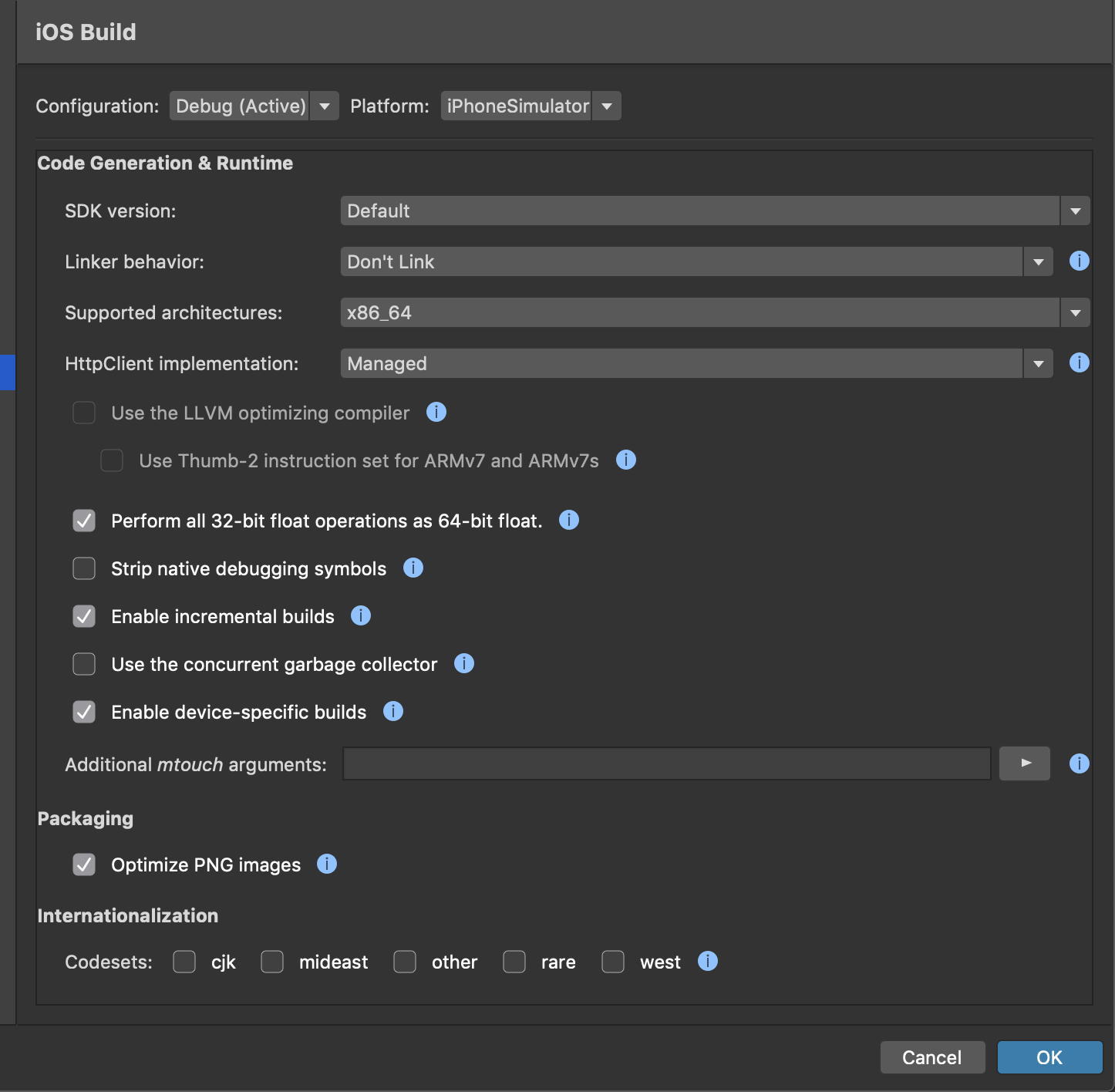
The project compiled and run perfectly with Realm 3.x, so I'm not sure what could be causing VS to get the wrong binary from the nuget package when compiling.
salgiza
on 21 Jun 2019
Do you think you can share a project that reproduces the issue?
nirinchev
on 24 Jun 2019
Ok, while trying to create an empty project with the bug (unfortunately the original project is from a bit comercial app that I can not share) I've found the culprit:

This is a setting in the Build > Compiler options of the iOS project. I don't know whether the error is in selecting the x86 value or in Realm, but changing it to "Any CPU" solved the problem. I'll guess Realm is the culprit, because I've never touched the value of the dropdown: I checked in our git repository, and that was the default value assigned by Visual Studio when the project was created, a year and a half ago (and that has been its value since, without any incidents until the Realm upgrade).
But currently VS for macOS creates the iOS project with "Any CPU" by default, which meant that creating a new empty solution did not trigger the error (I discovered this by comparing both projects). Sorry that I didn't do that from the beginning 😞
Even though I'm not affected by this problem anymore, I'm not closing this ticket because, if its a bug in Realm, I'm guessing you'd rather use it to track it (feel free to close it when you consider it appropriate).
salgiza
on 25 Jun 2019
P.S. I forgot to mention it: you can reproduce the error by creating an empty Xamarin.Forms solution and changing the properties of the iOS project to target x86.
salgiza
on 25 Jun 2019
Thanks for looking into that! And yes, while we now know why this has happened, I feel like we should be a bit more resilient around these subtle misconfigurations. Let's keep it open so we can see if there's a way to workaround it, although we'll take it as a lower priority compared to the iOS issues with 4.0.
nirinchev
on 25 Jun 2019
I updated Realm package from the version 3.0.0 to 4.0.1 using upgrade guide and faced the same issue described above:
iOS/MTOUCH: Error MT0009: Error while loading assemblies: /.nuget/packages/realm/4.0.1/runtimes/win-x64/native/realm-wrappers.dll (MT0009)
And indeed if I change _Compiler -> Platform target_ from x64 to Any CPU project builds successfully.
 yehor-hromadskyi-foresee
on 25 Jul 2019
yehor-hromadskyi-foresee
on 25 Jul 2019
I had the exact same issue after upgrading from realm 3 to 4! On a Mac, iOS project
Solved thanks to you! You made my day... thanks salgiza.
 pepperit-bxl
on 4 Sep 2019
pepperit-bxl
on 4 Sep 2019
Thanks for the fix above! Note that this is still an issue on VS Mac 8.4.2 (build 59) for Realm 4.2.0.
 ajhuntsman
on 23 Jan 2020
ajhuntsman
on 23 Jan 2020
Still prevalent on VS Mac 8.7.8 (build 4) for Realm 5.1.0. Fix still works though.
 NickSpag
on 1 Oct 2020
NickSpag
on 1 Oct 2020
Related issues
 Amor-Fairouz
·
15Comments
Amor-Fairouz
·
15Comments
 prin53
·
15Comments
prin53
·
15Comments
 jitendrajadav
·
12Comments
jitendrajadav
·
12Comments
 FoggyFinder
·
8Comments
FoggyFinder
·
8Comments
 sushihangover
·
12Comments
sushihangover
·
12Comments
Most helpful comment
I updated
Realmpackage from the version 3.0.0 to 4.0.1 using upgrade guide and faced the same issue described above:And indeed if I change _Compiler -> Platform target_ from
x64toAny CPUproject builds successfully.