Realm-cocoa: Xcode12 beta5 Carthage build fail
Goals
Carthage version:0.35.0 build Realm
Expected Results
Carthage version:0.35.0 build Realm Success
Actual Results
/Users/PathToProject/Carthage/Checkouts/realm-cocoa/Realm/ObjectStore/src/object_changeset.hpp:24:10: fatal error: 'realm/keys.hpp' file not found
#include <realm/keys.hpp>
         ^~~~~~~~~~~~~~~~
/Users/PathToProject/Carthage/Checkouts/realm-cocoa/Realm/ObjectStore/src/object_changeset.hpp:24:10: note: did not find header 'keys.hpp' in framework 'realm' (loaded from '/Users/UserName/Library/Caches/org.carthage.CarthageKit/DerivedData/12.0_12A8189h/realm-cocoa/v5.3.5/Build/Products/Release-iphonesimulator')
1 error generated.

** BUILD FAILED **


The following build commands failed:
    CompileC /Users
Steps for others to Reproduce
carthage update --platform iOS --cache-builds --no-use-binaries
Version of Realm and Tooling
Realm framework version: v 5.3.5
Realm Object Server version: N/A
Xcode version: 12 beta 5
iOS/OSX version: 14
Dependency manager + version: Carthage with Xcode 11.6
 AlexanderPan
All 18 comments
Also seeing this using the Xcode 12 Beta 5 command-line tools, Carthage 0.35.0
 gemmakbarlow
on 24 Aug 2020
gemmakbarlow
on 24 Aug 2020
I have the same problem on with Xcode12 beta6.
 David2XN
on 28 Aug 2020
David2XN
on 28 Aug 2020
Have you tried clearing all derived data, cached builds and cleaned your workspace?
 leemaguire
on 2 Sep 2020
leemaguire
on 2 Sep 2020
I also have the problem when using Xcode 12 Beta6 even though after I cleared all derived data of Xcode and cache files of carthage.
 SakuragiYoshimasa
on 2 Sep 2020
SakuragiYoshimasa
on 2 Sep 2020
Can confirm, also when clearing ~/Library/Caches/org.carthage.CarthageKit/DerivedData/ and using the script of https://github.com/Carthage/Carthage/issues/3019#issuecomment-681825436 the build fails with the above error message. Unfortunately SPM is not an alternative for me, as iOS 9 build target is required for my project.
 Patrick-Remy
on 9 Sep 2020
Patrick-Remy
on 9 Sep 2020
Tried 5.4.0, still got the same error.
.../Carthage/Checkouts/realm-cocoa/Realm/ObjectStore/src/object_changeset.hpp:24:10: fatal error: 'realm/keys.hpp' file not found
#include <realm/keys.hpp>
         ^~~~~~~~~~~~~~~~
.../Carthage/Checkouts/realm-cocoa/Realm/ObjectStore/src/object_changeset.hpp:24:10: note: did not find header 'keys.hpp' in framework 'realm' (loaded from '.../Library/Caches/org.carthage.CarthageKit/DerivedData/12.0_12A8189n/realm-cocoa/v5.4.0/Build/Products/Release-iphonesimulator')
1 error generated.
 aalenliang
on 10 Sep 2020
aalenliang
on 10 Sep 2020
I'm seeing the same with 5.4.0 too (fatal error: 'realm/keys.hpp' file not found). We'll still need to narrow down the cause.
 ericjordanmossman
on 11 Sep 2020
ericjordanmossman
on 11 Sep 2020
I have the same problem on with Xcode12 beta 6, realm 5.4.0, carthage 0.35.0
--
Upd:
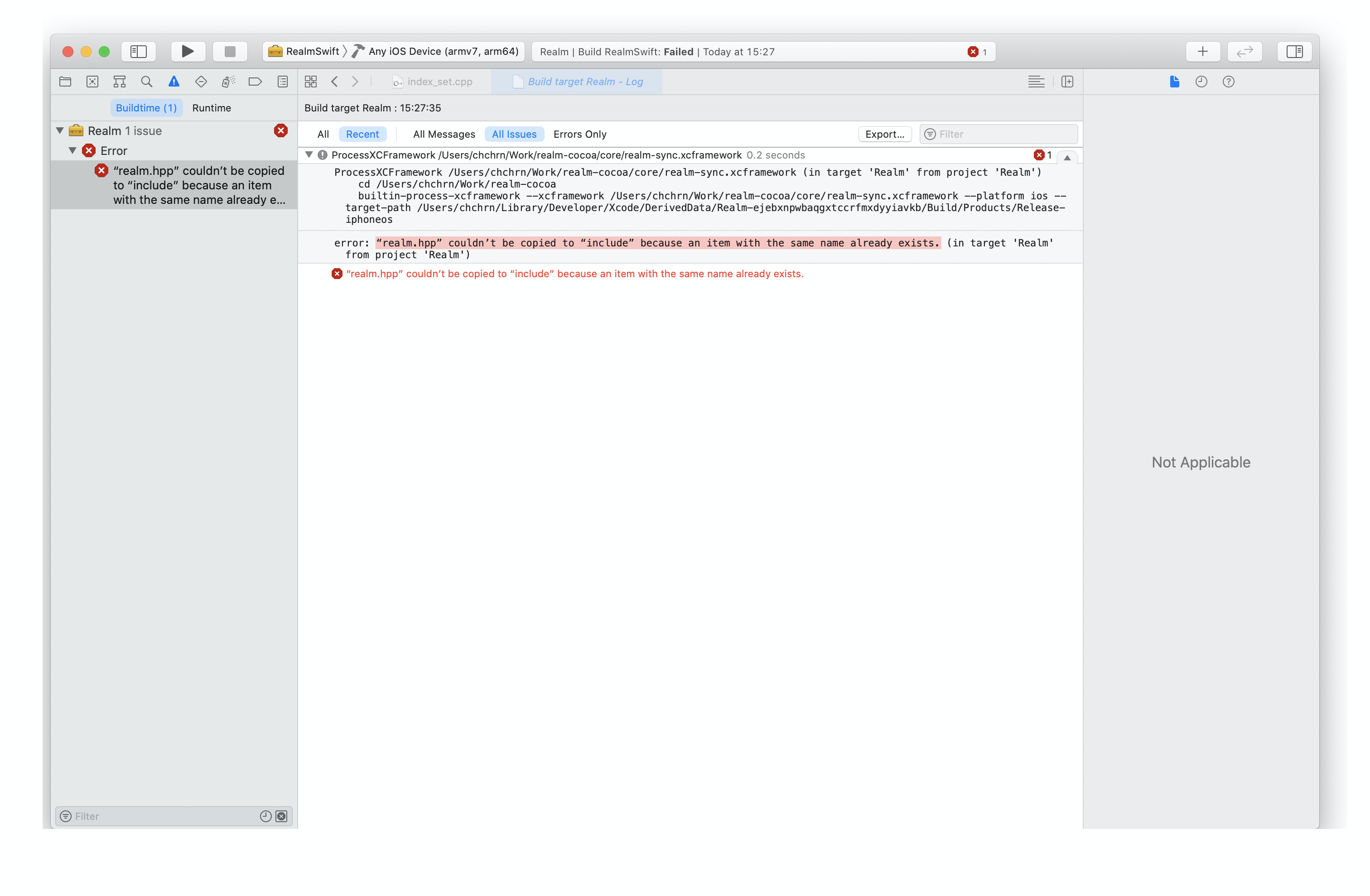
I have the same error in Release configuration for RealmSwift project, but everything is ok in the debug configuration
 chchrn
on 15 Sep 2020
chchrn
on 15 Sep 2020
i moved to cocoapods, carthage is dead
 jafara
on 16 Sep 2020
jafara
on 16 Sep 2020
Any progress on this? Or any hints how this could be fixed? 🙂
 olejnjak
on 16 Sep 2020
olejnjak
on 16 Sep 2020
@olejnjak No update yet. Will let you know. :slightly_smiling_face:
ericjordanmossman
on 16 Sep 2020
Thanks for quick update 🙂 is there any hint where to start when trying to fix this issue? I'm open to contribute but it would be nice to know where to start 🙂
olejnjak
on 16 Sep 2020
The same issue 😱
 Senocico
on 17 Sep 2020
Senocico
on 17 Sep 2020
carthage-xcodebuild.HvGU99.log
@tgoyne Take my failing build log for example -- the build fails on `fatal error: 'realm/keys.hpp' file not found
include `.
realm/keys.hpp is a header file in realm-core.
Sure enough I can see that in the process of downloading the submodule realm-core, the download script claims that 5.0.23 is already present.
PhaseScriptExecution Download\ Core\ and\ Sync /Users/mdb/Library/Caches/org.carthage.CarthageKit/DerivedData/12.0_12A8179i/realm-cocoa/v5.4.1/Build/Intermediates.noindex/ArchiveIntermediates/Realm/IntermediateBuildFilesPath/Realm.build/Release-iphoneos/Download\ Core\ Library.build/Script-5D659E7F1BE04556006515A0.sh (in target 'Download Core Library' from project 'Realm')
    cd /Users/mdb/Downloads/test-carthage/Carthage/Checkouts/realm-cocoa
    /bin/sh -c /Users/mdb/Library/Caches/org.carthage.CarthageKit/DerivedData/12.0_12A8179i/realm-cocoa/v5.4.1/Build/Intermediates.noindex/ArchiveIntermediates/Realm/IntermediateBuildFilesPath/Realm.build/Release-iphoneos/Download\\\ Core\\\ Library.build/Script-5D659E7F1BE04556006515A0.sh
Version 5.0.23 already present
But evidently realm/keys.hpp is not in my /Library/Caches/org.carthage.CarthageKit/DerivedData/.
The tar.xz is downloaded earlier, though:
PhaseScriptExecution Download\ Core\ and\ Sync /Users/mdb/Library/Caches/org.carthage.CarthageKit/DerivedData/12.0_12A8179i/realm-cocoa/v5.4.1/Build/Intermediates.noindex/ArchiveIntermediates/RealmSwift/IntermediateBuildFilesPath/Realm.build/Release-watchos/Download\ Core\ Library.build/Script-5D659E7F1BE04556006515A0.sh (in target 'Download Core Library' from project 'Realm')
    cd /Users/mdb/Downloads/test-carthage/Carthage/Checkouts/realm-cocoa
    /bin/sh -c /Users/mdb/Library/Caches/org.carthage.CarthageKit/DerivedData/12.0_12A8179i/realm-cocoa/v5.4.1/Build/Intermediates.noindex/ArchiveIntermediates/RealmSwift/IntermediateBuildFilesPath/Realm.build/Release-watchos/Download\\\ Core\\\ Library.build/Script-5D659E7F1BE04556006515A0.sh
Downloading dependency: sync 5.0.23 from https://static.realm.io/downloads/sync/realm-sync-xcframework-5.0.23.tar.xz
Is the order of the compiling causing a problem?
ericjordanmossman
on 17 Sep 2020
So far it appears to be a combination of Xcode 12's xcframework logic being incorrect when more than one target in a project depends on the same xcframework and carthage building a scheme that it shouldn't be building, which causes it to hit the xcode problem. I'm currently experimenting with workarounds.
 tgoyne
on 17 Sep 2020
tgoyne
on 17 Sep 2020
v5.4.2 switches the prebuilt carthage artifact to being built with Xcode 12, but this is unfortunately via ridiculous hacks and not by fixing the root problem, so if you specifically want to build from source that still won't work.
tgoyne
on 18 Sep 2020
Not working, Realm version: v5.4.2, Carthage: 0.35.1
#include <realm/keys.hpp>
         ^~~~~~~~~~~~~~~~
 caobug
on 18 Sep 2020
caobug
on 18 Sep 2020
https://github.com/realm/realm-cocoa/pull/6787 adds a better workaround that should make carthage update --no-use-binaries work.
tgoyne
on 19 Sep 2020
Related issues
 TheHmmka
·
3Comments
TheHmmka
·
3Comments
 dmorrow
·
3Comments
dmorrow
·
3Comments
 ishidakei
·
3Comments
ishidakei
·
3Comments
 jpsim
·
3Comments
jpsim
·
3Comments
 carvalho-oak
·
3Comments
carvalho-oak
·
3Comments
Most helpful comment
https://github.com/realm/realm-cocoa/pull/6787 adds a better workaround that should make
carthage update --no-use-binarieswork.