Realm-cocoa: Can't run project with RealmSwift in iOS simulator after building with Xcode 12 (after beta 3)
Goals
My goal is to run the app in simulator (preferably iOS 14 one) to be prepared for future iOS and Xcode updates.
Something's seem broken in the mapping of arm64 to x86_64 when new build system of Xcode 12 is used.
Expected Results
Application runs in simulator.
Actual Results
Since Xcode 12 beta 3 I can no longer build my project anymore. There are few scenarios:
- When the app was first build with Xcode 11.6 and the build folder wasn't cleaned prior building with Xcode 12 beta 3 build segfaults compiling the classes with RealmSwift imports.
Example error:AddressGeorecord.swift:10:8: error: could not find module 'RealmSwift' for target 'arm64-apple-ios-simulator'; found: x86_64-apple-ios-simulator, x86_64 import RealmSwift(all the long stack dump is omitted for brevity). - When the build folder is cleaned and derived data removed Xcode 12 beta 3 won't build at all showing
No such module 'RealmSwift'on imports in classes importing Realm. - When the build folder is cleaned and derived data removed beforehand and then RealmSwift pod scheme built for any of iOS 14 simulators trying to build and run the app afterwards fails with segfault and the same error
could not find module 'RealmSwift' for target 'arm64-apple-ios-simulator'. - Excluding x86_64 in Pods project Build settings -> Excluded Architectures and/or explicitly setting
armv7 armv7s arm64 arm64e i386in Pods project Build settings -> Architectures helps to build the project. But it can't be run in simulator with the following message:[Project name] architectures (arm64) include none that iPhone SE (1st generation) can execute (Intel 64-bit).(For whatever simulator is selected).
Steps for others to Reproduce
See 'Actual results' section above.
Code Sample
None.
Version of Realm and Tooling
ProductName:    Mac OS X
ProductVersion: 10.15.5
BuildVersion:   19F101

/Applications/Xcode-beta.app/Contents/Developer
Xcode 12.0
Build version 12A8169g

/Users/illabo/.rbenv/shims/pod
1.9.3
Realm (5.3.3)
RealmSwift (5.3.3)

/bin/bash
GNU bash, version 3.2.57(1)-release (x86_64-apple-darwin19)

carthage not found
(not in use here)

/usr/local/bin/git
git version 2.24.1
 illabo
All 29 comments
We do not support the new arm64 simulators yet as they break the old "universal" simulator/device libraries hack. Currently you'll need to exclude arm64 from the simulator architectures:
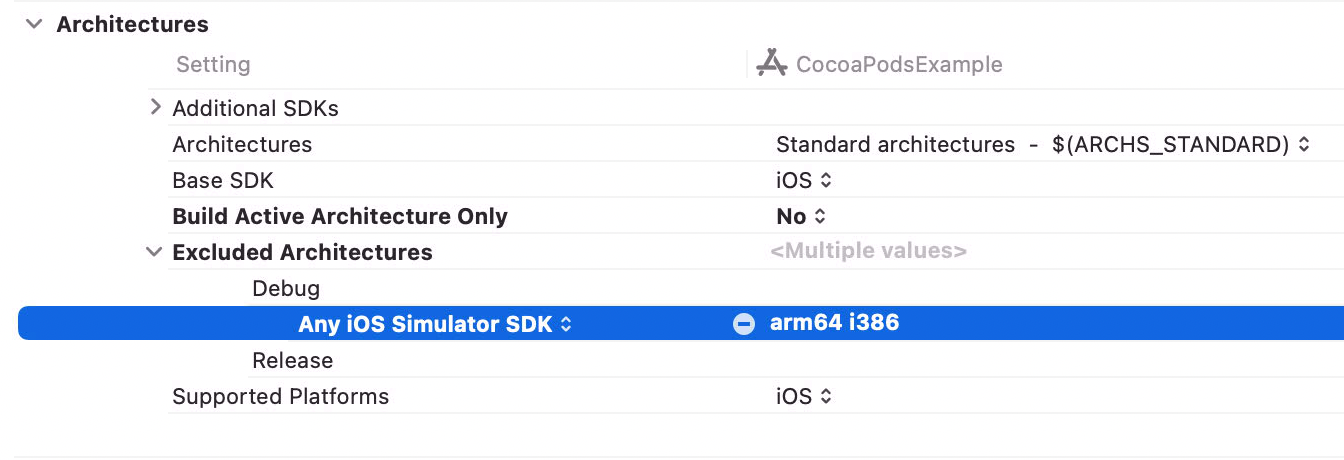
Build Active Architecture Only: Yes should also sidestep this unless you're running on an ARM DTK, as that's the only place the arm64 simulator is actually used.
 tgoyne
on 18 Aug 2020
tgoyne
on 18 Aug 2020
@tgoyne Sorry to say, but it isn't a solution. Whenever the project is attempted to be built for debug in simulator (main project and Pods targets architectures are set to ARCHS_STANDARD) excluding arm64 and i386 architectures it can't be linked as there aren't anything actually built:
None of the architectures in ARCHS (arm64, i386, x86_64) are valid. Consider setting ARCHS to $(ARCHS_STANDARD) or updating it to include at least one value from VALID_ARCHS (armv7, arm64) which is not in EXCLUDED_ARCHS (arm64, i386).
And I'm trying with no success to run the project on old simulators (10.3.1—13.6) not only 14.0, seems Xcode 12 treat them as arm64 simulators too for some reason. E.g. it is an error I'm getting trying to run on iOS 12.1 (when arm64 isn't excluded): could not find module 'RealmSwift' for target 'arm64-apple-ios-simulator'. Please check the last two bullets in "Actual Results" section in original issue. This mutually exceptional messages (saying a simulator could run x86 binary but Xcode can't find arm64 module) are present only when the project imports Realm. It is the reason to file this issue and not just wait for release of production ready Xcode 12.
Build Active Architecture Only: Yes not helping also on my Intel Mac whether I exclude arm64 from build archs or not.
I can understand this happens because of Apple tweaked the build system, but it is a coming reality to deal with. Unfortunately it seems the time for new 'hack' to force-feed simulator with the correct binary and resolve this contradiction.
For now I can perfectly fall back to building with Xcode 11, but I have some worries regarding upcoming releases.
illabo
on 18 Aug 2020
@tgoyne we're seeing a very similar issue. We're not attempting to use RealmSwift at all, just realm-cocoa. Tried excluding arm64 to no avail:


The error is:
ld: in /.../Pods/Realm/core/librealmcore-ios.a(bptree.o), building for iOS Simulator, but linking in object file built for iOS, for architecture arm64
Builds properly on a real device, just not on the simulator. Laptop has processor 2.9 GHz 6-Core Intel Core i9 running Catalina 10.15.6 (19G73). Let me know if there's any additional info about our build settings, Podfile, hardware etc. that would be helpful in debugging.
 tsheaff
on 25 Aug 2020
tsheaff
on 25 Aug 2020
Not sure if this is happening for everyone, but for us this is becoming an increasingly time-sensitive situation — iOS 14 is coming out very soon, and we're not able to compile our app on simulators at all right now due to this issue.
Is the realm team looking into this issue or aware of what may be causing this? cc @tgoyne
tsheaff
on 2 Sep 2020
When using CocoaPods you will also need to set EXCLUDED_ARCHS on the Pods project.
Supporting the arm simulators requires cocoapods 1.10, which currently is in beta. If they don't make a non-beta release before Xcode 12 leaves beta then I guess we'll just bump the minimum req to that anyway, but we'd prefer not to require everyone working on things being released now to use a beta version.
tgoyne
on 2 Sep 2020
OK thanks for the update @tgoyne very helpful
tsheaff
on 2 Sep 2020
As Xcode 12 is GM seed now and release is expected in hours perspective it seem the right time to revive the topic.
ProductName:    Mac OS X
ProductVersion: 10.15.6
BuildVersion:   19G2021

/Applications/Xcode.app/Contents/Developer
Xcode 12.0
Build version 12A7209

/Users/illabo/.rbenv/shims/pod
1.10.0.rc.1
Realm (5.4.0)
RealmSwift (5.4.0)

/bin/bash
GNU bash, version 3.2.57(1)-release (x86_64-apple-darwin19)

carthage not found
(not in use here)

/usr/local/bin/git
git version 2.28.0
Cocoapods 1.10 (at least rc 1) doesn't remedy this issue no matter Pods Project Base SDK and/or Supported Platform is set to macOS or iOS, Build Active Architectures Only is set to Yes for debug or to No, i386 is in Excluded Architectures or it isn't.
What steps one should take to try mitigate such an issue?
BTW: tried building older project with Realm 3.17.3 and it runs in iOS 14 simulator without any problem.
illabo
on 16 Sep 2020
When using CocoaPods 1.10.rc.1, try pointing at the lm/pod-xcframework as that's the branch which relies on 1.10 changes.
tgoyne
on 17 Sep 2020
Xcode 12 is not beta anymore, its oficial release and the problem persists. its not compiling anymore.
Not sure if this is happening for everyone, but for us this is becoming an increasingly time-sensitive situation — iOS 14 is coming out very soon, and we're not able to compile our app on simulators at all right now due to this issue.
Is the realm team looking into this issue or aware of what may be causing this? cc @tgoyne
 jbarros35
on 18 Sep 2020
jbarros35
on 18 Sep 2020
@jbarros35 what package manager & version of Realm are you using?
 leemaguire
on 18 Sep 2020
leemaguire
on 18 Sep 2020
Here is how I got rid of the problem, I bet this can not be termed as long term solution but the interesting thing is :
Xcode 11 had Valid Architecture(VALID_ARCHS) while Xcode 12 has Excluded Architectures (EXCLUDED_ARCHS).
So if you open the project in xcode12 then if you check-in build settings you will found that VALID_ARCHS is now moved to User-Defined.
So a quick solution will simply delete the entry of VALID_ARCHS from User-Defined. And this time it should work.
I am also looking for a more permanent kind of solution as this solution will break every time we perform pod install or pod updates.
So somewhere I found this post pod installation change but I have not tried that yet.
ref: https://developer.apple.com/forums/thread/656509
post_install do |installer|
    installer.pods_project.targets.each do |target|
          target.build_configurations.each do |config|
                config.build_settings['EXCLUDED_ARCHS[sdk=iphonesimulator*]'] = 'arm64'
          end
    end
end
Please try and let me know if it helps
 umang-simform
on 21 Sep 2020
umang-simform
on 21 Sep 2020
@umang-simform Thank you! The Podfile snippet seems to help in our case.
 lukas2
on 21 Sep 2020
lukas2
on 21 Sep 2020
Here is how I got rid of the problem, I bet this can not be termed as long term solution but the interesting thing is :
Xcode 11 hadValid Architecture(VALID_ARCHS)while Xcode 12 has Excluded Architectures (EXCLUDED_ARCHS).
So if you open the project in xcode12 then if you check-in build settings you will found thatVALID_ARCHSis now moved toUser-Defined.
So a quick solution will simply delete the entry ofVALID_ARCHSfromUser-Defined. And this time it should work. I am also looking for a more permanent kind of solution as this solution will break every time we perform pod install or pod updates.
So somewhere I found this post pod installation change but I have not tried that yet.
ref: https://developer.apple.com/forums/thread/656509post_install do |installer| installer.pods_project.targets.each do |target| target.build_configurations.each do |config| config.build_settings['EXCLUDED_ARCHS[sdk=iphonesimulator*]'] = 'arm64' end end endPlease try and let me know if it helps
I tried this too and it worked great
umang-simform
on 21 Sep 2020
Thanks @umang-simform, this!
So a quick solution will simply delete the entry of VALID_ARCHS from User-Defined. And this time it should work.
I'd want to say sorry to Realm team and @tgoyne for my complaints. I assumed VALID_ARCHS is just ignored by Xcode 12 as deprecated and affects nothing. Was wrong.
Perhaps there should be some kind of compile time warning or a notice in documentation (sorry if I overlooked that) for those who maintains pre XC12 projects?
illabo
on 21 Sep 2020
Here is how I got rid of the problem, I bet this can not be termed as long term solution but the interesting thing is :
Xcode 11 hadValid Architecture(VALID_ARCHS)while Xcode 12 has Excluded Architectures (EXCLUDED_ARCHS).
So if you open the project in xcode12 then if you check-in build settings you will found thatVALID_ARCHSis now moved toUser-Defined.
So a quick solution will simply delete the entry ofVALID_ARCHSfromUser-Defined. And this time it should work. I am also looking for a more permanent kind of solution as this solution will break every time we perform pod install or pod updates.
So somewhere I found this post pod installation change but I have not tried that yet.
ref: https://developer.apple.com/forums/thread/656509post_install do |installer| installer.pods_project.targets.each do |target| target.build_configurations.each do |config| config.build_settings['EXCLUDED_ARCHS[sdk=iphonesimulator*]'] = 'arm64' end end endPlease try and let me know if it helps
In my case applying this as is broke several other Pods, but was otherwise helpful when just restricted to Realm Pods:
post_install do |installer|
installer.pods_project.targets.each do |target|
+ if target.name.include?('Realm')
target.build_configurations.each do |config|
config.build_settings['EXCLUDED_ARCHS[sdk=iphonesimulator*]'] = 'arm64'
end
+ end
end
end
 naoey
on 28 Sep 2020
naoey
on 28 Sep 2020
In my case excluding arm64 brakes other pods.
Fog example:
post_install do |installer|
installer.pods_project.targets.each do |target|
if target.name.include?('Realm')
target.build_configurations.each do |config|
config.build_settings['EXCLUDED_ARCHS[sdk=iphonesimulator*]'] = 'arm64'
end
end
end
end
gives me the following error message:
Showing All Messages
....my_path.../Pods/RxRealm/Pod/Classes/RealmObserver.swift:9:8: Could not find module 'RealmSwift' for target 'arm64-apple-ios-simulator'; found: x86_64-apple-ios-simulator, x86_64
Any suggestions on how to exclude arm64 correctly to keep work other pods?
 codemeister64
on 28 Sep 2020
codemeister64
on 28 Sep 2020
I already tried it. The following code
installer.pods_project.targets.each do |target|
if target.name != 'RxRealm' && target.name.include?('Realm')
target.build_configurations.each do |config|
config.build_settings['EXCLUDED_ARCHS[sdk=iphonesimulator*]'] = 'arm64'
end
end
end
excludes arm64 arch only for Realm and RealmSwift pods, but there is still the same error for RxRealm. Also, I tried to clean DerivedData
codemeister64
on 28 Sep 2020
BUILD Settings -> VALID_ARCHS. add "X86_64" on your project (Prolly you might have arm* series. put it with them to work)
 stareta1202
on 7 Oct 2020
stareta1202
on 7 Oct 2020
Hi @codemeister64 !
Did you find any solution ? i have the same issue
 danielrobleM
on 23 Oct 2020
danielrobleM
on 23 Oct 2020
Anyone find any solution? I have the same issue
 ykhandelwal913
on 23 Oct 2020
ykhandelwal913
on 23 Oct 2020
Hi @danielrobleM, yes I`ve resolved the issue.
In my case the following steps works:
1) add following code to post_install section of your podfile:
post_install do |installer|
    installer.pods_project.targets.each do |target|
          target.build_configurations.each do |config|
                config.build_settings['EXCLUDED_ARCHS[sdk=iphonesimulator*]'] = 'arm64'
          end
    end
end
2) open your project settings and manually for each of your targets set Excluded Architectures setting (in my case I have two targets - main and push notification extension). Check this screenshot
codemeister64
on 26 Oct 2020
Anyone has this issue right now?
Every time I tried 'pod lib lint' and this is always the error
~/Pods/Realm/core/librealmcore-ios.a(bptree.o), building for iOS Simulator, but linking in object file built for iOS, for architecture arm64
    clang: error: linker command failed with exit code 1 (use -v to see invocation)
The following build commands failed:
        Ld /Users/~/Library/Developer/Xcode/DerivedData/App-bcahkoasabrxnhbthdoimxoxletm/Build/Intermediates.noindex/Pods.build/Release-iphonesimulator/Realm.build/Objects-normal/arm64/Binary/Realm normal arm64
    (1 failure)
- I've added exclusion for arm64 on all my targets
- I've set 'ONLY_ACTIVE_ARCH' to yes to both Debug and Release on all my targets
- I've added both exclusion for arm64 and ONLY_ACTIVE_ARCH in podfile in post install
- I've added the following code to my podspec
s.user_target_xcconfig = { 'EXCLUDED_ARCHS[sdk=iphonesimulator]' => 'arm64' }
s.user_target_xcconfig = { 'ONLY_ACTIVE_ARCH' => 'YES' }
s.pod_target_xcconfig = { 'EXCLUDED_ARCHS[sdk=iphonesimulator]' => 'arm64' }
s.pod_target_xcconfig = { 'ONLY_ACTIVE_ARCH' => 'YES' } - I've checked and there is no VALID_ARCH setting in my build setting
And yet I still cannot pass pod lib lint
Xcode: 12.2
Pod: 1.10.0
Realm: 3.21.0
RealmSwift: 3.21.0
 tzuhaohuang
on 27 Nov 2020
tzuhaohuang
on 27 Nov 2020
Hello, I have similar problems.
When building our project I get the error:
could not find module 'RealmSwift' for target 'arm64-apple-ios-simulator'; found: i386, x86_64-apple-ios-simulator, x86_64, i386-apple-ios-simulator
This happens when I'm building on the CI (azure). I've tried all solutions from the previous comments but no luck.
Now I'm actually adding the Realm and RealmSwift sdks as XCFrameworks to the project, instead of with Cocoapods. But the error remains the same.
Xcode 12.2
latest release of Realm.
Any suggestions are much appreciated
 FDavidse20
on 10 Dec 2020
FDavidse20
on 10 Dec 2020
Update: The following workaround is no longer required in Realm version 10.4.0
I've encountered the same issue in #6968. The Realm project excludes the arm64 architecture when building for the iOS simulator. Please change the following line in your Realm project
https://github.com/realm/realm-cocoa/blob/af4b201bb955736f250f5af1c1b6bc335a43c385/Configuration/Base.xcconfig#L65
to REALM_ARM_ARCHS_1200 = ; and build again with sh build.sh xcframework ios
 FelixII
on 10 Dec 2020
FelixII
on 10 Dec 2020
Hi Felixll,
in your case you are building on a simulator on a M1 machine right? So you need the arm64 architecture.
It's strange that I'm having the same error while I'm not building on simulator running on an M1 machine.
So in that case removing the line:
REALM_ARM_ARCHS_1200 = arm64 arm64e;
would not help right?
Or did I misinterpret your suggestions?
FDavidse20
on 10 Dec 2020
Yes, I'm building for the arm64 simulator on an M1 Mac.
Your error message
could not find module 'RealmSwift' for target 'arm64-apple-ios-simulator'
suggests that your machine tries to build this architecture as well and cannot find the correct slice for RealmSwift. Of course, this could also be due to a configuration problem in your project.
My approach allows you to build a xcframework with the full set of architectures and therefore should fix this error. I haven't tried it on an Intel Mac yet, but I see no reason why it shouldn't work there as well. I can send you the precompiled xcframework files if you want to give it a try.
I'm not a Realm developer and have limited experience with this project. There may be better solutions to this problem, but this one has worked for me so far.
FelixII
on 10 Dec 2020
The latest Realm version 10.4.0 has fixed the arm64-apple-ios-simulator compiler issue for me. My workaround in #6968 should no longer be necessary.
FelixII
on 11 Dec 2020
I have an MacBook Air M1, What do you suggest if I include Realm using Swift Package Manager?
 marcocattai
on 15 Dec 2020
marcocattai
on 15 Dec 2020
For SwiftPM, use Realm version 10.5.0.
 jsflax
on 15 Dec 2020
jsflax
on 15 Dec 2020
Related issues
 ciminuv
·
3Comments
ciminuv
·
3Comments
 jpsim
·
3Comments
jpsim
·
3Comments
 duribreux
·
3Comments
duribreux
·
3Comments
 Bogidon
·
3Comments
Bogidon
·
3Comments
 i-schuetz
·
3Comments
i-schuetz
·
3Comments
Most helpful comment
As Xcode 12 is GM seed now and release is expected in hours perspective it seem the right time to revive the topic.
Cocoapods 1.10 (at least rc 1) doesn't remedy this issue no matter Pods Project Base SDK and/or Supported Platform is set to macOS or iOS, Build Active Architectures Only is set to Yes for debug or to No, i386 is in Excluded Architectures or it isn't.
What steps one should take to try mitigate such an issue?
BTW: tried building older project with Realm 3.17.3 and it runs in iOS 14 simulator without any problem.