Realm-cocoa: Missing required architecture arm64 with Realm 5.4.4 against watchOS 7 simulator on Xcode 12
Goals
It is said in release note "Add support for the x86_64 watchOS simulator added in Xcode 12.", so I created a new iOS project with a watchOS app. Added Realm by CocoaPods and it couldn't compile.
Run the sample project on simulator.
Expected Results
App ran.
Actual Results
Build failed.
Steps for others to Reproduce
- create an iOS app.
- added an watchOS app.
- create a Podfile and added realm in both targets.
- pod install
- open the new workspace file
- run the app with a iPhone simulator.
Code Sample
Version of Realm and Tooling
Realm framework version: ?
5.3.3
Realm Object Server version: ?
Xcode version: ?
12.0 beta 3 (12A8169g)
iOS/OSX version: ?
iOS 14 simulator
Dependency manager + version: ?

 owenzhao
All 23 comments
The same with Xcode 12 beta 4.
owenzhao
on 5 Aug 2020
Facing the same issue with Realm 5.3.3, release notes suggested that the issue was fixed.
@tgoyne Perhaps you could shed light on what's causing this to happen or if you're aware of this still being an issue? The errors persist even after removing Realm from the watchOS Extension.
 virtuosovidit
on 14 Aug 2020
virtuosovidit
on 14 Aug 2020
Facing the same issue with Realm 5.3.3, release notes suggested that the issue was fixed.
@tgoyne Perhaps you could shed light on what's causing this to happen or if you're aware of this still being an issue? The errors persist even after removing Realm from the watchOS Extension.
I thought this week and last, Realm employees were on their vacations. As no one answered the issues and nothing was committed to the main branch.
owenzhao
on 15 Aug 2020
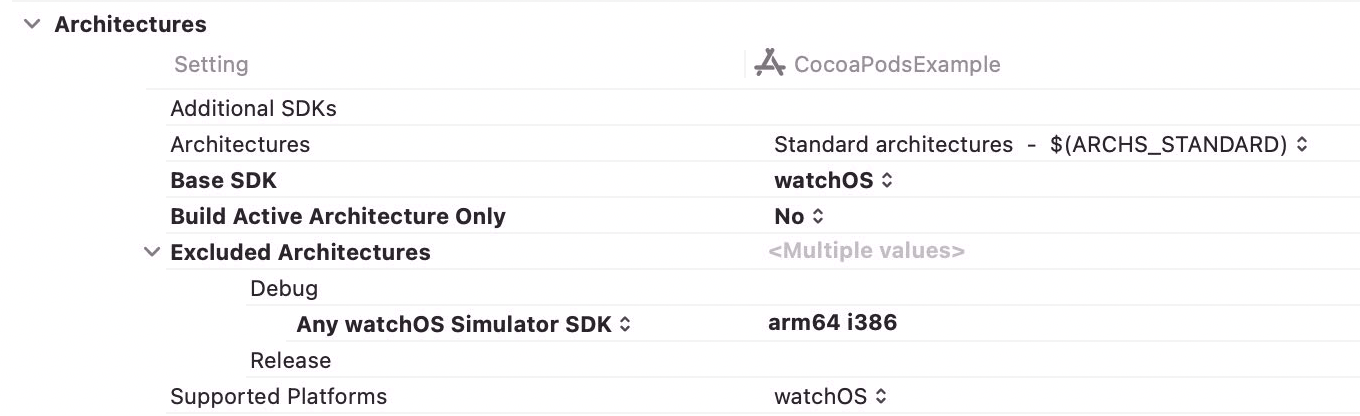
Those errors are related to the arm64 simulator added in beta 3, which we have not yet added support for. You'll currently need to add arm64 to the excluded architectures for the simulator only:
 tgoyne
on 18 Aug 2020
tgoyne
on 18 Aug 2020
I have the same problem with Xcode 12 beta 6
@tgoyne Is it working to support arm64?
Do you know a possible date when there will be a version of Realm with arm64 support?
 jordimele
on 2 Sep 2020
jordimele
on 2 Sep 2020
Realm framework version: 5.4.0
Xcode version: Xcode 12 GM (12A7209)
iOS/OSX version: iOS 14 simulator
Project with iOS app & watchOS app
The same problem:

Do you know when it will be resolved?
jordimele
on 16 Sep 2020
Realm framework version: 5.4.1
Xcode version: Xcode 12 (12A7209)
iOS/OSX version: iOS 14 simulator
Project with iOS app & watchOS app
The same problem:
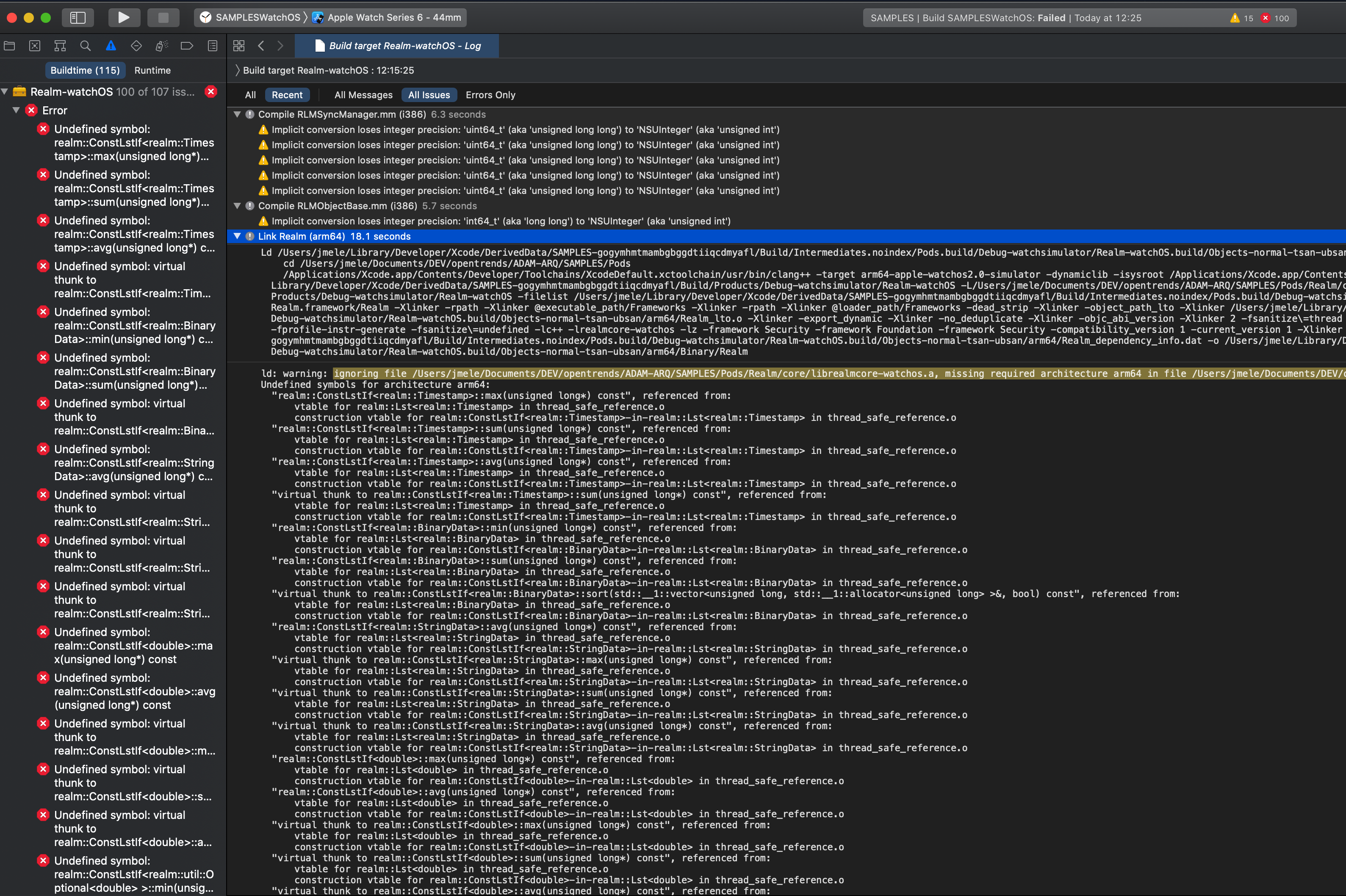
With the latest version released to the store yesterday of Xcode 12 and the latest version of Realm, the same error persists.
Are you working to release a version of Realm that will fix the problem?
It is important to know if a version is going to be released shortly solving the problem or if it is necessary to work with the workaround to exclude arm64 architectures for the simulator because there is no forecast that it will be solved.
Thank you.
jordimele
on 17 Sep 2020
v5.4.3 have the same issue, any ETA for the fix?
 rursache
on 25 Sep 2020
rursache
on 25 Sep 2020
Realm framework version: 5.4.4
Xcode version: Xcode 12.0.1 (12A7300)
iOS/OSX version: iOS 14 simulator
Project with iOS app & watchOS app
We have the same problem with the latest version of Realm (5.4.4) and Xcode (Xcode 12.0.1).
@tgoyne Do you know if a version is being worked on that solves this problem?
Thank you.
jordimele
on 28 Sep 2020
In your target/projects settings add arm64 to the list of excluded architectures.
 leemaguire
on 28 Sep 2020
leemaguire
on 28 Sep 2020
In your target/projects settings add
arm64to the list of excluded architectures.
That won't work at least if you are using other frameworks which depend Realm internally, for example: 'IceCream'.
owenzhao
on 28 Sep 2020
@owenzhao Try this, it may help https://github.com/realm/realm-cocoa/issues/6685#issuecomment-685870573
leemaguire
on 28 Sep 2020
@owenzhao Try this, it may help #6685 (comment)
@leemaguire
what you comment is still a workaround.
Working with other frameworks that have the dependency on Realm internally, I have added this configuration in the podspecs:
Pod :: Spec.new do | s |
    s.name = "repo_name"
    ...
    s.watchos.pod_target_xcconfig = {
        'EXCLUDED_ARCHS [sdk = watchsimulator *]' => 'arm64'
    }
end
Configuration is also required in the target / project settings of the application, to add arm64 to the list of excluded architectures.
The question is whether Realm plans to release a fix for that problem and not use the workaround.
jordimele
on 28 Sep 2020
It's still happening to me too.
Can anyone help me?
 maulik-brt
on 2 Oct 2020
maulik-brt
on 2 Oct 2020
Same issue
 borislav-pixely
on 2 Oct 2020
borislav-pixely
on 2 Oct 2020
Xcode 12.0.1
My corporate (private) framework uses Realm 5.4.7 internally and I still get the following error when linking Podspec file :
ld: in /var/folders/2p/kz5hwvys7pl4gjvpgyww69bh_tbwp3/T/CocoaPods-Lint-20201005-46915-696cd2-MyFramework/Pods/Realm/core/librealmcore-ios.a(array_binary.o), building for iOS Simulator, but linking in object file built for iOS, for architecture arm64
    clang: error: linker command failed with exit code 1 (use -v to see invocation)
_building for iOS Simulator, but linking in object file built for iOS, for architecture arm64_
Guys, tell me if you plan to fix this problem? If so, which version of Realm should this be expected?
Please do not ignore this message and respond. You must respect your developer users! 🧘♂️
upd 2020-10-05:
I installed Cocoapods 10.0.0-rc.1, Realm/RealmSwift 10.0.0-rc.1,
used in Podfile
post_install do |installer|
  installer.pods_project.build_configurations.each do |config|
    config.build_settings["EXCLUDED_ARCHS[sdk=iphonesimulator*]"] = "x86_64 i386"
    config.build_settings["ONLY_ACTIVE_ARCH"] = "YES"
  end
end
and in MyFramework.podspec
spec.user_target_xcconfig = {
  'EXCLUDED_ARCHS[sdk=iphonesimulator*]' => '$(EXCLUDED_ARCHS__EFFECTIVE_PLATFORM_SUFFIX_$(EFFECTIVE_PLATFORM_SUFFIX)__NATIVE_ARCH_64_BIT_$(NATIVE_ARCH_64_BIT)__XCODE_$(XCODE_VERSION_MAJOR))', 'EXCLUDED_ARCHS__EFFECTIVE_PLATFORM_SUFFIX_simulator__NATIVE_ARCH_64_BIT_x86_64__XCODE_1200' => 'arm64 arm64e armv7 armv7s armv6 armv8'
}
spec.pod_target_xcconfig = {
  'EXCLUDED_ARCHS[sdk=iphonesimulator*]' => '$(EXCLUDED_ARCHS__EFFECTIVE_PLATFORM_SUFFIX_$(EFFECTIVE_PLATFORM_SUFFIX)__NATIVE_ARCH_64_BIT_$(NATIVE_ARCH_64_BIT)__XCODE_$(XCODE_VERSION_MAJOR))',
      'EXCLUDED_ARCHS__EFFECTIVE_PLATFORM_SUFFIX_simulator__NATIVE_ARCH_64_BIT_x86_64__XCODE_1200' => 'arm64 arm64e armv7 armv7s armv6 armv8'
}
But none of this helped.
 anatoliykant
on 5 Oct 2020
anatoliykant
on 5 Oct 2020
Xcode 12.0.1
My corporate (private) framework uses Realm 5.4.7 internally and I still get the following error when linking Podspec file :
ld: in /var/folders/2p/kz5hwvys7pl4gjvpgyww69bh_tbwp3/T/CocoaPods-Lint-20201005-46915-696cd2-MyFramework/Pods/Realm/core/librealmcore-ios.a(array_binary.o), building for iOS Simulator, but linking in object file built for iOS, for architecture arm64 clang: error: linker command failed with exit code 1 (use -v to see invocation)_building for iOS Simulator, but linking in object file built for iOS, for architecture arm64_
Guys, tell me if you plan to fix this problem? If so, which version of Realm should this be expected?
Please do not ignore this message and respond. You must respect your developer users! 🧘♂️
Having exactly the same scenario. Kind of disappointed that this issue has not been solved before the release of iOS14.
I fixed the issue by pushing the podspec files of Realm to our private cocoaspecs repo and adding the EXCLUDED_ARCHS to the spec files of Realm. A workaround I wish did not have to make.
 dannydeut
on 5 Oct 2020
dannydeut
on 5 Oct 2020
Xcode 12.0.1
My corporate (private) framework uses Realm 5.4.7 internally and I still get the following error when linking Podspec file :
ld: in /var/folders/2p/kz5hwvys7pl4gjvpgyww69bh_tbwp3/T/CocoaPods-Lint-20201005-46915-696cd2-MyFramework/Pods/Realm/core/librealmcore-ios.a(array_binary.o), building for iOS Simulator, but linking in object file built for iOS, for architecture arm64 clang: error: linker command failed with exit code 1 (use -v to see invocation)
_building for iOS Simulator, but linking in object file built for iOS, for architecture arm64_
Guys, tell me if you plan to fix this problem? If so, which version of Realm should this be expected?
Please do not ignore this message and respond. You must respect your developer users! 🧘♂️Having exactly the same scenario. Kind of disappointed that this issue has not been solved before the release of iOS14.
I fixed the issue by pushing the podspec files of Realm to our private cocoaspecs repo and adding the
EXCLUDED_ARCHSto the spec files of Realm. A workaround I wish did not have to make.
Did I understand correctly that you only created the podspec Realm file in your private repository?
Moreover, you did not clone the Realm and RealmSwift repositories there?!
Could you share the podspec file for Realm?
anatoliykant
on 5 Oct 2020
@anatoliykant I only added the spec file to our private cocoa spec repo. No cloning of the actual repo is required. Make sure the source of your private repo is before cdn.cocoapods.org in the podfile of your framework. You might get some warnings about double pods, but these are acceptable until this is fixed the right way. Also had to clear some pod caches...
Realm/5.4.7/Realm.podspec
````
Pod::Spec.new do |s|
s.name = 'Realm'
s.version = '5.4.7'
s.summary = 'Realm is a modern data framework & database for iOS, macOS, tvOS & watchOS.'
s.description = <<-DESC
The Realm Mobile Database, for Objective-C. (If you want to use Realm from Swift, see the “RealmSwift” pod.)
                          The Realm Mobile Database is a fast, easy-to-use replacement for Core Data & SQLite. Use it with the Realm Mobile Platform for realtime, automatic data sync. Works on iOS, macOS, tvOS & watchOS. Learn more and get help at https://realm.io.
                          DESC
s.homepage = "https://realm.io"
s.source = { :git => 'https://github.com/realm/realm-cocoa.git', :tag => "v5.4.7", :submodules => true }
s.author = { 'Realm' => '[email protected]' }
s.library = 'c++', 'z'
s.requires_arc = true
s.social_media_url = 'https://twitter.com/realm'
s.documentation_url = "https://realm.io/docs/objc/latest"
s.license = { :type => 'Apache 2.0', :file => 'LICENSE' }
public_header_files = 'include//RLMArray.h',
'include//RLMCollection.h',
'include//RLMConstants.h',
'include//RLMListBase.h',
'include//RLMMigration.h',
'include//RLMObject.h',
'include//RLMObjectBase.h',
'include//RLMObjectSchema.h',
'include//RLMOptionalBase.h',
'include//RLMPlatform.h',
'include//RLMProperty.h',
'include//RLMRealm.h',
'include//RLMRealm+Sync.h',
'include//RLMRealmConfiguration+Sync.h',
'include//RLMRealmConfiguration.h',
'include//RLMResults.h',
'include//RLMSchema.h',
'include//RLMSyncConfiguration.h',
'include//RLMSyncCredentials.h',
'include//RLMSyncManager.h',
'include//RLMSyncPermission.h',
'include//RLMSyncSession.h',
'include//RLMSyncSubscription.h',
'include//RLMSyncUser.h',
'include//RLMSyncUtil.h',
'include//RLMThreadSafeReference.h',
'include//NSError+RLMSync.h',
'include//Realm.h',
                          # Realm.Dynamic module
                          'include/**/RLMRealm_Dynamic.h',
                          'include/**/RLMObjectBase_Dynamic.h'

                          # Realm.Private module
private_header_files = 'include//RLMAccessor.h',
'include//RLMArray_Private.h',
'include//RLMCollection_Private.h',
'include//RLMListBase.h',
'include//RLMObjectBase_Private.h',
'include//RLMObjectSchema_Private.h',
'include//RLMObjectStore.h',
'include//RLMObject_Private.h',
'include//RLMOptionalBase.h',
'include//RLMProperty_Private.h',
'include//RLMRealmConfiguration_Private.h',
'include//RLMRealm_Private.h',
'include//RLMResults_Private.h',
'include//RLMSchema_Private.h',
'include//RLMSyncConfiguration_Private.h',
'include//RLMSyncUtil_Private.h'
source_files = 'Realm/.{m,mm}',
'Realm/ObjectStore/src/.cpp',
'Realm/ObjectStore/src/sync/.cpp',
'Realm/ObjectStore/src/sync/impl/.cpp',
'Realm/ObjectStore/src/sync/impl/apple/.cpp',
'Realm/ObjectStore/src/impl/.cpp',
'Realm/ObjectStore/src/impl/apple/.cpp',
'Realm/ObjectStore/src/util/.cpp',
'Realm/ObjectStore/src/util/apple/*.cpp'
s.frameworks = 'Security'
s.module_map = 'Realm/Realm.modulemap'
s.compiler_flags = "-DREALM_HAVE_CONFIG -DREALM_COCOA_VERSION='@\"5.4.7\"' -D__ASSERTMACROS__ -DREALM_ENABLE_SYNC"
s.prepare_command = 'sh build.sh cocoapods-setup'
s.source_files = source_files + private_header_files
s.private_header_files = private_header_files
s.header_mappings_dir = 'include'
s.pod_target_xcconfig = { 'APPLICATION_EXTENSION_API_ONLY' => 'YES',
'CLANG_CXX_LANGUAGE_STANDARD' => 'c++17',
'CLANG_WARN_OBJC_IMPLICIT_RETAIN_SELF' => 'NO',
'OTHER_CPLUSPLUSFLAGS' => '-isystem "${PODS_ROOT}/Realm/include/core" -fvisibility-inlines-hidden',
'OTHER_CPLUSPLUSFLAGS[arch=armv7]' => '-isystem "${PODS_ROOT}/Realm/include/core" -fvisibility-inlines-hidden -fno-aligned-new',
'USER_HEADER_SEARCH_PATHS' => '"${PODS_ROOT}/Realm/include" "${PODS_ROOT}/Realm/include/Realm"',
'EXCLUDED_ARCHS[sdk=iphonesimulator*]' => 'arm64',
'ONLY_ACTIVE_ARCH' => 'YES',
}
s.preserve_paths = %w(build.sh include)
s.ios.deployment_target = '9.0'
s.ios.vendored_library = 'core/librealmcore-ios.a'
s.osx.deployment_target = '10.9'
s.osx.vendored_library = 'core/librealmcore-macosx.a'
s.watchos.deployment_target = '2.0'
s.watchos.vendored_library = 'core/librealmcore-watchos.a'
s.tvos.deployment_target = '9.0'
s.tvos.vendored_library = 'core/librealmcore-tvos.a'
s.subspec 'Headers' do |s|
s.source_files = public_header_files
s.public_header_files = public_header_files
end
end
````
RealmSwift/5.4.7/RealmSwift.podspec
````
Pod::Spec.new do |s|
s.name = 'RealmSwift'
s.version = '5.4.7'
s.summary = 'Realm is a modern data framework & database for iOS, macOS, tvOS & watchOS.'
s.description = <<-DESC
The Realm Mobile Database, for Swift. (If you want to use Realm from Objective-C, see the “Realm” pod.)
                            The Realm Mobile Database is a fast, easy-to-use replacement for Core Data & SQLite. Use it with the Realm Mobile Platform for realtime, automatic data sync. Works on iOS, macOS, tvOS & watchOS. Learn more and get help at https://realm.io.
                            DESC
s.homepage = "https://realm.io"
s.source = { :git => 'https://github.com/realm/realm-cocoa.git', :tag => "v5.4.7", :submodules => true }
s.author = { 'Realm' => '[email protected]' }
s.requires_arc = true
s.social_media_url = 'https://twitter.com/realm'
s.documentation_url = "https://realm.io/docs/swift/latest"
s.license = { :type => 'Apache 2.0', :file => 'LICENSE' }
s.dependency 'Realm', "= 5.4.7"
s.source_files = 'RealmSwift/*.swift'
s.exclude_files = 'RealmSwift/Nonsync.swift'
s.prepare_command = 'sh build.sh cocoapods-setup swift'
s.preserve_paths = %w(build.sh)
s.pod_target_xcconfig = { 'APPLICATION_EXTENSION_API_ONLY' => 'YES',
'EXCLUDED_ARCHS[sdk=iphonesimulator*]' => 'arm64',
'ONLY_ACTIVE_ARCH' => 'YES',
}
s.ios.deployment_target = '9.0'
s.osx.deployment_target = '10.9'
s.watchos.deployment_target = '2.0'
s.tvos.deployment_target = '9.0'
end
````
dannydeut
on 5 Oct 2020
@anatoliykant I only added the spec file to our private cocoa spec repo. No cloning of the actual repo is required. Make sure the source of your private repo is before cdn.cocoapods.org in the podfile of your framework. You might get some warnings about double pods, but these are acceptable until this is fixed the right way. Also had to clear some pod caches...
Realm/5.4.7/Realm.podspec
Pod::Spec.new do |s|
  s.name                    = 'Realm'
  s.version                 = '5.4.7'
...
  s.tvos.deployment_target    = '9.0'
end
thanks
I'll check it out and post here based on the results.
anatoliykant
on 5 Oct 2020
I'll check it out and post here based on the results.
I checked and it works for me.
The only thing at the end of MyFramework.podspec I had to add the following three lines:
    spec.user_target_xcconfig = { 'EXCLUDED_ARCHS[sdk=iphonesimulator*]' => 'arm64' }
    spec.pod_target_xcconfig = { 'EXCLUDED_ARCHS[sdk=iphonesimulator*]' => 'arm64' }
    spec.pod_target_xcconfig = { 'VALID_ARCHS' => 'x86_64 armv7 arm64' }
Thx @dannydeut & @stareta1202
https://github.com/realm/realm-cocoa/issues/6685#issuecomment-704744277
anatoliykant
on 14 Oct 2020
I'll check it out and post here based on the results.
I checked and it works for me.
The only thing at the end of MyFramework.podspec I had to add the following three lines:spec.user_target_xcconfig = { 'EXCLUDED_ARCHS[sdk=iphonesimulator*]' => 'arm64' } spec.pod_target_xcconfig = { 'EXCLUDED_ARCHS[sdk=iphonesimulator*]' => 'arm64' } spec.pod_target_xcconfig = { 'VALID_ARCHS' => 'x86_64 armv7 arm64' }Thx @dannydeut & @stareta1202
I think we can combine two lines pod_target_xcconfig into one line like this:
spec.pod_target_xcconfig = { 'EXCLUDED_ARCHS[sdk=iphonesimulator*]' => 'arm64', 'VALID_ARCHS' => 'x86_64 armv7 arm64' }
 dlpigpen
on 18 Oct 2020
rursache
on 26 Oct 2020
dlpigpen
on 18 Oct 2020
rursache
on 26 Oct 2020
Related issues
 BackWorld
·
3Comments
BackWorld
·
3Comments
 fadylateef
·
3Comments
fadylateef
·
3Comments
 thomasgravina
·
3Comments
thomasgravina
·
3Comments
 javierjulio
·
3Comments
javierjulio
·
3Comments
 Bogidon
·
3Comments
Bogidon
·
3Comments
Most helpful comment
Realm framework version: 5.4.0
Xcode version: Xcode 12 GM (12A7209)
iOS/OSX version: iOS 14 simulator
Project with iOS app & watchOS app
The same problem:
Do you know when it will be resolved?