Realm-cocoa: Xcode 12 Betas 1 and 2 crash when compiling when using Realm 5.2.0 and 5.3.0, is it a known fact?
Goals
Compile successfully with Xcode 12 a project that, as of now, it only compiles ok with Xcode 11.1
Expected Results
Xcode 12 Beta 1 and 2 should not crash using Realm 5.2.0 and 5.3.0 (in the compile phase)
Actual Results
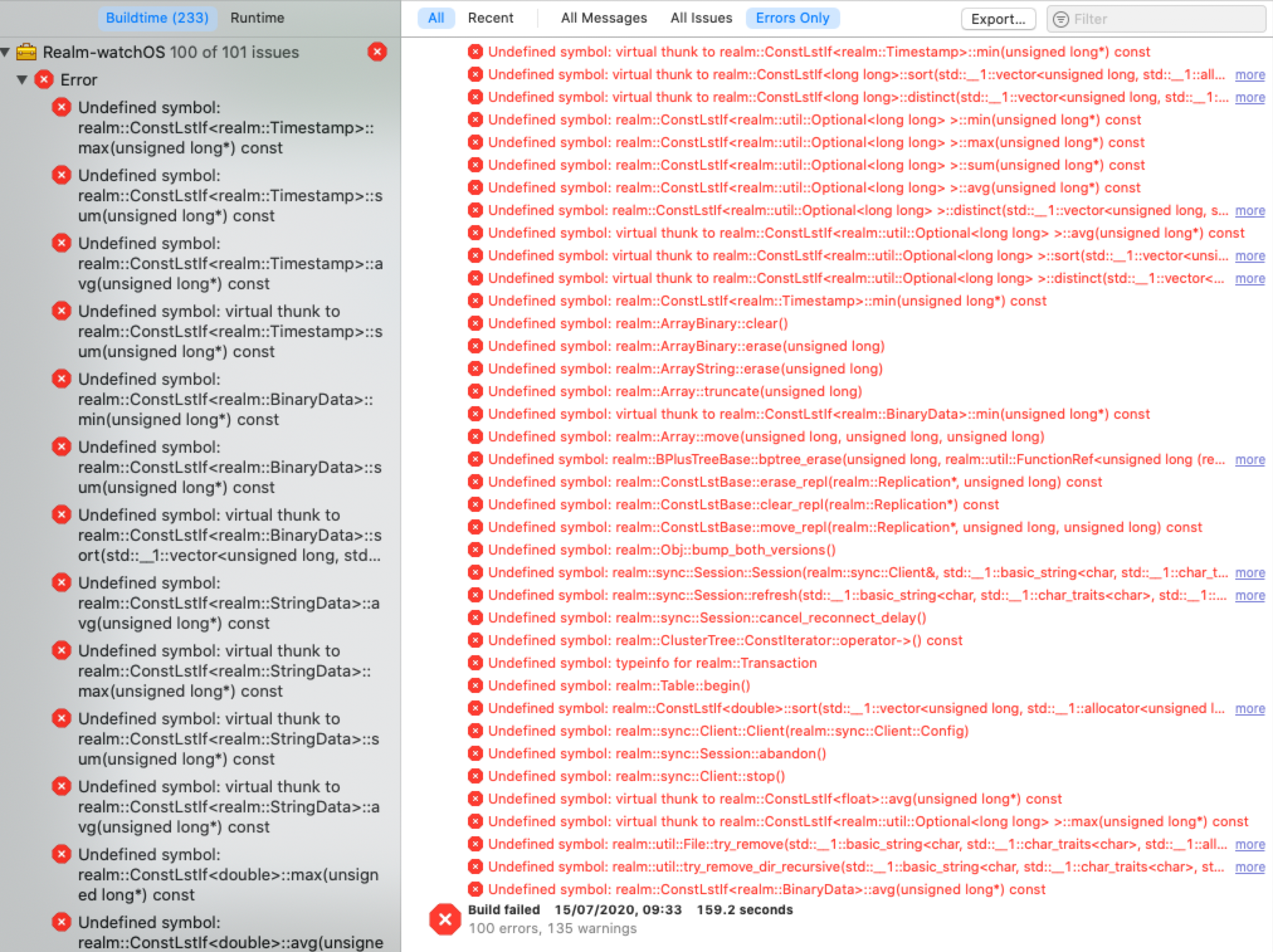
Xcode 12 Beta 1 and 2 both crash using Realm 5.2.0 and 5.3.0 (in the compile phase)
See attachment:
Steps to Reproduce
Using XCode 12 Betas 1 and/or 2, trying to compile our project (using Realm 5.2.0 or 5.3.0) the crash just appears. CMD + R just triggers this.
Code Sample
We can't send confidential code as of now, we should trim and subcase substantial parts of our code. If it's really needed we'll try to do it though.
Version of Realm and Tooling
Realm framework version: 5.2.0 and or 5.3.0
Realm Object Server version: Not used
Xcode version: Xcode 12 Betas 1 and/or 2
iOS/OSX version: Catalina 10.15.4
Dependency manager + version: Cocoapods 1.8.4
 friguron
All 16 comments
You currently need to remove x86_64 from the support architectures when building for watchOS as we are not yet publishing a library with a slice for the new 64-bit simulator.
 tgoyne
on 15 Jul 2020
tgoyne
on 15 Jul 2020
As far as we understand we've removed all "intel" mentions inside this test project we're attaching here:
https://www.dropbox.com/s/ndb0i5fq3yms04v/TestApp_realm_arm_only_with_watch.zip
The compilation error still appears. Should we do anything else to get a successful compilation?
On the other hand, should we expect x86/64 support for watchos targets as we had in previous Realm versions? Is it a known fact you're working on as of now? (for Xcode 12, we mean )
In a worst case we might drop support for Watchos+Realm in the future, but we'd like to know if we should still keep it or not.
Thanks !!
friguron
on 16 Jul 2020
this is happening in Xcode 11.6 as well.
 BrentMifsud
on 16 Jul 2020
BrentMifsud
on 16 Jul 2020
That project is building for "standard architectures". With Xcode 11 that results in building for i386, armv7k, and arm64_32. Xcode 12 has added x86_64 to that list because they added a 64-bit version of the watch simulator. We haven't released a version of the core library for the new simulator yet, so you currently need to explicitly set the supported architectures to the old value of "i386 armv7k arm64_32", or wait a few days for a release with the new architecture to happen.
tgoyne
on 16 Jul 2020
That project is building for "standard architectures". With Xcode 11 that results in building for i386, armv7k, and arm64_32. Xcode 12 has added x86_64 to that list because they added a 64-bit version of the watch simulator. We haven't released a version of the core library for the new simulator yet, so you currently need to explicitly set the supported architectures to the old value of "i386 armv7k arm64_32", or wait a few days for a release with the new architecture to happen.
Changing the architecture seems to have broken the cocoapods scripts. I had to add in "i386 armv7k arm64_32 arm64"
BrentMifsud
on 16 Jul 2020
arm64 should only be needed for the iOS part and not the watchOS part unless something strange is going on.
tgoyne
on 16 Jul 2020
arm64 should only be needed for the iOS part and not the watchOS part unless something strange is going on.
we do have a watchOS target as well. It doesn't have realm as a dependency though. Seems to build fine though with the architecture configuration I mentioned above.
Crisis averted for now.
Weird that apple made that architecture change as part of Xcode 11.6 instead of waiting for 12.
BrentMifsud
on 16 Jul 2020
Xcode 11.6 existing at all is pretty weird. I'm guessing there's some good reason for it, though.
tgoyne
on 16 Jul 2020
That project is building for "standard architectures". With Xcode 11 that results in building for i386, armv7k, and arm64_32. Xcode 12 has added x86_64 to that list because they added a 64-bit version of the watch simulator. We haven't released a version of the core library for the new simulator yet, so you currently need to explicitly set the supported architectures to the old value of "i386 armv7k arm64_32", or wait a few days for a release with the new architecture to happen.
What's the expected timeframe for the issue to be fixed? (i.e. Is the workaround the only way to run on simulator for the Beta period this year?)
 virtuosovidit
on 23 Jul 2020
virtuosovidit
on 23 Jul 2020
https://github.com/realm/realm-core/pull/3796 is the WIP PR to add the new simulator slice.
tgoyne
on 23 Jul 2020
Thanks a lot for sharing that! :)
virtuosovidit
on 23 Jul 2020
@tgoyne a similar issue with xcode 12.0 beta 2 when compiling a project with extensions. First I receive a warning
linking against a dylib which is not safe for use in application extensions: /Users/drei/Library/Developer/Xcode/DerivedData/IOSTemplateProject-eqmqqnyemwwahcaysepnexgjyyvd/Build/Intermediates.noindex/Previews/IOSTemplateProject/Products/Debug-iphonesimulator/PackageFrameworks/RealmCore.framework/RealmCore
Followed by the exact same build error containing a list of undefined symbols as the OP posted above
 saltyskip
on 24 Jul 2020
saltyskip
on 24 Jul 2020
Well beta 3 has now complicated things by adding arm simulator slices which are distinct from the arm device builds. Adding support for that will be awkward.
tgoyne
on 24 Jul 2020
Note it appears to also appears to affect Swift UI previews as referenced in #6625, which i was also able to reproduce locally
saltyskip
on 25 Jul 2020
SwiftUI previews not working when using spm are unrelated to this one despite having similar symptoms.
tgoyne
on 25 Jul 2020
Well beta 3 has now complicated things by adding arm simulator slices which are distinct from the arm device builds. Adding support for that will be awkward.
Arm Simulator slices are almost certainly for Apple Silicon Macs.. since the "simulator" there is also running on Arm.
 mikeyusc
on 28 Jul 2020
mikeyusc
on 28 Jul 2020
Related issues
 thomasgravina
·
3Comments
thomasgravina
·
3Comments
 fadylateef
·
3Comments
fadylateef
·
3Comments
 i-schuetz
·
3Comments
i-schuetz
·
3Comments
 mowens
·
3Comments
mowens
·
3Comments
 TheHmmka
·
3Comments
TheHmmka
·
3Comments
Most helpful comment
https://github.com/realm/realm-core/pull/3796 is the WIP PR to add the new simulator slice.