Realm-cocoa: Support Xcode 11 things
- [x] Get Realm/RealmSwift building in Xcode 11 (https://github.com/realm/realm-cocoa/pull/6164)
- [x] Swift Package Manager support as that's finally included with Xcode (https://github.com/realm/realm-cocoa/pull/6187)
- [x] [SwiftUI](https://github.com/realm/realm-cocoa/issues/6162)
- [x] [Combine framework](https://github.com/realm/realm-cocoa/issues/6161)
- [ ] PropertyWrapper-based RealmOptional
- [ ] Make all property types PropertyWrapper-based rather than
@objc dynamic? - [x] Support catalyst/UIKit for Mac (requires 10.15 to build)
- [x] Catalyst installation example/tests
- [x] Update release packaging
- [ ] Login with Apple for sync auth
More things to be discovered?
Using Realm with Xcode betas requires building from source, and typically will require using dev branches rather than releases.
Swift Package Manager
dependencies: [
    .package(url: "https://github.com/realm/realm-cocoa", from: "3.17.3")
],
Targets named "Realm" and "RealmSwift" (for the obj-c and swift APIs respectively) are exported from the package. SPM support is currently experimental and does not support Realm Sync.
Carthage
github "realm/realm-cocoa" "master"

DEVELOPER_DIR=/Applications/Xcode-beta.app/Contents/Developer carthage bootstrap -no-use-binaries
CocoaPods
  pod 'Realm', git: 'https://github.com/realm/realm-cocoa.git', branch: 'master', submodules: true
  pod 'RealmSwift', git: 'https://github.com/realm/realm-cocoa.git', branch: 'master', submodules: true
Explicitly including the Realm pod as a dependency is required as otherwise it'll try to use the latest release of the obj-c part.
Manual framework
git clone --recursive https://github.com/realm/realm-cocoa.git
cd realm-cocoa
DEVELOPER_DIR=/Applications/Xcode-beta.app/Contents/Developer sh build.sh build
Built frameworks are in the build directory.
 tgoyne
All 126 comments
I get Primary Key for a particular RealmObject not found, when i run my project using XCode11, it works fine on XCode10.
Realm 3.16.1
RealmSwift 3.16.1
uncaught exception 'RLMException', reason: 'Primary key property 'identifier' does not exist on object
 varyP
on 4 Jun 2019
varyP
on 4 Jun 2019
I get Primary Key for a particular RealmObject not found, when i run my project using XCode11, it works fine on XCode10.
The same here.
 owenzhao
on 4 Jun 2019
owenzhao
on 4 Jun 2019
I as well.
 etown
on 4 Jun 2019
etown
on 4 Jun 2019
Same
 joshgrenon
on 4 Jun 2019
joshgrenon
on 4 Jun 2019
Same here, unfortunately.
 corteggo
on 4 Jun 2019
corteggo
on 4 Jun 2019
Same
 haawa799
on 4 Jun 2019
haawa799
on 4 Jun 2019
On my side the exception is on:
'Primary key property 'name' does not exist on object 'RealmSwiftPermissionRole'
is this related, or do I start another issue?
 umwelt
on 4 Jun 2019
umwelt
on 4 Jun 2019
On my side the exception is on:
'Primary key property 'name' does not exist on object 'RealmSwiftPermissionRole'is this related, or do I start another issue?
It's the same issue.
varyP
on 4 Jun 2019
I am seeing the same issue. After digging around a bit I was able to see the following:
All String properties of a Realm class with a default 'String' value set are disregarded.
I.e:
allProperties = [[RLMObjectSchema propertiesForClass:cls isSwift:isSwift] on line 125 in RLMObjectSchema.mm returns all properties, except properties of non-optional 'String'.
This is why the 'primaryKeyProperty' is not set.
However, having an 'Int' as a primary key works.
It should be easy to reproduce for the Realm Team! Keep up the good work!
 fishfisher
on 4 Jun 2019
fishfisher
on 4 Jun 2019
In my case replacing all
: String = ""
with:
: String! = ""
and
: Date = Date()
with:
: Date! = Date()
fixed the issue. Good enough as a temporary workaround.
haawa799
on 4 Jun 2019
You will need to use the tg/xcode-11-b1 branch for now since the PR (https://github.com/realm/realm-cocoa/pull/6164) has not yet been merged.
tgoyne
on 4 Jun 2019
pod 'RealmSwift', git: 'https://github.com/realm/realm-cocoa.git', branch: 'tg/xcode-11-b1', submodules: true
etown
on 4 Jun 2019
@etown and everyone else trying the Xcode-11-b1 branch:
Remember to add
pod 'Realm', :git => 'https://github.com/realm/realm-cocoa.git', :branch => 'tg/xcode-11-b1', submodules: true
to the Podfile as well.
If not it will not update to the branch.
fishfisher
on 4 Jun 2019
Using the Xcode-11-b1 branch lets my iPad app run in Xcode 11 but there are compile errors when trying to use UIKitForMac (Project Catalyst / Marzipan). I'm not sure if you're supporting this and couldn't see it being tracked so thought I should flag it. My compile error looks like this:
ld: in /Users/redacted/App Files/Pods/Realm/core/librealmcore-ios.a(bptree.o), building for UIKitForMac, but linking in object file built for iOS Simulator, for architecture x86_64
clang: error: linker command failed with exit code 1 (use -v to see invocation)
 bendodson
on 4 Jun 2019
bendodson
on 4 Jun 2019
We'll probably need to adopt the new xcframework format to support uikitformac well. For now using the macOS framework rather than the iOS framework should work for that (but not for iOS/iPadOS).
tgoyne
on 4 Jun 2019
@tgoyne have you been able to get the frameworks to work together on UIKitForMac?
 jbhav24
on 5 Jun 2019
jbhav24
on 5 Jun 2019
The branch is not working for me? I am still getting the same error: * Terminating app due to uncaught exception 'RLMException', reason: 'Primary key property 'name' does not exist on object 'RealmSwiftClassPermission''
 mariohahn
on 5 Jun 2019
mariohahn
on 5 Jun 2019
@mariohahn
Have you tried adding this to your Podfile?
Also try doing a clean build.
It worked for me.
pod 'Realm', git: 'https://github.com/realm/realm-cocoa.git', branch: 'tg/xcode-11-b1', submodules: true
pod 'RealmSwift', git: 'https://github.com/realm/realm-cocoa.git', branch: 'tg/xcode-11-b1', submodules: true
 xfreebird
on 5 Jun 2019
xfreebird
on 5 Jun 2019
@xfreebird answer worked 4 me 🎉
mariohahn
on 5 Jun 2019
sh build.sh build will now produce a universal xcframework for both Realm and RealmSwift (if DEVELOPER_DIR points to Xcode 11) that should be usable with catalyst.
tgoyne
on 5 Jun 2019
+1 for Swift Package Manager support. That would be a huge improvement! I'll be eager to test it once it's available.
 cliftonlabrum
on 5 Jun 2019
cliftonlabrum
on 5 Jun 2019
I have already add
pod 'Realm', git: 'https://github.com/realm/realm-cocoa.git', branch: 'tg/xcode-11-b1', submodules: true
pod 'RealmSwift', git: 'https://github.com/realm/realm-cocoa.git', branch: 'tg/xcode-11-b1', submodules: true
Then I run
pod install
Then there was an error:

Where's the problem?
 simon0814
on 6 Jun 2019
simon0814
on 6 Jun 2019
sh build.sh buildwill now produce a universal xcframework for both Realm and RealmSwift (if DEVELOPER_DIR points to Xcode 11) that should be usable with catalyst.
I'm building Realm and RealmSwift with this command and successfully generate the xcframework files.
DEVELOPER_DIR=/Applications/Xcode-beta.app/Contents/Developer ./build.sh build
By using those xcframework files, I can successfully build my app in Xcode 11 for iOS target, but it seems not enough to use it for catalyst
error: Unable to find a suitable library in the XCFramework 'RealmSwift.xcframework' (in target 'redact')
 ainopara
on 6 Jun 2019
ainopara
on 6 Jun 2019
I have already add
pod 'Realm', git: 'https://github.com/realm/realm-cocoa.git', branch: 'tg/xcode-11-b1', submodules: true
pod 'RealmSwift', git: 'https://github.com/realm/realm-cocoa.git', branch: 'tg/xcode-11-b1', submodules: trueThen I run
pod installThen there was an error:
Where's the problem?
This is because the Commandline tools are still set as default for older XCode.
Considering your XCode beta is in Applications folder, running this on Terminal should solve your issue.
_sudo xcode-select -s /Applications/Xcode-beta.app/Contents/Developer_
varyP
on 6 Jun 2019
@tgoyne @ainopara AFAIK when building an iPad app for Mac, clang and swiftc compiles with -target x86_64-apple-ios13.0-macabi and with the -sdk FULL_PATH/Developer/SDKs/MacOSX10.15.sdkDeveloper/SDKs/MacOSX10.15.sdk flags.
I only spent an hour with the the build.sh script, but I think it still uses the ios sdk and the arm* targets when building. Fortunately when integrating Realm via pod, most of the files are added as source and compiling correctly. Imho to build the Realm pod with Catalyst, we would only need a librealm-core-ios library compiled with the mentioned flags.
Please correct me if i'm wrong :)
 WiesnerPeti
on 6 Jun 2019
WiesnerPeti
on 6 Jun 2019
@tgoyne if I use the xcframework I get the following Unable to find a suitable library in the XCFramework "Realm.xcframework"
mariohahn
on 6 Jun 2019
I have already add
pod 'Realm', git: 'https://github.com/realm/realm-cocoa.git', branch: 'tg/xcode-11-b1', submodules: true
pod 'RealmSwift', git: 'https://github.com/realm/realm-cocoa.git', branch: 'tg/xcode-11-b1', submodules: trueThen I run
pod installThen there was an error:
Where's the problem?
I Fixed a problem like that deleting /Library/Developer/CommandLineTools and then executing: sudo xcode-select --switch /Path/to/your/XCode.app
 ghost
on 6 Jun 2019
ghost
on 6 Jun 2019
How are you guys even able to change the branch and update the pod? I'm running into this issue when running pod update https://github.com/CocoaPods/CocoaPods/issues/8871
 jlubeck
on 6 Jun 2019
jlubeck
on 6 Jun 2019
Using the Xcode-11-b1 branch lets my iPad app run in Xcode 11 but there are compile errors when trying to use UIKitForMac (Project Catalyst / Marzipan). I'm not sure if you're supporting this and couldn't see it being tracked so thought I should flag it. My compile error looks like this:
ld: in /Users/redacted/App Files/Pods/Realm/core/librealmcore-ios.a(bptree.o), building for UIKitForMac, but linking in object file built for iOS Simulator, for architecture x86_64 clang: error: linker command failed with exit code 1 (use -v to see invocation)
@bendodson I am having the same error...
Any updates?
 victorBaro
on 6 Jun 2019
victorBaro
on 6 Jun 2019
@victorBaro No I haven't got any further with it as sounded like we'd need something new from Realm to get it working. That appears to have happened with a new Build.sh but both @ainopara and @WiesnerPeti seem to suggest above that this isn't fully working yet.
bendodson
on 6 Jun 2019
It looks like building with catalyst support requires a build machine running macos 10.15 for some reason (why would clang care about the host os?) which makes things obnoxiously complicated. The core library releases are built on CI machines and I don't exactly want to install a beta OS on those...
tgoyne
on 6 Jun 2019
@tgoyne clang and swiftc needs a target architecture to compile. For a normal macOS it would be x86_64. For UIKit for Mac, Apple specified a cross-compilation target that is identified with the LLVM "triplet" x86_64 (arch) - apple (vendor)- ios13.0 (system)-macabi (ABI). The clang/swiftc support for this is shipped with the new macos.
What I've been doing (as a quick check):
- I pulled the realm-core, realm-object-store repos and cmake-d the projects.
I searched for/created a test target in each of them that has the necessary library (core/object-store) as dependency target. I changed the test target settings to compile as UIKit for Mac. I built the test target and I grabbed the output .a files (librealm, librealm-parser, librealm-object-store) and manually replaced the librealm-ios.a file in my project's pod's Realm/Frameworks folder.
I got pass the above mentioned linker errors, but it seems that some sync related symbols are still missing (realm::sync::PermissionsCache::get_realm_privileges etc..)
I released that realm-object-store has to be created with the SYNC enabled flag. Unfortunately I do not have access to the realm-sync-lib and I can't build that part of the library manually. Is there a workaround? OR is realm-sync-lib a private repo?
Thanks for the support, cheers :)
WiesnerPeti
on 7 Jun 2019
The sync client library isn't open source. It's theoretically an optional dependency, none of the build systems currently support not using it. Building realm-core in a way usable by this repo is also more complicated than it should be (some of the relevant logic is in the Jenkinsfile, which means it can't be run outside of Jenkins...).
I guess a non-sync-enabled package would be a good starting point for spm support, as it should be at least theoretically possible.
tgoyne
on 7 Jun 2019
Ok I found a workaround to run Realm in a UIKit For Mac app. Use with care and only if you really can't wait till the official Realm release.
It is possible to dynamically load macOS bundles into UIKit for Mac apps. Here are the steps:
Create a macOS bundle and create a (principal) class into it. This will be the entry point for Realm operations.
Load the bundle it in your iPad app (Currently I only checked with ObjC iPad and ObjC bundle). Help: https://www.highcaffeinecontent.com/blog/20190607-Beyond-the-Checkbox-with-Catalyst-and-AppKitInit the principal class in the iPad AppDelegate. Help (Retrieving Principal Class section): https://developer.apple.com/library/archive/documentation/Cocoa/Conceptual/LoadingCode/Tasks/LoadingBundles.html
Add the Realm OSX pod to this bundle and hit
pod install. You might need to tweak the pbxproj file's object version: revert the version from 52 to 50 to avoid unknown object version pod crashes, then put it back once pod install finishes)You can use Realm in the principal app, and hence in the UIKit for Mac app. I tested by putting the the first steps of the getting started guide (https://realm.io/docs/objc/latest/) in the Principal Class.
According to the blog post in Step 1: both the bundle and the iPad app shares the same process/runtime so you can communicate with messages between the two world (not yet tested).
WiesnerPeti
on 8 Jun 2019
I know it’s too early to tell, but any rough roadmap or timeline in place for this? Would be super helpful for people starting new projects with Realm, thanks!
 martinstoyanov
on 12 Jun 2019
martinstoyanov
on 12 Jun 2019
Xcode 11 Beta 2 seems to work fine with 3.16.2.
tgoyne
on 17 Jun 2019
I can confirm that Realm 3.16.2 compiled successfully for me. Couldn't test the app yet, because I have problems with other dependencies now, but at least @bendodson 's issue seems to be resolved now
 swiftuisamples
on 17 Jun 2019
swiftuisamples
on 17 Jun 2019
Mmmm scratch that @tgoyne
After I fixed my other dependencies, the same error came back...
swiftuisamples
on 17 Jun 2019
Xcode 11 Beta 2 is still not working with 3.16.2
ld: in /Project/Pods/Realm/core/librealmcore-ios.a(bptree.o), building for UIKitForMac, but linking in object file built for iOS Simulator, for architecture x86_64
clang: error: linker command failed with exit code 1 (use -v to see invocation)
I can confirm that this is still not working with Catalyst/UIKitForMac in Xcode 11 Beta 2, even with a manually built framework version 3.16.2
Unable to find a suitable library in the XCFramework 'Realm.xcframework' (in target 'Redacted')
Unable to find a suitable library in the XCFramework 'Realm.xcframework'
 kunalsood
on 19 Jun 2019
kunalsood
on 19 Jun 2019
The library compiles, but linking into UIKitForMac still fails, as previously stated.
 Legoless
on 24 Jun 2019
Legoless
on 24 Jun 2019
UIKitForMac doesn't work with the generated .xcframework because it's missing the ios-x86_64-uikitformac variant.
I've tried compiling it myself from sources but I can't because of the Download Core Library stage during build process.
We need to have librealm.a compiled for UIKitForMac also. This is the current error I'm having:
ld: in core/librealm.a(bptree.o), building for UIKitForMac, but linking in object file built for macOS, for architecture x86_64
@tgoyne Can you please provide a valid librealm.a so that we can get realm working for project catalyst ? I'm out of luck at the moment and can't finish converting my ios app to mac.
 mmdumi
on 26 Jun 2019
mmdumi
on 26 Jun 2019
Same here: ld: in core/librealm-dbg.a(bptree.o), building for UIKitForMac, but linking in object file built for macOS, for architecture x86_64
 horse304
on 26 Jun 2019
horse304
on 26 Jun 2019
Building the core/sync library with Xcode betas would unfortunately be very time consuming. The SwiftPM package should sidestep the issue by building everything from scratch rather than pulling in a prebuilt library that has a limited set of platforms, although I haven't tested it with UIKitForMac yet.
tgoyne
on 26 Jun 2019
Thank you. Adding realm as a spm dependency seems to work on UIKitForMac in xcode 11b2
mmdumi
on 26 Jun 2019
I am using Realm in my app by manual drag and drop in Xcode, I have installed version 3.16.2, but still getting the compiler error:
"Module compiled with Swift 5.0.1 cannot be imported by the Swift 5.1 compiler"
Any idea how to solve the problem?
 FaroukZeino
on 26 Jun 2019
FaroukZeino
on 26 Jun 2019
I tried to include realm as a SPM dependency pointing to the branch "tg/spm", but ends up with the error "fatal: Needed a single revision". I tried different ways to get around it, but still got errors although of different types.
 geodesicer
on 27 Jun 2019
geodesicer
on 27 Jun 2019
I've got the same issue now unfortunately.
@tgoyne can you please help us with this and leave the tg/spm branch in a working state before yesterday's changes ?
mmdumi
on 27 Jun 2019
Thank you
mmdumi
on 27 Jun 2019
As of the latest commit in tg/spm (fc6ec59ad84045542f022bf5d8f38823f9b4318e) I've been able to successfully integrate RealmSwift into one for my own Packages and use it in an app!
 thebluepotato
on 28 Jun 2019
thebluepotato
on 28 Jun 2019
Now managed to successfully integrate Realm as a SPM dependency in an iOS&Mac app. Thanks for the hard work!
geodesicer
on 28 Jun 2019
@geodesicer How can I add Realm as SPM dependency in an iOS?
FaroukZeino
on 28 Jun 2019
@FaroukZeino in Xcode 11 there are two easy ways:
- Open project, click File -> Swift Packages -> Add Swift Package Dependency and then paste realm-cocoa GitHub url, click Next, then select the
tg/spmbranch. And that’s it! - Similarly, open the project, click on the project file, select the project « target » and the tab Swift Packages. Click on « + » then proceed as above.
thebluepotato
on 28 Jun 2019
@thebluepotato Thank you a lot. it's working.
FaroukZeino
on 28 Jun 2019
Swiftpm support is now in master, so you should point at that rather than tg/spm. Note that you will need to continue to point at the branch rather than a release tag (even once 3.17.0 is out) due to the restriction against a version-pinned dependency that depends on an upstream branch.
tgoyne
on 29 Jun 2019
Tried adding SPM from master but getting this error when building on mac: "realm/version_numbers.hpp" file not found
 keshavx11
on 3 Jul 2019
keshavx11
on 3 Jul 2019
Is there a way to do this with CocoaPods, so I do not need to migrate the entire project to SPM first?
Legoless
on 4 Jul 2019
@Legoless Yes, it is entirely doable. As long as Cocoapods is up to date, your Pods can live side-by-side in the same projectoject/workspace as Swift Packages.
Accordingly, just remove Realm from your Podfile and add it in your project's Packages as detailed in my answer above.
thebluepotato
on 4 Jul 2019
Well, yeah, more than one of my pods depend on Realm (custom ones) and so does the main project, so it's kinda harder. Would just need CocoaPods to link it.
Legoless
on 4 Jul 2019
TBH turning a pod into a Package is extremely easy. I find the Package.swift file much easier to draft, understand and maintain than a podspec. If its your own podsyou can just drop the Package.swift file where the podspec is, open it and bam you can check if it builds. Do this for the pods depending on Realm and you can add them to the project. Personally, I've been able to "wean off" Cocoapods nearly entirely from my current project now that Realm supports SPM. Only some hardly maintained pods remain. Thos I didn't own, I just made a pull request and very soon my pods turned to packages!
thebluepotato
on 4 Jul 2019
Yeah, and we also plan to do that, but it's not really what I am asking. :) I still think there should be a way for CocoaPods to link this correctly..
Legoless
on 5 Jul 2019
Are you saying integrating the Realm _Package_ into one of these pods? Indeed can’t be done but I don’t see why you’d do that as long as the Realm _pod_ is functionally identical. And if you mean having the Realm pod in your pods and Realm Package for your project, I believe this is redundant because dependencies of pods are always available to the project they’re integrated in without needing a separate dependency AFAIK
thebluepotato
on 5 Jul 2019
Once Xcode 11 final is out all of the existing installation methods will support uikit for mac.
Cocoapods supports locally-defined podspecs, so you could theoretically make a custom podsepc for Realm which builds the core library from source in the same way as the spm package does. I'm currently not planning to do that myself mostly because I think it's more important to be working on the things that will still be relevant after Xcode 11 is out of beta.
tgoyne
on 5 Jul 2019
I trying to build for Xcode Version 11.0 beta 3 (11M362v) and I get these:
xcodebuild: error: Unable to find a destination matching the provided destination specifier:
{ name:iPhone 8 }
Unsupported device specifier option.
The device “My Mac” does not support the following options: name
Please supply only supported device specifier options.

Available destinations for the "Realm iOS static" scheme:
    { platform:iOS Simulator, id:82000BD9-7CC4-4729-9992-6214A0647E77, OS:13.0, name:iPad Air (3rd generation) }
    { platform:iOS Simulator, id:E7259991-A100-49B6-BBAF-4D45D39F4786, OS:13.0, name:iPad Pro (9.7-inch) }
    { platform:iOS Simulator, id:1CB7F609-2BED-42EA-A23D-ACC1512051C8, OS:13.0, name:iPad Pro (11-inch) }
    { platform:iOS Simulator, id:9B74DBF6-8FB4-4C6C-A274-C46617E8AA08, OS:13.0, name:iPad Pro (12.9-inch) (3rd generation) }
    { platform:iOS Simulator, id:90160DA2-6D72-479B-A56B-3AB9228533CF, OS:13.0, name:iPhone 8 }
    { platform:iOS Simulator, id:D0776EA1-3A96-43DD-819C-030816DEE46B, OS:13.0, name:iPhone 8 Plus }
    { platform:iOS Simulator, id:FFC0BABA-78A5-4EE7-90B2-3A07E2E29AA1, OS:13.0, name:iPhone Xs }
    { platform:iOS Simulator, id:37F03F0A-BE61-4D45-950E-B9D7CD3D803D, OS:13.0, name:iPhone Xs Max }
    { platform:iOS Simulator, id:AA03D73A-BA40-424B-A017-8C2FBD7223A1, OS:13.0, name:iPhone Xʀ }

Ineligible destinations for the "Realm iOS static" scheme:
    { platform:iOS, id:dvtdevice-DVTiPhonePlaceholder-iphoneos:placeholder, name:Generic iOS Device }
    { platform:iOS Simulator, id:dvtdevice-DVTiOSDeviceSimulatorPlaceholder-iphonesimulator:placeholder, name:Generic iOS Simulator Device }
 saham
on 7 Jul 2019
saham
on 7 Jul 2019
@thebluepotato thanks for the tip about converting a private pod to a spm package so it can use the realm spm package. I've done that, and I can compile my spm package via swift build but as soon as I add it to my Xcode 11 project, I get this error:
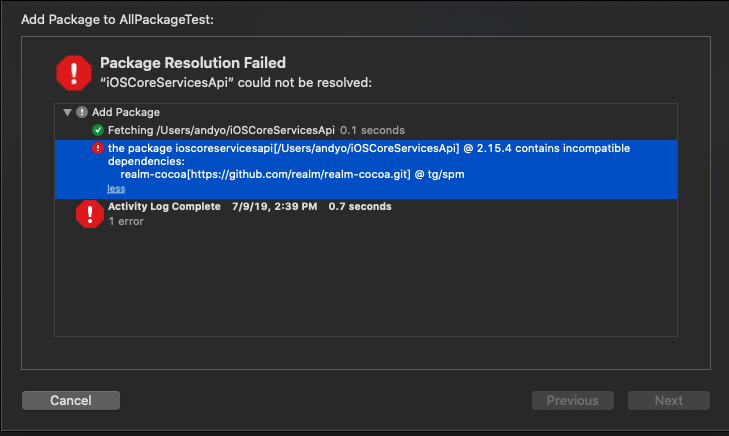
Here's my Package.swift:
// swift-tools-version:5.0
import PackageDescription

let package = Package(
        name: "iOSCoreServicesApi",
        dependencies: [
                .package(url: "https://github.com/realm/realm-cocoa.git", .branch("tg/spm")),
                .package(url: "https://github.com/Alamofire/Alamofire.git", from: "4.8.2"),
                .package(url: "https://github.com/tristanhimmelman/ObjectMapper.git", from: "3.0.0"),
        ],
        targets: [
          .target(
            name: "iOSCoreServicesApi",
            dependencies: ["Alamofire", "RealmSwift", "ObjectMapper"],
            path: "Sources",
            exclude: [
              "iOSCoreServicesApi/BundleEx.swift"
            ],
            sources: ["iOSCoreServicesApi"]
          )
        ]
)
Does anything jump out as wrong? Why would swift build work but Xcode not like it when I try to add the package?
 obuseme
on 9 Jul 2019
obuseme
on 9 Jul 2019
@obuseme The only thing that looks wrong is your reference to .branch("tg/spm"). Inbetween my post and yours @tgoyne pointed out that you should point to .branch("master") (apparently at least as long as the RealmCore dependency points to its own master branch). Otherwise, you don't need to explicitly specify sources: if you've specified path: (and this one itself is optional if all your source files are in [Package_root]/Sources/[Name_of_your_Package] and you just keep exclude:).
Try to apply those changes and see if it works. If it still doesn't, don't use swift build but use only Xcode 11 (I've never used swift build). You can open, build and test Packages just by opening the Package.swift manifest. Moreover, any project can have Swift Packages as dependencies as I've indicated.
thebluepotato
on 9 Jul 2019
Your app needs to point at a branch of iOSCoreServicesApi rather than a version. SwiftPM has a restriction that you can't version-pin to a dependency that itself has a branch-pinned dependency, so the fact that Realm currently internally has a branch-pinned dependency prevents anything downstream from pinning to versions.
tgoyne
on 9 Jul 2019
Thanks guys, @tgoyne 's comment fixed it.
obuseme
on 9 Jul 2019
Hi, I tried integrating through SPM (master or tg/spm) but for some reason, I can only import Realm and RealmCore in code, but not RealmSwift. I have added the RealmSwift library to the app target and no luck. This is using Xcode 11 and iOS project (uikitformac). I wonder if anyone has run into this?
 kevinwl02
on 29 Jul 2019
kevinwl02
on 29 Jul 2019
I'm not able to get this working in Swift Package Manager either. It worked for me in Beta 1, but now in Beta 5 I'm getting a slew of compilation errors in the Realm package. I've tried both master and tg/spm and I get the same errors in both branches.
 cnstoll
on 31 Jul 2019
cnstoll
on 31 Jul 2019
Tried specific version tagging to 3.17.1 and that didn't work either. The exact same setup that worked for me in beta 1 isn't working anymore in beta 5. I'm not sure if something changed in SPM that breaks this or what.
I've tried removing the package and re-adding it, and I've tried nuking derived data, resetting the SPM cache, and clean building and none of them seem to resolve. The main realm package just fails to builds with lots of pointers to .cpp and .hpp files that cannot be found.
cnstoll
on 31 Jul 2019
Using RealmSwift doesn't seem to work with Xcode Beta 4 or 5. Either through swift package manager or manually generated XCFrameworks. Importing the provided xcodeproject to use its frameworks works but not for macCatalyst.
 virtuosovidit
on 1 Aug 2019
virtuosovidit
on 1 Aug 2019
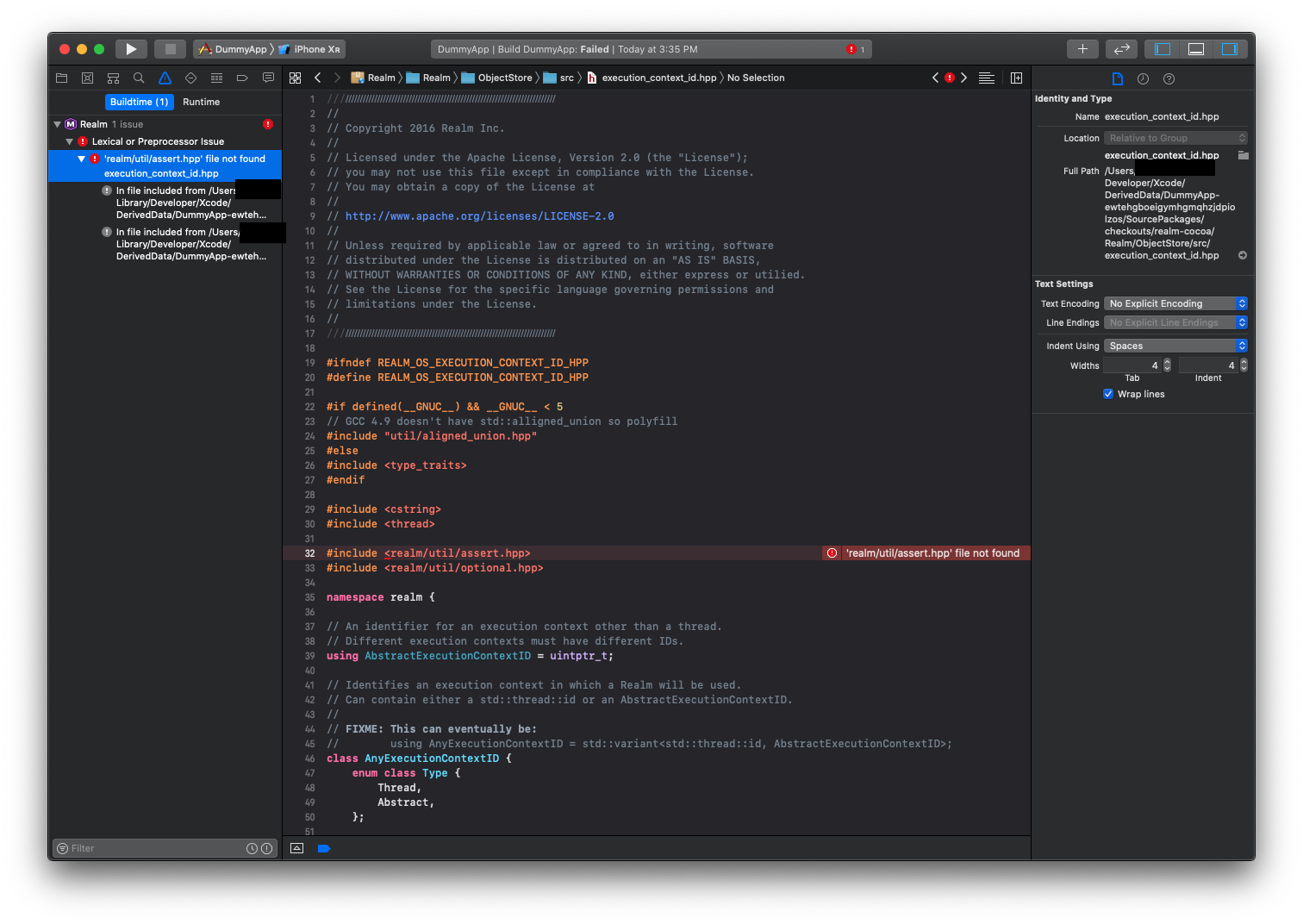
Building an iOS app, that includes a companion, independent watchOS app in watchOS 6, where both targets include Realm and RealmSwift using SPM, results in an error.
Should be noted, that building the watchOS app shows no such errors. It's only when you try to build the iOS app with the watchOS app attached as a target, that this error shows up.
virtuosovidit
on 3 Aug 2019
So what is the working solution as of now?
I've been trying to build using Carthage, first it takes forever to start building the scheme and then I read this:
Failed to write to .../Carthage/Checkouts/realm-cocoa/Carthage/Build/watchOS/Realm.framework: Error Domain=NSCocoaErrorDomain Code=260 "The file “Realm.framework” couldn’t be opened because there is no such file."
 denpazakura
on 4 Aug 2019
denpazakura
on 4 Aug 2019
Can't get it to work with Xcode 11 beta 5 either. Tried
pod 'RealmSwift', git: 'https://github.com/realm/realm-cocoa.git', branch: 'tg/xcode-11-b1', submodules: true
But to no help, as this threw the same RLM exception as with the versions before.
So I tried building the Framework on my own using the build.sh and the "ios-swift" command but when integrating these Xcode throws "RealmSwift.xcframework/ios-armv7_arm64/RealmSwift.framework: No such file or directory " as build error (likewise for the simulator)
I checked the RealmSwift.framework and it only contains a "Info.plist" file.
Am I missing something here? Did anybody got Realm to work with Beta 5?
 airlenbauer
on 6 Aug 2019
airlenbauer
on 6 Aug 2019
Can't get it to work with Xcode 11 beta 5 either. Tried
pod 'RealmSwift', git: 'https://github.com/realm/realm-cocoa.git', branch: 'tg/xcode-11-b1', submodules: true
But to no help, as this threw the same RLM exception as with the versions before.
So I tried building the Framework on my own using the build.sh and the "ios-swift" command but when integrating these Xcode throws"RealmSwift.xcframework/ios-armv7_arm64/RealmSwift.framework: No such file or directory "as build error (likewise for the simulator)
I checked the RealmSwift.framework and it only contains a "Info.plist" file.
Am I missing something here? Did anybody got Realm to work with Beta 5?
You'd better try the release version first. For my knowledge, unless you are using UIKit for Mac, you can use the latest release. If you are using UIKit for Mac, you should try Swift Package Manager.
I have projects for macOS, iOS and watchOS, they all work fine. The changes of pod 'RealmSwift', git: 'https://github.com/realm/realm-cocoa.git', branch: 'tg/xcode-11-b1', submodules: true had been merged to the release long times before.
owenzhao
on 6 Aug 2019
It looks like PR (#6164) was merged in on July 7th. Wonder why I'm still getting that same crash when running. I get Primary Key for a particular RealmObject not found, when i run my project.
 eCorrea831
on 8 Aug 2019
eCorrea831
on 8 Aug 2019
Same thing here.
Keep getting "Primary key property ... does not exist on object ..." on realm-cocoa v3.17.3 and Xcode 11.0 beta 5 (11M382q). Has there been a regression in recent beta?
@eCorrea831 have you found a workaround?
UPD: as mentioned above, using tg/xcode-11-b1 branch (with Carthage in my case) resolved the issue for me.
 uson1x
on 13 Aug 2019
uson1x
on 13 Aug 2019
Hi. Dear friends. I'm the maintainer of SDWebImage. We've supported SwiftPM and build macOS catalyst on the Xcode GUI. But when I want to write a build script to combine all the frameworks into XCFramework, I'm sucked here.
Any one here can tell me one question :
How to use xcodebuild to build macOS Catalyst / UIKit for macOS framework, not Xcode GUI ?
I try both of them:
xcodebuild -sdk "iphoneos" -target SDWebImage -configuration Release -destination 'platform=macOS,arch=x86_64,variant=Mac Catalyst' CONFIGURATION_BUILD_DIR="/Users/lizhuoli/Documents/GitHub/SDWebImage/build/maccatalyst/" SKIP_INSTALL=NOxcodebuild -sdk "iphonesimulator" -target SDWebImage -configuration Release -destination 'platform=macOS,arch=x86_64,variant=Mac Catalyst' CONFIGURATION_BUILD_DIR="/Users/lizhuoli/Documents/GitHub/SDWebImage/build/maccatalyst/" SKIP_INSTALL=NOxcodebuild -sdk "macosx" -target SDWebImage -configuration Release -destination 'platform=macOS,arch=x86_64,variant=Mac Catalyst' CONFIGURATION_BUILD_DIR="/Users/lizhuoli/Documents/GitHub/SDWebImage/build/maccatalyst/" SKIP_INSTALL=NO CFLAGS="-target x86_64-apple-ios13.0-macabi"
None of them works. It that possible for xcodebuild command line ?
 dreampiggy
on 14 Aug 2019
dreampiggy
on 14 Aug 2019
@dreampiggy This does not seem related to Realm. And as this issue is busy enough could we please keep this Realm related? If you need help from others about this, please update your comment with a reference to an issue in your project. Thanks!
 bmunkholm
on 14 Aug 2019
bmunkholm
on 14 Aug 2019
@bmunkholm This reply not related to Realm project. I just using Google and found the only information about the command line to build Catalyst is come from this GitHub issue, so I came here for help.
After my own reasearch, I found that using xcodebuild build does not help. The only way to generate the Catalyst product from Xcode command line. It's to use xcodebuild archive instead.
- xcodebuild archive -project SDWebImage.xcodeproj -scheme 'SDWebImage' -destination 'platform=macOS,arch=x86_64,variant=Mac Catalyst' -configuration Release
This works for us. Sorry for bother.
dreampiggy
on 16 Aug 2019
Same thing here.
Keep getting "Primary key property ... does not exist on object ..." on realm-cocoa v3.17.3 and Xcode 11.0 beta 5 (11M382q). Has there been a regression in recent beta?
@eCorrea831 have you found a workaround?
UPD: as mentioned above, using
tg/xcode-11-b1branch (with Carthage in my case) resolved the issue for me.
Not yet! I'm going to try your solution!
eCorrea831
on 16 Aug 2019
@uson1x the tg/xcode-11-b1 branch is giving me the same error at runtime too.
eCorrea831
on 16 Aug 2019
Please use the master branch at this point.
Ar Aoine 16 Lún 2019 ag 15:26, scríobh Erica Correa <
[email protected]>:
@uson1x https://github.com/uson1x the tg/xcode-11-b1 branch is giving
me the same error at runtime too.—
You are receiving this because you are subscribed to this thread.
Reply to this email directly, view it on GitHub
https://github.com/realm/realm-cocoa/issues/6163?email_source=notifications&email_token=ABBHWQFZX2Y5XHGHJN5BZS3QE22KRA5CNFSM4HSQIKIKYY3PNVWWK3TUL52HS4DFVREXG43VMVBW63LNMVXHJKTDN5WW2ZLOORPWSZGOD4OYKPY#issuecomment-522028351,
or mute the thread
https://github.com/notifications/unsubscribe-auth/ABBHWQCPDZRWHY46SMCWCULQE22KRANCNFSM4HSQIKIA
.
 jsflax
on 17 Aug 2019
jsflax
on 17 Aug 2019
using the master (with cocoapods) does not work with xcode beta 5/6. I get the same error as @eCorrea831 does: Primary Key for a particular RealmObject not found. tg/xcode-11-b1 seems not to be around anymore... what to do?
 reni99
on 22 Aug 2019
reni99
on 22 Aug 2019
@reni99 the tg/xcode-11-b1 has been merged into master recently with this PR.
It does work for my apps. Just make sure you specify the master branch as the source for the cocoapod in the Podfile (otherwise it'll use the latest release tag) like this:
pod 'RealmSwift', git: 'https://github.com/realm/realm-cocoa.git', branch: 'master', submodules: true
pod 'Realm', git: 'https://github.com/realm/realm-cocoa.git', branch: 'master', submodules: true
Then run pod install, clean project and run. If it still crashes, try deleting the app from the device/simulator, clean and rerun.
 jordanpichler
on 26 Aug 2019
jordanpichler
on 26 Aug 2019
@jordanpichler my bad, it worked after cleaning the project and deleting the app from the simulator. thx!
reni99
on 26 Aug 2019
@jordanpichler I am pointing at master in my Cartfile, I've updated the project, I've deleted derived data, cleaned, reset the sim and I am still getting the same runtime error
eCorrea831
on 27 Aug 2019
Not able to make it works. I have an issue on librealmcore-ios.a
_> ld: warning: directory not found for option '-L/Applications/Xcode-beta.app/Contents/Developer/Toolchains/XcodeDefault.xctoolchain/usr/lib/swift/undefined'
ld: warning: directory not found for option '-L/Applications/Xcode-beta.app/Contents/Developer/Toolchains/XcodeDefault.xctoolchain/usr/lib/swift/undefined'
ld: in /Users/sparembp/ios-client/Pods/Realm/core/librealmcore-ios.a(bptree.o), building for UIKitForMac, but linking in object file built for iOS Simulator, for architecture x86_6
_
Based on what I found in the Apple Dev Forum:
has to be rebuilt using the new XCode 11?
Libraries built for the iOS simulator with previous versions of Xcode need to be rebuilt with Xcode 11 for the Project Catalyst environment specifically for the Mac -- there are differences in the compiled product, and a build for the iOS simulator is not sufficient.
??? source [https://forums.developer.apple.com/thread/117346#364519]
 marcocattai
on 29 Aug 2019
marcocattai
on 29 Aug 2019
Catalyst is still only supported when using swiftpm.
tgoyne
on 29 Aug 2019
Catalyst is still only supported when using swiftpm.
Do you know if Catalyst for realm-cocoa will be supported soon ? I am using Cocoapods
marcocattai
on 29 Aug 2019
The current goal is to support it with all installation methods as soon as the Xcode 11 GM comes out, which will probably be September 10.
tgoyne
on 29 Aug 2019
FYI I removed Realm from Carthage and added it back as a cocoapod and that worked. I'm able to run the app. Anyone have any success running with the dependency in Carthage?
eCorrea831
on 3 Sep 2019
Xcode 11 GM Seed is now out, so I've kicked off the process of deploying it onto our CI machines. Once that's done I'll need to merge and release https://github.com/realm/realm-core/pull/3383, https://github.com/realm/realm-sync/pull/3109 and https://github.com/realm/realm-cocoa/pull/6248 and then we'll have prebuilt frameworks for xcode 11. This'll probably finish tomorrow.
tgoyne
on 10 Sep 2019
Was seeing a bunch of Undefined symbol errors yesterday in our project relating to Realm and a warning about ignoring librealmcore-ios.a in a Realm subfolder. Was wracking my brain for a while but finally pod update RealmSwift Realm fixed it - in case anyone else runs into that issue!
eCorrea831
on 11 Sep 2019
@tgoyne Any news about the above ? Now we're a bit blocked as the swift package doesn't work any more. I really need a compiled version of xcframework including mac-catalyst.
mmdumi
on 12 Sep 2019
Still trying to get Xcode 11 working on the CI machines. The new simulator runtime has caused some issues (they bumped up the minimum requirements and switching between Xcode 10 and 11 breaks in exciting new ways) and the iteration time on rolling out a change and retesting is awkwardly long.
tgoyne
on 12 Sep 2019
@tgoyne So what do you suggest developers do to add Realm in their iOS 13 apps? Now that even the SPM doesn't work!!? Is there any process that'd lead to a functioning Realm Library on iOS? Forget watchOS or Catalyst. That seems out of question at this point in the release schedule.
virtuosovidit
on 13 Sep 2019
Why do you say that SPM doesn't work?
Installing via CocoaPods and Carthage still work fine other than not supporting catalyst.
tgoyne
on 13 Sep 2019
SPM, CocoaPods and Carthage options are working as expected as of Xcode 11 GM. Same as previous betas since Package.swift manifest file was merged to master as well.
corteggo
on 13 Sep 2019
Using SPM with the master branch results in a duplicate symbols error at the moment (Switching to 3.17.3 resolves the issue but on builds prior to the GM, the master was working fine).
virtuosovidit
on 13 Sep 2019
@virtuosovidit you should either upload a sample project with repro steps or try to clear derived data folder and try it again, because I tested master branch with Xcode 11 GM and it worked fine as I said in my previous comment.
corteggo
on 13 Sep 2019
... because I tested master branch with Xcode 11 GM and it worked fine as I said in my previous comment.
I just downloaded Xcode 11 GM, cleared all caches and the derived data folder entirely, but I'm not able to build the latest master using carthage. There's no need for an example project as the build process itself is failing.
@corteggo did you try building the master with carthage?
ld: bitcode bundle could not be generated because 'core/librealm-ios-dbg.a(bptree.o)' was built without full bitcode. All object files and libraries for bitcode must be generated from Xcode Archive or Install build for architecture armv7
clang: error: linker command failed with exit code 1 (use -v to see invocation)

** ARCHIVE FAILED **
 ChristianSteffens
on 14 Sep 2019
ChristianSteffens
on 14 Sep 2019
Well release 3.18.0 solves everything (for me) - thanks a lot.
ChristianSteffens
on 15 Sep 2019
I'm getting:
Compiling for iOS 10.0, but module 'RealmSwift' has a minimum deployment target of iOS 13.0
Is this intentional ?
mmdumi
on 16 Sep 2019
@tgoyne thanks for the nice progress on SPM support. Any news on when RealmSync will be usable purely through swift package dependencies? (I don't see it listed in the checklist at the top of this thread - is that not a priority?)
 nimi1
on 16 Sep 2019
nimi1
on 16 Sep 2019
I'm using 3.18.0 but my app crashes with the following error.
Terminating app due to uncaught exception 'RLMException', reason: 'Primary key property 'identity' does not exist on object 'RealmSwiftPermissionUser''
 advaita13
on 16 Sep 2019
advaita13
on 16 Sep 2019
@advaita13 This is unrelated to this issue. It's not a bug and it's not a feature request, so please post on StackOverflow or the Forum. Before doing that though please check you have defined a primary key called identity in RealmSwiftPermissionUser.
bmunkholm
on 16 Sep 2019
Any news on when RealmSync will be usable purely through swift package dependencies? (I don't see it listed in the checklist at the top of this thread - is that not a priority?)
The problematic bit there is that the sync library is currently closed source, and SPM doesn't yet support binary packages. Apple is actively working on adding support for them (or at least designing the feature) so I'm currently thinking that it makes more sense to wait for that than to try to find some way to make spm do things it's specifically not supposed to do.
tgoyne
on 16 Sep 2019
This week is the mongodb engineering offsite, so I will have very limited time to look into the remaining (or any new) issues.
tgoyne
on 16 Sep 2019
@bmunkholm
Noticed a similar issue at the top of this issue thread.
https://github.com/realm/realm-cocoa/issues/6163#issuecomment-498504325
Also, RealmSwiftPermissionUser is a RealmSwift wrapper in the Sync.swift file, it is not something I've defined.
advaita13
on 17 Sep 2019
Swift Pack Manager / master - works perfectly
If I import Realm using cocoapods it download 3.18.0 and I receive the error: librealmcore-ios.a (bptree.o) building for Mac Catalyst, but linking in object file build for iOS Simulator for architecture x86_64
marcocattai
on 18 Sep 2019
Cocoapods does not support catalyst for projects with vendored libraries yet. You can follow https://github.com/CocoaPods/CocoaPods/issues/9148 for updates on that.
tgoyne
on 18 Sep 2019
@advaita13 maybe you should clean you project after 'pod install'
 fanthus
on 20 Sep 2019
fanthus
on 20 Sep 2019
Well release
3.18.0solves everything (for me) - thanks a lot.
pod 'RealmSwift', '~> 3.18.0'
then
pod repo update
and
pod install
solves the issue for me.
 ntnhon
on 20 Sep 2019
ntnhon
on 20 Sep 2019
This error still happens in 3.18.0 Terminating app due to uncaught exception 'RLMException', reason: 'Primary key property 'name' does not exist on object 'RealmSwiftPermissionRole''
 andre991
on 20 Sep 2019
andre991
on 20 Sep 2019
This error still happens in
3.18.0Terminating app due to uncaught exception 'RLMException', reason: 'Primary key property 'name' does not exist on object 'RealmSwiftPermissionRole''
Updating to 3.18.0, as @ntnhon wrote and then Product -> Clean Build Folder fixed the issue.
 gggal123
on 21 Sep 2019
gggal123
on 21 Sep 2019
/Users/realm/workspace/ealm-sync_release_4.7.5-catalyst/realm-sync/src/realm/sync/object.cpp:397: [realm-core-5.23.4] Assertion failed: info.object_id_index == 0 [3, 0]
after trying to add object to List in write transaction (3.18.0)
 services-thirdparty
on 21 Sep 2019
services-thirdparty
on 21 Sep 2019
On my side the exception is on:
'Primary key property 'name' does not exist on object 'RealmSwiftPermissionRole'is this related, or do I start another issue?
I also encountered the same problem and have solved it.
Xcode11 Version 11.0 (11A420a)
RealmSwift 3.13.1 -> 3.18.0
The processing method is as follows:
Remove 'realm' from 'pod', mask the realm in 'podfile', then 'pod install'
Reinstall the 3.18.0 version of 'realm'
The project is ok!
 smelloftime
on 23 Sep 2019
smelloftime
on 23 Sep 2019
@xfreebird fucking brand branch: 'tg/xcode-11-b1'
 Synat
on 23 Sep 2019
Synat
on 23 Sep 2019
Realm 3.18.0 release is already works fine. Close issue, please.
 vialyx
on 23 Sep 2019
vialyx
on 23 Sep 2019
This error still happens in
3.18.0Terminating app due to uncaught exception 'RLMException', reason: 'Primary key property 'name' does not exist on object 'RealmSwiftPermissionRole''...
@gggal123 i am still facing crash. My class is still in Swift and I am using RealmCocoa.
Sent with GitHawk
 ajanuar
on 23 Sep 2019
ajanuar
on 23 Sep 2019
Crashed: reason: 'Primary key property 'name' does not exist on object 'RealmSwiftPermissionRole''
Xcode 11
Realm 3.18.0
The Crashed is solved:
The method is remove the version 3.18.0 and pod install it again, then solved

Podfile write like this:
pod 'Realm', git: 'https://github.com/realm/realm-cocoa.git', branch: 'master', submodules: true
pod 'RealmSwift', git: 'https://github.com/realm/realm-cocoa.git', branch: 'master', submodules: true
 cellgit
on 23 Sep 2019
cellgit
on 23 Sep 2019
RealmCocoa
Remove 'realm' from 'pod', mask the realm in 'podfile', then 'pod install'
Reinstall the 3.18.0 version of 'realm'
smelloftime
on 23 Sep 2019
I'm locking this to avoid continuously spamming participants with similar replies. For those facing issues, reinstalling the pod and clearing the build folder data is likely to resolve them. If after doing that, you still have problems, please open a new issue and fill in the template.
Thanks for everyone who participated in the discussion and we're looking forward to supporting the rest of the features outlined in the issue summary. If your favourite Xcode 11 feature/addition is not there, please open a new issue and we'll add it.
 nirinchev
on 23 Sep 2019
nirinchev
on 23 Sep 2019
➤ Brian Munkholm commented:
All issues closed or tracked in individual issues.
 RealmBot
on 19 May 2020
RealmBot
on 19 May 2020
Related issues
 Bogidon
·
3Comments
Bogidon
·
3Comments
 dennisgec
·
3Comments
dennisgec
·
3Comments
 mowens
·
3Comments
mowens
·
3Comments
 jpsim
·
3Comments
jpsim
·
3Comments
 fadylateef
·
3Comments
fadylateef
·
3Comments
Most helpful comment
I get Primary Key for a particular RealmObject not found, when i run my project using XCode11, it works fine on XCode10.
Realm 3.16.1
RealmSwift 3.16.1