Real-time-voice-cloning: Install requirement error
I'm stuck on step 2 after cloning the files. When I enter the install requirements command I get:
Could not open requirements file (Errno 2). No such file or directory:
 jgraf451
All 18 comments
@jgraf451 did you make sure that where you are running the command in the same directory as the requirements.txt file? What I mean is like if you are in command prompt and you run python. python is gonna be looking for files where ever you are at that time. So like C:usersyour_username. So if you do the pip install make sure you specify the full path to the file or simply change your directory to be in the same folder as the files location.
 LordBaaa
on 19 Jan 2020
LordBaaa
on 19 Jan 2020
Thanks! That got me one step closer. But now I'm getting the following
error: $ pip install -r requirements.txt
ERROR: Could not find a version that satisfies the requirement
tensorflow-gpu<=1.14.0,>=1.10.0 (from -r requirements.txt (line 1))
(from versions: none)
ERROR: No matching distribution found for
tensorflow-gpu<=1.14.0,>=1.10.0 (from -r requirements.txt (line 1))
Any ideas?
On 2020-01-19 13:37, LordBaaa wrote:
@jgraf451 [1] did you make sure that where you are running the command
in the same directory as the requirements.txt file? What I mean is
like if you are in command prompt and you run python. python is gonna
be looking for files where ever you are at that time. So like
C:usersyour_username. So if you do the pip install make sure you
specify the full path to the file or simply change your directory to
be in the same folder as the files location.--
You are receiving this because you were mentioned.
Reply to this email directly, view it on GitHub [2], or unsubscribe
[3].Links:
[1] https://github.com/jgraf451
[2]
https://github.com/CorentinJ/Real-Time-Voice-Cloning/issues/266?email_source=notifications&email_token=AN55LJFB2YBTRTWSCYNYRODQ6TBY5A5CNFSM4KI25IE2YY3PNVWWK3TUL52HS4DFVREXG43VMVBW63LNMVXHJKTDN5WW2ZLOORPWSZGOEJK5HTI#issuecomment-576050125
[3]
https://github.com/notifications/unsubscribe-auth/AN55LJAYFSUZJENSBOWLVJDQ6TBY5ANCNFSM4KI25IEQ
jgraf451
on 20 Jan 2020
@jgraf451 Yeah I had a bit of a problem with that in the past. The greater then or equal to (<=) stuff messed up for me a bit. Also problem that happened to me is it will install tensorflow 2 with tensorflow-gpu to match, but tensorflow 2 is incompatible If you were to just install without version number. All you should need to do is change tensorflow-gpu>=1.10.0,<=1.14.0 to tensorflow-gpu==1.14.0. Or just use this requirements.txt
LordBaaa
on 20 Jan 2020
@jgraf451 Oh also for me I got an error like Warning: Passing (type, 1) or '1type' as a synonym of type is deprecated; with just the requirements.txt when I tried to import tensorflow as a test. So what has been working for was doing pip install tensorflow==1.15.0. This successfully grabbed my cudart64_100.dll and yeah been working for me so far. But I'd say try it without this first.
LordBaaa
on 20 Jan 2020
Hi,
So I went in and changed the tensorflow info in the requirements.txt
file. However, when I do "pip install -r requirements.txt"
I get a invalid syntax error msg. Is this command incorrect?
Thanks,
Jim.
On 2020-01-20 14:40, LordBaaa wrote:
Yeah I had a bit of a problem with that in the past. the greater then
or equal to (<=) stuff messed up for me a bit. Also problem that
happened to me is it will install tensorflow 2 with tensorflow-gpu to
match, but tensorflow 2 is incompatible. All you should need to do is
change tensorflow-gpu>=1.10.0,<=1.14.0 to tensorflow-gpu==1.14.0. Or
just use this requirements.txt [1]--
You are receiving this because you were mentioned.
Reply to this email directly, view it on GitHub [2], or unsubscribe
[3].Links:
[1]
https://github.com/CorentinJ/Real-Time-Voice-Cloning/files/4088240/requirements.txt
[2]
https://github.com/CorentinJ/Real-Time-Voice-Cloning/issues/266?email_source=notifications&email_token=AN55LJHARBQXZ2O6WUSQ4LLQ6YR67A5CNFSM4KI25IE2YY3PNVWWK3TUL52HS4DFVREXG43VMVBW63LNMVXHJKTDN5WW2ZLOORPWSZGOEJN7EYI#issuecomment-576451169
[3]
https://github.com/notifications/unsubscribe-auth/AN55LJFKBRYSB4FMLHDNWB3Q6YR67ANCNFSM4KI25IEQ
jgraf451
on 21 Jan 2020
@jgraf451 Well try the command in console. Again should just be pip install tensorflow-gpu==1.14.0 with no spaces between ==. Literally exactly like I typed it. If you just pip install tensorflow-gpu== it should show you a list of available versions. Also yeah command looks fine. Requirements.txt is basically just a list of individual pip commands so you should be able to just run them individually if need be
LordBaaa
on 21 Jan 2020
Still can't get passed the invalid syntax error msg. Know I'm typing it
correctly at python prompt. Any ideas?
On 2020-01-20 16:16, LordBaaa wrote:
@jgraf451 [1] Well try the command in console. Again should just be
pip install tensorflow-gpu==1.14.0 with no spaces between ==.
Literally exactly like I typed it. If you just pip install
tensorflow-gpu== it should show you a list of available versions.--
You are receiving this because you were mentioned.
Reply to this email directly, view it on GitHub [2], or unsubscribe
[3].Links:
[1] https://github.com/jgraf451
[2]
https://github.com/CorentinJ/Real-Time-Voice-Cloning/issues/266?email_source=notifications&email_token=AN55LJD4BQW7LMXPZVB2JFLQ6Y5ETA5CNFSM4KI25IE2YY3PNVWWK3TUL52HS4DFVREXG43VMVBW63LNMVXHJKTDN5WW2ZLOORPWSZGOEJODFTY#issuecomment-576467663
[3]
https://github.com/notifications/unsubscribe-auth/AN55LJHOC3LBR6XXZWJ5SGTQ6Y5ETANCNFSM4KI25IEQ
jgraf451
on 21 Jan 2020
Well as with all problems I’d say give me the full traceback/log
LordBaaa
on 21 Jan 2020
I have/had the same problem
from what I can tell there are two potential issues to check
- Are you running python 64bit?
- Do you actually have a gpu in the machine your are triyng to install on
 brianteeman
on 27 Jan 2020
brianteeman
on 27 Jan 2020
Thanks for trying to walk me thru this but in the end it was just too
complicated for my limited skills. Looking at the issues log and the
comments section of You Tube for this program guess I am not alone. Was
wondering how hard it would be to create a repository with a working
version of this. Something that would be downloaded and easily
launched. That would certainly make it more available to people with
fewer computing skills. Baidu's Deep Voice is also out there. One
might be easier to do than the other. Thanks again for your help.
Jim
n 2020-01-21 10:44, LordBaaa wrote:
Well as with all problems I’d say give me the full traceback/log
--
You are receiving this because you were mentioned.
Reply to this email directly, view it on GitHub [1], or unsubscribe
[2].Links:
[1]
https://github.com/CorentinJ/Real-Time-Voice-Cloning/issues/266?email_source=notifications&email_token=AN55LJG37SZZKFC26AI6VWLQ647CLA5CNFSM4KI25IE2YY3PNVWWK3TUL52HS4DFVREXG43VMVBW63LNMVXHJKTDN5WW2ZLOORPWSZGOEJQZ27I#issuecomment-576822653
[2]
https://github.com/notifications/unsubscribe-auth/AN55LJAL6QLZLHLROY2LG53Q647CLANCNFSM4KI25IEQ
jgraf451
on 27 Jan 2020
You sure you are running python3 right? People forget more often than you think.
If thats okay, a simple pip install tensorflow-gpu==1.14 should be enough.
But tbh, I always recommend using anaconda for installing tensorflow because it automatically handles download CuDNN on its own.
 tapankarnik
on 9 Feb 2020
tapankarnik
on 9 Feb 2020
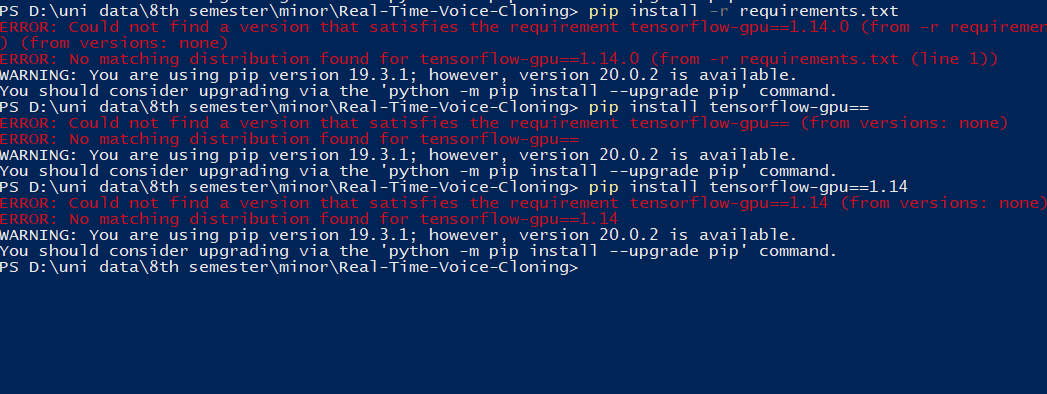
@tapankarnik I tried 1.14 but I think tensorflow-gpu==1.14 is no longer available. Lowest version available is 1.15 which does not comply with requirements.
 sahmed130
on 15 Feb 2020
sahmed130
on 15 Feb 2020
A:Program files (x86)Real Time Voice CloningReal-Time-Voice-Cloning-master>pip install -r requirements.txt
ERROR: Could not find a version that satisfies the requirement tensorflow-gpu==1.14.0 (from -r requirements.txt (line 1)) (from versions: 2.2.0rc1, 2.2.0rc2)
ERROR: No matching distribution found for tensorflow-gpu==1.14.0 (from -r requirements.txt (line 1))
Can't install the required version of tensorflow-gpu
 nicok1172
on 31 Mar 2020
nicok1172
on 31 Mar 2020
@nicok1172 Which python version are you using? I used 3.7 and it worked fine
tapankarnik
on 31 Mar 2020
@tapankarnik 3.8 I think.
nicok1172
on 31 Mar 2020
Tensorflow isn't supported on Python 3.8 so you'll have to downgrade to 3.7 (using Anaconda or just uninstall and reinstall 3.7)
 zrowny
on 8 Apr 2020
zrowny
on 8 Apr 2020
Thanks
nicok1172
on 8 Apr 2020
@jgraf451 I'm sorry you were unable to get it set up. We have recently improved the code to add CPU support and make a difficult-to-install dependency optional. You are invited to pull the latest and try again. Having installed both GPU and CPU versions, the latter is significantly easier in my experience since you don't need to get the dependencies to line up with your GPU drivers.
If you continue to experience a problem with setup please reopen the issue or open a new one.
 blue-fish
on 5 Jul 2020
blue-fish
on 5 Jul 2020
Related issues
 mmilk90
·
6Comments
mmilk90
·
6Comments
 git-davi
·
9Comments
git-davi
·
9Comments
 marcoippolito
·
6Comments
marcoippolito
·
6Comments
 frossi65
·
3Comments
frossi65
·
3Comments
 IrvDelgado
·
5Comments
IrvDelgado
·
5Comments
Most helpful comment
@tapankarnik I tried 1.14 but I think tensorflow-gpu==1.14 is no longer available. Lowest version available is 1.15 which does not comply with requirements.
