Readthedocs.org: No way back after deleting the webhook integration
Steps to reproduce it:
- Import GitHub project (do not use Manual Import)
- Webhook is created sucessfully
- Go to your GitHub project and remove the RTD integration from settings
- Go to your Admin -> Integrations
- Select your integration
- Remove/Delete it
Now, at this point, you have a repository completely disconnected from GitHub: none of them knows the other part.
At this point,
- go to Admin -> Integrations
- Click Add Integration
- Select Github
- Click Add Integration
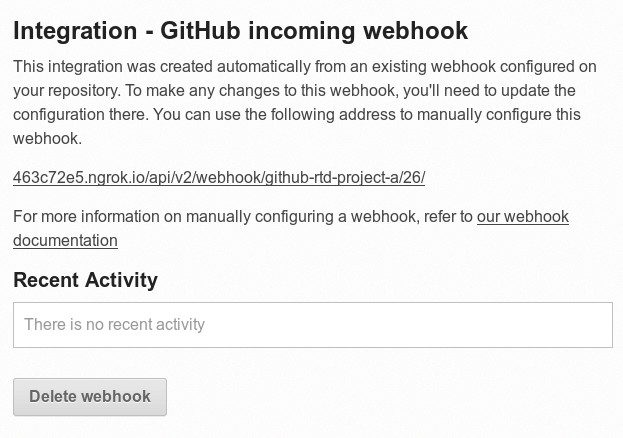
This integration lives under RTD but GitHub knows nothing about it yet. To make it work, you have to go to GitHub settings and add it manually.
I'd expect this to be done automatically by RTD if I'm adding a known integration (not a Generic one).
 humitos
All 19 comments
Ultimately, the number of folks hitting this is probably very low, so this will be low priority. Also, if the user intervened to disconnect the webhook, they can be responsible for manually fixing this as well -- and we have some directions here at least for now. Having a resync function on the webhook also addresses this issue, as that is the actual functionality you're going for.
 agjohnson
on 11 Apr 2018
agjohnson
on 11 Apr 2018
A couple of additional things for folks being affected by this bug:
- The "_this integration was created automatically from an existing webhook configured on your repository_" message is misleading. If you see it, the webhook on your github/gitlab/etc. repo is probably no longer there and you'll have to recreate it upstream.
- To recreate the webhook on the upstream repository, use the URL from the readthedocs message as the "Payload" (e.g. on GitHub) input.
- Even after doing this, the "Resync webhook" button will no longer appear in the readthedocs UI
@agjohnson @humitos happy to file separate bugs for these issues if it helps.
 dplanella
on 11 Jul 2018
dplanella
on 11 Jul 2018
This issue has been automatically marked as stale because it has not had recent activity. It will be closed if no further activity occurs. Thank you for your contributions.
![stale[bot] picture](https://avatars3.githubusercontent.com/in/1724?v=4&s=40) stale[bot]
on 10 Jan 2019
stale[bot]
on 10 Jan 2019
This occurs in more cases though. With the droppping of the old github system I got 7 emails about projects that were going to stop working even though I've got the github auth set up a long time ago.
Perhaps the repos are older than the github integration though, that's a possibility.
Or I didn't import them through the Github integration because of how that integration (used to) work.
In the past all of the repositories were listed duplicate for some reason and there was no way to filter/search projects. Not sure about the current state of the system since I'm seeing no repositories there and pressing the refresh button results in waiting for at least two minutes (not sure if it will ever finish, but I've been staring at the loading icon for 3 minutes while typing this reply).
 WoLpH
on 13 Mar 2019
WoLpH
on 13 Mar 2019
Yesterday, I was bitten by this again. This time in a different case.
- I imported my project from GH using the auto-import (not manually)
- the webhook failed to be created because I didn't have admin permissions on the repo
At this point, I request admin permissions to the organization the project is under, and I was granted.
Now, I don't have a way (without deleting and recreating the project) to make RTD to re-create the webhook on GH automatically.
humitos
on 1 Jun 2019
Can we not just call attach_webhook when we create the Integration?
 ericholscher
on 8 Aug 2019
ericholscher
on 8 Aug 2019
I have looked into this issue a bit. There are some things we need to figure out about this issue before we can proceed.
We can use attach_webhook as @ericholscher mentioned to update the webhook on the projects repo while creating an integration. but there are few cases to consider.
If the users imported the project manually and does not have permission to the repo and the the user tries to create an integration. So, for this we can show a message to the user that sync was not possible and just create a regular webhook like before.
If the user already has an integration we can have a button to re-sync the integration and if the user tries to create a new integration then we should not attach a new webhook on the repo but just create a regular webhook.
User might have created multiple integrations with the same provider manually. we need to figure out which one to sync.
If the user create a integration with a different provider than the project we might just create an integration like before.
Or, Another approach can be having the re-synch button on the integration list page with a message like this:
Only the first integration with < provider > will be re-synced.
 saadmk11
on 9 Aug 2019
saadmk11
on 9 Aug 2019
If the users imported the project manually and does not have permission to the repo and the the user tries to create an integration. So, for this we can show a message to the user that sync was not possible and just create a regular webhook like before.
That makes sense.
If the user already has an integration we can have a button to re-sync the integration and if the user tries to create a new integration then we should not attach a new webhook on the repo but just create a regular webhook.
Not sure I follow here. I guess we should think through if we should even allow multiple of the same integration on the same project -- I don't see a great reason for it.
User might have created multiple integrations with the same provider manually. we need to figure out which one to sync.
Won't the sync button be on the integration detail page? So, we'd just sync that one.
If the user create a integration with a different provider than the project we might just create an integration like before.
We should likely only try to automatically sync if we have a social account attached to that service for the user -- these others cases all just seem like places where we can ignore auto-syncing and just create the integration normally.
ericholscher
on 9 Aug 2019
Not sure I follow here. I guess we should think through if we should even allow multiple of the same integration on the same project -- I don't see a great reason for it.
I think this is a good idea. Now we are allowing the creation of multiple integrations for the same service, which I think has no use case.
Won't the sync button be on the integration detail page? So, we'd just sync that one.
If we give the ability to sync multiple webhook for the same provider. then the repo will have multiple webhooks attached to it and send the same event multiple times to our API from different hooks and we will build the same thing multiple times.
We should likely only try to automatically sync if we have a social account attached to that service for the user -- these others cases all just seem like places where we can ignore auto-syncing and just create the integration normally.
Yeah! I agree. but even if the user has a social account but wants to create a webhook for a different provider we should ignore that also. :)
saadmk11
on 9 Aug 2019
I'm :+1: in the listed use cases and comments from @ericholscher.
I see this as "two different type of webhooks"
- the one that creates Read the Docs automatically
- the one that creates the user manually
I'm interested in auto-resync 1) because we have everything to do it and fix it. The other ones, 2), there is not too much we can do there because we don't create those webhooks in the service platform.
humitos
on 12 Aug 2019
@humitos So, We should only have the re-sync functionality for the webhook that is created by RTD on project setup?
If the initial webhook setup is valid we already provide a re-sync functionality on those cases. so we only need to have the re-sync functionality when the initial webhook attachment fails.
saadmk11
on 12 Aug 2019
so we only need to have the re-sync functionality when the initial webhook attachment fails.
I think you are right. I'd say that we also need to be able "re-create" the webhook if it was removed (for some reason).
humitos
on 12 Aug 2019
Yeah I agree. But the issue is what should be the UX for normal webhook creation and RTD Project webhook creation and how should we distinguish between them for the users.
saadmk11
on 12 Aug 2019
We should be able to re-sync any webhook we are able to re-sync. It doesn't matter when it's created. That's all we need to do.
- If I have a social account connected, and create a github webhook, it should auto-sync.
- If I have a social account connected, and a github webhook already created, it should have a re-sync button
ericholscher
on 12 Aug 2019
- If I have a social account connected, and create a github webhook, it should auto-sync.
Makes sense.
- If I have a social account connected, and a github webhook already created, it should have a re-sync button
But can I create another github webhook? if yes then i'll have access to create and auto sync as many webhooks as i want for a single repository the we don't want.
@ericholscher My concern is that if the user already has multiple webhooks created for same provider then what should we do? we certainly should not let him sync all of them and attact multiple webhooks to the same repo.
saadmk11
on 13 Aug 2019
For now people can create and resync as many as they want, I don't see a problem with this, really.
ericholscher
on 13 Aug 2019
@ericholscher sure! But we will receive multiple webhook requests for the same event and build the same thing multiple times.
saadmk11
on 13 Aug 2019
Sure, but that isn't the problem we're trying to solve here.
ericholscher
on 13 Aug 2019
This issue is related to this other one as well: https://github.com/readthedocs/readthedocs.org/issues/5062
humitos
on 13 Aug 2019
Related issues
 goerz
·
4Comments
humitos
·
4Comments
goerz
·
4Comments
humitos
·
4Comments
 boscorelly
·
4Comments
boscorelly
·
4Comments
 et304383
·
4Comments
et304383
·
4Comments
 SylvainCorlay
·
3Comments
SylvainCorlay
·
3Comments