Reactstrap: Custom Dropdown usage?
We have been using the Dropdown component from reactstrap 4 to create dropdowns for a number custom input components, for example:
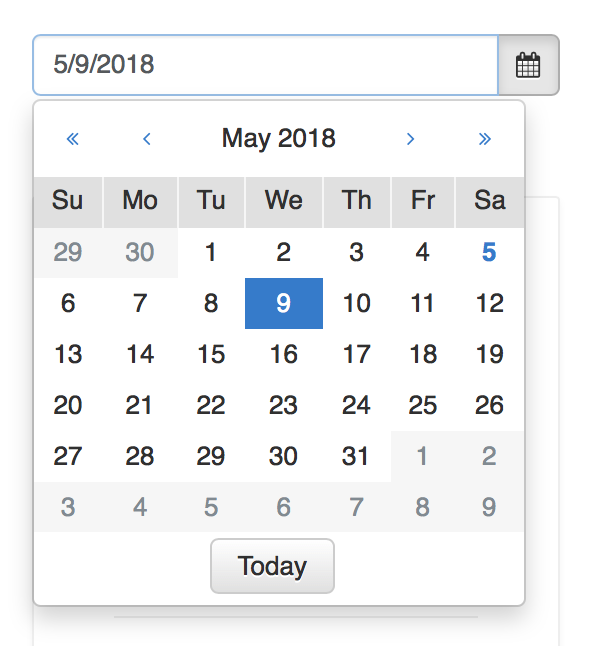
Usage is basically:
    <Dropdown isOpen={!disabled && open} toggle={this.toggle}>
      <InputGroup className={className}>...</InputGroup>
      <DropdownMenu>...</DropdownMenu>
    </Dropdown>
and it worked really well.
However in upgrading to reactstrap 5 - This approach breaks without a DropdownToggle button:
Error: Target missing. Popper must be given a target from the Popper Manager, or as a prop.
We can't use DropdownToggle due the logic we have in the Inputs, so what would be the recommended upgrade path for this?
(Note we don't always use InputGroups, so can't just put a DropdownToggle button in the InputGroupAddon.)
 gthomas-appfolio
All 3 comments
There are a few way to achieve what you want.
You can use DropdownToggle with the tag prop to change the underlying component it renders to be whatever you want (such as an InputGroup or Input)
You can use a Popover (this is what I do for my date inputs). You can even use the hideArrow prop to make it appear without the arrow tip thing.
You can use the PopperContent helper with the target helper which Popover and Tooltip uses directly, or you can use react-popper directly.
I'm on mobile, so I cannot provide examples/demos. I know the Popover way works and is relatively easy (you have to tie the calendar data to the input, but I imagine that you have to do that with the previous way it worked for you).
 TheSharpieOne
on 6 May 2018
TheSharpieOne
on 6 May 2018
Ah, thanks @TheSharpieOne , I missed you can specify tag prop. In this case I can just use a <div> around the InputGroup
<Dropdown ...>
  <DropdownToggle tag="div">
    <InputGroup>
      <Input />
      <InputGroupAddon addonType="append">...</InputGroupAddon>
    </InputGroup>
  </DropdownToggle>
  <DropdownMenu className="w-100">
    ...
  </DropdownMenu>
</Dropdown>
Sample here for others:
https://stackblitz.com/edit/reactstrap-v5-beta-starter-eilhwl?file=index.js
 bestguy
on 6 May 2018
bestguy
on 6 May 2018
How to use up/down arrow key to select in this custom dropdown ?
 Rajesh-Thiyagarajan
on 4 Feb 2021
Rajesh-Thiyagarajan
on 4 Feb 2021
Related issues
 rlambrecht
·
3Comments
rlambrecht
·
3Comments
 paulevmo
·
3Comments
paulevmo
·
3Comments
 smmoosavi
·
3Comments
smmoosavi
·
3Comments
 gregmacbean
·
3Comments
gregmacbean
·
3Comments
 nitingupta910
·
3Comments
nitingupta910
·
3Comments
Most helpful comment
Ah, thanks @TheSharpieOne , I missed you can specify
tagprop. In this case I can just use a<div>around the InputGroupSample here for others:
https://stackblitz.com/edit/reactstrap-v5-beta-starter-eilhwl?file=index.js