Reactotron: Full text filtering
It would be awesome to filter / search the logs shown in the reactotron cli.
I have something in my mind like: pressing L for log and enter a regex and press enter to apply it.
If this is a welcome feature, I will start preparing a PR.
 reicheltp
All 14 comments
Heyo.
I'm considering dropping support (#229) for the CLI. There's a lot more we can do with desktop app. If we can keep the keystroke friendly maybe we can convince more people to use it.
Having said that, I'd absolutely welcome that PR, but I'd hate for you to invest some time into something that might be going away.
I know some folks are diehard CLI'ers. Do you consider yourself one? Would the desktop app be a non-starter for you?
What if we put themes in place to make you feel at home?

😍
 skellock
on 17 Nov 2016
skellock
on 17 Nov 2016
I am absolutely fan of GUI application. Unfortunately, I am working on Windows 😜. I have tried to compile the gui application but got some really strange errors with babel and rollup, so the cli was the easiest way to get reactotron run.
If you can help me get over this, I am the first one switching to GUI and help to improve it! 😄
The babel rollup error:
Error transforming C:\tools\reactotron\packages\reactotron-core-server\src\index.js with 'babel' plugin: It looks like your Babel configuration specifies a module transformer. Please disable it. If you're using the "es2015" preset, consider using "es2015-rollup" instead.
 See https://github.com/rollup/rollup-plugin-babel#configuring-babel for more information
Error: Error transforming C:\tools\reactotron\packages\reactotron-core-server\src\index.js with 'babel' plugin: It looks like your Babel configuration specifies a module transformer. Please disable it. If you're using the "es2015" preset, consider using "es2015-rollup" i
nstead. See https://github.com/rollup/rollup-plugin-babel#configuring-babel for more information
    at preflightCheck (C:\tools\reactotron\packages\reactotron-core-server\node_modules\rollup-plugin-babel\dist\rollup-plugin-babel.cjs.js:43:102)
    at Object.transform$1 [as transform] (C:\tools\reactotron\packages\reactotron-core-server\node_modules\rollup-plugin-babel\dist\rollup-plugin-babel.cjs.js:104:18)
    at C:\tools\reactotron\packages\reactotron-core-server\node_modules\rollup\src\utils\transform.js:19:35
    at process._tickCallback (internal/process/next_tick.js:103:7)
    at Module.runMain (module.js:609:11)
    at run (bootstrap_node.js:382:7)
    at startup (bootstrap_node.js:137:9)
    at bootstrap_node.js:497:3
Type rollup --help for help, or visit https://github.com/rollup/rollup/wiki

npm ERR! Windows_NT 10.0.14393
npm ERR! argv "C:\\Program Files\\nodejs\\node.exe" "C:\\Users\\Paul\\AppData\\Roaming\\npm\\node_modules\\npm\\bin\\npm-cli.js" "run" "build"
npm ERR! node v7.0.0
npm ERR! npm  v3.10.9
npm ERR! code ELIFECYCLE
npm ERR! [email protected] build: `rollup -c`
npm ERR! Exit status 1
npm ERR!
npm ERR! Failed at the [email protected] build script 'rollup -c'.
npm ERR! Make sure you have the latest version of node.js and npm installed.
npm ERR! If you do, this is most likely a problem with the reactotron-core-server package,
npm ERR! not with npm itself.
npm ERR! Tell the author that this fails on your system:
npm ERR!     rollup -c
npm ERR! You can get information on how to open an issue for this project with:
npm ERR!     npm bugs reactotron-core-server
npm ERR! Or if that isn't available, you can get their info via:
npm ERR!     npm owner ls reactotron-core-server
npm ERR! There is likely additional logging output above.

npm ERR! Please include the following file with any support request:
npm ERR!     C:\tools\reactotron\packages\reactotron-core-server\npm-debug.log
I've seen that before too. I found the build tools super difficult for electron on Windows. I actually end up using Wine on Mac to make the builds for Windows.
Here's the latest versions of the Windows binary:
https://github.com/reactotron/reactotron/releases/download/v1.5.0/Reactotron-win32-x64.zip
https://github.com/reactotron/reactotron/releases/download/v1.5.0/Reactotron-win32-ia32.zip
I'm still in the process of getting the build tools up & running. My goal is to be able to:
git clone ...
yarn run welcome
And you're set 100% setup with everything to start contributing.
I'm almost there. Having issues with builds on Electron in Windows and Symlinks in React Native. :(
skellock
on 18 Nov 2016
Played around the last week with reactotron app and it's very nice and more handy as the cli.
Nevertheless, there is no search within the log. Thus, let me know when everything's ready for contributing from a Windows machine. 😉
reicheltp
on 23 Nov 2016
Nice. Haha.
The data is JSON, so I'm wondering what kind of searching you're after here. Matches on the message type? Or are you looking for like a "full-text" search because you're after a piece of text within an action or something?
Cheers!
skellock
on 23 Nov 2016
Yes, I am looking for a full text search. This would make the timeline more clear, if one could hide everything, which is not relevant for the current development task one is working on.
reicheltp
on 23 Nov 2016
Gotcha. I'd have to keep a pre-JSON'd version of it around in case people want to search text.
Should be doable.
That'd be pretty cool actually.
Type / to regex filter or something?
skellock
on 23 Nov 2016
I'm not sure if we actually need a full regex search. If it's no special effort, why not. But I think a simple wildcard * should be sufficient enough, for most use cases.
reicheltp
on 23 Nov 2016
Would this mean that we would be able to have a input field and when we type it will filter the timeline?
I would love to have a function so that it would be possible to filter the debug output!
 nonameolsson
on 16 Aug 2017
nonameolsson
on 16 Aug 2017
This comes up a lot. I didn't see the value too much until recently. =)
skellock
on 16 Aug 2017
I wanted this feature myself and wrote an implementation yesterday. To keep it pretty lazy, it categories commands by type, triggerType, preview and name. Each command get a bit of a heavier imprint in memory, but the query is quick.
Unfortunately it doesn't keep it in the 'timeline fashion' because I'd have to pick out uniques from all the matching categories. It does show latest updated categories first though. Maybe I could add an option in the filter dialogue to sort out uniques to keep It as a timeline.
Right now it will show the latest ten per match.
_The query field is located by the filter buttons. It converts the given string to a regex._
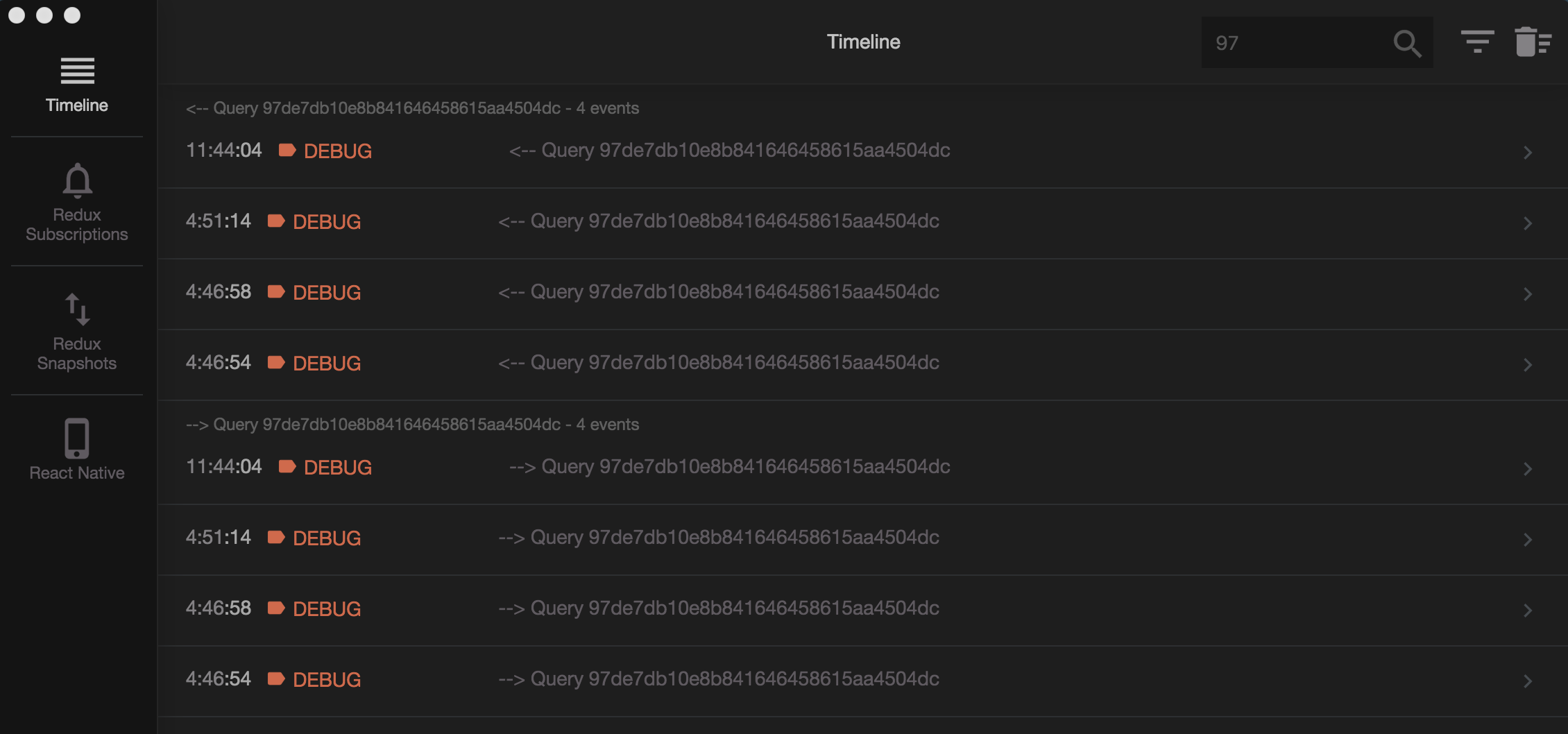
Should I hit it up as a PR?
 Rhineheart
on 1 Nov 2017
Rhineheart
on 1 Nov 2017
Absolutely!!!
skellock
on 2 Nov 2017
Alright! I'll set it up in the morning.
Rhineheart
on 2 Nov 2017
This is now in place! Thx @Rhineheart
skellock
on 23 Feb 2018
Related issues
nonameolsson
·
5Comments
 Eyesonly88
·
4Comments
Eyesonly88
·
4Comments
 wilr
·
3Comments
wilr
·
3Comments
 Anahkiasen
·
5Comments
Anahkiasen
·
5Comments
 itaied246
·
4Comments
itaied246
·
4Comments
Most helpful comment
I wanted this feature myself and wrote an implementation yesterday. To keep it pretty lazy, it categories commands by type, triggerType, preview and name. Each command get a bit of a heavier imprint in memory, but the query is quick.
Unfortunately it doesn't keep it in the 'timeline fashion' because I'd have to pick out uniques from all the matching categories. It does show latest updated categories first though. Maybe I could add an option in the filter dialogue to sort out uniques to keep It as a timeline.
Right now it will show the latest ten per match.
_The query field is located by the filter buttons. It converts the given string to a regex._

Should I hit it up as a PR?