Reactor-core: ReactorDebugAgent.init fails with the NoClassDefFoundError in 3.3.6.RELEASE
The ReactorDebugAgent.init() has been broken in the latest release version 3.3.6.RELEASE and it fails with the NoClassDefFoundError.
In 3.3.5.RELEASE version everything works fine (just downgrade version back in a build.gradle.kts in the reproducer and ReactorDebugAgent.init() will work fine)
The issue was originally discovered in a project that uses __Spring-Boot__ after updating from 2.3.0.RELEASE to 2.3.1.RELEASE (that bumps the __reactor__ version from 3.3.5.RELEASE to 3.3.6.RELEASE).
But I was able to make a small reproducer attached below.
Expected Behavior
ReactorDebugAgent.init() completes successfully
Actual Behavior
ReactorDebugAgent.init() fails with the NoClassDefFoundError:
Stacktrace
Exception in thread "main" java.lang.NoClassDefFoundError: net/bytebuddy/agent/ByteBuddyAgent
    at reactor.tools.agent.ReactorDebugAgent.init(ReactorDebugAgent.java:56)
    at Application.main(Application.java:5)

Caused by: java.lang.ClassNotFoundException: net.bytebuddy.agent.ByteBuddyAgent
    at java.base/jdk.internal.loader.BuiltinClassLoader.loadClass(BuiltinClassLoader.java:602)
Caused by: java.lang.ClassNotFoundException: net.bytebuddy.agent.ByteBuddyAgent

    at java.base/jdk.internal.loader.ClassLoaders$AppClassLoader.loadClass(ClassLoaders.java:178)
    at java.base/java.lang.ClassLoader.loadClass(ClassLoader.java:522)
    ... 2 more
Steps to Reproduce
- A Gradle project of the following structure:
gradle.build.kts
plugins {
    java
    application
}

repositories {
    jcenter()
}

dependencies {
    // 3.3.5.RELEASE works fine
    implementation("io.projectreactor:reactor-tools:3.3.6.RELEASE")
}

application {
    mainClassName = "Application"
}
src/main/java/Application.java
import reactor.tools.agent.ReactorDebugAgent;

public class Application {
    public static void main(String[] args) {
        ReactorDebugAgent.init();
    }
}
- Run
./gradlew run
Possible Solution
I've seen some commits in the last release that manipulate with version format, so that can be the reason for the bug.
I'll try to investigate the reason in a more detailed way, but at the moment I have no idea what specifically led to the bug
Your Environment
- Reactor version(s) used: 3.3.6
- JVM version: openjdk version "14" 2020-03-17
OpenJDK Runtime Environment (build 14+36-1461)
OpenJDK 64-Bit Server VM (build 14+36-1461, mixed mode, sharing) - Gradle version: 6.5
- OS and version: macOS 10.15.4
 lamtev
All 9 comments
@lamtev any particular reason you're applying both compile-time and runtime instrumentations? You only need either one of them.
 bsideup
on 13 Jun 2020
bsideup
on 13 Jun 2020
I'm also suspecting the following change to break it:
https://github.com/reactor/reactor-core/pull/2158
/cc @simonbasle
bsideup
on 13 Jun 2020
any particular reason you're applying both compile-time and runtime instrumentations? You only need either one of them.
Thanks for pointing that out. Indeed, I mistakenly use both methods simultaneously.
At first, I was using the runtime instrumentation, and then I decided to switch to the compile-time option, forgetting to remove the previous setup. It is strange that I did not wonder: why do I need to do something in runtime when everything should be done at the build-time stage 🤔
lamtev
on 13 Jun 2020
@bsideup Since the issue actually concerns the runtime instrumentation and the other build-time instrumentation works fine for me, I've updated an original description and reproducer's code samples
lamtev
on 13 Jun 2020
@lamtev I just tried decompiling reactor-tools and inspecting it.
it does not seem to be referencing unshaded ByteBuddyAgent:
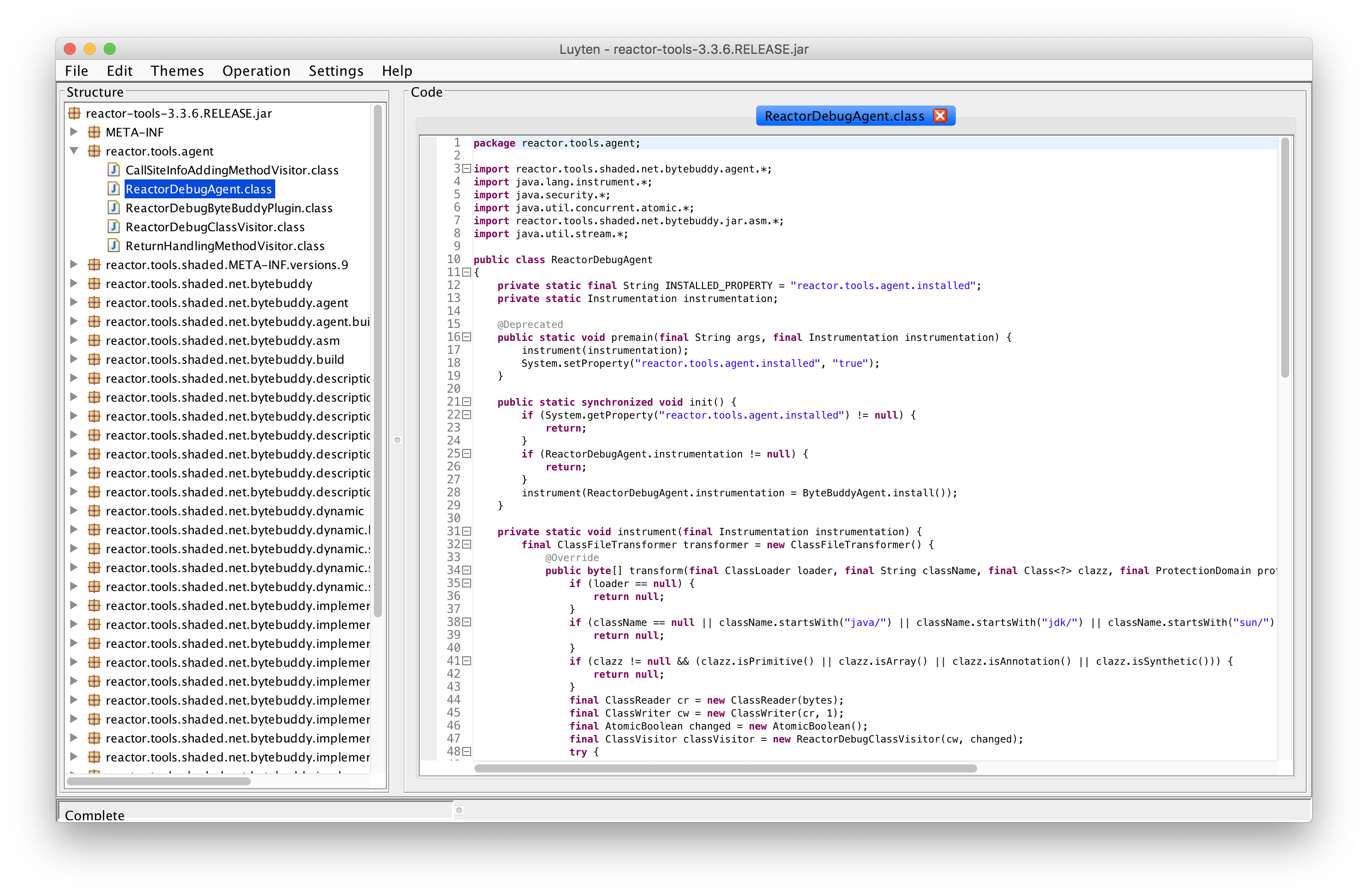
Are you sure that the reproducer is correct?
bsideup
on 16 Jun 2020
@bsideup The most recent version of the reproducer is based on the reference Production-ready Global Debugging section, which tells us to add reactor-tools as a dependency and call ReactorDebugAgent.init() explicitly. Unlike earlier versions, build.gradle.kts doesn't contain net.bytebuddy:byte-buddy dependency declaration anymore, because (as I understand) reactor-tools uses its own shaded bytebuddy.
Are you sure that the reproducer is correct?
The reproducer fails with a stacktrace attached to the head comment. When I change the version of a dependency from 3.3.6.RELEASE to 3.3.5.RELEASE, the code completes successfully. So, I think the provided reproducer is correct.
lamtev
on 16 Jun 2020
@lamtev okay, there seems to be a bug in Gradle (I was unable to reproduce it with Maven) that makes it select the artefact with original classifier instead of the correct one.
Most probably it started happening when #2158 got merged, and, due to a bug in Gradle, it incorrectly reads the metadata and selects the wrong artefact. I will forward it to the Gradle team.
bsideup
on 16 Jun 2020
@bsideup I confirm there is no problem with Maven.
I will forward it to the Gradle team
Thank you!
lamtev
on 16 Jun 2020
The module file from reactor-tools contains wrong metadata. The file name referenced for the api and runtime variant is original, so it's not a bug in the resolution. I'm going to look at this project to figure out how this could have been published.
In the meantime, you can fix the bad metadata in your build by applying a component metadata rule:
dependencies {
   components {
      withModule<FixReactor>("io.projectreactor:reactor-tools")
   }
}

open class FixReactor: ComponentMetadataRule {
    override fun execute(context: ComponentMetadataContext) = context.run {
        if (details.id.version == "3.3.6.RELEASE") {
            details.allVariants {
                withFiles {
                    removeAllFiles()
                    addFile("reactor-tools-3.3.6.RELEASE.jar")
                }
            }
        }
    }
}
 melix
on 16 Jun 2020
melix
on 16 Jun 2020
Related issues
 BerlinAdam87
·
3Comments
BerlinAdam87
·
3Comments
 dfeist
·
3Comments
dfeist
·
3Comments
 asarkar
·
3Comments
asarkar
·
3Comments
 simonbasle
·
3Comments
simonbasle
·
3Comments
 osi
·
4Comments
osi
·
4Comments
Most helpful comment
The module file from reactor-tools contains wrong metadata. The file name referenced for the api and runtime variant is
original, so it's not a bug in the resolution. I'm going to look at this project to figure out how this could have been published.In the meantime, you can fix the bad metadata in your build by applying a component metadata rule: