Reactjs.org: There was an error in your GraphQL query
I know this issue is already solved #1374 .But still I am getting similar error.
Here is full error:
ERROR #85923 GRAPHQL
There was an error in your GraphQL query:
Cannot query field "allExampleCode" on type "Query".
If you don't expect "allExampleCode" to exist on the type "Query" it is most likely a typo.
However, if you expect "allExampleCode" to exist there are a couple of solutions to common problems:
- If you added a new data source and/or changed something inside gatsby-node.js/gatsby-config.js, please try a restart of your development server
- The field might be accessible in another subfield, please try your query in GraphiQL and use the GraphiQL explorer to see which fields you can query and what shape they have
- You want to optionally use your field "allExampleCode" and right now it is not used anywhere. Therefore Gatsby can't infer the type and add it to the GraphQL schema. A quick fix is to add a least one entry with that field ("dummy content")
It is recommended to explicitly type your GraphQL schema if you want to use optional fields. This way you don't have to add the mentioned "dummy content". Visit our docs to learn how you can define the schema for "Query":
https://www.gatsbyjs.org/docs/schema-customization/#creating-type-definitions
File: src\pages\index.js:358:5
failed extract queries from components - 0.758s
success write out requires - 0.146s
success write out redirect data - 0.042s
success Build manifest and related icons - 0.123s
success onPostBootstrap - 0.137s
⠀
info bootstrap finished - 12.114 s
⠀
warn code block or inline code language not specified in markdown. applying generic code block
warn unable to find prism language 'sh' for highlighting. applying generic code block
warn unable to find prism language 'jsxon' for highlighting. applying generic code block
ERROR
UNHANDLED REJECTION [
'/C:\hp\gu.reactjs.org\examples\es5-syntax-example',
Error: C:\hp\gu.reactjs.org\public\page-data\C:\hp\gu.reactjs.org\examples\es5-syntax-example contains invalid WIN32 path characters.
at Object.mkdirs (C:\hp\gu.reactjs.orgnode_modules\fs-extra\lib\mkdirs\mkdirs.js:18:22)
at Object.mkdirs (C:\hp\gu.reactjs.orgnode_modules\universalify\index.js:5:67)
at C:\hp\gu.reactjs.orgnode_modules\fs-extra\lib\output\index.js:20:11
at C:\hp\gu.reactjs.orgnode_modules\universalify\index.js:23:46 {
code: 'EINVAL'
},
{ elapsed: 33635 }
]
Error: [
'/C:\hp\gu.reactjs.org\examples\es5-syntax-example',
Error: C:\hp\gu.reactjs.org\public\page-data\C:\hp\gu.reactjs.org\examples\es5-syntax-example contains invalid WIN32 path characters.
mkdirs.js:18 Object.mkdirs
[gu.reactjs.org]/[fs-extra]/lib/mkdirs/mkdirs.js:18:22index.js:5 Object.mkdirs
[gu.reactjs.org]/[universalify]/index.js:5:67index.js:20
[gu.reactjs.org]/[fs-extra]/lib/output/index.js:20:11code: 'EINVAL'
},
{ elapsed: 33635 }
]
index.js:133 process.
[gu.reactjs.org]/[gatsby-cli]/lib/index.js:133:14index.js:155 processEmit [as emit]
[gu.reactjs.org]/[signal-exit]/index.js:155:32promises.js:209 processPromiseRejections
internal/process/promises.js:209:33task_queues.js:98 processTicksAndRejections
internal/process/task_queues.js:98:32
not finished run queries - 33.795s
not finished Generating image thumbnails - 33.566s
——————————————————————————————————————————————————————————————————————————————————————————————————————————————————————————————————————————————————————————————————320 pages In Progress react-websiteerror Command failed with exit code 1.
info Visit https://yarnpkg.com/en/docs/cli/run for documentation about this command.
 harshilparmar
All 24 comments
https://github.com/gatsbyjs/gatsby/issues/23633
maybe this one helpful.
 KuldeepSingh0
on 3 Jun 2020
KuldeepSingh0
on 3 Jun 2020
@harshilparmar thanks for opening this, looks like this is still an issue on Windows.
 rickhanlonii
on 8 Jul 2020
rickhanlonii
on 8 Jul 2020
I'm also seeing this (running Win 10 and gatsby ghost)
 ERROR #85923  GRAPHQL

There was an error in your GraphQL query:

Cannot query field "count" on type "GhostTag".

If you don't expect "count" to exist on the type "GhostTag" it is most likely a typo.
However, if you expect "count" to exist there are a couple of solutions to common problems:

- If you added a new data source and/or changed something inside gatsby-node.js/gatsby-config.js, please try a restart of your development server
- The field might be accessible in another subfield, please try your query in GraphiQL and use the GraphiQL explorer to see which fields you can query and what shape they have
- You want to optionally use your field "count" and right now it is not used anywhere. Therefore Gatsby can't infer the type and add it to the GraphQL schema. A quick fix is to add a least one entry with that field ("dummy content")

It is recommended to explicitly type your GraphQL schema if you want to use optional fields. This way you don't have to add the mentioned "dummy content". Visit our docs to learn how you can define the schema for "GhostTag":
https://www.gatsbyjs.org/docs/schema-customization/#creating-type-definitions

File: src\templates\tag.js:68:9

failed extract queries from components - 1.240s
warn The GraphQL query in the non-page component
warn The GraphQL query in the non-page component
warn The GraphQL query in the non-page component
Exported queries are only executed for Page components. It's possible you're
trying to create pages in your gatsby-node.js and that's failing for some
reason.

If the failing component(s) is a regular component and not intended to be a page
component, you generally want to use a <StaticQuery> (https://gatsbyjs.org/docs/static-query)
instead of exporting a page query.

If you're more experienced with GraphQL, you can also export GraphQL
fragments from components and compose the fragments in the Page component
query and pass data down into the child component — https://graphql.org/learn/queries/#fragments
success write out requires - 0.137s
success write out redirect data - 0.006s
success onPostBootstrap - 0.003s
⠀
info bootstrap finished - 25.258s
⠀
success run static queries - 0.169s - 10/10 59.06/s
success run page queries - 0.026s - 4/4 156.11/s
⠀
You can now view gatsby-starter-ghost in the browser.
⠀
  http://localhost:8000/
⠀
View GraphiQL, an in-browser IDE, to explore your site's data and schema
⠀
  http://localhost:8000/___graphql
⠀
Note that the development build is not optimized.
To create a production build, use gatsby build
⠀
success Building development bundle - 5.784s
 jeffreywyman
on 12 Jul 2020
jeffreywyman
on 12 Jul 2020
I'm facing the exact same issue as @harshilparmar. I wonder how else are we supposed to work on the project locally, for now? Is there any quick (or permanent) fix till yet? I'm using Windows 10.
 heytulsiprasad
on 23 Jul 2020
heytulsiprasad
on 23 Jul 2020
@heytulsiprasad Yes,For quick fix you can use ubantu in VM .Its working fine.I am also using it.
harshilparmar
on 23 Jul 2020
I am facing the same issue on Win 10, and when I try this on an Ubuntu 20.04 I get #3021
Unlucko :(
 asheerrizvi
on 31 Jul 2020
asheerrizvi
on 31 Jul 2020
@asheerrizvi Bro try this https://github.com/JeffreyWay/laravel-mix/issues/2383#issuecomment-643265068
I also got the same error.
harshilparmar
on 1 Aug 2020
@harshilparmar Thanks, I'll check it out!
asheerrizvi
on 1 Aug 2020
@DSchau is this something you can help with? I've been working with @manyaagarwal and in addition to the graphql error we're also seeing a related path not found issue. Somehow we're trying to create page-data paths like:
D:\reactjs.org\public\page-data\D:\reactjs.org\example\es5-syntax-example\page-data.json
I've dug in the best I can and I can't figure out how we're trying to create page data for this example or why the path is wrong. On OSX we don't create page data for this example.

rickhanlonii
on 8 Aug 2020
@rickhanlonii wanna setup a call tomorrow? Can have a look together.
 pvdz
on 11 Aug 2020
pvdz
on 11 Aug 2020
@pvdz would love to include @manyaagarwal as well, will DM to set up.
rickhanlonii
on 14 Aug 2020
Can someone on Windows try this PR: https://github.com/reactjs/reactjs.org/pull/3213
It should fix those issues.
 vladar
on 19 Aug 2020
vladar
on 19 Aug 2020
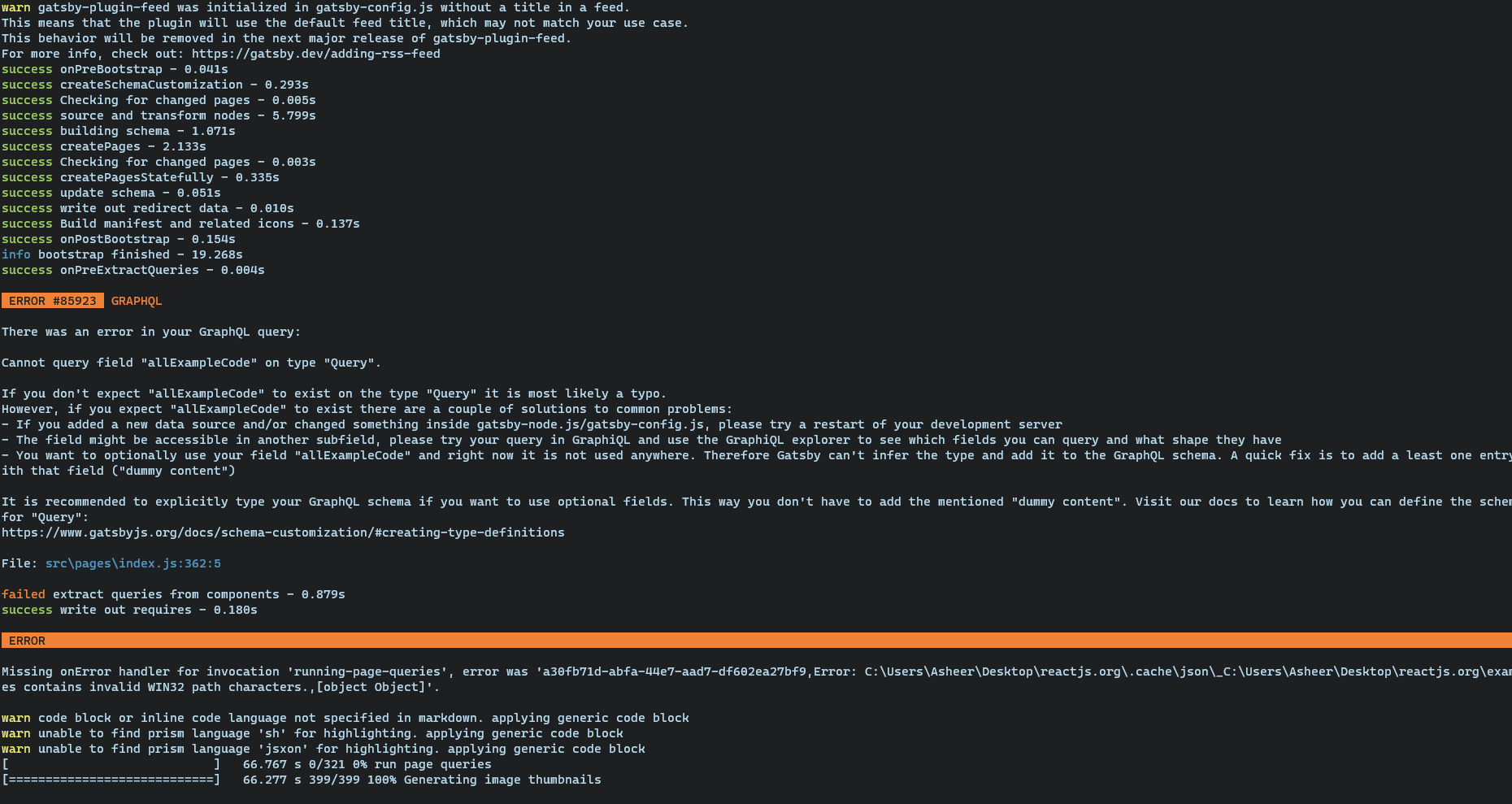
@vladar still getting the error, but now its stuck on running page queries.
asheerrizvi
on 19 Aug 2020
@asheerrizvi I tried it, but did not get the same error. Can you try resetting your cache and installing node modules again?
 manyaagarwal
on 19 Aug 2020
manyaagarwal
on 19 Aug 2020
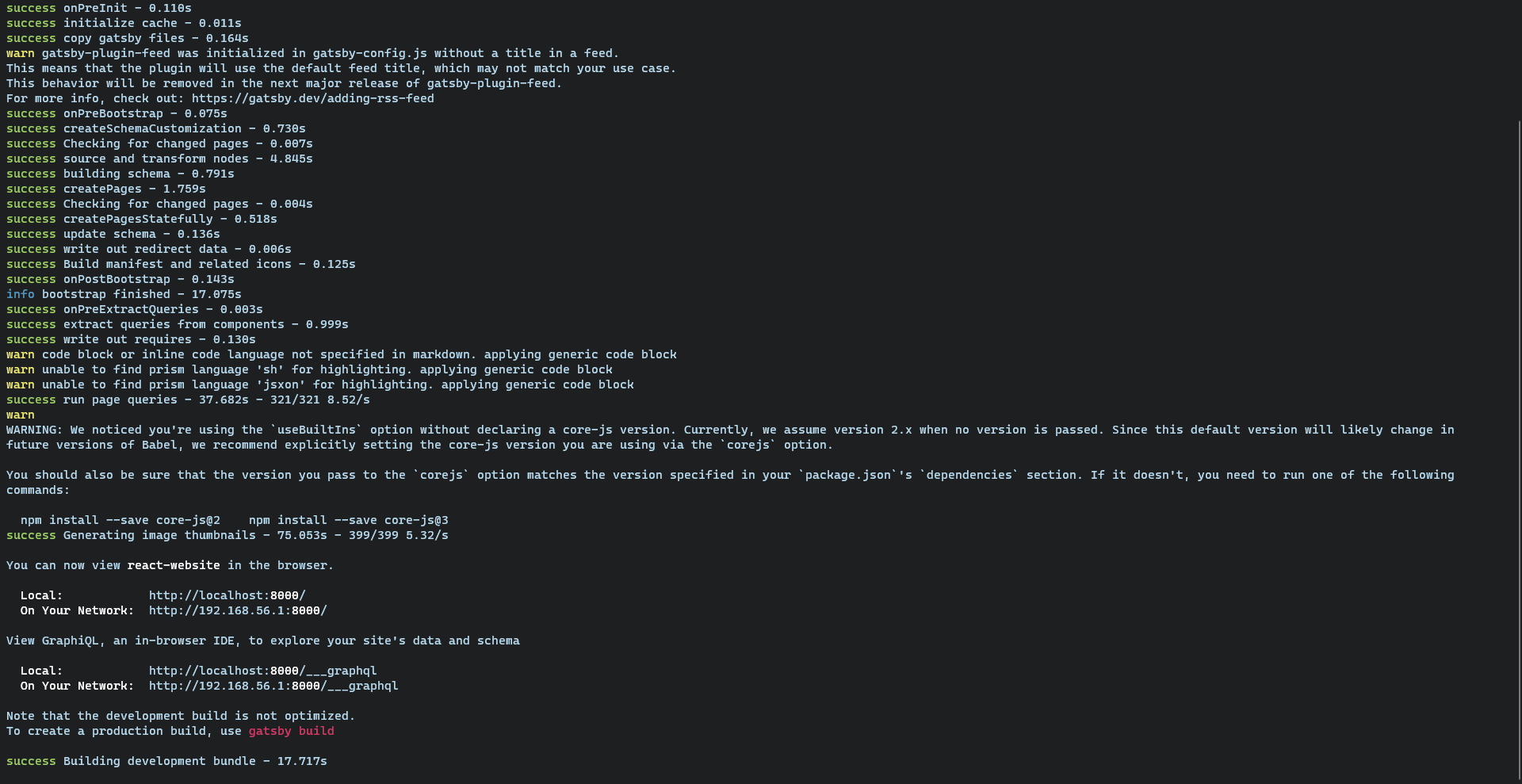
@manyaagarwal my bad, it was an issue on my end. It's working now :D
asheerrizvi
on 19 Aug 2020
Nice work @vladar! Thanks @rickhanlonii for surfacing -- appreciate you 👍
 DSchau
on 19 Aug 2020
DSchau
on 19 Aug 2020
Thanks for the fix @vladar!
Huge shout out to @manyaagarwal @asheerrizvi and @pvdz for helping out on this as well!
rickhanlonii
on 19 Aug 2020
@rickhanlonii Is this also fix the error in all react native language repos ? Such as reactjs/gu.reactjs.org.
harshilparmar
on 20 Aug 2020
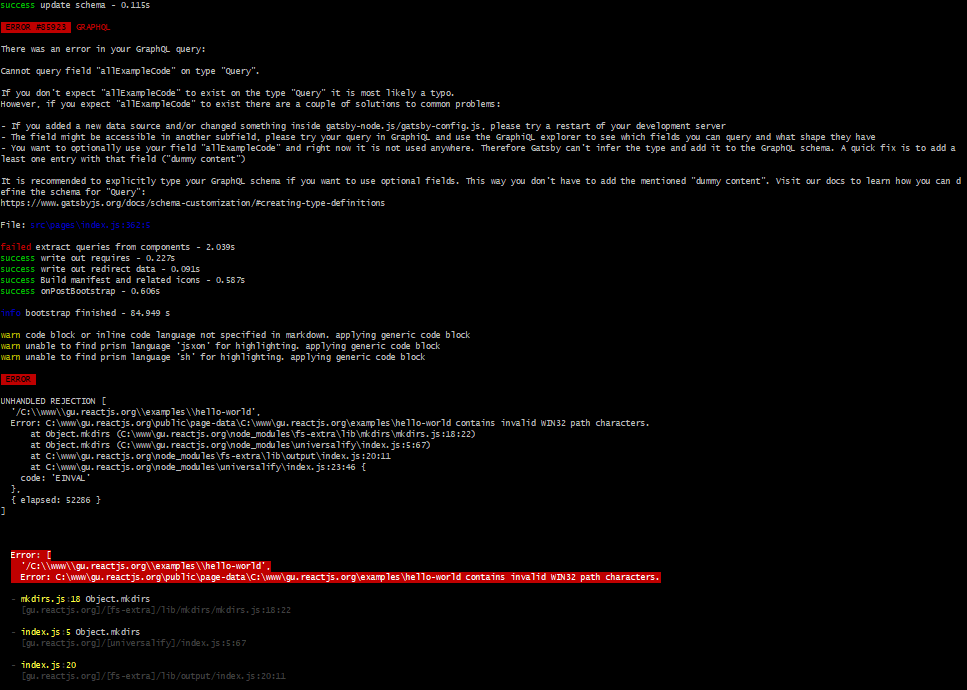
I am still getting the same issue as shown in screenshot yarn run dev: [I configured project 2 times]
 kamal250
on 24 Aug 2020
kamal250
on 24 Aug 2020
@harshilparmar I'm not sure.
@kamal250 have you rebased?
rickhanlonii
on 25 Aug 2020
I am still getting the same issue as shown in screenshot
yarn run dev: [I configured project 2 times]
@rickhanlonii Yes, I am taking about this.I think all other native language repos are also going to face this issue.
harshilparmar
on 25 Aug 2020
@rickhanlonii, rebase is not a problem but @reactjs-translation-bot has not updated master branch of https://github.com/reactjs/gu.reactjs.org repo. Is there any way to update it or trigger?
kamal250
on 25 Aug 2020
I got it, we need to request to reviewers of that repo.
 brinyemp4
on 25 Aug 2020
brinyemp4
on 25 Aug 2020
Oh good call!
rickhanlonii
on 26 Aug 2020
Related issues
 gaearon
·
4Comments
gaearon
·
4Comments
 tajo
·
4Comments
tajo
·
4Comments
 ahtee
·
4Comments
gaearon
·
4Comments
ahtee
·
4Comments
gaearon
·
4Comments
 trungdq88
·
3Comments
trungdq88
·
3Comments
Most helpful comment
Thanks for the fix @vladar!
Huge shout out to @manyaagarwal @asheerrizvi and @pvdz for helping out on this as well!